
1. పరిచయం
This manual provides detailed instructions for the proper use and maintenance of your New Bee BH58 Wireless Headset. Please read this manual thoroughly before using the product to ensure optimal performance and longevity. The BH58 headset features Bluetooth V5.0 connectivity, a noise-canceling microphone, and multiple connection options for various devices.

Figure 1: New Bee BH58 Wireless Headset with included USB dongle.
2. ప్యాకేజీ విషయాలు
ప్యాకేజీలో అన్ని వస్తువులు ఉన్నాయని నిర్ధారించుకోండి:
- New Bee BH58 Wireless Headset
- USB డాంగిల్
- USB-C ఛార్జింగ్ కేబుల్
- 3.5mm ఆడియో కేబుల్
- వినియోగదారు మాన్యువల్ (ఈ పత్రం)
3. ఉత్పత్తి ముగిసిందిview
హెడ్సెట్ యొక్క భాగాలు మరియు నియంత్రణలతో మిమ్మల్ని మీరు పరిచయం చేసుకోండి.

Figure 2: Headset controls layout.
- మైక్ మ్యూట్ బటన్: కాల్ల సమయంలో మైక్రోఫోన్ను మ్యూట్/అన్మ్యూట్ చేయండి.
- వాల్యూమ్ + / -: ఆడియో వాల్యూమ్ను సర్దుబాటు చేయండి.
- Power On/Off / Multifunctional Button: పవర్ ఆన్/ఆఫ్ చేయండి, సంగీతాన్ని ప్లే చేయండి/పాజ్ చేయండి, కాల్లకు సమాధానం ఇవ్వండి/ముగించండి.
- 3.5mm ఆడియో ఇంటర్ఫేస్: వైర్డు కనెక్షన్ కోసం.
- ఛార్జింగ్ పోర్ట్ (USB-C): హెడ్సెట్ను ఛార్జ్ చేయడం కోసం.
- మైక్రోఫోన్: Rotatable for optimal positioning.

Figure 3: The microphone can rotate 270 degrees for use on either ear.
4. సెటప్
4.1 హెడ్సెట్ను ఛార్జ్ చేస్తోంది
Before first use, fully charge the headset. Connect the USB-C charging cable to the headset's charging port and the other end to a USB power source. The LED indicator will show charging status. A full charge takes approximately 1.5 hours.
4.2 పవర్ ఆన్/ఆఫ్
- పవర్ ఆన్: Push the power button to the middle position and hold for 3 seconds until the LED indicator flashes red and green alternately (for computer pairing mode) or red and blue alternately (for cellphone pairing mode).
- పవర్ ఆఫ్: Push the power button to the bottom position to turn off the headset.
4.3 పరికరాలతో జత చేయడం
The BH58 headset supports three connection methods: Bluetooth, USB Dongle, and Wired.
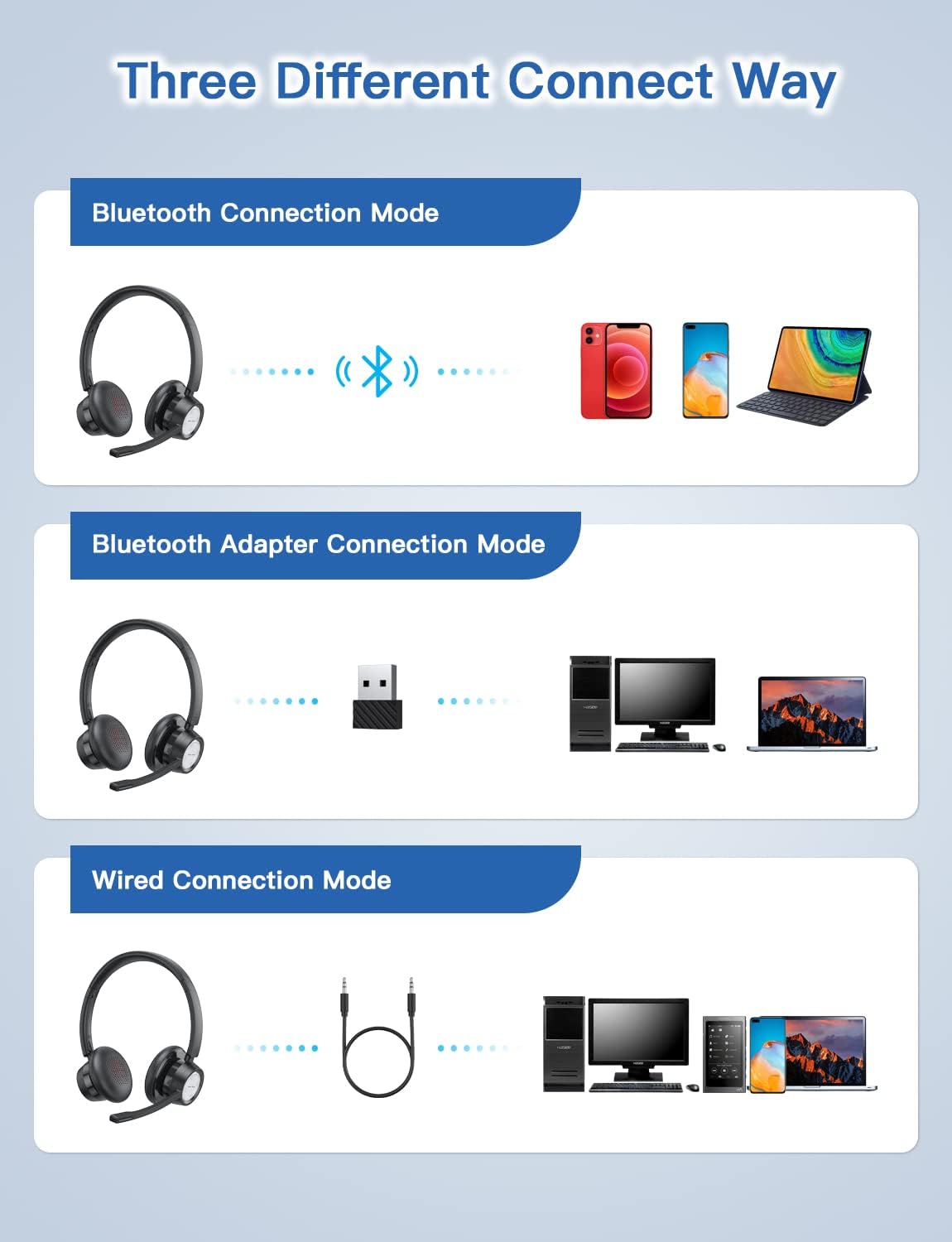
Figure 4: Multiple connection options for the BH58 headset.
4.3.1 Bluetooth Connection (for Cellphones/Tablets)
- Push the power button to the top and hold for 10 seconds until the headset LED indicator keeps flashing red and blue alternately. This indicates cellphone pairing mode.
- On your cellphone or tablet, go to 'Settings' > 'Bluetooth' and turn on Bluetooth.
- కోసం వెతకండి new devices and select 'BH58' from the list to connect.
- Once connected, you will hear a 'connected' voice prompt, and the LED indicator will flash blue every 30 seconds.
Video 1: Demonstrates the process of connecting the BH58 headset to a cellphone via Bluetooth.
4.3.2 USB Dongle Connection (for Computers without Bluetooth)
- Push the power button to the middle position to turn on the headset. The headset LED indicator keeps flashing red and green alternately, indicating computer pairing mode.
- Plug the Bluetooth transmitter (USB dongle) into your computer's USB port. It will automatically enter pairing mode. The Bluetooth transmitter LED indicator keeps flashing blue for about 3 seconds, then turns into red and blue flashing alternately.
- When hearing the 'connected' voice prompt, the connection is successful. The headset LED indicator flashes blue every 30 seconds, and the Bluetooth transmitter LED indicator is solid blue.
- On your computer, navigate to Sound Settings. Choose 'BH58' (or 'BTD-Q2' if listed) as the audio input and output device. Adjust sound settings as preferred.
Video 2: Illustrates how to connect the BH58 headset to a computer using the USB dongle and configure sound settings.
4.3.3 వైర్డు కనెక్షన్
Connect the 3.5mm audio cable to the headset's 3.5mm audio interface and the other end to your device's audio jack. In wired mode, only the speaker has sound; the buttons and microphone on the headset do not function.
5. ఆపరేషన్
5.1 కాల్ నిర్వహణ
- సమాధానం/ముగింపు కాల్: Press the Multifunctional Button once.
- కాల్ని తిరస్కరించండి: Press and hold the Multifunctional Button for 2 seconds.
- మైక్రోఫోన్ను మ్యూట్/అన్మ్యూట్ చేయండి: Press the Mic Mute Button during an active call.
5.2 ఆడియో నియంత్రణ
- ధ్వని పెంచు: వాల్యూమ్ + బటన్ని నొక్కండి.
- వాల్యూమ్ డౌన్: వాల్యూమ్ - బటన్ నొక్కండి.
- సంగీతాన్ని ప్లే/పాజ్ చేయండి: Press the Multifunctional Button once.
5.3 హెడ్సెట్ ధరించడం
Adjust the headband for a comfortable fit. The microphone boom can be rotated 270 degrees to be worn on either the left or right ear. Position the microphone approximately 1-2 inches from your mouth for optimal voice clarity.

Figure 5: The headset can be adjusted for left or right ear wearing.
6. బ్యాటరీ లైఫ్
The BH58 wireless headset offers extended battery performance:
- చర్చ సమయం: 20 గంటల వరకు
- సంగీతం ప్లేటైమ్: 28 గంటల వరకు
- స్టాండ్బై సమయం: 400 గంటలకు పైగా
- ఛార్జింగ్ సమయం: సుమారు 1.5 గంటలు

చిత్రం 6: పైగాview of BH58 headset battery performance.
7. నిర్వహణ
- హెడ్సెట్ను మెత్తటి, పొడి గుడ్డతో క్రమం తప్పకుండా శుభ్రం చేయండి.
- Avoid exposing the headset to extreme temperatures, moisture, or corrosive substances.
- హెడ్సెట్ను ఉపయోగంలో లేనప్పుడు చల్లని, పొడి ప్రదేశంలో నిల్వ చేయండి.
- హెడ్సెట్ను మీరే విడదీయడానికి లేదా రిపేర్ చేయడానికి ప్రయత్నించవద్దు, ఎందుకంటే ఇది వారంటీని రద్దు చేస్తుంది.
8. ట్రబుల్షూటింగ్
| సమస్య | పరిష్కారం |
|---|---|
| హెడ్సెట్ పవర్ ఆన్ అవ్వదు. | హెడ్సెట్ పూర్తిగా ఛార్జ్ చేయబడిందని నిర్ధారించుకోండి. |
| బ్లూటూత్ ద్వారా జత చేయడం సాధ్యం కాదు. | Ensure the headset is in pairing mode (LED flashing red/blue or red/green). Turn off and on Bluetooth on your device. Clear previous Bluetooth connections. |
| ధ్వని లేదు లేదా ధ్వని నాణ్యత తక్కువగా ఉంది. | Check volume levels on both the headset and your device. Ensure 'BH58' is selected as the audio output device in your system settings. For wired mode, ensure the cable is fully inserted. |
| మైక్రోఫోన్ పనిచేయడం లేదు. | Ensure the microphone is not muted. Check that 'BH58' is selected as the audio input device in your system settings. Microphone does not work in wired mode. |
| హెడ్సెట్ తరచుగా డిస్కనెక్ట్ అవుతుంది. | Ensure the headset is within the effective Bluetooth range (10-45 meters depending on mode and environment). Avoid obstacles that may interfere with the signal. |
9. స్పెసిఫికేషన్లు
| ఫీచర్ | వివరాలు |
|---|---|
| మోడల్ పేరు | BH58 |
| కనెక్టివిటీ టెక్నాలజీ | వైర్లెస్ (బ్లూటూత్), వైర్డ్ (3.5mm) |
| వైర్లెస్ కమ్యూనికేషన్ టెక్నాలజీ | బ్లూటూత్ V5.0 |
| నాయిస్ కంట్రోల్ | Adaptive Noise Cancellation (ENC) |
| మైక్రోఫోన్ | Omnidirectional, 270° Rotatable |
| టాక్ టైమ్ | 20 గంటల వరకు |
| సంగీతం ప్లేబ్యాక్ సమయం | 28 గంటల వరకు |
| స్టాండ్బై సమయం | 400 గంటలకు పైగా |
| ఛార్జింగ్ సమయం | 1.5 గంటలు |
| ఛార్జింగ్ పోర్ట్ | USB-C |
| బ్లూటూత్ రేంజ్ | 10-45 meters (depending on mode/environment) |
| మెటీరియల్ | Fabric, Memory Foam |
| వస్తువు బరువు | 230 గ్రాములు (8.1 ఔన్సులు) |
| అనుకూల పరికరాలు | Computers, Laptops, Smartphones, Tablets, VoIP systems, Webinar systems, Skype, Zoom, Avaya, Call Centers, Online meeting systems, Home devices, Office devices |
10. వారంటీ మరియు మద్దతు
New Bee provides excellent after-sales service, including a 12-month warranty from the date of purchase. A professional technical team and customer service center are available to assist you with any inquiries or issues.
For support, please refer to the contact information provided on the product packaging or the official New Bee webసైట్.