
Quad Lock QLM-CAR-5
క్వాడ్ లాక్ సక్షన్ విండ్షీల్డ్/డ్యాష్బోర్డ్ కార్ ఫోన్ హోల్డర్ యూజర్ మాన్యువల్
Model: QLM-CAR-5
పరిచయం
The Quad Lock Suction Windshield/Dashboard Car Phone Holder (Model: QLM-CAR-5) provides a secure and convenient mounting solution for your smartphone in your vehicle. Designed for use with all Quad Lock Cases and Universal Adaptors, this mount features a super rigid body and an industrial-strength suction cup, allowing for reliable attachment to your car's windscreen or dashboard. Its adjustable gimbal head enables optimal viewing angles, and it supports both portrait and landscape phone orientations for easy navigation and access to your device.

Image: The Quad Lock Suction Windshield/Dashboard Car Phone Holder, showcasing దాని దృఢమైన డిజైన్ మరియు సక్షన్ కప్ బేస్.
సెటప్ సూచనలు
- మౌంటు స్థానాన్ని ఎంచుకోండి: Select a clean, flat, and smooth surface on your car's windscreen or dashboard. If mounting on the dashboard, use the included dash pad for optimal adhesion. Ensure the chosen location does not obstruct your view of the road or interfere with airbags.
- ఉపరితలాన్ని శుభ్రం చేయండి: Thoroughly clean the chosen mounting surface with an alcohol wipe or a clean, damp cloth. Allow the surface to dry completely before proceeding.
- సక్షన్ కప్ను అటాచ్ చేయండి:

Image: The Quad Lock Suction Mount securely placed on a car dashboard.
Press the suction cup firmly against the cleaned surface. While pressing, push down the lever on the suction cup base to create a vacuum seal. Ensure the mount is securely attached and does not wobble.
- కోణాన్ని సర్దుబాటు చేయండి: Loosen the adjustment knob on the gimbal head. Position the mount to your desired viewing angle. Tighten the knob firmly to lock the angle in place.
ఆపరేటింగ్ సూచనలు
- మీ ఫోన్ని జోడించడం:

Image: A hand demonstrating the attachment of a phone with a Quad Lock case to the car mount.
Align your Quad Lock-compatible phone case or universal adaptor with the mounting head. Press down and twist your phone clockwise until you hear a click, indicating it is securely locked into place. The dual-stage locking mechanism ensures your device remains firmly attached.
- Detaching Your Phone: To remove your phone, press down on the blue lever (or similar release mechanism) on the mounting head and twist your phone counter-clockwise. Lift the phone away from the mount.
- ఫోన్ ఓరియంటేషన్ సర్దుబాటు: The mount allows for both portrait and landscape orientation. Simply twist your phone on the mount to switch between orientations as needed for navigation or media viewing.

Image: A smartphone mounted in portrait orientation on the Quad Lock holder, displaying a navigation map.
- Using with Optional Wireless Charging Head: If you have the optional Quad Lock Wireless Charging Head (not included), attach it to the mount according to its instructions. Ensure your phone case is compatible with wireless charging.
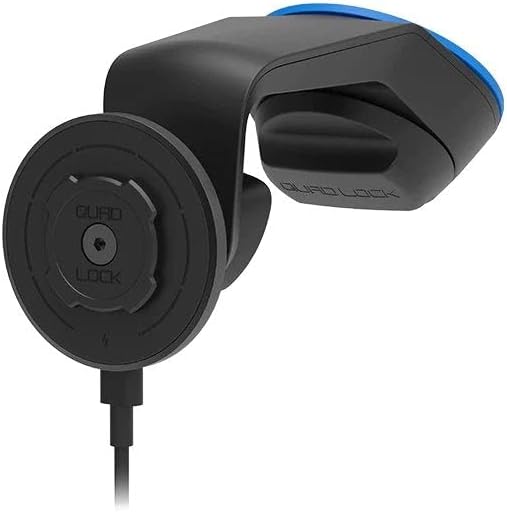
Image: The Quad Lock mount with a smartphone attached, showing a charging cable connected to the phone.
నిర్వహణ
- శుభ్రపరచడం: Regularly wipe down the mount and suction cup with a soft, damp cloth to remove dust and grime. For the suction cup, occasional cleaning with mild soap and water can help maintain its adhesive properties. Ensure all parts are dry before re-mounting.
- Suction Cup Rejuvenation: If the suction cup loses its grip over time, wash it with warm, soapy water and let it air dry. This can help restore its stickiness. Avoid touching the adhesive surface with your fingers.
- నిల్వ: When not in use for extended periods, detach the mount from the surface and store it in a cool, dry place away from direct sunlight.
ట్రబుల్షూటింగ్
| సమస్య | సాధ్యమైన కారణం | పరిష్కారం |
|---|---|---|
| Mount does not stick to surface. | Surface is dirty, oily, or not smooth; suction cup is dirty or dry; lever not fully engaged. | Clean the surface and suction cup thoroughly. Ensure the surface is flat and smooth. Press the suction cup firmly and fully engage the lever. Try a different mounting location. |
| Phone wobbles on the mount. | Gimbal head adjustment knob is loose; phone not fully locked into place. | Tighten the adjustment knob firmly. Ensure your phone is twisted clockwise until it clicks securely into the dual-stagఇ లాక్. |
| Difficulty attaching/detaching phone. | Incorrect alignment; release lever not pressed. | Ensure the phone case is correctly aligned with the mounting head. For detachment, firmly press the blue release lever before twisting counter-clockwise. |
| Mount falls off in extreme temperatures. | Temperature fluctuations can affect suction. | Re-attach the mount when the car interior temperature is stable. Consider using the dash pad for more permanent dashboard mounting in areas with significant temperature swings. |
స్పెసిఫికేషన్లు
- మోడల్ సంఖ్య: QLM-CAR-5
- ఉత్పత్తి కొలతలు: 2.76 x 5.12 x 5.12 అంగుళాలు
- వస్తువు బరువు: 7.4 ఔన్సులు
- మౌంటు రకం: Suction Cup (Windshield/Dashboard)
- అనుకూలత: All Quad Lock Cases & Universal Adaptors
- adjustability: Adjustable gimbal head for optimal viewing angle; supports portrait and landscape orientation.
- మెటీరియల్: Super rigid body, industrial strength suction cup.
వారంటీ మరియు మద్దతు
For warranty information, product support, or to purchase additional accessories, please visit the official Quad Lock website or contact their customer service directly. Details can typically be found on the product packaging or the manufacturer's webసైట్.
Note: This manual provides general instructions. Specific details may vary slightly based on product revisions. Always refer to the latest information provided by the manufacturer.
ఉత్పత్తి వీడియోలు
No official product videos from the seller were found in the provided data. For visual guides or demonstrations, please check the manufacturer's official webసైట్ లేదా వారి అధీకృత ఛానెల్లు.
Ask a question about this manual
Ask about setup, troubleshooting, compatibility, parts, safety, or missing instructions. Manuals+ will review the question and use this page’s manual context to help answer it.