
పరిచయం
Thank you for choosing the Rowenta Eole Ultra VU6871 Silent Tower Fan. This manual provides essential information for the safe and efficient use of your appliance. Please read it thoroughly before first use and keep it for future reference.
The Rowenta Eole Ultra VU6871 offers powerful and quiet cooling, designed to provide comfort in your home or office. Its features include a remote control, multiple speed settings, automatic modes, and a timer function.
ముఖ్యమైన భద్రతా సూచనలు
- ఈ ఉపకరణాన్ని ఉపయోగించే ముందు అన్ని సూచనలను చదవండి.
- ఈ ఉపకరణం ఇంటి లోపల మాత్రమే ఉపయోగించబడుతుంది. ఆరుబయట లేదా తడి పరిస్థితులలో ఉపయోగించవద్దు.
- వాల్యూమ్ నిర్ధారించుకోండిtagఉపకరణంలో సూచించిన మీ స్థానిక మెయిన్స్ వాల్యూమ్కి అనుగుణంగా ఉంటుందిtagఇ కనెక్ట్ చేయడానికి ముందు.
- Do not operate any fan with a damaged cord or plug. If the cord or plug is damaged, it must be replaced by the manufacturer, its service agent, or similarly qualified persons to avoid a hazard.
- Do not place the fan near heat sources such as radiators, heat registers, stoves, or other appliances that produce heat.
- Keep fingers and other objects away from the fan blades and openings during operation.
- Always unplug the fan before cleaning, moving, or performing any maintenance.
- నీటిలో లేదా ఇతర ద్రవాలలో ఫ్యాన్ను ముంచవద్దు.
- ఈ ఉపకరణం వారి భద్రతకు బాధ్యత వహించే వ్యక్తి ద్వారా ఉపకరణాన్ని ఉపయోగించడం గురించి పర్యవేక్షణ లేదా సూచనలను అందిస్తే తప్ప, శారీరక, ఇంద్రియ లేదా మానసిక సామర్థ్యాలు తగ్గిన వ్యక్తులు (పిల్లలతో సహా) లేదా అనుభవం మరియు జ్ఞానం లేకపోవడం కోసం ఉద్దేశించబడలేదు.
- పిల్లలు ఉపకరణంతో ఆడకుండా ఉండేలా పర్యవేక్షించాలి.
ఉత్పత్తి ముగిసిందిview
The Rowenta Eole Ultra VU6871 tower fan is designed for efficient air circulation and cooling. It features a sleek, tall design with an integrated control panel and comes with a remote control for convenience.

Image: The Rowenta Eole Ultra VU6871 tower fan illustrating its airflow capabilities.
ప్రధాన భాగాలు:
- ఎయిర్ అవుట్లెట్ గ్రిల్: Front panel where air is expelled.
- నియంత్రణ ప్యానెల్: Located on top of the fan for manual operation.
- ఆధారం: టవర్ ఫ్యాన్కు స్థిరత్వాన్ని అందిస్తుంది.
- పవర్ కార్డ్: For connecting to a mains power supply.
- క్యారీ హ్యాండిల్: Integrated at the back for easy transport.
- రిమోట్ కంట్రోల్: దూరం నుండి అనుకూలమైన ఆపరేషన్ కోసం.
- రిమోట్ కంట్రోల్ నిల్వ: Integrated compartment for the remote.
అసెంబ్లీ మరియు సెటప్
The Rowenta Eole Ultra VU6871 typically comes pre-assembled. If any assembly is required, follow these general steps:
- అన్ప్యాక్: అన్ని ప్యాకేజింగ్ మెటీరియల్లను జాగ్రత్తగా తీసివేసి, అన్ని భాగాలు ఉన్నాయని నిర్ధారించుకోండి.
- Base Attachment (if separate): If the base is separate, align it with the bottom of the fan body and secure it using the provided screws. Ensure it is stable.
- ప్లేస్మెంట్: Place the fan on a firm, level surface. Ensure there is adequate space around the fan for optimal air circulation and oscillation. Avoid placing it directly against walls or furniture that might obstruct airflow.
- పవర్ కనెక్షన్: Plug the power cord into a standard electrical outlet (220-240V).

Image: The tower fan positioned in a room, demonstrating its suitability for various living spaces.
ఆపరేటింగ్ సూచనలు
Your Rowenta Eole Ultra VU6871 fan can be operated using the control panel on top of the unit or the included remote control.
నియంత్రణ ప్యానెల్ విధులు:
- పవర్ బటన్ (U): ఫ్యాన్ను ఆన్ లేదా ఆఫ్ చేయడానికి నొక్కండి.
- వేగ సర్దుబాటు (+/-): Increase or decrease the fan speed. There are 3 manual speed settings.
- మోడ్ బటన్ (M): Cycle through the available operating modes: Standard, Night, and Natural Breeze.
- ఆసిలేషన్ బటన్ (~): Activate or deactivate the 60° horizontal oscillation function.
- Timer Button (L): Set the automatic shut-off timer for 1, 2, 4, or 7 hours.
రిమోట్ కంట్రోల్:
The compact remote control provides full access to all fan functions from a distance.
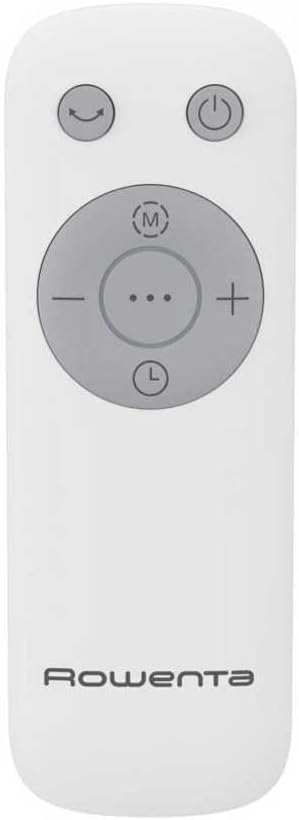
Image: The remote control for the Rowenta Eole Ultra VU6871 tower fan.

Image: A hand operating the fan using the remote control.
- Ensure the remote control has working batteries (typically 2x AAA, not included).
- Point the remote control towards the fan's receiver.
- The buttons on the remote correspond to the functions on the control panel.
- Store the remote control in its integrated compartment on the fan when not in use.
ఆపరేటింగ్ మోడ్లు:
- ప్రామాణిక మోడ్: Provides continuous airflow at your selected speed.
- రాత్రి మోడ్: Designed for quiet operation during sleep, with reduced noise levels (as low as 52 dB(A)) and gentle airflow.
- సహజ బ్రీజ్ మోడ్: Simulates a natural outdoor breeze by varying the fan speed intermittently.

Image: The fan operating in a bedroom, highlighting its quiet performance for undisturbed sleep.
నిర్వహణ మరియు శుభ్రపరచడం
క్రమం తప్పకుండా శుభ్రపరచడం వల్ల మీ ఫ్యాన్ పనితీరు మరియు దీర్ఘాయుష్షును కాపాడుకోవచ్చు.
- శుభ్రపరిచే ముందు: శుభ్రం చేసే ముందు ఎల్లప్పుడూ ఫ్యాన్ను పవర్ అవుట్లెట్ నుండి అన్ప్లగ్ చేయండి.
- బాహ్య క్లీనింగ్: ఫ్యాన్ బయటి ఉపరితలాలను మృదువైన, d శుభ్రముపరచుతో తుడవండి.amp cloth. Do not use abrasive cleaners, solvents, or harsh chemicals, as these can damage the plastic.
- Air Inlet/Outlet Grilles: Use a vacuum cleaner with a brush attachment to remove dust from the air inlet and outlet grilles. This helps prevent dust buildup that can impede airflow.
- నిల్వ: If storing the fan for an extended period, cover it to protect it from dust and store it in a dry place.
ట్రబుల్షూటింగ్
మీ ఫ్యాన్తో మీకు సమస్యలు ఎదురైతే, ఈ క్రింది సాధారణ సమస్యలు మరియు పరిష్కారాలను చూడండి:
| సమస్య | సాధ్యమైన కారణం | పరిష్కారం |
|---|---|---|
| ఫ్యాన్ ఆన్ అవ్వదు. | విద్యుత్ సరఫరా లేదు. పవర్ కార్డ్ సరిగ్గా ప్లగ్ ఇన్ చేయబడలేదు. | Check if the fan is plugged into a working electrical outlet. పవర్ కార్డ్ సురక్షితంగా కనెక్ట్ చేయబడిందని నిర్ధారించుకోండి. |
| బలహీనమైన గాలి ప్రవాహం. | Air grilles are blocked by dust. ఫ్యాన్ వేగం చాలా తక్కువగా ఉంది. | Clean the air inlet and outlet grilles. ఫ్యాన్ స్పీడ్ సెట్టింగ్ను పెంచండి. |
| ఫ్యాన్ శబ్దం చేస్తోంది. | Dust buildup inside. ఫ్యాన్ సమతల ఉపరితలంపై లేదు. | ఫ్యాన్ను బాగా శుభ్రం చేయండి. ఫ్యాన్ స్థిరమైన, చదునైన ఉపరితలంపై ఉంచబడిందని నిర్ధారించుకోండి. |
| రిమోట్ కంట్రోల్ పనిచేయడం లేదు. | బ్యాటరీలు డెడ్ అయ్యాయి లేదా తప్పుగా చొప్పించబడ్డాయి. రిమోట్ మరియు ఫ్యాన్ మధ్య అడ్డంకి. | Replace batteries (2x AAA). ఫ్యాన్ రిసీవర్ కు స్పష్టమైన దృశ్య రేఖ ఉండేలా చూసుకోండి. |
ఈ పరిష్కారాలను ప్రయత్నించిన తర్వాత కూడా సమస్య కొనసాగితే, దయచేసి కస్టమర్ మద్దతును సంప్రదించండి.
సాంకేతిక లక్షణాలు
| ఫీచర్ | స్పెసిఫికేషన్ |
|---|---|
| మోడల్ సంఖ్య | VU6871 |
| శక్తి | 40 వాట్స్ |
| కొలతలు (L x W x H) | 30 x 30 x 102.8 సెం.మీ |
| బరువు | 3.5 కిలోలు |
| Noise Level (Min) | 52 డెసిబెల్స్ (dB(A)) |
| వాయుప్రసరణ (గరిష్టంగా) | 3.23 Cubic meters per minute |
| స్పీడ్ సెట్టింగ్లు | 3 మాన్యువల్ వేగం |
| ఆపరేటింగ్ మోడ్లు | Standard, Night, Natural Breeze |
| డోలనం | 60° క్షితిజ సమాంతర |
| టైమర్ సెట్టింగ్లు | 1గం, 2గం, 4గం, 7గం |
| నియంత్రణ రకం | Electronic Button, Remote Control |
| శక్తి మూలం | Mains Powered (Schuko Plug) |
| మెటీరియల్ | ప్లాస్టిక్ |
| భద్రతా లక్షణాలు | Automatic Stop, Indicator Light, TÜV Certified |
వారంటీ మరియు కస్టమర్ మద్దతు
Rowenta products are manufactured to high-quality standards. For information regarding warranty coverage, please refer to the warranty card included with your purchase or visit the official Rowenta webసైట్.
For technical assistance, spare parts, or any questions not covered in this manual, please contact Rowenta customer support. Contact details can typically be found on the Rowenta webసైట్ లేదా మీ ఉత్పత్తి ప్యాకేజింగ్లో.