
1. పరిచయం
This manual provides essential information for the safe and efficient operation, maintenance, and troubleshooting of your Ariens IKON (52") 23HP Kawasaki Zero Turn Mower, model 918005. Please read this manual thoroughly before operating the mower to ensure proper use and to prevent injury or damage.
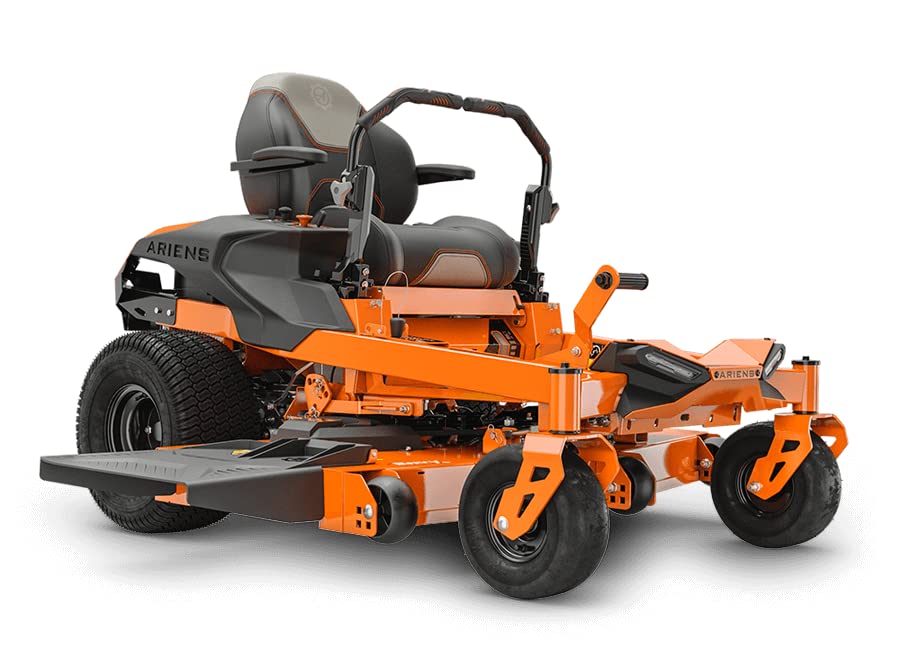
Figure 1: Ariens IKON (52") 23HP Kawasaki Zero Turn Mower, Model 918005.
2. భద్రతా సమాచారం
Always prioritize safety when operating the mower. Failure to follow safety instructions can result in serious injury or death. Keep all guards and safety devices in place and in working order. Read and understand all safety decals on the mower.
WARNING: This product can expose you to chemicals including engine exhaust, which is known to the State of California to cause cancer. For more information go to www.P65Warnings.ca.gov.
- కంటి రక్షణ, వినికిడి రక్షణ మరియు దృఢమైన పాదరక్షలతో సహా తగిన వ్యక్తిగత రక్షణ పరికరాలను (PPE) ఎల్లప్పుడూ ధరించండి.
- పిల్లలు మరియు పెంపుడు జంతువులను ఆపరేటింగ్ ప్రాంతం నుండి దూరంగా ఉంచండి.
- మద్యం లేదా మాదకద్రవ్యాల ప్రభావంతో కోత యంత్రాన్ని ఎప్పుడూ ఆపరేట్ చేయవద్దు.
- Inspect the area for debris before mowing.
- వాలులపై తీవ్ర జాగ్రత్త వహించండి.
- Turn off the engine and remove the key before performing any maintenance or adjustments.
3. సెటప్
Upon receiving your Ariens IKON Zero Turn Mower, perform the following initial setup steps:
- అన్ప్యాకేజింగ్: Carefully remove the mower from its shipping pallet. Ensure all packaging materials are removed.
- బ్యాటరీ కనెక్షన్: Connect the battery terminals as instructed in the separate battery manual (if applicable). Ensure connections are secure.
- ద్రవ స్థాయిలు: Check engine oil and fuel levels. Refer to the engine manual for specific oil type and capacity.
- టైర్ ఒత్తిడి: Verify tire pressure according to the specifications listed in this manual or on the tire sidewall.
- నియంత్రణ పరిచయము: Before starting the engine, familiarize yourself with all controls, including the ignition, throttle, choke, and deck lift lever.
4. ఆపరేటింగ్ సూచనలు
The Ariens IKON Zero Turn Mower is designed for efficient lawn care. Follow these instructions for optimal performance.
4.1 ఇంజిన్ను ప్రారంభించడం
- పార్కింగ్ బ్రేక్ నిమగ్నమై ఉందని నిర్ధారించుకోండి.
- Place the motion control levers in the neutral locked position.
- Engage the choke (if the engine is cold).
- Insert the key into the ignition and turn it to the START position. Release the key once the engine starts.
- Disengage the choke gradually as the engine warms up.
4.2 Engaging the Blades and Mowing
- With the engine running, set the throttle to full.
- Use the deck lift lever to set the desired cutting height. The mower offers 13 cutting positions, ranging from 1.5 to 4.5 inches in 0.25-inch increments.
- Engage the blade switch.
- పార్కింగ్ బ్రేక్ను విడుదల చేయండి.
- Slowly move the motion control levers forward to begin moving. Adjust the levers for steering and speed. The mower has a ground speed of 7 mph forward and 3 mph reverse.
- To stop, pull the motion control levers inward to neutral, engage the parking brake, and disengage the blades.
4.3 Zero Turn Operation
The zero-turn capability allows for precise maneuvering and faster mowing times. While initially different from standard tractor mowers, the controls are intuitive and easy to learn. Practice in an open area before mowing around obstacles.
4.4 Operator Comfort Features
- సర్దుబాటు చేయగల సీటు: The comfortable seat can be adjusted forward and backward to suit operator preference.
- Control Levers: Handles are adjustable for height and feature textured rubber grips.
- సౌలభ్యం: Includes a USB charging port and a cup holder for added convenience during operation.
- హెడ్లైట్లు: Equipped with headlights for visibility in low-light conditions.
5. నిర్వహణ
Regular maintenance is crucial for the longevity and optimal performance of your Ariens IKON Zero Turn Mower. Refer to the engine manual for specific engine maintenance schedules.
- ప్రతి ఉపయోగం ముందు: Check engine oil level, fuel level, tire pressure, and inspect for loose fasteners or damaged parts.
- ప్రతి ఉపయోగం తర్వాత: Clean the mower deck and exterior. Remove grass clippings and debris.
- బ్లేడ్ తనిఖీ: Regularly inspect mower blades for sharpness and damage. Sharpen or replace as needed.
- ఎయిర్ ఫిల్టర్: Clean or replace the air filter as recommended by the engine manufacturer.
- స్పార్క్ ప్లగ్: Inspect and replace the spark plug according to the engine manual.
- నిల్వ: For extended storage, prepare the mower by stabilizing fuel, disconnecting the battery, and cleaning thoroughly.
6. ట్రబుల్షూటింగ్
This section provides solutions to common operational issues. For problems not listed here, contact authorized service personnel.
| సమస్య | సాధ్యమైన కారణం | పరిష్కారం |
|---|---|---|
| ఇంజిన్ ప్రారంభం కాదు | No fuel, dead battery, spark plug issue, safety interlock engaged. | Check fuel level, charge/replace battery, inspect spark plug, ensure parking brake is on and levers are neutral. |
| పేలవమైన కట్ నాణ్యత | Dull blades, incorrect cutting height, engine speed too low. | Sharpen/replace blades, adjust cutting height, increase engine RPM. |
| కోత యంత్రం శక్తిని కోల్పోతుంది | మూసుకుపోయిన ఎయిర్ ఫిల్టర్, తక్కువ ఇంధనం, ఇంజిన్ వేడెక్కడం. | Clean/replace air filter, refuel, check for obstructions around engine. |
7. స్పెసిఫికేషన్లు
| ఫీచర్ | వివరాలు |
|---|---|
| బ్రాండ్ | ఏరియన్స్ |
| మోడల్ సంఖ్య | 918005 |
| ఇంజిన్ | 23 HP Kawasaki FR691V Twin Engine |
| కట్టింగ్ వెడల్పు | 52 అంగుళాలు |
| డెక్ రకం | 3-blade fabricated deck |
| కట్టింగ్ స్థానాలు | 13 (1.5" to 4.5" in 0.25" increments) |
| ఒకరి నుండి ఒకరికి వ్యాధి ప్రబలడం | Hydro-Gear EZT |
| Ground Speed (Forward) | 7 mph |
| Ground Speed (Reverse) | 3 mph |
| శక్తి మూలం | గ్యాస్ పవర్డ్ |
| వస్తువు బరువు | 682 పౌండ్లు |
| ఉత్పత్తి కొలతలు (D x W x H) | 80"డి x 62"వా x 35"హ |
| మెటీరియల్ | Plastic (referring to certain components, main frame is metal) |
| UPC | 751058048253 |
8. వారంటీ మరియు మద్దతు
Your Ariens IKON Zero Turn Mower is backed by a 3-year consumer warranty. This warranty covers defects in materials and workmanship under normal use. For specific terms and conditions, please refer to the warranty documentation included with your product or visit the official Ariens webసైట్.
ఉత్పత్తి నమోదు: It is highly recommended to register your product with Ariens to ensure full warranty coverage and to receive important product updates. If you encounter any issues with registration, contact Ariens customer support directly.
కస్టమర్ మద్దతు: For technical assistance, parts, or service, please contact your authorized Ariens dealer or visit the Ariens official support channels.