
1. భద్రతా సమాచారం
అసెంబ్లీ మరియు ఉపయోగం ముందు దయచేసి అన్ని భద్రతా సూచనలను జాగ్రత్తగా చదవండి. ఈ సూచనలను పాటించడంలో విఫలమైతే ఉత్పత్తికి గాయం లేదా నష్టం జరగవచ్చు.
- భారీ వస్తువు: This furniture is heavy and requires careful handling during assembly. It is recommended that two or more people assemble this product.
- యాంకరింగ్: To prevent tipping, the table must be securely anchored when fully extended. Ensure the table is stable on a flat, level surface.
- పిల్లలు మరియు పెంపుడు జంతువులు: అసెంబ్లీ ప్రాంతం నుండి పిల్లలు మరియు పెంపుడు జంతువులను దూరంగా ఉంచండి. చిన్న భాగాలు ఉక్కిరిబిక్కిరి చేసే ప్రమాదం ఉంది.
- సాధనాలు: Use only the recommended tools for assembly (Allen key, screwdriver). Do not use power tools unless explicitly stated, as over-tightening can damage components.
2. ఉత్పత్తి ముగిసిందిview
The FACILITYS Extensible Console Table is a versatile furniture piece designed to adapt to various needs, functioning as a compact console or extending to a full dining table. It features a wood-effect top and a robust metal frame.
ముఖ్య లక్షణాలు:
- విస్తరించదగిన డిజైన్: Transforms from a compact console (47 cm depth) to a large dining table (up to 235 cm length).
- సామర్థ్యం: Accommodates 2 to 10 people depending on the number of extensions used.
- మెటీరియల్స్: Constructed with a durable wood-effect top and a sturdy metal frame.
- ఆధునిక సౌందర్యం: Industrial style design suitable for various interior decors.
కొలతలు:
- Folded Console: Length 90 cm x Depth 47 cm x Height 75 cm
- పూర్తిగా విస్తరించబడింది: Length 90 cm x Depth 235 cm x Height 75 cm
- Extension Leaves: 4 leaves, each 47 cm long.
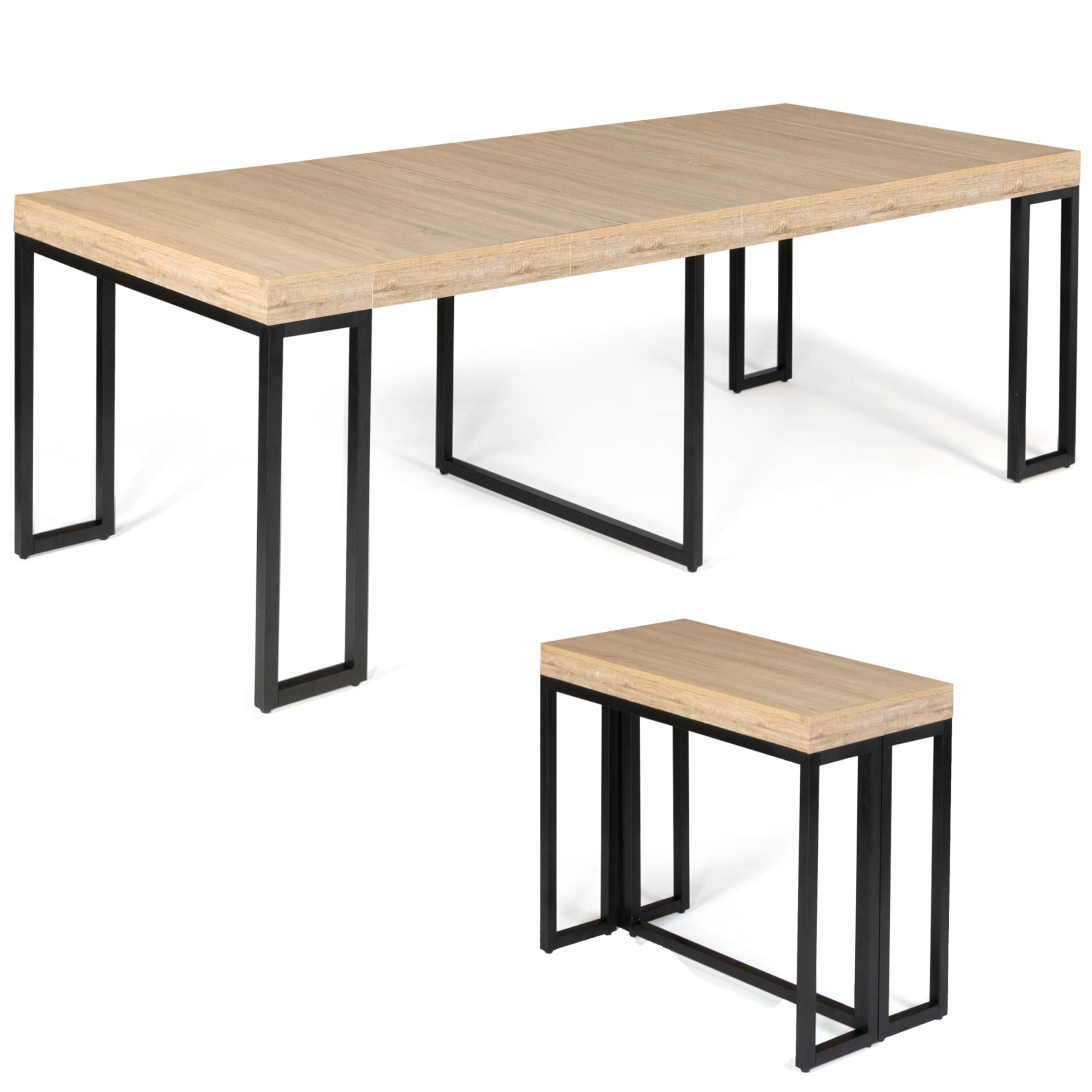
Figure 2.1: The FACILITYS Extensible Console Table in a dining room setting, partially extended.

Figure 2.2: The console table fully extended, demonstrating its capacity for multiple guests.

Figure 2.3: Dimensions of the table in its extended configuration: 235cm length, 90cm width, 75cm height.
3. సెటప్ మరియు అసెంబ్లీ
Assembly is required for this product. Please follow the instructions carefully. It is recommended to have at least two people for assembly due to the weight and size of the components.
అవసరమైన సాధనాలు:
- Allen Key (usually included)
- స్క్రూడ్రైవర్ (ఫిలిప్స్ హెడ్ సిఫార్సు చేయబడింది)
అసెంబ్లీ దశలు:
- భాగాలను అన్ప్యాక్ చేయండి: Carefully unpack all parts and hardware. Lay them out on a soft, clean surface to prevent scratches. Verify all parts are present against the included parts list.
- ఫ్రేమ్ని సమీకరించండి: Attach the metal frame components using the provided screws and Allen key. Ensure all connections are secure but do not overtighten initially.
- టేబుల్టాప్ను అటాచ్ చేయండి: Secure the main tabletop section to the assembled frame.
- Install Extension Mechanism: Mount the sliding extension mechanism to the underside of the main tabletop. Ensure it operates smoothly.
- తుది బిగింపు: అన్ని భాగాలు స్థానంలో మరియు సమలేఖనం చేయబడిన తర్వాత, అన్ని స్క్రూలను పూర్తిగా బిగించండి.
గమనిక: Some users have reported minor discrepancies in the assembly instructions or part labeling. Please cross-reference the visual diagrams with the physical parts carefully during assembly. If you encounter any issues, refer to the troubleshooting section or contact customer support.

మూర్తి 3.1: వివరంగా view of the extension mechanism and table segments during assembly.

Figure 3.2: Close-up of the table's metal leg structure, showing adjustable feet.
4. ఆపరేటింగ్ సూచనలు
The FACILITYS Extensible Console Table is designed for easy transformation between its compact console and extended dining table configurations.
పట్టికను విస్తరించడం:
- అన్లాక్ మెకానిజం: Locate and unlock any securing latches or pins on the underside of the table that hold the main sections together.
- Pull Apart: Gently pull the two main halves of the table apart. The extension mechanism will slide out, creating a gap in the center.
- Insert Extension Leaves: Take one extension leaf and carefully place it into the gap, aligning the connectors. Push the main table halves together until the leaf is securely seated.
- Repeat for More Length: Repeat step 3 for each additional extension leaf you wish to add, up to a maximum of four leaves.
- సురక్షిత: Once all desired leaves are in place, ensure the table halves are pushed firmly together and engage any locking mechanisms to secure the table in its extended position.
పట్టికను ఉపసంహరించుకోవడం:
- అన్లాక్ మెకానిజం: Disengage any locking mechanisms that secure the extended table.
- Remove Extension Leaves: Gently pull the table halves apart slightly and lift out each extension leaf. Store the leaves safely in a designated area.
- Push Together: Once all leaves are removed, push the two main table halves back together until they meet.
- లాక్ ఇన్ ప్లేస్: Secure the table in its compact console position using the original locking latches or pins.

Figure 4.1: Close-up of the table's extension locking mechanism.

Figure 4.2: The console table in its compact form, serving as a decorative console.
5. నిర్వహణ
Proper care and maintenance will ensure the longevity and appearance of your FACILITYS Extensible Console Table.
- శుభ్రపరచడం: టేబుల్ ఉపరితలాలను పొడి, మృదువైన గుడ్డతో తుడవండి. మొండి గుర్తుల కోసం, కొద్దిగా డి.amp cloth with mild soap can be used, followed immediately by drying with a clean, dry cloth.
- కఠినమైన రసాయనాలను నివారించండి: రాపిడి క్లీనర్లు, బలమైన డిటర్జెంట్లు లేదా రసాయన ద్రావకాలను ఉపయోగించవద్దు, ఎందుకంటే ఇవి ముగింపును దెబ్బతీస్తాయి.
- చిందులు: Clean up spills immediately to prevent staining or damage to the wood-effect surface.
- వేడి మరియు తేమ: Avoid placing hot items directly on the table. Use coasters or placemats. Protect from excessive moisture.
- సాధారణ తనిఖీలు: అన్ని స్క్రూలు మరియు కనెక్షన్లు బిగుతుగా ఉన్నాయని నిర్ధారించుకోవడానికి కాలానుగుణంగా వాటిని తనిఖీ చేయండి. అవసరమైతే తిరిగి బిగించండి.
6. ట్రబుల్షూటింగ్
మీ కన్సోల్ టేబుల్తో మీకు ఏవైనా సమస్యలు ఎదురైతే, దయచేసి ఈ క్రింది సాధారణ పరిష్కారాలను చూడండి:
- టేబుల్ వణుకులు/అస్థిరత:
- Ensure the table is on a level surface.
- అన్ని అసెంబ్లీ స్క్రూలు సురక్షితంగా బిగించబడ్డాయో లేదో తనిఖీ చేయండి.
- Adjust the leveling feet on the bottom of the legs if present.
- విస్తరించడంలో/ఉపసంహరించుకోవడంలో ఇబ్బంది:
- Ensure no debris is obstructing the sliding mechanism.
- Verify that all locking mechanisms are fully disengaged before attempting to move the table sections.
- Apply a silicone-based lubricant to the sliding rails if movement is stiff (avoid oil-based lubricants).
- Parts Missing or Incorrect:
- Double-check the packaging for any overlooked small parts.
- Compare the received parts with the parts list in the assembly guide. If parts are genuinely missing or incorrect, contact FACILITYS customer support immediately.
- Visible Screws/Aesthetic Issues After Assembly:
- This may indicate a part was installed incorrectly or an instruction was misinterpreted. Review the assembly steps and diagrams carefully.
- If the issue persists and affects functionality, contact customer support.
7. స్పెసిఫికేషన్లు
| ఫీచర్ | స్పెసిఫికేషన్ |
|---|---|
| బ్రాండ్ | FACILITYS |
| మోడల్ పేరు | CONSOLE EXTENSIBLE MEMPHIS 235 CM |
| మోడల్ సంఖ్య | 9075 |
| కొలతలు (మడత) | 90 cm (L) x 47 cm (W) x 75 cm (H) |
| కొలతలు (విస్తరించినవి) | 90 cm (L) x 235 cm (W) x 75 cm (H) |
| బరువు | 43 కిలోలు |
| మెటీరియల్ (పైన) | Wood Particle Board |
| మెటీరియల్ (ఫ్రేమ్) | మెటల్ |
| రంగు | Wood (Brown Top) |
| సీటింగ్ కెపాసిటీ | Up to 10 persons (when extended) |
| Number of Extension Leaves | 4 |
| అసెంబ్లీ అవసరం | అవును |
| సిఫార్సు చేసిన సాధనాలు | Allen Key, Screwdriver |
| వాడుక | ఇండోర్ |
8. వారంటీ మరియు మద్దతు
వారంటీ సమాచారం:
This product is covered by a manufacturer's warranty for a period of 2 సంవత్సరాలు from the date of purchase. The warranty covers manufacturing defects and material faults under normal use. It does not cover damage caused by misuse, improper assembly, accidents, or normal wear and tear.
కస్టమర్ మద్దతు:
For any questions, assistance with assembly, or warranty claims, please contact FACILITYS customer support. Please have your purchase receipt and model number (9075) ready when contacting support.
Contact information can typically be found on the FACILITYS official website or through your retailer's customer service portal.