
1. పరిచయం
The LASERLINER VideoPocket HD 082262A is a compact and versatile industrial endoscope designed for visual inspection in hard-to-reach areas. This device allows for real-time viewing, image capture, and video recording, making it an essential tool for professionals in various fields. This manual provides detailed instructions for the safe and effective operation, maintenance, and troubleshooting of your VideoPocket HD.
2. భద్రతా సూచనలు
- సాధారణ భద్రత: Read all instructions carefully before use. Keep the device away from water, high temperatures, and direct sunlight.
- బ్యాటరీ భద్రత: Use only specified AA alkaline batteries. Do not mix old and new batteries, or different types of batteries. Remove batteries if the device will not be used for an extended period.
- Camera Cable: Do not bend, pinch, or pull the camera cable excessively. Avoid inserting the camera into live electrical circuits or hazardous environments without proper safety precautions.
- శుభ్రపరచడం: శుభ్రపరిచే ముందు విద్యుత్తును డిస్కనెక్ట్ చేయండి. మృదువైన, పొడి వస్త్రాన్ని ఉపయోగించండి. రాపిడి క్లీనర్లను లేదా ద్రావకాలను ఉపయోగించవద్దు.
- మరమ్మత్తు: పరికరాన్ని మీరే తెరవడానికి లేదా మరమ్మతు చేయడానికి ప్రయత్నించవద్దు. అన్ని సర్వీసింగ్లను అర్హత కలిగిన సిబ్బందికి సూచించండి.
3. ప్యాకేజీ విషయాలు
మీ ప్యాకేజీలో అన్ని అంశాలు ఉన్నాయని ధృవీకరించండి:
- LASERLINER VideoPocket HD Main Unit
- Camera Cable with 5.2mm Camera Head (1m length)
- మాగ్నెట్ అటాచ్మెంట్
- మిర్రర్ అటాచ్మెంట్
- హుక్ అటాచ్మెంట్
- Camera Tip Attachments (for securing magnet, mirror, hook)
- వినియోగదారు మాన్యువల్
4. ఉత్పత్తి ముగిసిందిview
The VideoPocket HD features a robust design for industrial use, with an integrated display and flexible camera probe.

మూర్తి 1: LASERLINER VideoPocket HD industrial endoscope handheld unit. This image shows the complete device, highlighting its compact form factor and integrated display.

మూర్తి 2: Close-up of the 5.2mm camera head with 6 integrated LEDs for illumination. The small diameter allows access into narrow spaces, and the LEDs provide necessary lighting.
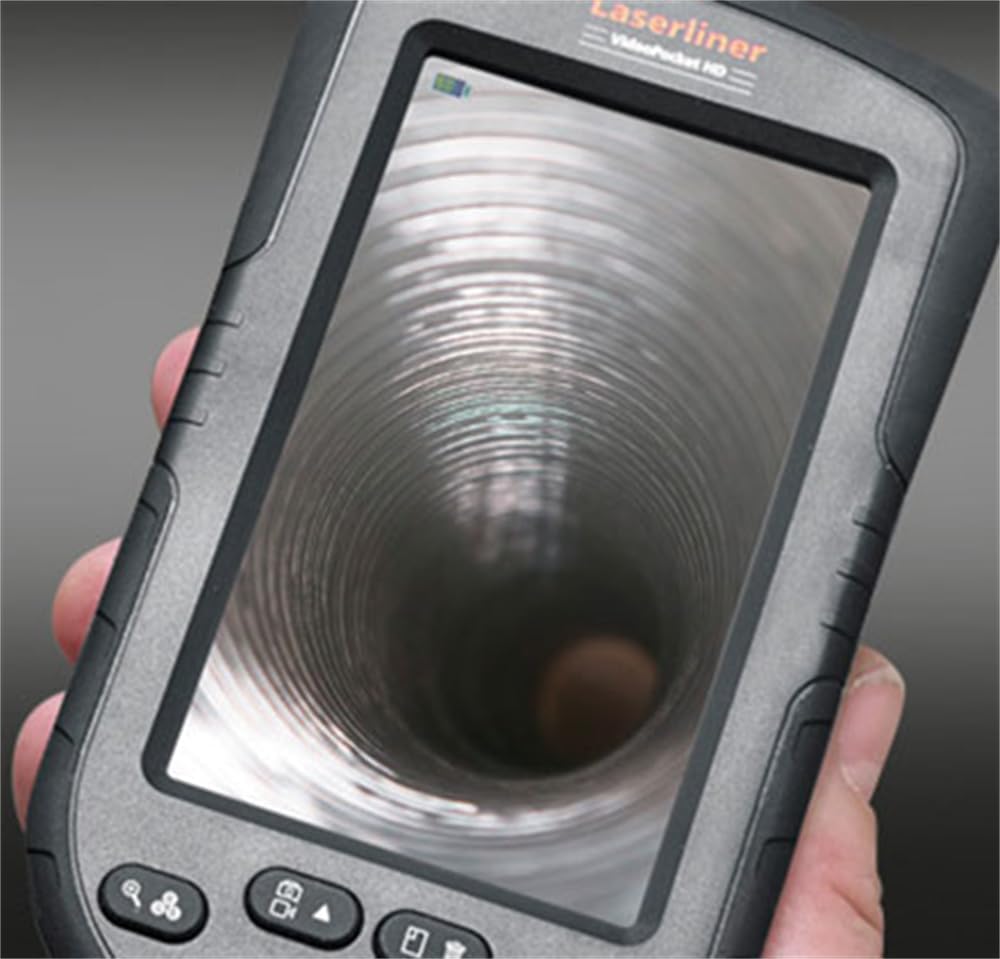
మూర్తి 3: LASERLINER VideoPocket HD display showing a live view from inside a corrugated pipe. This demonstrates the device's capability to provide clear visuals during inspection.

మూర్తి 4: వైపు view of the VideoPocket HD unit, highlighting the MicroUSB port and microSD card slot. These ports are used for data transfer and memory expansion.

మూర్తి 5: వెనుక view of the LASERLINER VideoPocket HD, showing the integrated storage for the camera cable. This design ensures convenient and secure storage of the probe.
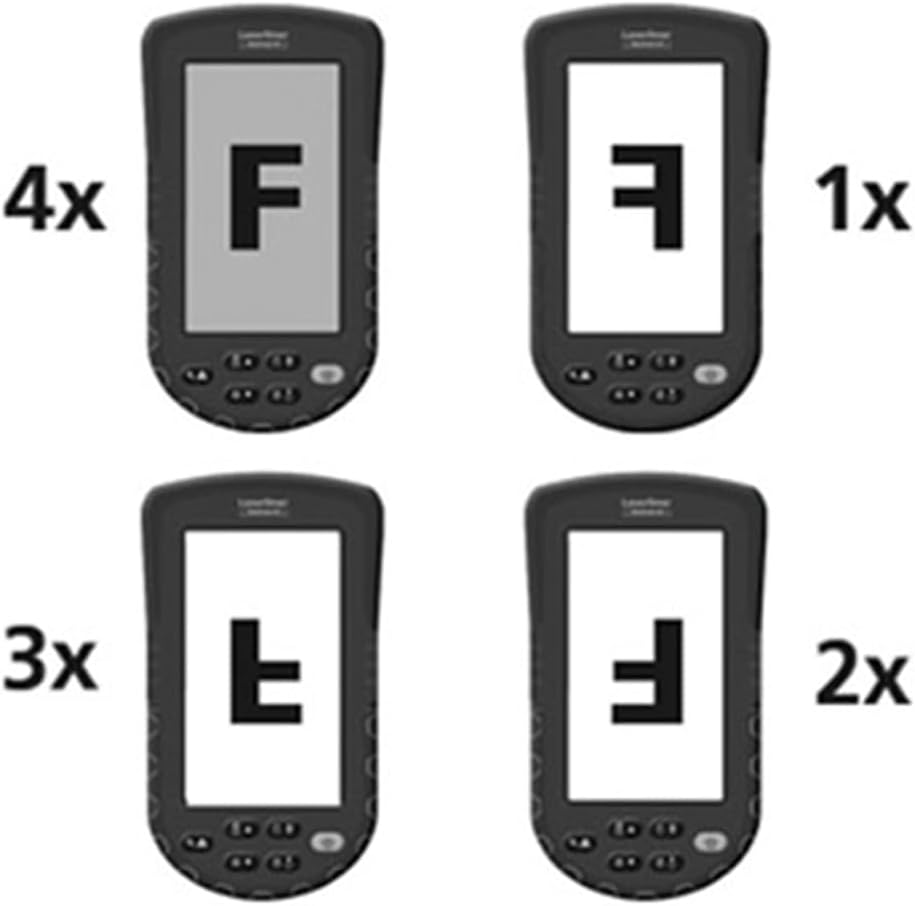
మూర్తి 6: Diagram illustrating the 4x digital zoom function of the VideoPocket HD, showing different magnification levels. This feature allows for closer examination of details.
5. సెటప్
5.1 బ్యాటరీ ఇన్స్టాలేషన్
- పరికరం వెనుక భాగంలో బ్యాటరీ కంపార్ట్మెంట్ కవర్ను గుర్తించండి.
- కవర్ను స్లైడ్ చేయడం లేదా లాక్ చేయడం ద్వారా తెరవండి.
- కంపార్ట్మెంట్ లోపల సూచించిన విధంగా సరైన ధ్రువణత (+/-) ఉండేలా చూసుకోవడానికి, నాలుగు (4) AA ఆల్కలీన్ బ్యాటరీలను చొప్పించండి.
- బ్యాటరీ కంపార్ట్మెంట్ కవర్ను సురక్షితంగా మూసివేయండి.
5.2 మైక్రో SD కార్డ్ చొప్పించడం
- Locate the microSD card slot on the side of the device (refer to Figure 4).
- Insert a microSD card (up to 32GB, not included) into the slot with the contacts facing down, until it clicks into place.
- తీసివేయడానికి, కార్డు బయటకు వచ్చే వరకు సున్నితంగా లోపలికి నెట్టండి.
5.3 ఉపకరణాలను జోడించడం
The magnet, mirror, and hook attachments can be secured to the camera head using the provided camera tip attachments.
- Select the desired attachment (magnet, mirror, or hook).
- Carefully slide the camera tip attachment over the camera head.
- Ensure the accessory is firmly seated and aligned with the camera lens if necessary (e.g., mirror).
6. ఆపరేటింగ్ సూచనలు
6.1 పవర్ చేయడం ఆన్/ఆఫ్
- పవర్ ఆన్: డిస్ప్లే వెలిగే వరకు పవర్ బటన్ను నొక్కి పట్టుకోండి.
- పవర్ ఆఫ్: డిస్ప్లే ఆఫ్ అయ్యే వరకు పవర్ బటన్ను నొక్కి పట్టుకోండి.
6.2 ప్రత్యక్ష ప్రసారం View మరియు నావిగేషన్
- Once powered on, the device will display a live feed from the camera probe.
- Use the directional buttons (if present) to navigate through menus or adjust settings.
6.3 ప్రకాశం సర్దుబాటు
The camera head features 6 LEDs with 10-stage brightness adjustment.
- Locate the brightness adjustment buttons (often marked with sun icons or up/down arrows).
- Press the appropriate button to increase or decrease the LED illumination intensity.
6.4 డిజిటల్ జూమ్ ఉపయోగించడం
The device supports up to 4x digital zoom (refer to Figure 6).
- Press the Zoom button (often marked with a magnifying glass icon) to cycle through zoom levels (1x, 2x, 3x, 4x).
6.5 చిత్రాలు మరియు వీడియోలను సంగ్రహించడం
Ensure a microSD card is inserted before attempting to record.
- చిత్రాన్ని సంగ్రహించండి: ప్రత్యక్ష ప్రసారంలో view, press the Photo/Capture button (often marked with a camera icon) to take a still image.
- వీడియో రికార్డ్ చేయండి: Press the Video/Record button (often marked with a video camera icon) to start recording. Press it again to stop recording.
6.6 Viewing Recorded Media
- Enter Playback mode (usually via a dedicated button or menu option).
- Use the directional buttons to browse through captured images and videos.
- Press the OK/Play button to view an image or play a video.
6.7 కంప్యూటర్కు కనెక్ట్ అవుతోంది
Use the MicroUSB port to transfer fileఒక కంప్యూటర్కు లు.
- Connect the device to your computer using a MicroUSB cable (not included).
- The device should appear as a removable storage device on your computer.
- You can then access and transfer the images and videos stored on the microSD card.
7. నిర్వహణ
7.1 శుభ్రపరచడం
- ప్రధాన యూనిట్: Wipe the main unit and display with a soft, dry, lint-free cloth. For stubborn dirt, a slightly damp వస్త్రాన్ని ఉపయోగించవచ్చు, తరువాత పొడి వస్త్రాన్ని ఉపయోగించవచ్చు.
- కెమెరా హెడ్: Gently clean the camera lens with a soft lens cleaning cloth or cotton swab. Avoid scratching the lens.
- పరికరంలోని ఏ భాగాన్ని నీటిలో ముంచవద్దు.
7.2 నిల్వ
- పరికరాన్ని చల్లని, పొడి ప్రదేశంలో, ప్రత్యక్ష సూర్యకాంతి మరియు తీవ్రమైన ఉష్ణోగ్రతలకు దూరంగా నిల్వ చేయండి.
- లీకేజీని నివారించడానికి పరికరం ఎక్కువ కాలం ఉపయోగించబడకపోతే బ్యాటరీలను తీసివేయండి.
- Ensure the camera cable is neatly coiled and stored in its designated compartment (refer to Figure 5).
8. ట్రబుల్షూటింగ్
| సమస్య | సాధ్యమైన కారణం | పరిష్కారం |
|---|---|---|
| పరికరం పవర్ ఆన్ చేయదు. | బ్యాటరీలు డెడ్ అయ్యాయి లేదా తప్పుగా చొప్పించబడ్డాయి. | సరైన ధ్రువణతను నిర్ధారించుకోవడానికి, బ్యాటరీలను కొత్త AA ఆల్కలీన్ బ్యాటరీలతో భర్తీ చేయండి. |
| ప్రదర్శనలో చిత్రం లేదు. | Camera cable not properly connected or damaged. | Check the camera cable connection. If problem persists, contact support. |
| Cannot capture images/videos. | మైక్రో SD కార్డ్ చొప్పించబడలేదు లేదా కార్డ్ పూర్తిగా/పాడైపోయింది. | Insert a valid microSD card. Delete unnecessary files or format the card (this will erase all data). |
| Image is too dark/bright. | LED brightness is not adjusted correctly. | Adjust the LED brightness using the dedicated buttons. |
| పరికరం స్తంభించిపోతుంది లేదా స్పందించడం మానేస్తుంది. | తాత్కాలిక సాఫ్ట్వేర్ లోపం. | హార్డ్ రీసెట్ చేయడానికి బ్యాటరీలను తీసివేసి తిరిగి చొప్పించండి. |
9. స్పెసిఫికేషన్లు
| ఫీచర్ | స్పెసిఫికేషన్ |
|---|---|
| బ్రాండ్ | లేజర్లైనర్ |
| మోడల్ సంఖ్య | 082262A |
| ఉత్పత్తి కొలతలు (W x H x D) | 8.5 x 15.5 x 3.2 సెం.మీ |
| బరువు (బ్యాటరీలతో) | 370 గ్రా |
| Product Weight (Gross/Shipping) | 810 గ్రా |
| కెమెరా హెడ్ వ్యాసం | 5.2 మి.మీ |
| Camera Cable Length | 1 మీ |
| కెమెరా రిజల్యూషన్ | 1280 x 720 పిక్సెల్లు |
| ఫీల్డ్ View | 65° |
| ఫోకల్ దూరం | 3 - 8 సెం.మీ. |
| ప్రదర్శన రకం | 4.3 అంగుళాల TFT కలర్ డిస్ప్లే |
| డిస్ప్లే రిజల్యూషన్ | 480 x 272 పిక్సెల్లు |
| LED ప్రకాశం సర్దుబాటు | 10 సెtages |
| డిజిటల్ జూమ్ | 4x |
| వీడియో క్యాప్చర్ రిజల్యూషన్ | 1080p (for saved files) |
| మెమరీ మీడియా | మైక్రో SD కార్డ్ (32GB వరకు) |
| పోర్ట్ | మైక్రో USB |
| శక్తి మూలం | 4 x AA ఆల్కలీన్ బ్యాటరీలు |
| ఉపకరణాలు చేర్చబడ్డాయి | Magnet, Mirror, Hook, Camera Tip Attachments |
10. వారంటీ మరియు మద్దతు
10.1 వారంటీ సమాచారం
This LASERLINER VideoPocket HD 082262A comes with a 1-సంవత్సరం తయారీదారు వారంటీ from the date of purchase. This warranty covers defects in materials and workmanship under normal use. It does not cover damage caused by misuse, accidents, unauthorized modifications, or normal wear and tear. Please retain your proof of purchase for warranty claims.
10.2 కస్టమర్ మద్దతు
For technical assistance, troubleshooting beyond this manual, or warranty inquiries, please contact your retailer or visit the official Laserliner website for support contact information. When contacting support, please have your product model number (082262A) and proof of purchase readily available.