
పరిచయం
This manual provides comprehensive instructions for the installation, operation, and maintenance of your Podofo Wireless CarPlay Android Auto Portable Car Stereo. Please read this manual thoroughly before using the device to ensure proper functionality and safety. Keep this manual for future reference.
ఉత్పత్తి ముగిసిందిview
కీ ఫీచర్లు
- Suitable for All Car Models: Compatible with various car brands (7-32V), including Ford, Jeep, BMW, and Lexus. It can be installed without disassembling the central console, making it an ideal choice for vehicles without an original screen.
- Wireless CarPlay and Android Auto Support: Compatible with both CarPlay and Android Auto. After a wireless Bluetooth connection, you can use features like Siri, Maps, Music, and Phone.
- Integrated Driving Recorder and External Reversing Camera: The stereo includes a built-in driving recorder for front-view video recording, enhancing driving safety. An external reversing camera is also provided, supporting reverse input.
- Larger Screen: The 9.3-inch high-definition touchscreen offers a wider viewing angle. Its rectangular design minimizes obstruction of the driver's line of sight.
- Card Reader Function and Split Screen: Features a card reader function, allowing you to insert a 64GB memory card to view stored videos, music, and movies. Supports two-way split-screen video display, showing two different application interfaces simultaneously.
ప్యాకేజీ విషయాలు
ప్యాకేజీలో అన్ని అంశాలు ఉన్నాయని నిర్ధారించుకోండి:
- Portable Car Stereo Unit
- పవర్ కార్డ్
- Camera Extension Cord
- మానిటర్ బేస్
- TF Card (64GB)
- Bracket Fixing Stickers
- కెమెరా ఉపకరణాలు
- వినియోగదారు మాన్యువల్
- 3m AUX Cable
- Pull Back Camera (Backup Camera)
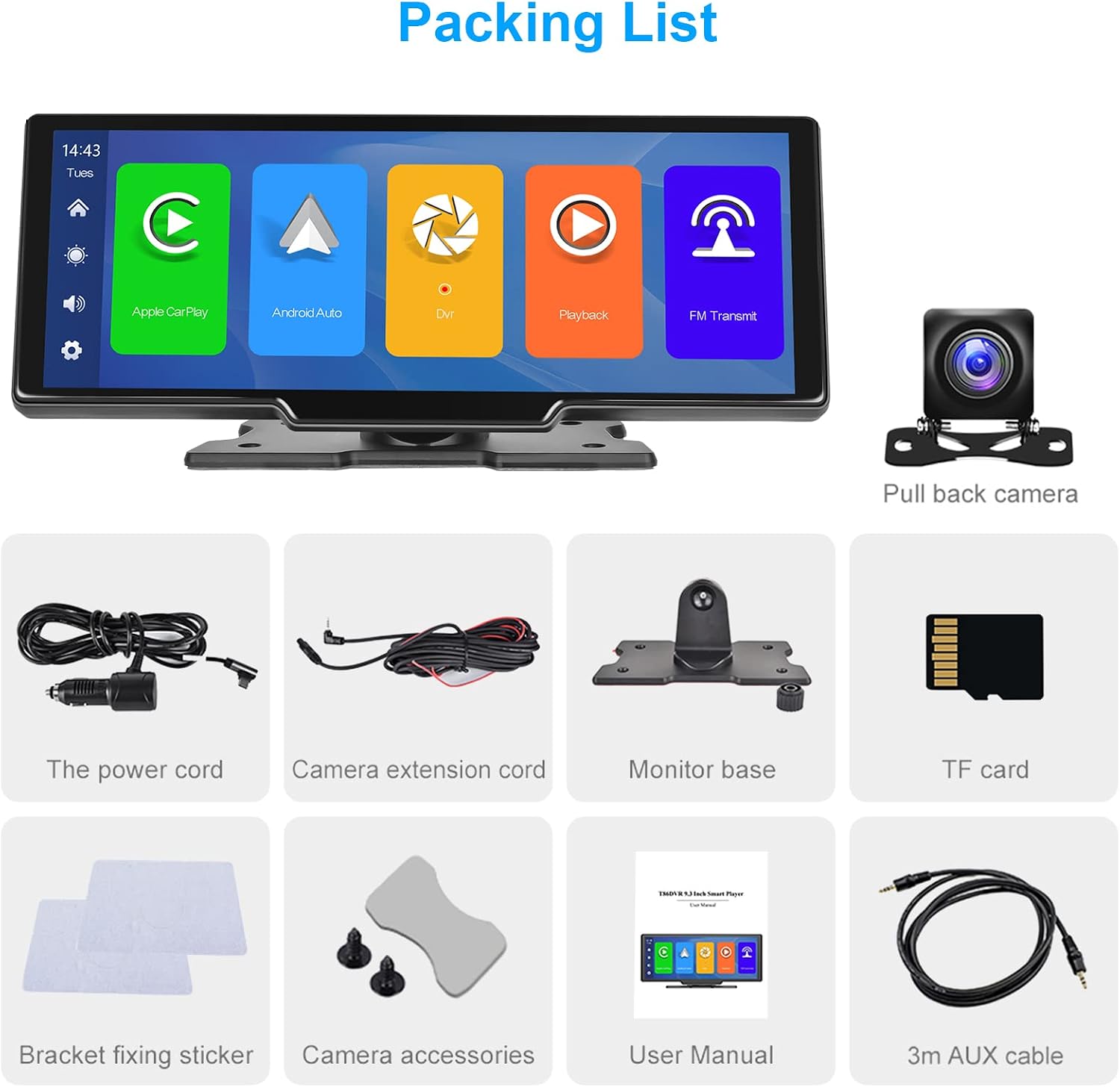
మూర్తి 1: ప్యాకేజీ కంటెంట్లు
సెటప్
పరికరాన్ని మౌంట్ చేస్తోంది
- Choose a suitable location on your dashboard that does not obstruct your view లేదా డ్రైవింగ్ నియంత్రణలలో జోక్యం చేసుకోవచ్చు.
- Attach the monitor base to the back of the main unit. The base allows for 360-degree rotation and angle adjustment for optimal viewing.
- మీరు పరికరాన్ని మౌంట్ చేయాలనుకుంటున్న డాష్బోర్డ్ ఉపరితలాన్ని శుభ్రం చేయండి.
- Apply the bracket fixing stickers to the bottom of the monitor base and firmly press it onto the dashboard.

Figure 2: Product Dimensions and Mounting Details
వైరింగ్ సూచనలు
- పవర్ కనెక్షన్: Insert the power cord into the designated power hole on the side of the unit. Plug the other end into your car's 12V power outlet (cigarette lighter socket).
- వెనుక కెమెరా కనెక్షన్: Connect the camera extension cord to the 'Cable holes for rear cameras' port on the unit. Route the cable to the rear of your vehicle and connect it to the backup camera. Ensure the camera is mounted securely and provides a clear view.
- Forward Camera (Dash Cam) Connection: If applicable, connect the forward camera to its designated port.
- AUX కనెక్షన్: If you wish to output audio to your car's stereo system via AUX, connect the 3m AUX cable from the 'AUX hole' on the unit to your car's AUX input.
- TF Card Insertion: Insert the provided 64GB TF card into the 'Storage slot' for recording and media playback.

చిత్రం 3: వైరింగ్ రేఖాచిత్రం
ప్రారంభ పవర్ ఆన్
Once all connections are made, start your vehicle. The device should power on automatically. Follow the on-screen prompts for initial setup, including language selection and time zone.
ఆపరేటింగ్ సూచనలు
వైర్లెస్ కార్ప్లే మరియు ఆండ్రాయిడ్ ఆటో
- మీ స్మార్ట్ఫోన్లో బ్లూటూత్ మరియు Wi-Fi ప్రారంభించబడిందని నిర్ధారించుకోండి.
- On the car stereo, select the CarPlay or Android Auto icon.
- On your phone, search for the device's Bluetooth name and pair.
- Confirm the connection on both devices. CarPlay or Android Auto will launch automatically.
- You can now access navigation, music, calls, and messages directly from the stereo screen.

చిత్రం 4: వైర్లెస్ కార్ప్లే ఇంటర్ఫేస్
వాయిస్ కంట్రోల్
With CarPlay or Android Auto connected, you can use voice commands for hands-free operation. Activate your phone's voice assistant (Siri for iOS, Google Assistant for Android) by saying the wake word (e.g., "Hey Siri" or "OK Google") or by pressing the voice control button on the screen (if available).

Figure 5: Voice Control Interface
FM ట్రాన్స్మిటర్ ఫంక్షన్
To output audio to your car's FM radio:
- Select the FM Transmitter icon on the stereo's main menu.
- Choose an unused FM frequency on the stereo.
- Tune your car's FM radio to the exact same frequency.
- Audio from the portable stereo will now play through your car's speakers.

Figure 6: FM Transmitting Interface
బ్లూటూత్ కనెక్టివిటీ
For direct Bluetooth audio streaming or hands-free calling without CarPlay/Android Auto:
- Select the Bluetooth icon on the stereo's main menu.
- మీ స్మార్ట్ఫోన్లో బ్లూటూత్ని ప్రారంభించండి మరియు అందుబాటులో ఉన్న పరికరాల కోసం శోధించండి.
- Select the stereo's Bluetooth name (e.g., "PODOFO") from your phone's list.
- Confirm pairing on both devices.
- You can now play music or make calls via Bluetooth.

Figure 7: Bluetooth Connection Screen
Dash Cam and Backup Camera
The integrated dash cam continuously records video to the TF card. When reversing, the external backup camera automatically displays the rear view on the screen with parking guidelines.
- డాష్ క్యామ్: వీడియో files are saved in a loop recording format on the TF card. Older files are overwritten automatically when the card is full.
- బ్యాకప్ కెమెరా: When the vehicle is shifted into reverse, the screen will automatically switch to the backup camera view.
- Viewరికార్డింగ్లు: Access recorded videos through the 'DVR' or 'Playback' application on the main menu.

Figure 8: Dash Cam Loop Recording and Backup Camera View

Figure 9: AHD Backup Camera Details
TF Card Media Playback
Insert a TF card with media files (videos, music, photos) into the storage slot. Use the 'Playback' or relevant media player application on the stereo to browse and play content.
స్ప్లిట్ స్క్రీన్ ఫంక్షన్
The device supports displaying two applications simultaneously on the screen. Refer to the on-screen interface for activating and managing split-screen mode, typically by long-pressing an app icon or using a dedicated split-screen button.
నిర్వహణ
క్లీనింగ్
Use a soft, dry cloth to clean the screen and exterior of the device. For stubborn smudges, slightly dampen the cloth with water or a screen-safe cleaner. Avoid using harsh chemicals, abrasives, or solvents.
నిల్వ
If storing the device for an extended period, disconnect it from power and store it in a cool, dry place away from direct sunlight and extreme temperatures.
ట్రబుల్షూటింగ్
మీరు సమస్యలను ఎదుర్కొంటే, ఈ క్రింది సాధారణ సమస్యలు మరియు పరిష్కారాలను చూడండి:
- శక్తి లేదు:
- Ensure the power cord is securely plugged into both the device and the car's 12V outlet.
- Check if the car's 12V outlet is functioning (e.g., by plugging in another device).
- Verify the car's fuse for the 12V outlet is not blown.
- CarPlay/Android Auto Connectivity Issues:
- మీ ఫోన్లో బ్లూటూత్ మరియు Wi-Fi ప్రారంభించబడ్డాయని నిర్ధారించుకోండి.
- మీ ఫోన్ బ్లూటూత్ సెట్టింగ్ల నుండి పరికరాన్ని మర్చిపోయి తిరిగి జత చేయండి.
- Restart both your phone and the car stereo.
- మీ ఫోన్ ఆపరేటింగ్ సిస్టమ్ తాజాగా ఉందని నిర్ధారించుకోండి.
- Poor Audio Quality (FM/AUX):
- FM ట్రాన్స్మిటర్: Try different FM frequencies to find one with less interference. Ensure your car's radio is tuned precisely to the stereo's frequency.
- AUX కనెక్షన్: Ensure the AUX cable is fully inserted into both the stereo and your car's AUX input. Check the volume levels on both devices. If experiencing humming or static, an audio ground loop isolator may be required (not included).
- Camera Display Problems:
- Check all camera cable connections for looseness or damage.
- Ensure the cameras are clean and free from obstructions.
- If the backup camera doesn't activate, verify its power connection and trigger wire (if applicable).
- టచ్స్క్రీన్ స్పందించడం లేదు:
- Restart the device by disconnecting and reconnecting the power.
- స్క్రీన్ శుభ్రంగా మరియు పొడిగా ఉందని నిర్ధారించుకోండి.
- Avoid using sharp objects on the screen.
స్పెసిఫికేషన్లు
| ఫీచర్ | స్పెసిఫికేషన్ |
|---|---|
| బ్రాండ్ | పోడోఫో |
| మోడల్ సంఖ్య | 26cb7522-ae9a-40c6-9a1c-05b4a5651427 |
| కనెక్టివిటీ టెక్నాలజీ | బ్లూటూత్ |
| కంట్రోలర్ రకం | ఆండ్రాయిడ్, iOS |
| ప్రత్యేక ఫీచర్ | పోర్టబుల్ |
| అనుకూల పరికరాలు | స్మార్ట్ఫోన్, టాబ్లెట్ |
| మొత్తం HDMI పోర్ట్లు | 1 |
| ఆడియో అవుట్పుట్ మోడ్ | స్టీరియో |
| సరౌండ్ సౌండ్ ఛానెల్ కాన్ఫిగరేషన్ | 2.0 |
| వీడియో ఎన్కోడింగ్ | F4V, MOV, MP4, TS |
| రంగు | నలుపు |
| అవుట్పుట్ పవర్ | 6 వాట్ |
| ఛానెల్ల సంఖ్య | 2 |
| Internet Applications | Apple Music, Google Play Music |
| నియంత్రణ పద్ధతి | టచ్ |
| ఆడియో అవుట్పుట్ రకం | బ్లూటూత్ |
| వైర్లెస్ టెక్నాలజీ | బ్లూటూత్ |
| ఫార్మాట్ | డిజిటల్ |
| తయారీదారు | పోడోఫో |
| మూలం దేశం | చైనా |
| వస్తువు బరువు | 64 గ్రాములు |
వారంటీ మరియు మద్దతు
వారంటీ సమాచారం
This product is covered by a standard manufacturer's warranty. For specific warranty terms, duration, and claim procedures, please refer to the warranty card included in your package or contact the seller directly. Keep your proof of purchase for warranty claims.
కస్టమర్ మద్దతు
If you require further assistance, technical support, or have questions not covered in this manual, please contact the seller or manufacturer through the platform where you purchased the product. Provide your model number and a detailed description of the issue for efficient support.