
ఉత్పత్తి ముగిసిందిview
The ClimaTek T-721 is an OEM upgraded thermostat designed for reliable temperature control in your home or office. This digital thermostat offers programmable features and a user-friendly interface for adjusting heating and cooling settings.
- OEM Upgraded Thermostat: Ensures compatibility and performance as a direct replacement for part # T-721.
- Top Quality Replacement Part: Constructed for durability and long-lasting operation.
- Programmable Feature: Allows for customized temperature schedules.
- డిజిటల్ ఉష్ణోగ్రత నియంత్రణ: Provides precise temperature management.
- పుష్ బటన్ కంట్రోలర్: Simple and intuitive interface for adjustments.
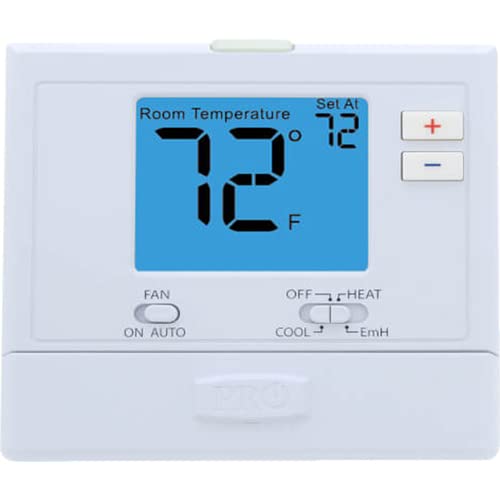
మూర్తి 1: ముందు view of the ClimaTek T-721 thermostat, showing its digital display and control buttons. The display shows '78' degrees, and buttons for temperature adjustment and system mode selection are visible.
సెటప్ మరియు ఇన్స్టాలేషన్
This section provides general guidelines for installing your ClimaTek T-721 thermostat. For detailed wiring instructions, always refer to the specific wiring diagram provided with your HVAC system and consult a qualified technician if you are unsure.
- పవర్ డిస్కనెక్ట్: Before beginning any installation, ensure the power to your heating and cooling system is turned off at the main breaker or fuse box.
- పాత థర్మోస్టాట్ని తీసివేయండి: Carefully remove the cover of your old thermostat. Take a picture of the wiring connections before disconnecting any wires. Label each wire with the terminal it was connected to.
- కొత్త థర్మోస్టాట్ బేస్ను మౌంట్ చేయండి: Mount the new ClimaTek T-721 thermostat base plate to the wall using the provided screws. Ensure it is level.
- వైర్ కనెక్షన్లు: Connect the wires from your HVAC system to the corresponding terminals on the T-721 thermostat base. Match the labels you made earlier. If you are unsure, consult a professional.
- థర్మోస్టాట్ బాడీని అటాచ్ చేయండి: Secure the main body of the T-721 thermostat onto its base plate.
- శక్తిని పునరుద్ధరించండి: Turn the power back on to your heating and cooling system at the main breaker.
- ప్రారంభ కాన్ఫిగరేషన్: Follow the on-screen prompts or refer to the specific programming section to set the date, time, and initial temperature preferences.
ఆపరేటింగ్ సూచనలు
The ClimaTek T-721 thermostat is designed for straightforward operation. Here's how to adjust its settings:
సర్దుబాటు ఉష్ణోగ్రత:
- ఏదైనా నొక్కండి '+' (ప్లస్) లేదా '-' (minus) button located on the right side of the thermostat.
- The display will illuminate, typically with a blue backlight, indicating that the thermostat is ready for temperature adjustment.
- నొక్కడం కొనసాగించండి '+' button to increase the desired temperature or the '-' దాన్ని తగ్గించడానికి బటన్.
- The thermostat will automatically save the new setting after a few seconds of inactivity.
Selecting System Mode (Cool, Off, Heat):
- Locate the "SYSTEM" slider switch at the bottom center of the thermostat.
- స్విచ్ని స్లైడ్ చేయండి వదిలేశారు for "COOL" mode (air conditioning).
- స్విచ్ని స్లైడ్ చేయండి కుడి for "HEAT" mode (heating).
- Position the switch in the మధ్య for "OFF" mode to turn off both heating and cooling functions.
Selecting Fan Mode (On, Auto):
- Locate the "FAN" slider switch at the bottom left of the thermostat.
- Slide the switch to "ON" to make the fan run continuously.
- Slide the switch to "AUTO" to make the fan run only when the heating or cooling system is actively operating.
నిర్వహణ
Regular maintenance helps ensure the longevity and optimal performance of your ClimaTek T-721 thermostat.
- శుభ్రపరచడం: Gently wipe the exterior of the thermostat with a soft, damp వస్త్రం. రాపిడి క్లీనర్లను లేదా ద్రావకాలను ఉపయోగించవద్దు. పరికరంలోకి ద్రవం రాకుండా చూసుకోండి.
- బ్యాటరీ భర్తీ: If your thermostat uses batteries (check your specific model for battery compartment location, usually on the back or side), replace them annually or when a low battery indicator appears on the display. Use fresh alkaline batteries of the specified type.
- గాలి ప్రవాహం: థర్మోస్టాట్ పై ఉన్న వెంట్లు casing are not obstructed by dust or debris, as this can affect temperature readings.
- స్థానం: Avoid placing furniture or appliances that generate heat or cold near the thermostat, as this can lead to inaccurate temperature readings.
ట్రబుల్షూటింగ్
If you encounter issues with your ClimaTek T-721 thermostat, refer to the following common troubleshooting steps:
- డిస్ప్లే/పవర్ లేదు:
- Check if the power to your HVAC system is on at the main breaker.
- If battery-powered, replace the batteries with fresh ones.
- Ensure the thermostat is properly seated on its base.
- తప్పు ఉష్ణోగ్రత రీడింగ్:
- థర్మోస్టాట్ ప్రత్యక్ష సూర్యకాంతి, చిత్తుప్రతులు లేదా ఉష్ణ వనరులకు (ఉదా. l) గురికాకుండా చూసుకోండిamps, TVs).
- Clean any dust or debris from the thermostat's vents.
- తాపన/శీతలీకరణ సక్రియం కావడం లేదు:
- Verify that the system mode switch is set to "HEAT" or "COOL" as desired.
- Check that the fan mode is set to "AUTO" or "ON".
- Ensure the desired temperature is set appropriately (e.g., lower than room temperature for cooling, higher for heating).
- Check your HVAC system's circuit breaker.
- థర్మోస్టాట్ స్పందించడం లేదు:
- Try resetting the thermostat (refer to your HVAC system's manual or consult a professional if a specific reset procedure is not available for the T-721).
- అన్ని వైరింగ్ కనెక్షన్లు సురక్షితంగా ఉన్నాయని నిర్ధారించుకోండి.
If these steps do not resolve the issue, it is recommended to contact a qualified HVAC technician for further assistance.
స్పెసిఫికేషన్లు
| బ్రాండ్ | ClimaTek |
| మోడల్ పేరు | T-721 |
| కంట్రోలర్ రకం | పుష్ బటన్ |
| ప్రత్యేక ఫీచర్ | ప్రోగ్రామబుల్ |
| ఉష్ణోగ్రత నియంత్రణ రకం | డిజిటల్ |
| వస్తువు బరువు | 10 ఔన్సులు |
| బ్యాక్లైట్ | నం |
| స్పెసిఫికేషన్ మెట్ | OEM |
| తయారీదారు | ప్రో 1 |
| ఉత్పత్తి కొలతలు | 6 x 6 x 2 అంగుళాలు |
| మొదటి తేదీ అందుబాటులో ఉంది | మార్చి 8, 2023 |
వారంటీ మరియు మద్దతు
For information regarding warranty coverage, returns, or technical support for your ClimaTek T-721 thermostat, please refer to the documentation provided at the time of purchase or contact ClimaTek customer service directly. You may also visit the ClimaTek Store on Amazon అదనపు ఉత్పత్తి సమాచారం కోసం.