
1. పరిచయం
The SHREYANS SRS588 is a compact and lightweight 2-inch portable Bluetooth thermal printer designed for various mobile printing applications. This manual provides essential information for setting up, operating, maintaining, and troubleshooting your printer to ensure optimal performance.

Image 1.1: SHREYANS SRS588 Portable Bluetooth Printer in use.
2. పెట్టెలో ఏముంది
Upon unpacking your SHREYANS SRS588 printer, please verify that all the following items are included:
- SHREYANS SRS588 Portable Bluetooth Printer
- USB ఛార్జింగ్ కేబుల్
- పవర్ అడాప్టర్
- వినియోగదారు మాన్యువల్ (ఈ పత్రం)
- Leather Protective Case (may vary by version)
- Thermal Paper Roll (initial roll)
3. ఉత్పత్తి ముగిసిందిview
The SHREYANS SRS588 printer features a compact design with intuitive controls. It utilizes thermal printing technology, eliminating the need for ink cartridges or ribbons.

చిత్రం 3.1: ముందు view of the SHREYANS SRS588 printer, showing power and feed buttons.
Key features include wireless Bluetooth connectivity, fast printing, and a built-in rechargeable battery for portability.

Image 3.2: Visual representation of key features: Wireless Connection, Fast Printing, Small & Portable, Built-in Battery.
4. సెటప్
Follow these steps to prepare your SHREYANS SRS588 printer for first use:
4.1. అన్బాక్సింగ్ మరియు ప్రారంభ ఛార్జ్
Carefully remove all components from the packaging. Connect the printer to the power adapter using the provided USB cable and charge it fully before initial use. The battery indicator lights will show charging status.
4.2. బ్యాటరీ ఇన్స్టాలేషన్
If the battery is not pre-installed, open the battery compartment cover on the bottom of the printer. Insert the rechargeable battery, ensuring correct polarity. Close the cover securely.
4.3. పేపర్ రోల్ ఇన్స్టాలేషన్
- Open the printer's top cover by pressing the release button or lifting the latch.
- Insert a 58mm thermal paper roll into the compartment. Ensure the paper feeds out from the bottom of the roll and the leading edge is straight.
- కట్టింగ్ ఎడ్జ్ దాటి కొద్ది మొత్తంలో కాగితాన్ని బయటకు లాగండి.
- పై కవర్ సరిగ్గా తగిలే వరకు గట్టిగా మూసివేయండి.

Image 4.1: Printer with the paper roll compartment open, showing proper paper insertion.
4.4. బ్లూటూత్ పెయిరింగ్
The SHREYANS SRS588 printer supports Bluetooth connectivity with Android and iOS devices.
- Power on the printer by pressing and holding the power button until the indicator light illuminates.
- మీ మొబైల్ పరికరంలో, బ్లూటూత్ సెట్టింగ్లకు వెళ్లి అందుబాటులో ఉన్న పరికరాల కోసం శోధించండి.
- Select 'SHREYANS Printer' or a similar device name (e.g., 'SRS588') from the list.
- If prompted for a PIN, enter '0000' or '1234'.
- Once paired, the Bluetooth indicator on the printer will confirm the connection.

Image 4.2: Bluetooth pairing process with Android and iOS devices.
4.5. Video Guide: Unboxing, Setup & Printing
Video 4.1: This video demonstrates the unboxing, battery installation, paper roll loading, and a sample print operation of the SHREYANS SRS588 printer.
5. ఆపరేటింగ్ సూచనలు
5.1. పవర్ ఆన్/ఆఫ్
- పవర్ ఆన్ చేయడానికి: సూచిక లైట్ ఆన్ అయ్యే వరకు పవర్ బటన్ను దాదాపు 2-3 సెకన్ల పాటు నొక్కి పట్టుకోండి.
- పవర్ ఆఫ్ చేయడానికి: సూచిక లైట్ ఆపివేయబడే వరకు పవర్ బటన్ను దాదాపు 3-5 సెకన్ల పాటు నొక్కి పట్టుకోండి.
5.2. Printing from Mobile Devices
To print, you will need a compatible application on your smartphone or tablet. Many billing and POS applications support this printer. Examples include Vyapar, Loyverse, TabShop, Pozool, Expressprint, ireap, CashSale POS, O3POS, and others.
- Ensure the printer is powered on and successfully paired via Bluetooth with your device.
- Open your preferred printing application.
- Navigate to the print function within the application.
- Select the SHREYANS SRS588 printer from the list of available printers.
- Initiate the print command. The printer will automatically print and cut the receipt.
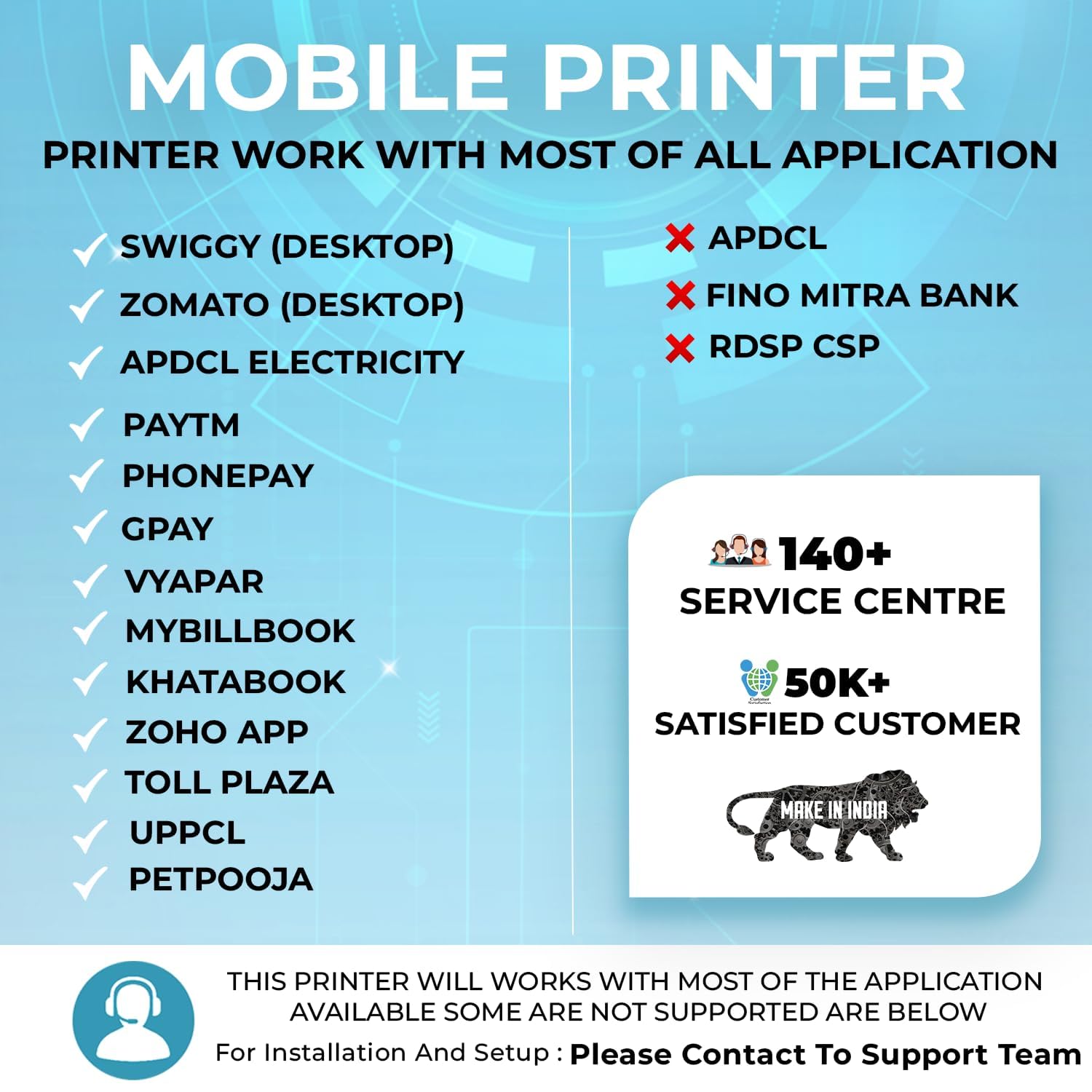
చిత్రం 5.1: ఉదాamples of compatible applications for the SHREYANS SRS588 printer.
5.3. Auto-Cutter Feature
The SRS588 features an automatic cutter that provides a clean and precise cut after each print job, enhancing efficiency and presentation.
6. నిర్వహణ
క్రమం తప్పకుండా నిర్వహణ మీ ప్రింటర్ యొక్క దీర్ఘాయువు మరియు ఉత్తమ పనితీరును నిర్ధారిస్తుంది.
6.1. ప్రింట్ హెడ్ను శుభ్రపరచడం
థర్మల్ ప్రింట్ హెడ్ ఒక కీలకమైన భాగం. ప్రింట్ నాణ్యత సమస్యలను నివారించడానికి దానిని కాలానుగుణంగా శుభ్రం చేయండి.
- Turn off the printer and disconnect it from power.
- పేపర్ కంపార్ట్మెంట్ తెరవండి.
- Gently wipe the print head (the dark strip) with a cotton swab lightly dampఐసోప్రొపైల్ ఆల్కహాల్తో కలుపుతారు.
- కవర్ను మూసివేసి ప్రింటర్ను ఆన్ చేసే ముందు ప్రింట్ హెడ్ పూర్తిగా ఆరనివ్వండి.
6.2. బ్యాటరీ సంరక్షణ
- మొదటి ఉపయోగం ముందు బ్యాటరీని పూర్తిగా ఛార్జ్ చేయండి.
- బ్యాటరీని తరచుగా పూర్తిగా డిశ్చార్జ్ చేయడాన్ని నివారించండి.
- If storing the printer for an extended period, charge the battery to about 50% and store it in a cool, dry place.
6.3. Paper Roll Storage
Store thermal paper rolls in a cool, dry place away from direct sunlight and heat to prevent premature fading of printouts.
7. ట్రబుల్షూటింగ్
If you encounter issues with your SHREYANS SRS588 printer, refer to the following common problems and solutions:
| సమస్య | సాధ్యమైన కారణం | పరిష్కారం |
|---|---|---|
| ప్రింటర్ పవర్ ఆన్ చేయడం లేదు | బ్యాటరీ తక్కువగా ఉంది; పవర్ బటన్ సరిగ్గా నొక్కబడలేదు. | Charge the printer; Press and hold the power button for 2-3 seconds. |
| బ్లూటూత్ ద్వారా కనెక్ట్ చేయడం సాధ్యపడదు | Printer not in pairing mode; Incorrect PIN; Device Bluetooth off | Ensure printer is on; Re-enter PIN (0000 or 1234); Enable Bluetooth on your device. |
| ప్రింట్ నాణ్యత సరిగా లేదు / వాడిపోయిన ప్రింట్లు | Dirty print head; Low battery; Old thermal paper | Clean the print head (see Section 6.1); Charge the printer; Use fresh thermal paper. |
| పేపర్ జామ్ | Improper paper loading; Foreign object in paper path | Open cover, remove jammed paper, re-load correctly; Check for obstructions. |
| Printer not responding to print commands | Bluetooth disconnected; Application error; Printer in error state | Verify Bluetooth connection; Restart application/printer; Check printer indicator lights for error codes. |
If the problem persists after attempting these solutions, please contact SHREYANS customer support.
8. స్పెసిఫికేషన్లు
Detailed technical specifications for the SHREYANS SRS588 Portable Bluetooth Printer:
- బ్రాండ్: శ్రేయాన్స్
- మోడల్ పేరు: SRS58201 (also referred to as SRS588)
- కనెక్టివిటీ టెక్నాలజీ: బ్లూటూత్, USB
- ప్రింటింగ్ టెక్నాలజీ: థర్మల్
- ప్రత్యేక ఫీచర్: Portable, Auto-Cutter
- రంగు: తెలుపు
- ప్రింటర్ అవుట్పుట్: మోనోక్రోమ్
- గరిష్ట ప్రింట్ స్పీడ్ మోనోక్రోమ్: 30 ppm
- వస్తువు బరువు: 340 గ్రాములు
- అంశం కొలతలు (D x W x H): 4D x 8W x 11H సెంటీమీటర్లు
- నియంత్రిక రకం: ఆండ్రాయిడ్
- Printing Media Type: కాగితం (సాదా)
- అనుకూల పరికరాలు: స్మార్ట్ఫోన్లు
- ఇంక్ రంగు: Black (Thermal, no ink required)
- రిజల్యూషన్: 2 inch (print width)
- అదనపు ప్రింటర్ విధులు: ప్రింట్ మాత్రమే
- నియంత్రణ పద్ధతి: టచ్
- Maximum Copy Resolution Black and White: 150 dpi
- గరిష్ట మీడియా పరిమాణం: 58 మి.మీ
- కాగితం పరిమాణం: 58 మిల్లీమీటర్లు
- Max Print Resolution Color: 200 dpi (for color images, though output is monochrome)
- Max Print Speed Black/White: 150 dpi
- రెండు వైపులా ముద్రణ: నం
- డ్యూప్లెక్స్: మాన్యువల్
- మూలం దేశం: భారతదేశం
9. వారంటీ మరియు మద్దతు
9.1. వారంటీ సమాచారం
The SHREYANS SRS588 Portable Bluetooth Printer comes with a 1 సంవత్సరం వారంటీ కొనుగోలు చేసిన తేదీ నుండి. దయచేసి మీ కొనుగోలు రసీదును వారంటీ రుజువుగా ఉంచుకోండి.
9.2. కస్టమర్ మద్దతు
For any technical assistance, warranty claims, or further inquiries, please contact Shreyans Retail Solution. Refer to the contact information provided with your product packaging or visit the official SHREYANS webమద్దతు వివరాల కోసం సైట్.