
1. పరిచయం
Thank you for choosing the LFF DAB/FM Digital Radio YT81107. This manual provides essential information for the safe and efficient use of your new radio. Please read these instructions carefully before operating the device and retain them for future reference.
భద్రతా సమాచారం
- అగ్ని లేదా విద్యుత్ షాక్ను నివారించడానికి యూనిట్ను వర్షం లేదా తేమకు గురిచేయవద్దు.
- సి ని తెరవవద్దుasing. అన్ని సర్వీసింగ్లను అర్హత కలిగిన సిబ్బందికి సూచించండి.
- పేర్కొన్న పవర్ అడాప్టర్ లేదా బ్యాటరీలను మాత్రమే ఉపయోగించండి.
- విపరీతమైన ఉష్ణోగ్రతలు, ప్రత్యక్ష సూర్యకాంతి మరియు దుమ్ముతో కూడిన వాతావరణాలను నివారించండి.
2. ఉత్పత్తి ముగిసిందిview
The LFF DAB/FM Digital Radio YT81107 offers versatile listening options with DAB+ and FM radio, Bluetooth connectivity, and convenient features like a dual alarm and sleep timer. Its compact design and dual power options make it suitable for various environments.
కీ ఫీచర్లు
- DAB+ and FM Digital Radio Tuner
- Bluetooth Connectivity for Audio Streaming
- పూర్తి-రంగు LCD డిస్ప్లే
- 60 Preset Stations (30 DAB+, 30 FM)
- Dual Alarm Clock Function
- సర్దుబాటు చేయగల స్లీప్ టైమర్
- 3.5mm హెడ్ఫోన్ జాక్
- AC Power Adapter or Battery Operated (4x AA batteries, not included)

మూర్తి 2.1: ముందు view of the LFF DAB/FM Digital Radio highlighting its main features.
నియంత్రణలు మరియు భాగాలు
Familiarize yourself with the buttons and ports on your radio:

Figure 2.2: Front and top view of the radio with labeled controls.
- పవర్ / మోడ్ బటన్: Turns the radio on/off and switches between modes (DAB, FM, Bluetooth).
- మెనూ/సమాచారం బటన్: Accesses menu settings or displays station information.
- అలారం బటన్: అలారాలను సెట్ చేస్తుంది మరియు నిర్వహిస్తుంది.
- ప్రీసెట్ బటన్లు (1-5): సేవ్ చేసిన ఇష్టమైన స్టేషన్లను త్వరగా యాక్సెస్ చేయండి.
- Volume Knob/Select: Rotates to adjust volume or navigate menus; press to confirm selection.
- Tuning/Scroll Buttons: Navigates through stations or menu options.
- ప్రదర్శన: Full-color LCD screen.
- స్పీకర్: ఇంటిగ్రేటెడ్ ఆడియో అవుట్పుట్.
- యాంటెన్నా: రేడియో రిసెప్షన్ కోసం విస్తరించదగిన టెలిస్కోపిక్ యాంటెన్నా.
- పోర్ట్ లో DC: AC పవర్ అడాప్టర్ను కనెక్ట్ చేయడానికి.
- హెడ్ఫోన్ జాక్: ప్రైవేట్ లిజనింగ్ కోసం 3.5mm అవుట్పుట్.
- బ్యాటరీ కంపార్ట్మెంట్: Located on the back for 4x AA batteries.
3. సెటప్
రేడియోను శక్తివంతం చేయడం
Your radio can be powered by the included AC adapter or by batteries for portable use.
- AC పవర్: Connect the supplied AC adapter to the DC IN port on the back of the radio and plug it into a standard wall outlet.
- బ్యాటరీ శక్తి: Open the battery compartment on the back and insert 4x 1.5V AA (LR6) batteries (not included), ensuring correct polarity. Close the compartment securely.

Figure 3.1: Power options and physical dimensions of the radio.
యాంటెన్నా సర్దుబాటు
ఉత్తమ రేడియో రిసెప్షన్ కోసం, టెలిస్కోపిక్ యాంటెన్నాను పూర్తిగా విస్తరించండి. ఉత్తమ సిగ్నల్ నాణ్యత కోసం దాని స్థానాన్ని సర్దుబాటు చేయండి.
4. ఆపరేటింగ్ సూచనలు
ఆన్/ఆఫ్ చేయడం మరియు మోడ్ ఎంపిక
- నొక్కండి పవర్/మోడ్ రేడియోను ఆన్ లేదా ఆఫ్ చేయడానికి బటన్.
- While on, press the పవర్/మోడ్ button repeatedly to cycle through available modes: DAB, FM, and Bluetooth.
DAB/FM రేడియో ఆపరేషన్
Ensure the antenna is fully extended for best reception.

Figure 4.1: Radio reception ranges and preset capacity.
- ఆటోమేటిక్ స్కాన్: DAB లేదా FM మోడ్లో, నొక్కి పట్టుకోండి మెను/సమాచారం button to initiate an automatic scan for available stations. The radio will store them automatically.
- మాన్యువల్ ట్యూనింగ్: ఉపయోగించండి Tuning/Scroll ఫ్రీక్వెన్సీని మాన్యువల్గా సర్దుబాటు చేయడానికి బటన్లు.
- స్టేషన్లను ఎంచుకోవడం: తిప్పండి Volume Knob/Select to browse through available stations. Press the knob to select a station.
- ప్రీసెట్లను సేవ్ చేస్తోంది: To save a station, tune to the desired station, then press and hold one of the ప్రీసెట్ బటన్లు (1-5) until the display confirms it's saved. You can save up to 30 DAB+ and 30 FM stations.
- ప్రీసెట్లను గుర్తుచేసుకుంటున్నారు: క్లుప్తంగా వాటిలో ఒకదాన్ని నొక్కండి ప్రీసెట్ బటన్లు (1-5) to recall a saved station.
బ్లూటూత్ మోడ్
Connect your smartphone, tablet, or other Bluetooth-enabled device to stream audio wirelessly.
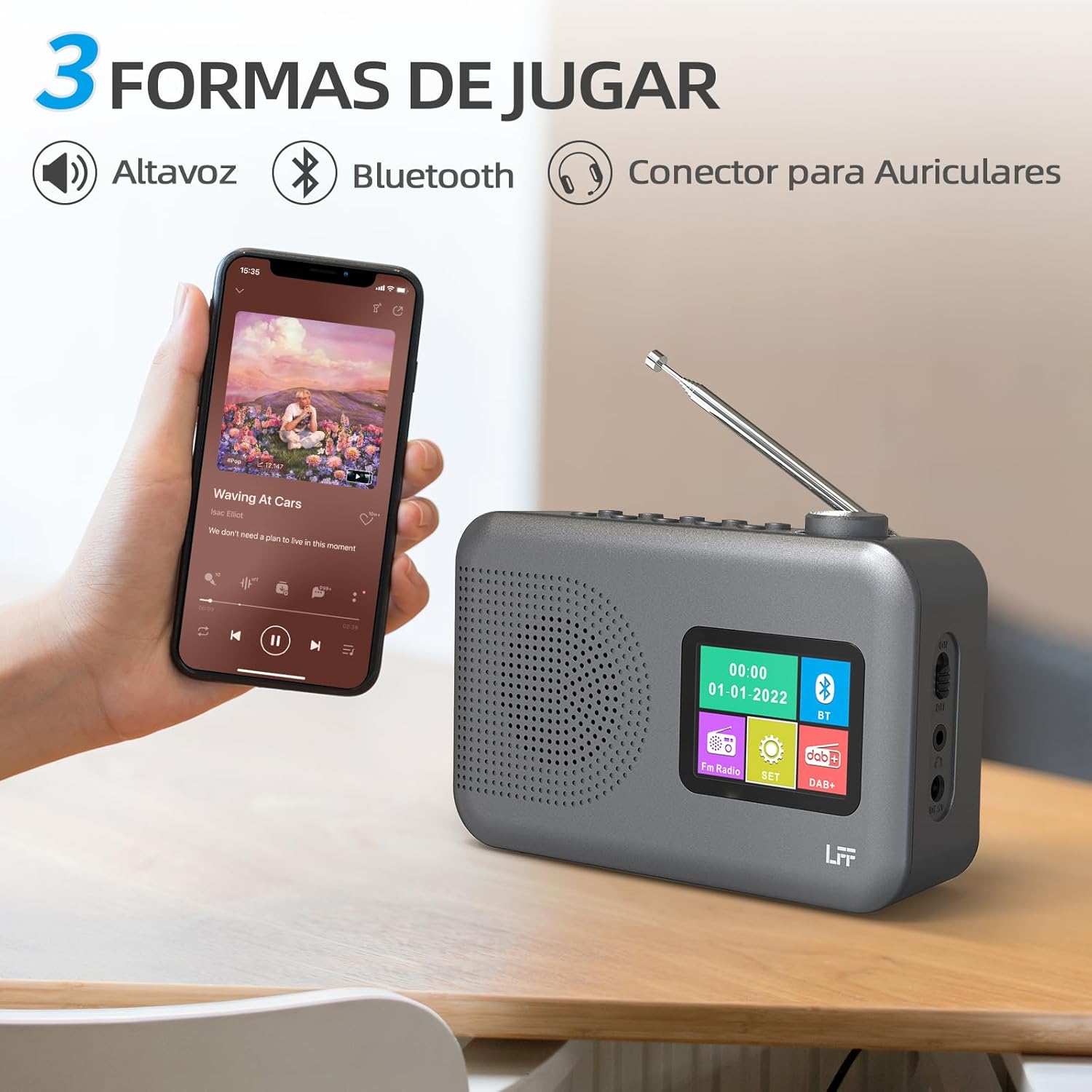
Figure 4.2: Bluetooth connectivity and audio playback options.
- ఉపయోగించి రేడియోను బ్లూటూత్ మోడ్కి మార్చండి పవర్/మోడ్ button. The display will show "Bluetooth Pairing" or similar.
- On your device, enable Bluetooth and search for "LFF YT81107" (or similar).
- Select the radio to pair. Once connected, you can play audio from your device through the radio's speaker.
- Adjust volume using the radio's వాల్యూమ్ నాబ్ or your connected device.
అలారం క్లాక్ ఫంక్షన్
రెండు స్వతంత్ర అలారాలను సెటప్ చేయండి.
- నొక్కండి అలారం అలారం సెట్టింగ్లను నమోదు చేయడానికి బటన్.
- ఉపయోగించండి Tuning/Scroll బటన్లు మరియు Volume Knob/Select to set the alarm time, source (DAB, FM, or buzzer), and frequency (daily, weekdays, weekends, once).
- నొక్కండి అలారం button again to confirm and activate the alarm.
- When an alarm sounds, press any button (except Power) to snooze, or press the పవర్/మోడ్ దాన్ని ఆపివేయడానికి బటన్.
స్లీప్ టైమర్
స్లీప్ టైమర్ నిర్ణీత వ్యవధి తర్వాత రేడియో స్వయంచాలకంగా ఆపివేయడానికి అనుమతిస్తుంది.

Figure 4.3: Sleep timer function in use.
- నొక్కండి మెను/సమాచారం ప్రధాన మెనూని యాక్సెస్ చేయడానికి బటన్.
- Navigate to the "Sleep Timer" option using the Tuning/Scroll బటన్లు మరియు నొక్కండి Volume Knob/Select.
- Select your desired duration (15, 30, 45, 60, 90, or 120 minutes) and confirm. The radio will automatically turn off after the selected time.
హెడ్ఫోన్ వాడకం
For private listening, connect standard 3.5mm headphones to the headphone jack on the side of the radio. The internal speaker will be muted automatically.
Note: This radio does not support Bluetooth headphones. The 3.5mm headphone jack is for wired headphones only.
5. నిర్వహణ
- శుభ్రపరచడం: రేడియోను మృదువైన, పొడి వస్త్రంతో తుడవండి. రాపిడి క్లీనర్లు లేదా ద్రావకాలను ఉపయోగించవద్దు.
- బ్యాటరీ భర్తీ: If using batteries, replace all four AA batteries when the low battery indicator appears on the display or when performance degrades. Ensure proper disposal of old batteries.
- నిల్వ: రేడియోను ఎక్కువ కాలం నిల్వ ఉంచినట్లయితే, లీకేజీని నివారించడానికి బ్యాటరీలను తీసివేయండి.
6. ట్రబుల్షూటింగ్
| సమస్య | సాధ్యమైన కారణం | పరిష్కారం |
|---|---|---|
| శక్తి లేదు | AC అడాప్టర్ కనెక్ట్ కాలేదు లేదా లోపభూయిష్టంగా ఉంది; బ్యాటరీలు అయిపోయాయి లేదా తప్పుగా చొప్పించబడ్డాయి. | AC అడాప్టర్ కనెక్షన్ మరియు పవర్ అవుట్లెట్ను తనిఖీ చేయండి. బ్యాటరీలను మార్చండి లేదా సరైన ధ్రువణతను నిర్ధారించుకోండి. |
| పేలవమైన రేడియో రిసెప్షన్ | యాంటెన్నా విస్తరించబడలేదు; బలహీనమైన సిగ్నల్ ప్రాంతం; జోక్యం. | Fully extend and adjust the telescopic antenna. Try moving the radio to a different location. |
| బ్లూటూత్ కనెక్ట్ కావడం లేదు | Radio not in Bluetooth mode; device not in pairing mode; radio already connected to another device. | Ensure radio is in Bluetooth mode. Put your device in pairing mode. Disconnect from other Bluetooth devices. |
| అలారం మోగడం లేదు | Alarm not activated; volume too low; incorrect alarm settings. | Check alarm settings and ensure it is enabled. Increase volume. Verify alarm time and source. |
7. స్పెసిఫికేషన్లు
| ఫీచర్ | వివరాలు |
|---|---|
| మోడల్ సంఖ్య | YT81107 |
| బ్రాండ్ | LFF |
| ట్యూనింగ్ టెక్నాలజీ | DAB+, FM |
| రేడియో బ్యాండ్లకు మద్దతు ఉంది | DAB+ (174.928 - 239.2 MHz), FM (87.5 - 108 MHz) |
| కనెక్టివిటీ | Bluetooth, 3.5mm Headphone Jack |
| శక్తి మూలం | AC Adapter (included), 4x 1.5V AA (LR6) Batteries (not included) |
| కొలతలు (L x W x H) | 16.1 cm x 5.9 cm x 10.9 cm |
| రంగు | బూడిద రంగు |
| ప్రత్యేక లక్షణాలు | DAB Radio, DAB Plus Radio, DAB+ Radio, FM Radio, Color Display, Bluetooth, Dual Alarm, Sleep Timer |
| అనుకూల పరికరాలు | Headphones, MP3 Player, Smartphone, Laptop, Speaker, Tablet |
8. వారంటీ మరియు మద్దతు
LFF is committed to providing high-quality products. If you encounter any quality issues with your LFF DAB/FM Digital Radio YT81107, please contact us directly. Our customer support team is available to assist you and resolve any problems you may experience.
నిర్దిష్ట వారంటీ నిబంధనలు మరియు సంప్రదింపు సమాచారం కోసం దయచేసి మీ కొనుగోలు డాక్యుమెంటేషన్ను చూడండి.