
1. పరిచయం
Thank you for choosing the HIKMICRO HEIMDAL H4D Digital Night Vision Monocular. This device is designed for observation in low light and complete darkness, featuring a high-resolution sensor and AMOLED display for clear imaging.
ముఖ్య లక్షణాలు:
- 1.39" AMOLED display with 454 x 454 resolution
- High-resolution 2560 x 1440 sensor
- Integrated 850 nm infrared illuminator with smart IR function
- Day/Night/Auto/Defog modes
- ఎలక్ట్రానిక్ ఇమేజ్ స్టెబిలైజేషన్ (EIS)
- Detection range up to 200 meters
- Replaceable and rechargeable battery with over 4 hours of use
- Compact and portable design, waterproof and dustproof (IP67)
- Integrated 32 GB EMMC for storing recorded videos and photos
- Wireless connection via HIKMICRO Sight app, local album function
ప్యాకేజీ విషయాలు:
- HIKMICRO HEIMDAL H4D Digital Night Vision Monocular
- బ్యాటరీ
- దుమ్ము వస్త్రం
- రక్షణ సంచి
- మణికట్టు పట్టీ
- USB-C కేబుల్
- త్వరిత గైడ్
2. ఉత్పత్తి ముగిసిందిview
Familiarize yourself with the components and controls of your HIKMICRO HEIMDAL H4D monocular.
పరికర లేఅవుట్
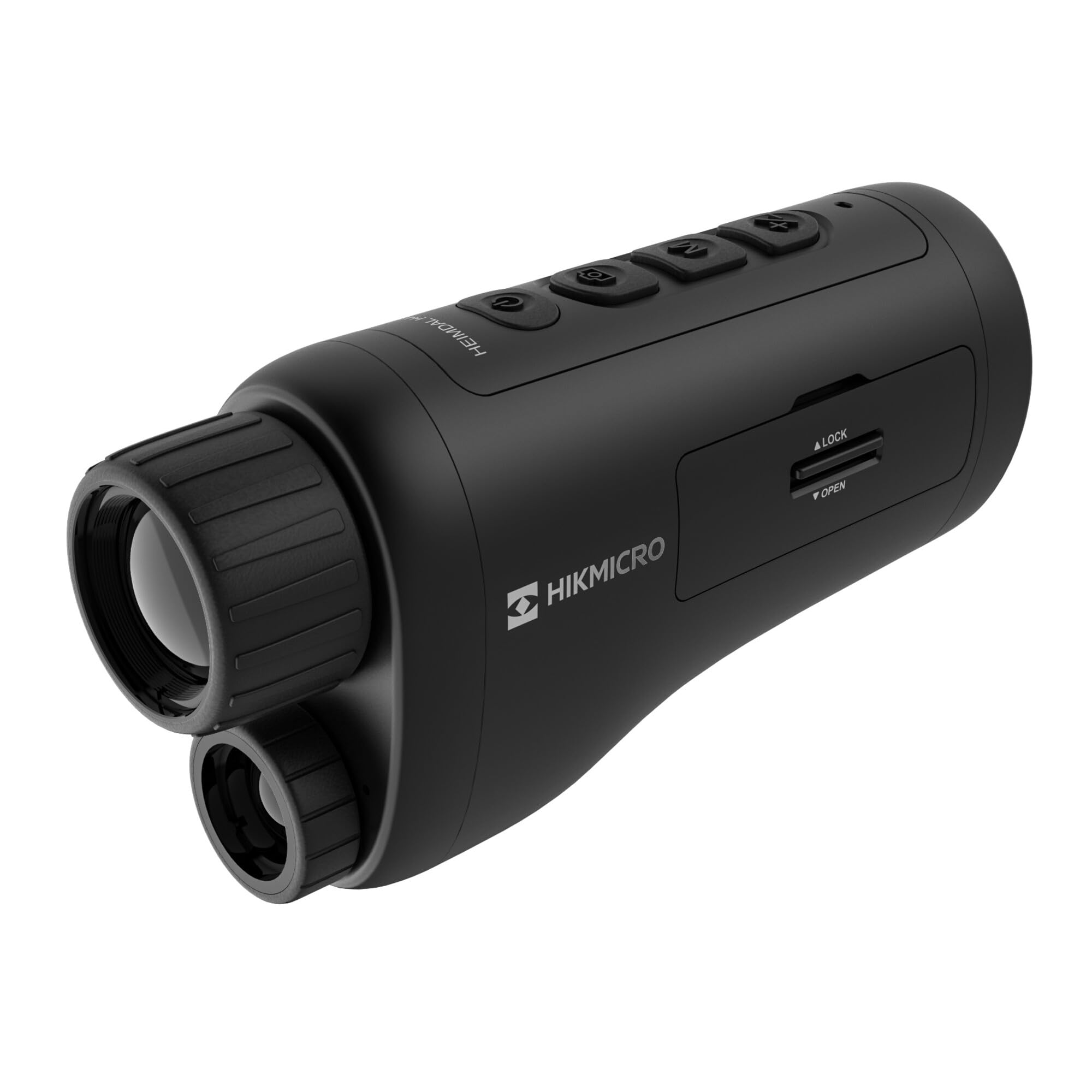
కోణీయ view of the HIKMICRO HEIMDAL H4D monocular, showing its compact, ergonomic design and the main lens.
నియంత్రణలు మరియు బటన్లు

టాప్ view of the monocular showing the power button, photo/video record button, mode button, and zoom/IR adjustment buttons.
Lenses and Focus

ముందు view displaying the objective lens and the integrated infrared illuminator.
బ్యాటరీ కంపార్ట్మెంట్

వైపు view showing the battery compartment with 'LOCK' and 'OPEN' indicators.
3. సెటప్
బ్యాటరీ సంస్థాపన
- పరికరం వైపు బ్యాటరీ కంపార్ట్మెంట్ను గుర్తించండి.
- Slide the lock mechanism to the 'OPEN' position.
- సరైన ధ్రువణతను నిర్ధారించుకుంటూ, రీఛార్జబుల్ బ్యాటరీని చొప్పించండి.
- Close the compartment and slide the lock mechanism to the 'LOCK' position.
బ్యాటరీని ఛార్జ్ చేస్తోంది
Connect the device to a power source using the provided USB-C cable. The charging indicator will show the charging status.
ప్రారంభ పవర్ ఆన్
పవర్ బటన్ను నొక్కి పట్టుకోండి (సాధారణంగా దీనితో గుర్తించబడుతుంది Ⓘ Ⓘ Ⓘ कालिक) until the HIKMICRO logo appears on the display.
4. ఆపరేటింగ్ సూచనలు
పవర్ ఆన్/ఆఫ్
- పవర్ ఆన్: పవర్ బటన్ను సుమారు 3 సెకన్ల పాటు నొక్కి పట్టుకోండి.
- పవర్ ఆఫ్: Press and hold the power button for approximately 3 seconds until the device shuts down.
దృష్టి సర్దుబాటు
Rotate the focus ring on the objective lens to achieve a clear image of your target.
మోడ్ ఎంపిక
Press the 'M' (Mode) button to cycle through observation modes: Day, Night, Auto, and Defog.
Zoom and IR Adjustment
Use the '+' and '-' buttons to adjust the digital zoom level. These buttons also control the intensity of the infrared illuminator in night mode.
ఫోటో మరియు వీడియో రికార్డింగ్
- ఫోటో తీయండి: Press the photo/video button (usually marked with 📷) once to capture an image.
- వీడియో రికార్డ్ చేయండి: Press and hold the photo/video button to start recording. Press again to stop.
Connecting to HIKMICRO Sight App
Download the HIKMICRO Sight app from your device's app store. Follow the in-app instructions to connect your monocular for live view, రిమోట్ కంట్రోల్ మరియు మీడియా నిర్వహణ.
5. నిర్వహణ
క్లీనింగ్
- Use the provided dust cloth or a soft, lint-free cloth to clean the lenses.
- For stubborn dirt, use a lens cleaning solution specifically designed for optics.
- పరికర బాడీని మృదువైన, d తో తుడవండి.amp గుడ్డ. రాపిడి క్లీనర్లు లేదా ద్రావకాలు ఉపయోగించవద్దు.
నిల్వ
- Store the monocular in its protective bag in a cool, dry place when not in use.
- పరికరం ఎక్కువ కాలం ఉపయోగించబడకపోతే బ్యాటరీని తీసివేయండి.
బ్యాటరీ సంరక్షణ
- Charge the battery regularly, even if not in frequent use, to maintain its lifespan.
- ఛార్జింగ్ మరియు నిల్వ సమయంలో తీవ్రమైన ఉష్ణోగ్రతలను నివారించండి.
6. ట్రబుల్షూటింగ్
సాధారణ సమస్యలు మరియు పరిష్కారాలు
| సమస్య | సాధ్యమైన కారణం | పరిష్కారం |
|---|---|---|
| పరికరం పవర్ ఆన్ చేయదు. | బ్యాటరీ ఖాళీగా ఉంది లేదా తప్పుగా ఇన్స్టాల్ చేయబడింది. | బ్యాటరీని ఛార్జ్ చేయండి. బ్యాటరీ సరైన ధ్రువణతతో చొప్పించబడిందని నిర్ధారించుకోండి. |
| చిత్రం అస్పష్టంగా ఉంది. | Focus is not adjusted. | Rotate the focus ring on the objective lens until the image is clear. |
| Poor image quality in darkness. | IR illuminator is off or set to low intensity. | Activate the IR illuminator or increase its intensity using the '+' button. Ensure you are in Night mode. |
| Cannot connect to HIKMICRO Sight app. | Bluetooth/Wi-Fi is off on device or phone, or app is not updated. | Ensure Bluetooth/Wi-Fi is enabled on both devices. Restart the app and monocular. Check for app updates. |
| పరికరం స్తంభించిపోతుంది లేదా స్పందించడం మానేస్తుంది. | తాత్కాలిక సాఫ్ట్వేర్ లోపం. | Perform a soft reset by holding the power button until the device restarts. If issue persists, contact support. |
7. స్పెసిఫికేషన్లు
| ఫీచర్ | వివరాలు |
|---|---|
| సెన్సార్ రిజల్యూషన్ | 2560 x 1440 |
| ప్రదర్శన రకం | AMOLED |
| డిస్ప్లే రిజల్యూషన్ | 454 x 454 |
| ప్రదర్శన పరిమాణం | 1.39 అంగుళాలు (3.5 సెం.మీ.) |
| పరారుణ ఇల్యూమినేటర్ | Integrated 850 nm |
| గుర్తింపు పరిధి | 200 మీటర్ వరకు |
| నిల్వ | 32 GB EMMC (internal) |
| బ్యాటరీ లైఫ్ | More than 4 hours (replaceable, rechargeable) |
| జలనిరోధిత రేటింగ్ | IP67 |
| కొలతలు | 153 మిమీ x 50 మిమీ x 80 మిమీ (6.02" x 1.97" x 3.15") |
| బరువు | 375 గ్రాములు (0.83 పౌండ్లు) |
| మెటీరియల్ | ప్లాస్టిక్ |
| అనుకూల పరికరాలు | Rifle, Compound Bow |
| మౌంటు రకం | పికాటిన్నీ మౌంట్ |
| Sport Use | Camping, హైకింగ్ |
| రంగు | తెలుపు |
8. వారంటీ మరియు మద్దతు
HIKMICRO products are covered by a limited warranty. For detailed warranty information, please refer to the official HIKMICRO webసైట్ లేదా మీ స్థానిక డీలర్ను సంప్రదించండి.
For technical support, troubleshooting assistance, or service inquiries, please visit the official HIKMICRO support page or contact their customer service department.
అధికారిక Webసైట్: www.hikmicrotech.com