
1. పరిచయం
ధన్యవాదాలు, ధన్యవాదాలు.asing the PONER SAUND H69 Projector. This device is designed to provide a high-quality visual experience with its 1080P Full HD resolution and 500 ANSI lumens brightness. Equipped with advanced features like WiFi, Bluetooth 5.2, electric focus, auto keystone correction, and a versatile 360° adjustable stand, this projector offers flexibility and ease of use for various entertainment and presentation needs. Please read this manual carefully before operating the projector to ensure proper use and optimal performance.
2. భద్రతా సమాచారం
- l ఉన్నప్పుడు ప్రొజెక్టర్ లెన్స్లోకి నేరుగా చూడకండిamp ఆన్లో ఉంది.
- ప్రొజెక్టర్ చుట్టూ సరైన వెంటిలేషన్ ఉండేలా చూసుకోండి, తద్వారా వేడెక్కకుండా నిరోధించవచ్చు. వెంటిలేషన్ ఓపెనింగ్లను బ్లాక్ చేయవద్దు.
- ప్రొజెక్టర్తో సరఫరా చేయబడిన పవర్ అడాప్టర్ను మాత్రమే ఉపయోగించండి.
- ప్రొజెక్టర్ను వర్షం, తేమ లేదా విపరీతమైన ఉష్ణోగ్రతలకు గురిచేయవద్దు.
- ప్రొజెక్టర్ను అస్థిర ఉపరితలాలపై ఉంచడం మానుకోండి.
- Do not attempt to disassemble or repair the projector yourself. Contact qualified service personnel for assistance.
- Keep the projector away from water and other liquids.
3. ప్యాకేజీ విషయాలు
దయచేసి అన్ని వస్తువులు ఉన్నాయో లేదో మరియు మంచి స్థితిలో ఉన్నాయో లేదో తనిఖీ చేయండి:
- PONER SAUND H69 Projector
- పవర్ అడాప్టర్
- రిమోట్ కంట్రోల్ (బ్యాటరీలు చేర్చబడలేదు)
- AV కేబుల్
- వినియోగదారు మాన్యువల్
4. ఉత్పత్తి ముగిసిందిview
Familiarize yourself with the components and ports of your PONER SAUND H69 Projector.
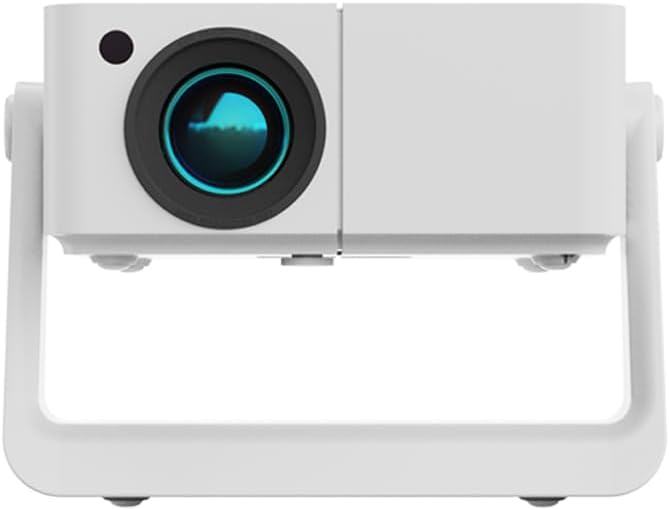
మూర్తి 4.1: ముందు view of the PONER SAUND H69 Projector, showing the lens and sensor.

చిత్రం 4.2: వెనుక మరియు వైపు view of the projector, highlighting the Headset jack, USB port, IR receiver, HDMI port, Power input, and Power button with F+/- controls.
పోర్టులు మరియు నియంత్రణలు:
- లెన్స్: చిత్రాన్ని ప్రొజెక్ట్ చేస్తుంది.
- IR రిసీవర్: రిమోట్ కంట్రోల్ సిగ్నల్స్ కోసం.
- హెడ్సెట్ జాక్: 3.5mm audio output for headphones or external speakers.
- USB పోర్ట్: USB నిల్వ పరికరాలను కనెక్ట్ చేయడానికి.
- HDMI పోర్ట్: For connecting HDMI-enabled devices like laptops, gaming consoles, or TV sticks.
- పవర్ ఇన్పుట్: పవర్ అడాప్టర్కు కనెక్ట్ చేస్తుంది.
- పవర్ బటన్: ప్రొజెక్టర్ను ఆన్/ఆఫ్ చేస్తుంది.
- F+/- Buttons: Adjust focus manually if needed.
5. సెటప్
5.1 ప్రారంభ పవర్-ఆన్
- Connect the power adapter to the projector's power input port and then to a power outlet.
- Press the Power button on the projector or the remote control to turn on the device.
- The projector will display the startup screen.
5.2 Placement and Adjustment
The H69 projector features a built-in 360° adjustable stand, auto keystone correction, and electric focus for flexible setup.

Figure 5.1: The projector's built-in stand allows for 360° rotation, enabling projection onto ceilings, walls, or floors.
- స్థానం: Place the projector on a stable surface. Utilize the 360° stand to adjust the projection angle as needed, allowing for projection on walls, ceilings, or floors.
- స్వీయ కీస్టోన్ దిద్దుబాటు: The projector automatically corrects trapezoidal distortion, ensuring a rectangular image even when projected at an angle.
- ఎలక్ట్రిక్ ఫోకస్: The projector features electric focus for precise image clarity. This can be adjusted via the remote control or the F+/- buttons on the projector.

Figure 5.2: Visual representation of auto keystone correction and electric focus adjusting the projected image.
5.3 కనెక్టివిటీ
The H69 projector offers multiple connectivity options:
- WiFi: Connect to your wireless network for online streaming and screen mirroring. Navigate to the 'Settings' menu on the projector's interface to configure WiFi.
- బ్లూటూత్ 5.2: Pair with external Bluetooth speakers or headphones for enhanced audio. Access Bluetooth settings from the projector's main menu.
- HDMI: Connect laptops, gaming consoles (e.g., PlayStation), TV boxes, or other HDMI-enabled devices using an HDMI cable.
- USB: మీడియాను ప్లే చేయడానికి USB ఫ్లాష్ డ్రైవ్ను చొప్పించండి. fileనేరుగా లు.
- యొక్క: Use the included AV cable to connect older devices.
6. ఆపరేటింగ్ సూచనలు
6.1 ప్రాథమిక ఆపరేషన్
- పవర్ ఆన్/ఆఫ్: Press the Power button on the projector or remote.
- నావిగేషన్: Use the arrow keys and OK button on the remote control to navigate the projector's Android interface.
- ఇన్పుట్ సోర్స్ ఎంపిక: Select the desired input source (HDMI, USB, WiFi, etc.) from the main menu.
6.2 బాహ్య పరికరాలను కనెక్ట్ చేయడం
The projector supports various external devices for versatile entertainment.

Figure 6.1: The projector's Android system provides access to various streaming applications for endless entertainment.
- స్మార్ట్ఫోన్లు/టాబ్లెట్లు: Connect via WiFi for screen mirroring (e.g., AirPlay for iOS, Miracast for Android). Ensure both devices are on the same WiFi network.
- ల్యాప్టాప్లు/PCలు: Connect via HDMI for a direct display output.
- గేమింగ్ కన్సోల్లు: Connect via HDMI for an immersive gaming experience.
- USB డ్రైవ్లు: Insert a USB drive into the USB port. The projector's media player will allow you to browse and play supported video, audio, and image files.
6.3 Image and Audio Adjustment
- దృష్టి: The projector features electric focus. Use the remote control or the F+/- buttons on the projector to achieve a sharp image.
- కీస్టోన్ దిద్దుబాటు: The projector has automatic keystone correction. If manual adjustment is needed, it can typically be found in the 'Settings' menu.
- జూమ్: Adjust the image size (50%-100% zoom) through the projector's settings without moving the unit.
- వాల్యూమ్: Adjust audio volume using the remote control.
7. నిర్వహణ
7.1 శుభ్రపరచడం
- లెన్స్: ఆప్టికల్ లెన్స్ల కోసం ప్రత్యేకంగా రూపొందించిన మృదువైన, లింట్-ఫ్రీ వస్త్రాన్ని ఉపయోగించండి. రాపిడి క్లీనర్లు లేదా వస్త్రాలను ఉపయోగించవద్దు.
- ప్రొజెక్టర్ బాడీ: Wipe the surface with a soft, dry cloth. For stubborn marks, slightly dampen నీటితో గుడ్డ.
- వెంటిలేషన్ ఓపెనింగ్స్: Periodically clean the ventilation openings with a soft brush or compressed air to ensure proper airflow and prevent overheating.
7.2 నిల్వ
When not in use for extended periods, store the projector in a cool, dry place, away from direct sunlight and excessive dust. It is recommended to use the original packaging or a protective case.
8. ట్రబుల్షూటింగ్
If you encounter issues with your projector, please refer to the following common problems and solutions:
| సమస్య | సాధ్యమైన కారణం | పరిష్కారం |
|---|---|---|
| ఏ చిత్రం ప్రదర్శించబడలేదు | పవర్ కనెక్ట్ కాలేదు; తప్పు ఇన్పుట్ సోర్స్; లెన్స్ క్యాప్ ఆన్లో ఉంది. | Ensure power is connected and unit is on; Select correct input source (HDMI, USB, etc.); Remove lens cap. |
| చిత్రం అస్పష్టంగా ఉంది | Out of focus; Projector too far/close to screen. | Use electric focus (remote or F+/- buttons) to adjust; Ensure projector is within optimal projection distance. |
| చిత్రం వక్రీకరించబడింది (ట్రాపెజాయిడ్ ఆకారం) | ప్రొజెక్టర్ స్క్రీన్కు లంబంగా లేదు. | Auto keystone correction should adjust automatically. If not, check settings for manual keystone adjustment. |
| శబ్దం లేదు | Volume too low; Incorrect audio output; External device audio issue. | Increase volume; Check audio output settings on projector; Ensure external device audio is working. |
| Cannot connect to WiFi/Bluetooth | Incorrect password; Out of range; Interference. | Verify WiFi password; Move projector closer to router; Reduce interference from other devices. For iPhone connectivity issues, ensure both devices support the same mirroring protocol and are on the same network. |
| రిమోట్ కంట్రోల్ పనిచేయడం లేదు | Batteries dead/incorrectly inserted; IR receiver blocked. | Replace batteries; Ensure correct polarity; Clear any obstructions between remote and projector's IR receiver. |
ఈ పరిష్కారాలను ప్రయత్నించిన తర్వాత కూడా సమస్య కొనసాగితే, దయచేసి కస్టమర్ మద్దతును సంప్రదించండి.
9. స్పెసిఫికేషన్లు
Key technical specifications for the PONER SAUND H69 Projector:
| ఫీచర్ | స్పెసిఫికేషన్ |
|---|---|
| బ్రాండ్ | పోనర్ సౌండ్ |
| మోడల్ సంఖ్య | H69 |
| డిస్ప్లే రిజల్యూషన్ | నేటివ్ 1920 x 1080 (పూర్తి HD) |
| ప్రకాశం | 500 ANSI లుమెన్స్ |
| కనెక్టివిటీ టెక్నాలజీ | HDMI, USB, WiFi (5G+2.4G WiFi6), Bluetooth 5.2 |
| ప్రత్యేక లక్షణాలు | 360° Stand, Auto Keystone Correction, Built-in Stand, Electric Focus |
| సిఫార్సు చేసిన ఉపయోగాలు | Home Cinema, Business Presentations, Outdoor Movie |
| రంగు | తెలుపు |
| వస్తువు బరువు | 1.76 పౌండ్లు |
| ఉత్పత్తి కొలతలు | 6.5 x 6 x 6 అంగుళాలు |
10. వారంటీ మరియు మద్దతు
Your PONER SAUND H69 Projector comes with a standard manufacturer's warranty. For specific warranty terms and conditions, please refer to the warranty card included in your package or visit the official PONER SAUND webసైట్.
For technical support, troubleshooting assistance, or service inquiries, please contact PONER SAUND customer support through the contact information provided on the product packaging or the official brand website. Please have your model number (H69) and purchase details ready when contacting support.
ఆన్లైన్ వనరులు:
- సందర్శించండి PONER SAUND Store on Amazon ఉత్పత్తి సమాచారం మరియు నవీకరణల కోసం.