
1. ఉత్పత్తి ముగిసిందిview
The TROND TD-PS-US12 Tower Power Bar Surge Protector is designed to provide extensive power distribution and surge protection for multiple electronic devices. This unit features a vertical tower design, optimizing space and accessibility for various plugs and adapters.
ముఖ్య లక్షణాలు:
- 14 AC అవుట్లెట్లు: అందిస్తుంది ample power connections for numerous devices.
- 4 USB Ports (2 USB-C, 2 USB-A): Offers convenient charging for mobile devices, with a total output of 17W.
- 10ft Flat Plug Extension Cord: A heavy-duty 16 AWG cord allows for flexible placement and features a 0.55-inch thin, 45-degree right-angle flat plug to fit in tight spaces.
- 2100 జూల్స్ సర్జ్ ప్రొటెక్షన్: Safeguards connected electronics from power surges and spikes.
- Stable Base & Widely Spaced Outlets: Prevents tipping and accommodates larger power adapters without blocking adjacent outlets.
- పుష్ బటన్ స్విచ్: For easy power control and to prevent accidental power-off.
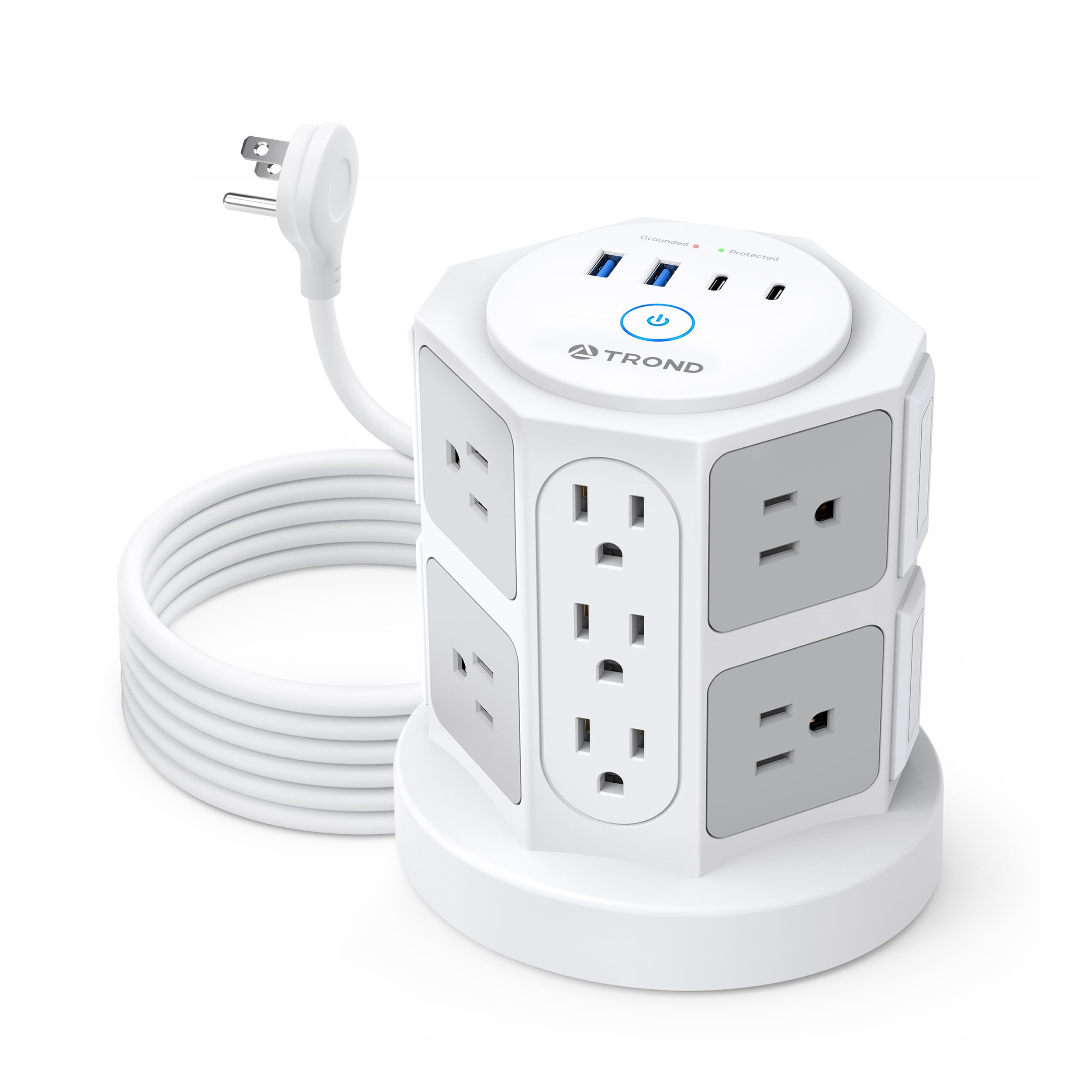
Figure 1: TROND TD-PS-US12 Tower Power Bar Surge Protector. This image shows the overall design of the white tower power bar with multiple outlets and USB ports.
2. సెటప్ సూచనలు
Follow these steps to set up your TROND Tower Power Bar Surge Protector:
- యూనిట్ను అన్ప్యాక్ చేయండి: Carefully remove the power bar from its packaging and inspect it for any signs of damage. Do not use if damaged.
- ఒక స్థానాన్ని ఎంచుకోండి: Place the power bar on a stable, flat, and dry surface. Ensure it is away from sources of moisture, heat, and direct sunlight. Adequate ventilation around the unit is recommended.
- Plug into a Wall Outlet: Insert the 10ft flat plug into a standard 3-prong grounded wall outlet. The 45-degree right-angle design of the plug allows furniture to be placed closer to the wall and keeps the lower wall outlet clear for other uses.

Figure 2: The 10ft extension cord with its flat, right-angle plug connected to a wall outlet, demonstrating its low-profile డిజైన్.
3. ఆపరేటింగ్ సూచనలు
Once the power bar is plugged into a wall outlet, you can begin connecting your devices.
- పవర్ ఆన్/ఆఫ్: Press the main power button located on the top of the tower to turn the unit on or off. A blue indicator light will illuminate when the power is on.
- AC పరికరాలను కనెక్ట్ చేయండి: Plug your electronic devices into any of the 14 AC outlets. The widely spaced outlets are designed to accommodate larger power adapters without obstructing adjacent ports.
- USB పరికరాలను కనెక్ట్ చేయండి: Use the 2 USB-C ports or 2 USB-A ports to charge compatible mobile devices. Ensure your device's charging cable is properly connected to the power bar and your device.
ముఖ్యమైన: Do not exceed the maximum total power rating of 1625W for AC outlets and 17W total for USB ports. Overloading the power bar can trip the circuit breaker or cause damage.

Figure 3: The tower power bar in use, showing various AC adapters and USB cables connected to different ports.

చిత్రం 4: వివరణాత్మక view of the USB-C and USB-A charging ports on the top of the power bar, indicating their power output capabilities.
4. భద్రతా సమాచారం
The TROND TD-PS-US12 Tower Power Bar is equipped with multiple safety features to protect your devices and ensure safe operation.
Integrated Safety System:
- 2100 జూల్స్ సర్జ్ ప్రొటెక్షన్: వాల్యూమ్ నుండి రక్షిస్తుందిtagఇ వచ్చే చిక్కులు.
- ఓవర్వోల్tagఇ రక్షణ: అధిక వాల్యూమ్ నుండి నష్టాన్ని నివారిస్తుందిtage.
- ఓవర్ కరెంట్ రక్షణ: Guards against excessive current flow.
- షార్ట్ సర్క్యూట్ రక్షణ: షార్ట్ సర్క్యూట్ సంభవించినప్పుడు స్వయంచాలకంగా విద్యుత్తును నిలిపివేస్తుంది.
- అధిక వేడి రక్షణ: వేడెక్కడాన్ని పర్యవేక్షిస్తుంది మరియు నివారిస్తుంది.
- ఓవర్లోడ్ రక్షణ: A built-in circuit breaker trips if the connected load exceeds the maximum capacity (13A / 1625W).
- Fire Resistance Shell: Constructed with UL94 V-0 flame-retardant material to withstand high temperatures.
సాధారణ భద్రతా జాగ్రత్తలు:
- For indoor use only. Do not expose to moisture or use in wet environments.
- యూనిట్ను విడదీయవద్దు లేదా సవరించవద్దు.
- పిల్లలు మరియు పెంపుడు జంతువులకు దూరంగా ఉంచండి.
- కనెక్ట్ చేయబడిన పరికరాల మొత్తం విద్యుత్ వినియోగం 1625W మించకుండా చూసుకోండి.
- Do not use with aquariums or other water-related products.

Figure 5: Visual representation of the 7-point safety system, highlighting various protection mechanisms.
5. నిర్వహణ
Proper maintenance ensures the longevity and safe operation of your power bar.
- శుభ్రపరచడం: Always unplug the power bar from the wall outlet before cleaning. Use a soft, dry cloth to wipe the exterior. Do not use liquid cleaners or abrasive materials.
- నిల్వ: When not in use for extended periods, unplug the unit and store it in a cool, dry place away from direct sunlight and moisture.
- తనిఖీ: Periodically inspect the power cord and the unit for any signs of damage, such as frayed wires or cracks. If damage is found, discontinue use and contact support.
6. ట్రబుల్షూటింగ్
If you encounter issues with your TROND Tower Power Bar, refer to the following common problems and solutions:
- No Power to Outlets/USB Ports:
- Ensure the power bar's flat plug is securely inserted into a functional wall outlet.
- Press the main power button on the top of the unit to ensure it is in the "ON" position. The blue indicator light should be illuminated.
- Check your home's circuit breaker panel to ensure the wall outlet circuit has not tripped.
- If the power bar was overloaded, its internal circuit breaker might have tripped. Unplug some devices, then press the power button to reset.
- USB పోర్ట్లు ఛార్జ్ చేయని పరికరాలు:
- Verify that the USB cables are properly connected to both the power bar and your device.
- Try using a different USB cable or a different USB port on the power bar.
- Ensure your device is compatible with the USB charging specifications (5V/3.0A Max for USB-C, 5V/2.4A Max for USB-A, 17W Total). Some devices may require higher power delivery.
- సర్జ్ ప్రొటెక్షన్ ఇండికేటర్ లైట్ ఆఫ్లో ఉంది:
- If the surge protection indicator light is no longer illuminated, it signifies that the surge protection components have absorbed a significant power surge and may no longer be providing protection. The AC outlets may still function, but without surge protection. It is recommended to replace the unit to ensure continued protection for your electronics.
7. ఉత్పత్తి లక్షణాలు
| మోడల్ సంఖ్య | TD-PS-US12 |
| ఉత్పత్తి కొలతలు | 13.11 x 11.51 x 14.4 సెం.మీ |
| బరువు | 900 గ్రా |
| ఇన్పుట్ వాల్యూమ్tage | 100V~250V |
| మొత్తం AC అవుట్లెట్లు | 14 |
| మొత్తం USB పోర్ట్లు | 4 (2 USB-C, 2 USB-A) |
| USB-C అవుట్పుట్ | 5V/3.0A గరిష్టం |
| USB-A అవుట్పుట్ | 5V/2.4A గరిష్టం |
| మొత్తం USB అవుట్పుట్ | 17W |
| గరిష్ట కరెంట్ | 13 Amps |
| గరిష్ట శక్తి | 1625 వాట్స్ |
| ఉప్పెన రక్షణ రేటింగ్ | 2100 జౌల్స్ |
| త్రాడు పొడవు | 10 అడుగులు (3.05 మీటర్లు) |
| ప్లగ్ రకం | Type B - 3 pin (North American), 45° Right Angle Flat Plug |
| మెటీరియల్ | Copper, Plastic (UL94 V-0 Flame-Retardant) |
| సిఫార్సు ఉపయోగం | Indoor, home, office, dorm room |
8. వారంటీ మరియు మద్దతు
TROND products are designed and manufactured to high-quality standards. For information regarding product warranty, returns, or technical support, please refer to the official TROND website or contact TROND customer service directly.
మీరు సందర్శించడం ద్వారా మరిన్ని వివరాలు మరియు సంప్రదింపు వివరాలను పొందవచ్చు అమెజాన్లో TROND అధికారిక స్టోర్.