1. పరిచయం
Thank you for choosing the Smartwatch T900 Pro Max L Series 8. This device is designed to enhance your daily life with its versatile features and user-friendly interface. This manual will guide you through the setup, operation, and maintenance of your new smartwatch.

Figure 1.1: The T900 Pro Max L Series 8 Smartwatch.
2. పెట్టెలో ఏముంది
Upon unboxing your Smartwatch T900 Pro Max L Series 8, you should find the following items:
- Smartwatch T900 Pro Max L Series 8 (with pre-attached strap)
- మాగ్నెటిక్ ఛార్జింగ్ కేబుల్
- వినియోగదారు మాన్యువల్
3. ఉత్పత్తి ముగిసిందిview
The T900 Pro Max L Series 8 Smartwatch features a 1.92-inch HD screen, offering clear visuals and easy navigation. It includes a scroll crown for intuitive menu control and a comfortable, flexible strap that is also replaceable.
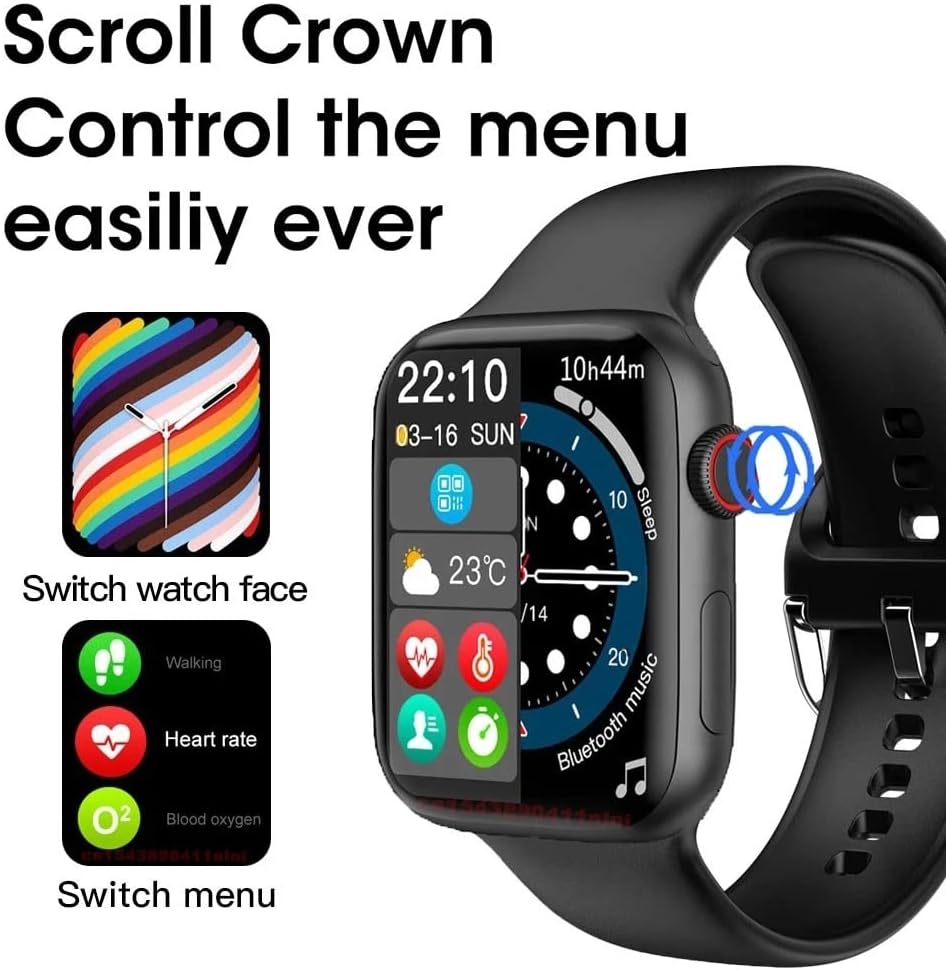
Figure 3.1: Smartwatch with visible scroll crown and menu interface.

Figure 3.2: The 1.92-inch HD display of the smartwatch.
4. స్మార్ట్వాచ్ను ఛార్జ్ చేయడం
To charge your smartwatch, connect the magnetic charging cable to the charging points on the back of the watch. Ensure the pins align correctly. Plug the USB end of the cable into a compatible USB power adapter (not included) or a computer USB port. The watch screen will indicate charging status.
5. Initial Setup & App Connection
To unlock the full potential of your smartwatch, it is recommended to connect it to your smartphone via the dedicated application. Scan the QR code provided in the user manual or on the watch itself to download the companion app. Follow the in-app instructions to pair your device.
6. స్మార్ట్వాచ్ను ఆపరేట్ చేయడం
6.1. నావిగేషన్
The smartwatch features a touch-sensitive screen and a functional scroll crown for navigation:
- స్వైప్ సంజ్ఞలు: Swipe left, right, up, or down on the screen to navigate through different menus, notifications, and watch faces.
- Scroll Crown: Rotate the scroll crown to scroll through lists or zoom in/out on certain interfaces. Press the crown to return to the home screen or confirm selections.
6.2 కీ ఫీచర్లు
The T900 Pro Max L Series 8 Smartwatch offers a range of features:
- బ్లూటూత్ కాల్: మీ స్మార్ట్ఫోన్కి కనెక్ట్ అయినప్పుడు మీ వాచ్ నుండి నేరుగా కాల్లు చేయండి మరియు స్వీకరించండి.
- ఫోన్ బుక్: Access your phone's contacts for quick dialing.
- సందేశ నోటిఫికేషన్లు: Receive alerts for SMS, WhatsApp, Facebook, and Twitter messages.
- Heart Rate Monitor & ECG: Track your heart rate and perform ECG measurements for health insights.
- స్లీప్ ట్రాకర్: Monitor your sleep patterns to help improve sleep quality.
- Steps Counter: Track your daily steps and activity levels.
- ఫిట్నెస్ మోడ్లు: Includes various sports modes such as Running, Sit-ups, Jumping Jack, Walking, Pingpong, Badminton, Rope Skipping, Basketball, and Riding to track your workouts.
- యుటిలిటీ విధులు: Features like Alarm Clock, Stopwatch, Timer, and Flashlight are built-in for convenience.
- వాతావరణం: నిజ-సమయ వాతావరణ నవీకరణలను పొందండి.
- సంగీత నియంత్రణ: మీ కనెక్ట్ చేయబడిన స్మార్ట్ఫోన్లో మ్యూజిక్ ప్లేబ్యాక్ను నియంత్రించండి.
- కెమెరా రిమోట్: మీ స్మార్ట్ఫోన్ కెమెరాకు మీ గడియారాన్ని రిమోట్ షట్టర్గా ఉపయోగించండి.
- అనుకూల వాచ్ ముఖాలు: Personalize your watch with custom watch faces, including using your own photos.
- AI వాయిస్ అసిస్టెంట్: Utilize voice commands for various tasks.

Figure 6.1: Smart Voice Call feature with HD original sound.

Figure 6.2: AI Voice Assistant in action.

Figure 6.3: Fitness tracking modes for various activities.

Figure 6.4: Alarm, Stopwatch, and Timer functions.

Figure 6.5: Customizing your watch face.
7. పట్టీ భర్తీ
The smartwatch strap is designed for easy replacement. To remove a strap, slide it out from the watch body. To attach a new strap, align it with the slot and slide it in until it clicks securely into place. This allows for personalization and easy cleaning.

Figure 7.1: The T900 Pro Max L Series 8 Smartwatch in different colors, highlighting strap versatility.
8. స్పెసిఫికేషన్లు
| ఫీచర్ | వివరాలు |
|---|---|
| మోడల్ పేరు | T900 Pro Max L Series 8 |
| స్క్రీన్ పరిమాణం | 1.92 అంగుళాలు |
| ఆపరేటింగ్ సిస్టమ్ | OS ధరించండి |
| కనెక్టివిటీ టెక్నాలజీ | Bluetooth (4.2 + 3.0 Dual Mode) |
| ప్రత్యేక లక్షణాలు | Camera Remote, Heart Rate Monitor, ECG, Sleep Tracker, Fitness Modes, AI Voice Assistant, Bluetooth Call |
| బ్యాటరీ కూర్పు | లిథియం అయాన్ |
| వస్తువు బరువు | 0.08 కిలోగ్రాములు (2.89 ఔన్సులు) |
| తయారీదారు | సాధారణమైనది |
9. నిర్వహణ
To ensure the longevity and optimal performance of your smartwatch, follow these maintenance guidelines:
- శుభ్రపరచడం: Wipe the screen and strap regularly with a soft, dry cloth. For stubborn dirt, use a slightly damp గుడ్డ మరియు పూర్తిగా పొడిగా.
- నీటి బహిర్గతం నివారించండి: While the watch may have some splash resistance, it is not designed for swimming or showering. Avoid prolonged exposure to water.
- ఉష్ణోగ్రత: Do not expose the watch to extreme temperatures (hot or cold) or direct sunlight for extended periods.
- ఛార్జింగ్: Use only the provided charging cable. Avoid using damaged cables or chargers.
10. ట్రబుల్షూటింగ్
మీ స్మార్ట్ వాచ్ తో మీకు ఏవైనా సమస్యలు ఎదురైతే, దయచేసి ఈ క్రింది సాధారణ పరిష్కారాలను చూడండి:
- గడియారం ఆన్ కావడం లేదు: వాచ్ పూర్తిగా ఛార్జ్ అయ్యిందని నిర్ధారించుకోండి. దాన్ని ఛార్జర్కి కనెక్ట్ చేసి, మళ్ళీ పవర్ ఆన్ చేయడానికి ప్రయత్నించే ముందు కొన్ని నిమిషాలు వేచి ఉండండి.
- Cannot connect to smartphone: Make sure Bluetooth is enabled on your phone and the smartwatch app is open. Try restarting both devices. Ensure the watch is within Bluetooth range.
- సరికాని ఆరోగ్య డేటా: మీ మణికట్టు మీద వాచ్ గట్టిగా ధరించేలా చూసుకోండి, మరీ బిగుతుగా లేదా మరీ వదులుగా ఉండకూడదు. వాచ్ వెనుక ఉన్న సెన్సార్లను శుభ్రం చేయండి.
- నోటిఫికేషన్లు కనిపించడం లేదు: Check your smartphone's app settings to ensure notifications are enabled for the smartwatch app and for individual applications (e.g., WhatsApp, Facebook).
- తక్కువ బ్యాటరీ జీవితం: Reduce screen brightness, disable unnecessary features, and ensure the watch is fully charged before use.
If the issue persists, consider performing a factory reset via the watch settings (More > Reset). Please note that a factory reset will erase all data on the watch.
11. వారంటీ మరియు మద్దతు
This product comes with a standard manufacturer's warranty. For detailed warranty information, please refer to the documentation included with your purchase or contact the retailer. For technical support or further assistance, please reach out to the customer service provided by the seller.


