
పరిచయం
Thank you for choosing the Jectse Mini HD 1080P WiFi Camera. This compact and versatile camera is designed for indoor security and surveillance, offering features such as 1080P video recording, night vision, motion detection, and real-time monitoring via a mobile application. Please read this manual carefully to ensure proper setup and operation of your device.

Image: The Jectse Mini HD 1080P WiFi Camera, showcasing its compact design and connectivity ports.
ఉత్పత్తి లక్షణాలు
- HD 1080P Video: Records high-definition video at 1080 pixels.
- రాత్రి దృష్టి: Equipped with 6 photosensitive lenses for clear night vision.
- చలన గుర్తింపు: Automatically detects movement and sends alerts.
- వైఫై కనెక్టివిటీ: Supports WiFi network connection for remote viewing via mobile app.
- లూప్ రికార్డింగ్: పాత foo ని ఓవర్రైట్ చేస్తుందిtagఇ మెమరీ కార్డ్ నిండినప్పుడు.
- మాగ్నెటిక్ డిజైన్: Strong magnetic force for easy attachment to metallic surfaces. Includes a magnetic bracket for adjustable angles.
- అంతర్నిర్మిత బ్యాటరీ: Provides up to 60 minutes of operation on a full charge.
- కాంపాక్ట్ సైజు: Ultra-small body for easy portability and discreet placement.
- విస్తరించదగిన నిల్వ: Supports Micro SD cards up to 128GB (card not included).

Image: Visual representation of the camera's key features, including night vision, HD quality, remote access, hotspot, video/audio recording, and storage capabilities.
ప్యాకేజీ విషయాలు
దయచేసి ఈ క్రింది అంశాల కోసం ప్యాకేజీని తనిఖీ చేయండి:
- 1 x Jectse Mini HD 1080P WiFi Camera
- 1 x ఇన్స్ట్రక్షన్ మాన్యువల్
- 1 x మాగ్నెటిక్ బ్రాకెట్
- 1 x మైక్రో USB ఛార్జింగ్ కేబుల్
సెటప్
1. కెమెరాను ఛార్జ్ చేయడం
Before first use, fully charge the camera. Connect the Micro USB charging cable to the camera's charging port and the other end to a 5V/1A USB power adapter (not included). A full charge takes approximately 30 minutes (from 0% to 100%).
2. మైక్రో SD కార్డ్ని చొప్పించడం (ఐచ్ఛికం)
To enable video recording and storage, insert a Micro SD card (up to 128GB, not included) into the designated slot on the camera. Ensure the card is inserted correctly. The camera supports continuous recording for up to 21 hours with a 128GB card.

Image: The camera's Micro SD card slot, illustrating its storage capability for continuous recording.
3. Mobile App Connection
Download the dedicated mobile application from your smartphone's app store. Follow the in-app instructions to connect the camera to your home or office WiFi network. This allows for real-time viewing మరియు నియంత్రణ.
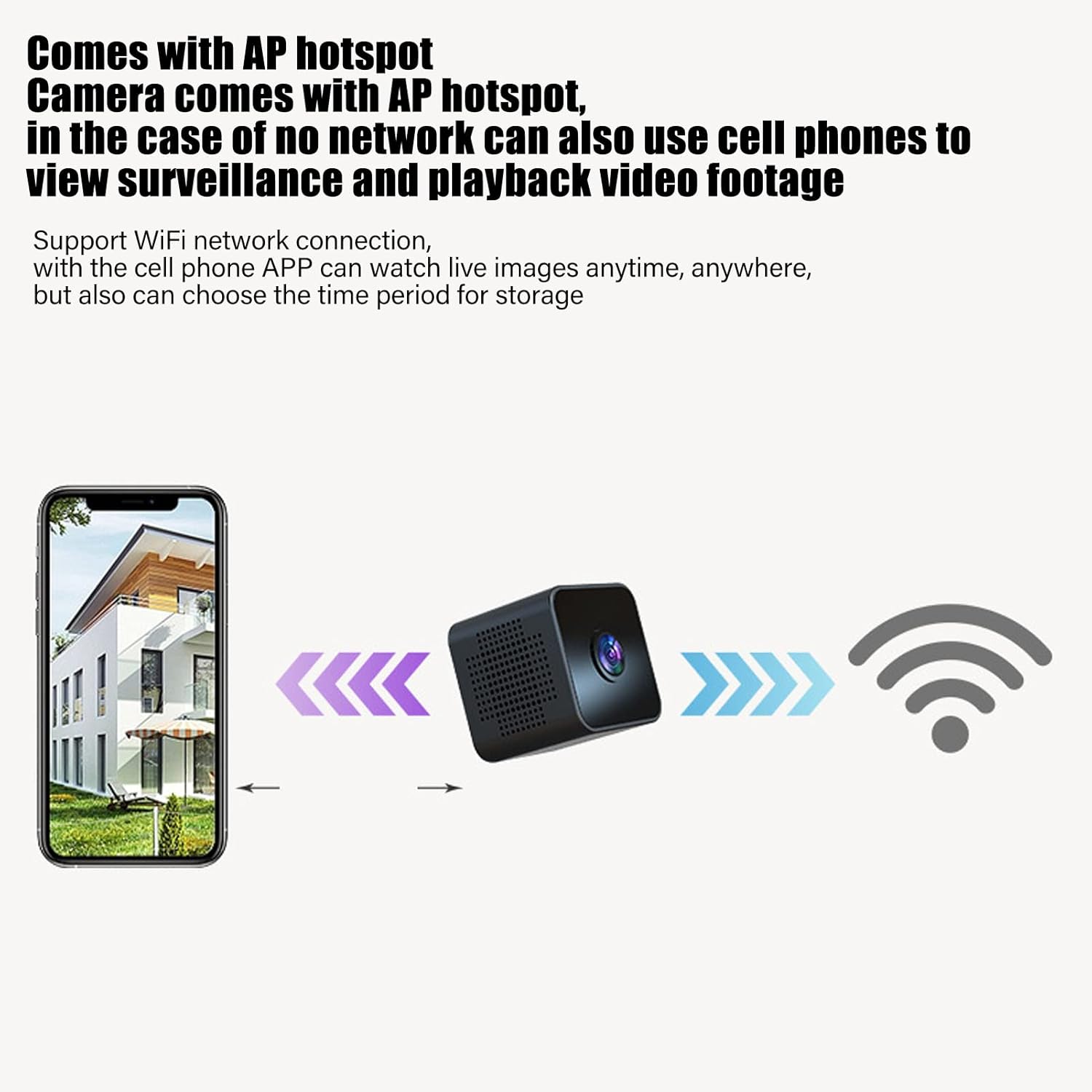
Image: Diagram showing a smartphone connecting to the camera, indicating remote viewing and control via the mobile app.
ఆపరేటింగ్ సూచనలు
పవర్ ఆన్/ఆఫ్
Refer to the instruction manual included in the package for specific power on/off procedures. Typically, a long press of the power button will turn the device on or off.
రియల్ టైమ్ మానిటరింగ్
మొబైల్ యాప్కి కనెక్ట్ అయిన తర్వాత, మీరు view ప్రత్యక్ష వీడియో footage from the camera anytime, anywhere. The app also allows you to set specific time periods for video storage.
మోషన్ డిటెక్షన్
The camera features intelligent motion detection. When movement is detected in the camera's field of view, an alarm notification will be sent to your mobile app. This feature helps monitor your premises effectively.

Image: Illustration of the motion detection function, where the camera identifies movement and triggers an alert on a connected smartphone.
నైట్ విజన్
The camera is equipped with high-definition night vision capabilities, ensuring clear video even in low-light conditions. The night vision mode can be manually activated or set to open at specific times via the app.

Image: A visual comparison demonstrating the clear picture quality of the camera, highlighting its HD capabilities.
లూప్ రికార్డింగ్
When a Micro SD card is inserted, the camera will continuously record. If the memory card becomes full, the camera will automatically overwrite the oldest video files to make space for new recordings, ensuring continuous surveillance without manual intervention.
అయస్కాంత మౌంటు
The camera features a strong magnetic back, allowing it to be easily attached to any metallic surface. Use the included magnetic bracket to adjust the camera's angle for optimal viewing.

Image: Two perspectives of the mini camera, emphasizing its small size and magnetic design for flexible placement.
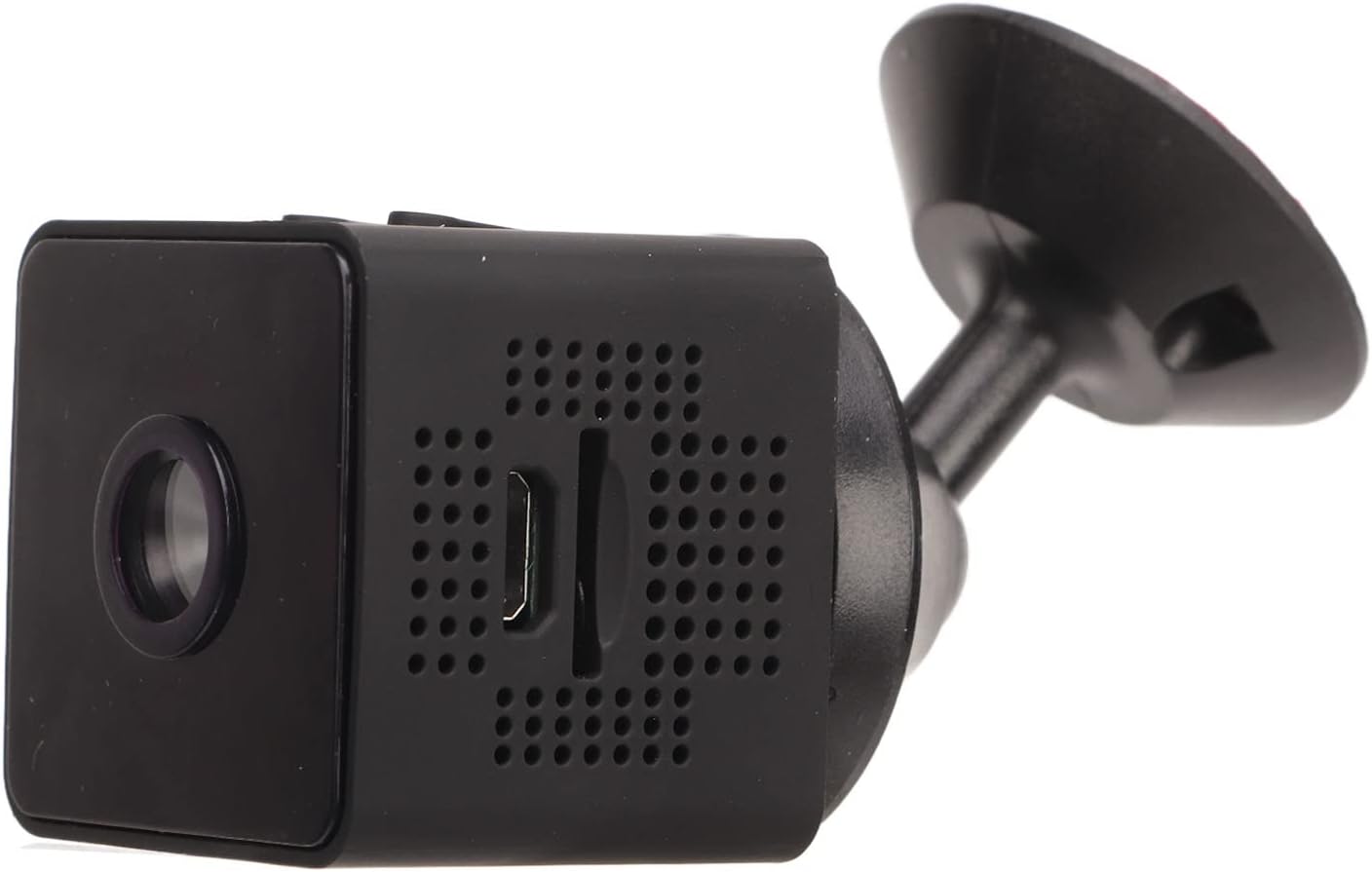
చిత్రం: వైపు view of the camera, showing how it connects to the magnetic bracket for adjustable positioning.
నిర్వహణ
- శుభ్రపరచడం: కెమెరా లెన్స్ మరియు బాడీని శుభ్రం చేయడానికి మృదువైన, పొడి వస్త్రాన్ని ఉపయోగించండి. ద్రవ క్లీనర్లు లేదా రాపిడి పదార్థాలను ఉపయోగించడం మానుకోండి.
- నిల్వ: కెమెరాను ప్రత్యక్ష సూర్యకాంతి మరియు తీవ్రమైన ఉష్ణోగ్రతలకు దూరంగా చల్లని, పొడి ప్రదేశంలో నిల్వ చేయండి.
- బ్యాటరీ సంరక్షణ: To prolong battery life, avoid fully discharging the battery frequently. Charge the camera regularly, even if not in active use.
- ఫర్మ్వేర్ నవీకరణలు: సరైన పనితీరు మరియు భద్రతను నిర్ధారించడానికి అందుబాటులో ఉన్న ఏవైనా ఫర్మ్వేర్ నవీకరణల కోసం మొబైల్ అప్లికేషన్ను క్రమానుగతంగా తనిఖీ చేయండి.
- పర్యావరణ పరిస్థితులు: This camera is designed for indoor use. It is not waterproof and should not be exposed to rain, moisture, or submerged in water.
ట్రబుల్షూటింగ్
| సమస్య | సాధ్యమైన పరిష్కారం |
|---|---|
| కెమెరా ఆన్ చేయడం లేదు. | Ensure the camera is fully charged. Connect it to a power source and wait for the charging indicator. |
| WiFiకి కనెక్ట్ చేయడం సాధ్యం కాలేదు. | Check your WiFi network credentials. Ensure the camera is within range of your router. Restart the camera and your router. Follow the app's connection guide carefully. |
| వీడియో రికార్డింగ్ లేదు. | Verify that a Micro SD card is properly inserted and formatted. Check if the card has sufficient free space. |
| పేలవమైన వీడియో నాణ్యత. | Ensure the camera lens is clean. Check your network connection speed if streaming remotely. |
| మోషన్ డిటెక్షన్ పని చేయడం లేదు. | Check the motion detection settings in the mobile app. Ensure the camera's view స్పష్టంగా మరియు అడ్డంకులు లేకుండా ఉంది. |
స్పెసిఫికేషన్లు
| ఉత్పత్తి రకం | మినీ వైఫై కెమెరా |
| మోడల్ సంఖ్య | Jectseot42hdk8wq |
| వీడియో రిజల్యూషన్ | 1080P HD |
| ఇమేజ్ సెన్సార్ టెక్నాలజీ | CMOS |
| కనెక్టివిటీ టెక్నాలజీ | వైర్లెస్ (వైఫై) |
| శక్తి మూలం | Built-in Rechargeable Battery (350 mAh) / Corded Electric (via Micro USB) |
| బ్యాటరీ లైఫ్ | Approx. 60 minutes (continuous recording) |
| ఛార్జింగ్ ఇంటర్ఫేస్ | మైక్రో USB (5V/1A) |
| ఛార్జింగ్ వ్యవధి | Approx. 30 minutes (0%-100%) |
| నిల్వ | మైక్రో SD కార్డ్ (128GB వరకు, చేర్చబడలేదు) |
| వీడియో కంప్రెషన్ స్టాండర్డ్ | H.264 Main, H.264 Baseline, MJPEG, JPEG Baseline |
| వీడియో క్యాప్చర్ ఫార్మాట్ | MP4 |
| నైట్ విజన్ | Infrared (IR) with 6 photosensitive lenses, Color Night Vision |
| మోషన్ డిటెక్షన్ | Yes (App-controlled alerts) |
| నియంత్రణ పద్ధతి | మొబైల్ అప్లికేషన్ |
| మెటీరియల్ | ABS ప్లాస్టిక్ |
| Approx. Product Dimensions | 3 x 3 x 3 సెం.మీ |
| సిఫార్సు ఉపయోగం | ఇండోర్ సెక్యూరిటీ |
| నీటి నిరోధక స్థాయి | Not waterproof; designed for indoor use. |
Note: All data is measured manually and may contain minor discrepancies.
వారంటీ మరియు మద్దతు
For warranty information and technical support, please refer to the contact details provided on the product packaging or the official Jectse webసైట్. ఏవైనా వారంటీ క్లెయిమ్లకు కొనుగోలు రుజువుగా మీ కొనుగోలు రసీదును ఉంచండి.
ఈ మాన్యువల్లో పేర్కొనబడని ఏవైనా సమస్యలు మీకు ఎదురైతే, దయచేసి సహాయం కోసం కస్టమర్ సపోర్ట్ను సంప్రదించండి.