
షియోమి BHR6179EU
Xiaomi వాక్యూమ్ క్లీనర్ G10 ప్లస్ యూజర్ మాన్యువల్
మోడల్: BHR6179EU
1. ముఖ్యమైన భద్రతా సూచనలు
ఉపకరణాన్ని ఉపయోగించే ముందు అన్ని సూచనలను జాగ్రత్తగా చదవండి. భవిష్యత్తు సూచన కోసం ఈ మాన్యువల్ని ఉంచండి.
- ఆరుబయట లేదా తడి ఉపరితలాలపై ఉపయోగించవద్దు.
- బొమ్మలాగా వాడుకోవడానికి అనుమతించవద్దు. పిల్లలు లేదా సమీపంలో ఉపయోగించినప్పుడు దగ్గరగా శ్రద్ధ అవసరం.
- ఈ మాన్యువల్లో వివరించిన విధంగా మాత్రమే ఉపయోగించండి. తయారీదారు సిఫార్సు చేసిన అటాచ్మెంట్లను మాత్రమే ఉపయోగించండి.
- దెబ్బతిన్న త్రాడు లేదా ప్లగ్తో ఉపయోగించవద్దు. ఉపకరణం సరిగ్గా పని చేయకపోతే, పడిపోయినట్లయితే, పాడైపోయినట్లయితే, ఆరుబయట వదిలివేయబడినట్లయితే లేదా నీటిలో పడిపోయినట్లయితే, దానిని సేవా కేంద్రానికి తిరిగి ఇవ్వండి.
- త్రాడుతో లాగడం లేదా తీసుకెళ్లడం చేయవద్దు, త్రాడును హ్యాండిల్గా ఉపయోగించవద్దు, త్రాడుపై తలుపును మూసివేయండి లేదా పదునైన అంచులు లేదా మూలల చుట్టూ త్రాడును లాగండి. త్రాడుపై ఉపకరణాన్ని నడపవద్దు. వేడిచేసిన ఉపరితలాల నుండి త్రాడును దూరంగా ఉంచండి.
- త్రాడుపై లాగడం ద్వారా అన్ప్లగ్ చేయవద్దు. అన్ప్లగ్ చేయడానికి, ప్లగ్ని పట్టుకోండి, త్రాడు కాదు.
- తడి చేతులతో ప్లగ్ లేదా ఉపకరణాన్ని నిర్వహించవద్దు.
- ఓపెనింగ్స్లో ఏ వస్తువును ఉంచవద్దు. ఏ ఓపెనింగ్ బ్లాక్ చేయబడినా ఉపయోగించవద్దు; దుమ్ము, మెత్తటి, జుట్టు మరియు గాలి ప్రవాహాన్ని తగ్గించే ఏదైనా లేకుండా ఉంచండి.
- జుట్టు, వదులుగా ఉండే దుస్తులు, వేళ్లు మరియు శరీరంలోని అన్ని భాగాలను ఓపెనింగ్స్ మరియు కదిలే భాగాలకు దూరంగా ఉంచండి.
- సిగరెట్లు, అగ్గిపుల్లలు లేదా వేడి బూడిద వంటి కాలుతున్న లేదా ధూమపానం చేసే ఏదైనా తీసుకోవద్దు.
- గ్యాసోలిన్ వంటి మండే లేదా మండే ద్రవాలను తీయడానికి లేదా అవి ఉండే ప్రాంతాల్లో ఉపయోగించవద్దు.
- విషపూరిత పదార్థాలను (క్లోరిన్ బ్లీచ్, అమ్మోనియా, డ్రెయిన్ క్లీనర్ మొదలైనవి) తీసుకోవద్దు.
- డస్ట్ బ్యాగ్ మరియు/లేదా ఫిల్టర్లు లేకుండా ఉపయోగించవద్దు.
- అనుకోకుండా ప్రారంభించడాన్ని నిరోధించండి. బ్యాటరీ ప్యాక్కి కనెక్ట్ చేయడానికి, తీయడానికి లేదా ఉపకరణాన్ని తీసుకెళ్లడానికి ముందు స్విచ్ ఆఫ్-పొజిషన్లో ఉందని నిర్ధారించుకోండి.
- తయారీదారు పేర్కొన్న ఛార్జర్తో మాత్రమే రీఛార్జ్ చేయండి.
- దుర్వినియోగ పరిస్థితులలో, బ్యాటరీ నుండి ద్రవాన్ని బయటకు తీయవచ్చు; పరిచయాన్ని నివారించండి. అనుకోకుండా పరిచయం ఏర్పడితే, నీటితో ఫ్లష్ చేయండి. ద్రవం కళ్లను సంప్రదించినట్లయితే, అదనంగా వైద్య సహాయం తీసుకోండి.
- ఉపకరణం లేదా బ్యాటరీ ప్యాక్ను సవరించవద్దు లేదా రిపేర్ చేయడానికి ప్రయత్నించవద్దు.
2. ఉత్పత్తి ముగిసిందిview
The Xiaomi Vacuum Cleaner G10 Plus is a versatile cordless stick vacuum designed for efficient cleaning of various surfaces, including hard floors and carpets. It features a powerful motor, a long-lasting battery, and a 2-in-1 vacuum and mop function.

మూర్తి 2.1: Main unit of the Xiaomi Vacuum Cleaner G10 Plus, showing the motor, dustbin, and extension tube connected to the main brush head.

మూర్తి 2.2: Close-up of the LED user interface on the vacuum cleaner, displaying battery percentage and mode indicators.

మూర్తి 2.3: Various accessories included with the vacuum cleaner, such as the crevice nozzle and 2-in-1 brush nozzle.
ప్యాకేజీ విషయాలు:
- Battery Vacuum Cleaner Main Unit
- High-Performance Roller Brush
- Electric Mini Brush
- సందు నాజిల్
- 2-ఇన్ -1 బ్రష్ నాజిల్
- 2-in-1 Charging and Storage Holder (with screws, dowels, and mounting template stickers)
- పొడిగింపు ట్యూబ్
- ఛార్జర్
- వాటర్ ట్యాంక్
- మోప్ ప్యాడ్
3. సెటప్ మరియు అసెంబ్లీ
3.1 ప్రారంభ ఛార్జింగ్
Before first use, fully charge the vacuum cleaner. Connect the charger to the charging port on the main unit or the charging dock. The LED display will indicate charging status.
- ఛార్జింగ్ సమయం: పూర్తిగా ఛార్జ్ చేయడానికి సుమారు 4 గంటలు.
3.2 వాక్యూమ్ క్లీనర్ను అసెంబుల్ చేయడం
- ఎక్స్టెన్షన్ ట్యూబ్ను అటాచ్ చేయండి: ఎక్స్టెన్షన్ ట్యూబ్ను ప్రధాన యూనిట్లోకి అది క్లిక్ అయ్యే వరకు చొప్పించండి.
- Attach the Main Brush Head: Connect the high-performance roller brush to the other end of the extension tube. Ensure it clicks securely.
- Install Wall-Mounted Charging Dock (Optional): Use the provided screws and dowels to mount the 2-in-1 charging and storage holder to a suitable wall. Refer to the mounting template sticker for correct positioning.

మూర్తి 3.1: The vacuum cleaner stored and charging on its wall-mounted dock, demonstrating compact storage.
4. ఆపరేటింగ్ సూచనలు
4.1 పవర్ ఆన్/ఆఫ్ మరియు మోడ్ ఎంపిక
Press the power button to turn the vacuum cleaner on or off. Use the mode selection button on the LED display to switch between different suction modes (e.g., Eco, Standard, Max).
4.2 వాక్యూమింగ్
Select the appropriate brush head for your cleaning task:
- High-Performance Roller Brush: Ideal for general floor cleaning, suitable for both hard floors and carpets.
- Electric Mini Brush: Best for cleaning upholstery, pet hair, and smaller areas.
- క్రెవిస్ నాజిల్: For narrow gaps, corners, and hard-to-reach spaces.
- 2-ఇన్ -1 బ్రష్ నాజిల్: Combines a brush and a wide nozzle for versatile cleaning of surfaces and crevices.
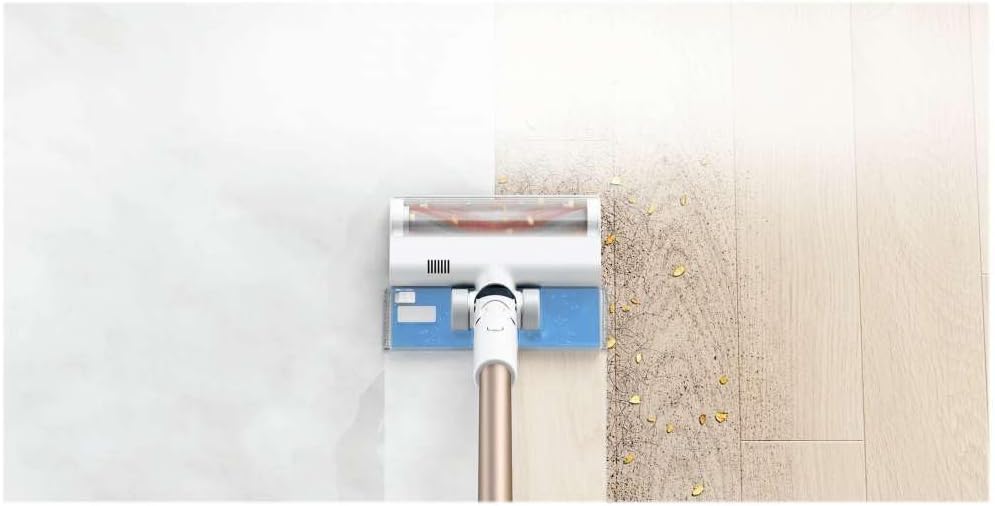
మూర్తి 4.1: The vacuum cleaner demonstrating its 2-in-1 vacuuming and mopping capability on a hard floor, showing a clean path next to a dirty one.
4.3 Mop Function (2-in-1)
To use the mop function:
- శుభ్రమైన నీటితో వాటర్ ట్యాంక్ నింపండి.
- మాప్ ప్యాడ్ను వాటర్ ట్యాంక్కు సురక్షితంగా అటాచ్ చేయండి.
- Attach the water tank assembly to the high-performance roller brush head.
- The vacuum cleaner will now vacuum and mop simultaneously.
5. నిర్వహణ
క్రమం తప్పకుండా నిర్వహణ సరైన పనితీరును నిర్ధారిస్తుంది మరియు మీ వాక్యూమ్ క్లీనర్ యొక్క జీవితకాలాన్ని పొడిగిస్తుంది.
5.1 చెత్తబుట్టను ఖాళీ చేయడం
The 0.6-liter dustbin should be emptied regularly, especially when the MAX line is reached. Press the dustbin release button and empty contents into a waste bin. The dustbin can be easily washed with water.
5.2 ఫిల్టర్లను శుభ్రపరచడం
5-stage highly efficient filter system should be cleaned periodically to maintain suction power and prevent secondary pollution.
- Remove the filter module from the dustbin.
- వదులుగా ఉన్న దుమ్మును తొలగించండి.
- Rinse the filter module under running water. Ensure it is completely dry before reinserting.
5.3 రోలర్ బ్రష్ను శుభ్రపరచడం
The anti-tangling multi brush reduces hair tangles, but occasional cleaning is recommended.
- Remove the roller brush from the brush head.
- Use scissors or a cleaning tool to remove any tangled hair or debris.
- Wipe the brush and brush head housing with a damp గుడ్డ.
- Reinsert the roller brush.
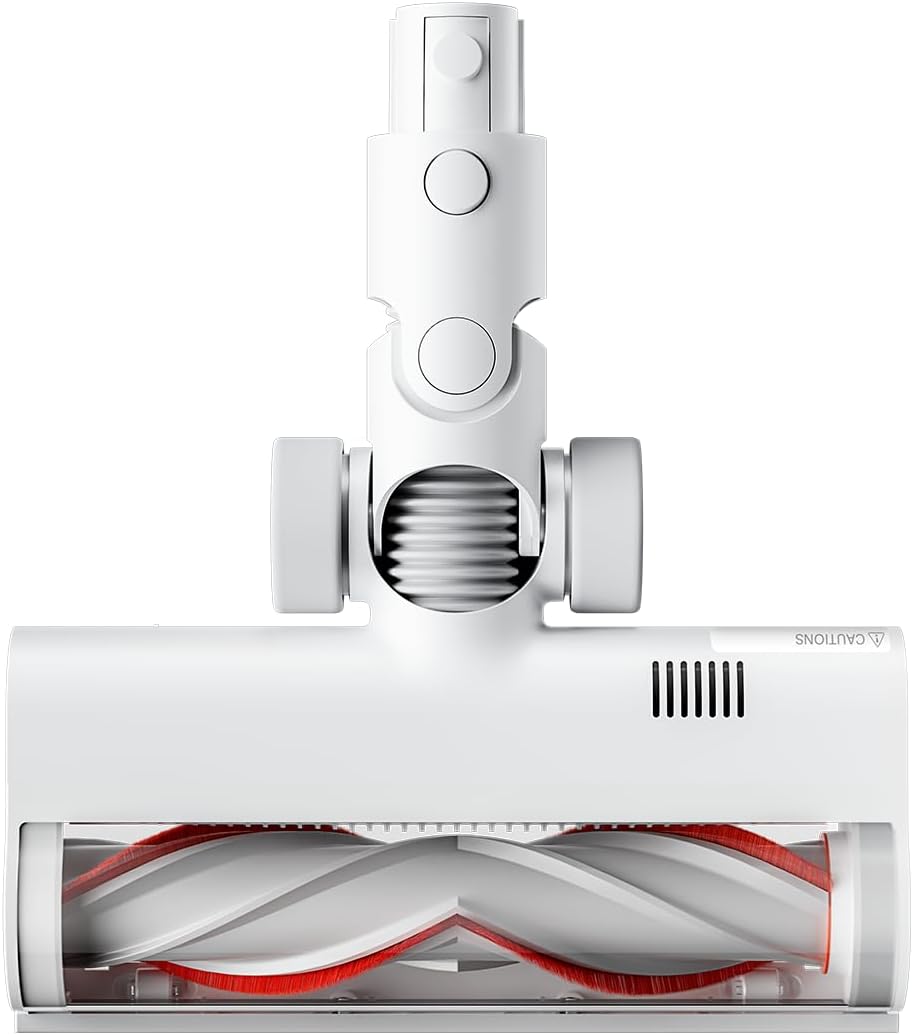
మూర్తి 5.1: అండర్ సైడ్ view of the high-performance roller brush head, showing the anti-tangling design.
5.4 Cleaning the Mop Pad and Water Tank
- After each use, remove the mop pad and wash it thoroughly.
- Empty any remaining water from the water tank and rinse it. Allow to air dry.
6. ట్రబుల్షూటింగ్
సాధారణ సమస్యలు మరియు వాటి పరిష్కారాల కోసం క్రింది పట్టికను చూడండి.
| సమస్య | సాధ్యమైన కారణం | పరిష్కారం |
|---|---|---|
| పవర్ లేదు / ఆన్ అవ్వడం లేదు | బ్యాటరీ క్షీణించింది. | బ్యాటరీని పూర్తిగా ఛార్జ్ చేయండి (సుమారు 4 గంటలు). |
| చూషణ శక్తి తగ్గింది | Dustbin is full. Filter is clogged. Roller brush is tangled. | Empty the dustbin. Clean or wash the filter. Remove tangled hair from the roller brush. |
| Vacuum cleaner stops during operation | బ్యాటరీ తక్కువగా ఉంది. వేడెక్కడం రక్షణ సక్రియం చేయబడింది. | Recharge the battery. Turn off the vacuum cleaner and allow it to cool down for at least 30 minutes. |
| Water not dispensing from mop tank | Water tank is empty. Mop pad is not properly attached. | Refill the water tank. Ensure the mop pad is correctly attached. |
7. స్పెసిఫికేషన్లు
| ఫీచర్ | వివరాలు |
|---|---|
| మోడల్ సంఖ్య | BHR6179EU |
| రేట్ చేయబడిన శక్తి | 425 W |
| చూషణ శక్తి | Max. 150 AW |
| బ్యాటరీ రకం | లిథియం-అయాన్ (3000 mAh) |
| రన్టైమ్ | 65 నిమిషాల వరకు |
| ఛార్జింగ్ సమయం | సుమారు 4 గంటలు |
| డస్ట్బిన్ కెపాసిటీ | 0.6 లీటర్లు |
| నీటి ట్యాంక్ సామర్థ్యం | 250 మి.లీ |
| ఫిల్టర్ సిస్టమ్ | 5-సెtage cyclone filtration |
| శబ్దం స్థాయి | 80 డిబి |
| కొలతలు (L x W x H) | 1286 x 214 x 256 మిమీ (50.63"L x 8.43"W x 10.08"H) |
| నికర బరువు | 4.2 kg (9.24 lbs with accessories) |
8. వారంటీ మరియు మద్దతు
వారంటీ సమాచారం మరియు కస్టమర్ మద్దతు కోసం, దయచేసి అధికారిక Xiaomi వెబ్సైట్ను చూడండి. webసైట్ లేదా మీ స్థానిక అధీకృత సేవా కేంద్రాన్ని సంప్రదించండి. వారంటీ క్లెయిమ్ల కోసం కొనుగోలు రుజువుగా మీ కొనుగోలు రసీదును ఉంచండి.
ఆన్లైన్ మద్దతు: https://www.mi.com/global/service/support/
Ask a question about this manual
Ask about setup, troubleshooting, compatibility, parts, safety, or missing instructions. Manuals+ will review the question and use this page’s manual context to help answer it.