
పరిచయం
The MARTVSEN M7-RGM Camera Mount is a versatile and robust accessory designed for securely attaching action cameras, digital cameras, and other devices to various surfaces. Its enhanced stability, flexible adjustment options, and broad compatibility make it ideal for capturing dynamic footagమరియు విభిన్న వాతావరణాలలో.
ఉత్పత్తి లక్షణాలు
- మెరుగైన స్థిరత్వం: Features a larger metal frame and reinforced crab claw for secure attachment.
- బహుముఖ అనుకూలత: Designed to accommodate round and square tubes (0.39-1.96 inches / 1-5 cm).
- సులభమైన సర్దుబాటు: Equipped with a 1/4-inch thread and a standard 1-inch ball head, allowing for 360-degree rotation and 180-degree tilt for multiple angles.
- ప్రీమియం నాణ్యత: Constructed from durable aluminum alloy with precision engineering.
- విస్తృత అప్లికేషన్లు: Suitable for cycling, motorcycling, mountain biking, outdoor sports, and travel photography.
ప్యాకేజీ విషయాలు
దయచేసి ఇన్స్టాలేషన్తో కొనసాగే ముందు అన్ని భాగాలు ఉన్నాయని నిర్ధారించుకోండి:
- 1 x MARTVSEN M7-RGM Camera Mount (Crab Claw Clamp with Magic Arm)
- 1 x గోప్రో అడాప్టర్
- 1 x 1/4-inch Screw Anti-Slip Pad
సెటప్ సూచనలు
1. Attaching the GoPro Adapter (if applicable)
If you are using a GoPro or a compatible action camera that requires a GoPro-style mount, attach the included GoPro adapter to the 1/4-inch screw on the magic arm. Ensure it is tightened securely.
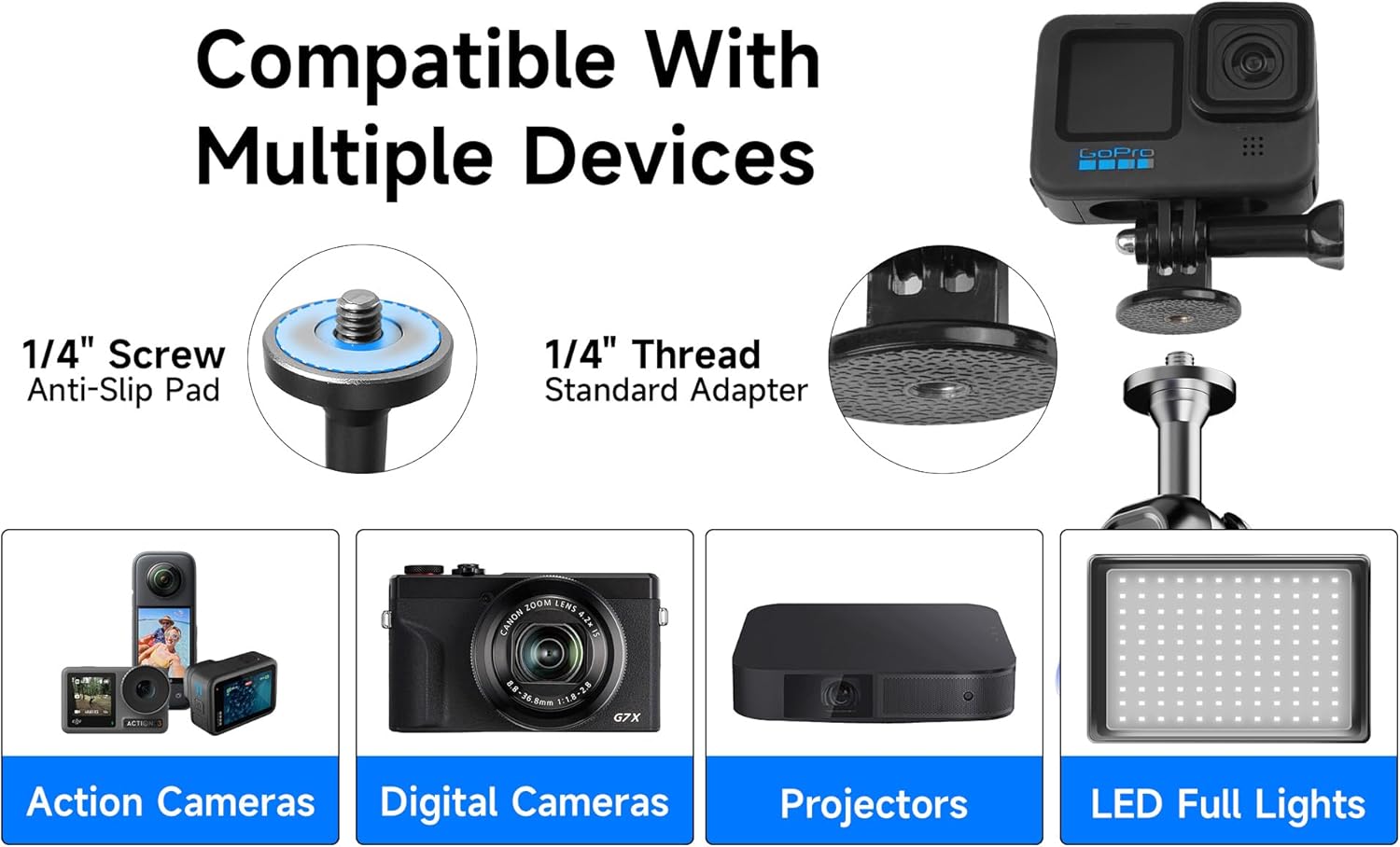
Image: The 1/4-inch screw with anti-slip pad and the standard GoPro adapter, demonstrating compatibility with various devices.
2. Mounting the Camera/Device
Attach your camera or device to the 1/4-inch screw or the GoPro adapter. Ensure the camera is firmly screwed onto the mount to prevent accidental detachment during use.
Video: This video demonstrates the secure attachment of an action camera to the mount, highlighting its robust design and ease of use for various activities.
3. Attaching the Mount to a Surface
The crab claw clamp is designed for secure attachment to round or square tubes. Open the clamp by turning the blue knob counter-clockwise. Position the clamp around the desired surface (e.g., motorcycle handlebar, bicycle frame, railing) and tighten the knob clockwise until the mount is firmly secured. The removable TPE pads provide extra grip and protect the mounting surface.
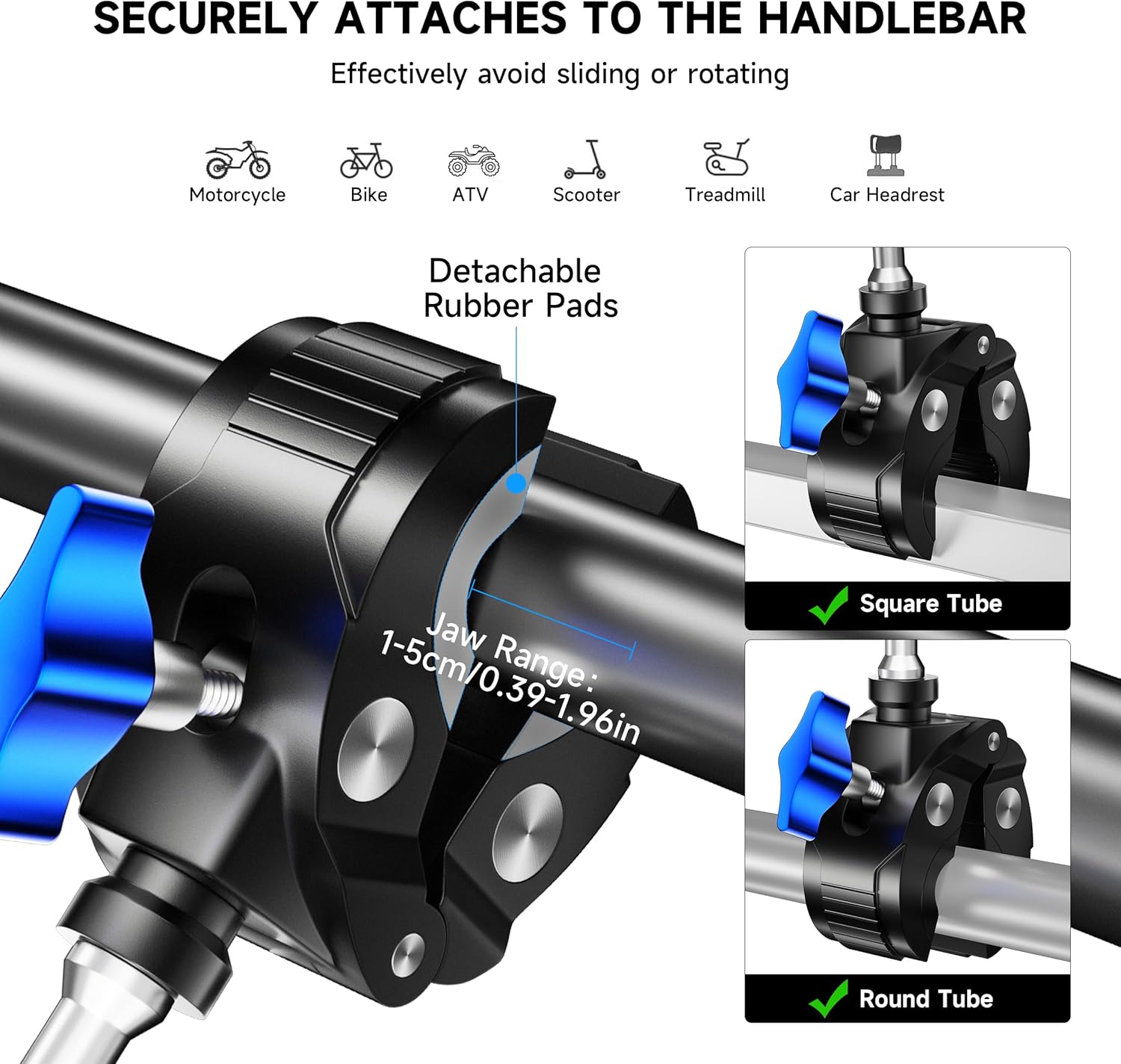
Image: The crab claw clamp features a jaw range of 0.39-1.96 inches (1-5 cm) and is suitable for both round and square tubes, ensuring a stable attachment.

Image: The versatile clamp can be fitted to round tubes, square tubes, and even rear mirror arms, accommodating a range of 0.4 to 2 inches (1-5 cm).
ఆపరేటింగ్ సూచనలు
Adjusting the Magic Arm
The magic arm features dual ball heads that allow for 360-degree rotation and 180-degree tilt. Loosen the central blue knob on the magic arm to adjust the angle and position of your camera. Once the desired angle is achieved, tighten the knob firmly to lock the position. This allows for flexible camera placement to capture various perspectives.

Image: The jumbo bracket and magic arm allow for easy switching between horizontal and vertical orientations with 360-degree rotation and 180-degree tilt.
Video: This video showcases the mount's compatibility with Insta360 cameras and its flexible adjustment capabilities for optimal recording angles.
నిర్వహణ
To ensure the longevity and optimal performance of your MARTVSEN M7-RGM Camera Mount, follow these maintenance guidelines:
- శుభ్రపరచడం: మౌంట్ను మృదువైన, d తో తుడవండిamp దుమ్ము మరియు ధూళిని తొలగించడానికి వస్త్రం. ముగింపును దెబ్బతీసే కఠినమైన రసాయనాలు లేదా రాపిడి పదార్థాలను ఉపయోగించకుండా ఉండండి.
- తనిఖీ: Regularly check all screws and knobs for tightness. Ensure the crab claw clamp and ball joints operate smoothly.
- నిల్వ: Store the mount in a dry, cool place away from direct sunlight and extreme temperatures when not in use.
ట్రబుల్షూటింగ్
If you encounter any issues with your camera mount, consider the following:
- మౌంట్ స్లిప్పింగ్: cl నిర్ధారించుకోండిamp knob is fully tightened. Verify that the TPE pads are correctly positioned to provide maximum grip on the mounting surface.
- Camera Instability: Check that the 1/4-inch screw or GoPro adapter is securely fastened to your camera and the magic arm. Tighten the central knob on the magic arm to lock the ball joints.
- సర్దుబాటు చేయడంలో ఇబ్బంది: Loosen the central knob on the magic arm sufficiently to allow free movement of the ball joints. If movement is still stiff, ensure no debris is obstructing the joints.
స్పెసిఫికేషన్లు
| ఫీచర్ | వివరాలు |
|---|---|
| ఉత్పత్తి కొలతలు | 9 x 3 x 1.26 అంగుళాలు |
| వస్తువు బరువు | 11.2 ఔన్సులు |
| అంశం మోడల్ సంఖ్య | M7-RGM |
| Mountable Range | 0.39-1.96 అంగుళాలు / 1-5 సెం.మీ. |
| గరిష్ట లోడ్ | 6.6 పౌండ్లు / 3 కిలోలు |
| ప్రత్యేక లక్షణాలు | 1" 360° Adjustable Double Metal Non-slip Ball Head, Fits Round & Square Tube, Al Alloy Universal Magic Arm, Larger & Thicker Crab Claw Clamp |
| అనుకూల పరికరాలు | Cameras (GoPro Max Hero 12/11/10/9/8/7/6/5 Black/4/3+ Fusion Session, DJI Osmo Action 2 Pocket 2, Insta360 Go3/Go2/One R/One X2, All Camera Devices with 1/4 Inch Thread) |
| మౌంటు రకం | Handlebar/Seatpost/Pole/Rear-view Mirror/Headrest |

Image: This diagram illustrates the mount's dimensions, including its 9-inch (23 cm) total length, 3-inch (8 cm) width, 0.4-2 inch (1-5 cm) grip range, and 6.6 lbs (3 kg) maximum load.
వారంటీ మరియు మద్దతు
For any product inquiries, technical support, or warranty claims, please contact MARTVSEN customer service through the retailer's platform or the official MARTVSEN webసైట్. వారంటీ ధ్రువీకరణ కోసం దయచేసి మీ కొనుగోలు రుజువును ఉంచుకోండి.