
1. పరిచయం
This manual provides essential instructions for the installation, operation, and maintenance of your Generic 850VA SLA Intelligent Uninterruptible Power Supply (UPS). A UPS provides backup power when your regular power source fails or drops to an unacceptable voltage level. It also protects your electronic devices from power surges and fluctuations. Please read this manual thoroughly before operating the unit to ensure proper use and safety.
2. భద్రతా సూచనలు
Please observe the following safety precautions to prevent injury and damage to the UPS unit or connected equipment:
- విద్యుత్ భద్రత: The UPS operates with high voltages. Do not open the UPS casing. లోపల వినియోగదారు-సేవ చేయగల భాగాలు లేవు. అన్ని సర్వీసింగ్లను అర్హత కలిగిన సేవా సిబ్బందికి సూచించండి.
- పర్యావరణం: Install the UPS in a well-ventilated area, away from direct sunlight, heat sources, and excessive moisture. Avoid placing it near flammable liquids or gases.
- కనెక్షన్: Connect the UPS to a grounded AC power outlet. Do not use extension cords or power strips to connect the UPS to the wall outlet.
- లోడ్: Do not overload the UPS. Ensure the total power consumption of connected equipment does not exceed the UPS's capacity (850VA / 490W).
- బ్యాటరీ: The UPS contains a sealed lead-acid battery. Do not dispose of batteries in a fire, as they may explode. Follow local regulations for battery disposal.
- అత్యవసరం: In case of fire or other emergency, immediately disconnect the UPS from the AC power source and all connected equipment.
3. ప్యాకేజీ విషయాలు
ప్యాకేజీలో అన్ని అంశాలు ఉన్నాయని నిర్ధారించుకోండి:
- Generic 850VA SLA Intelligent UPS Unit
- వినియోగదారు మాన్యువల్ (ఈ పత్రం)
- Power Cord (for connecting UPS to wall outlet)
- RJ11 Cable (for surge protection of telephone/fax lines)
4. ఉత్పత్తి ముగిసిందిview
The Generic 850VA SLA Intelligent UPS is designed to provide reliable power backup and surge protection for your electronic devices. It features multiple outlets and RJ11 protection for telephone/fax lines.
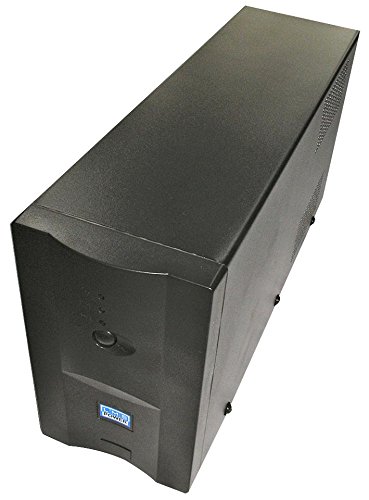
చిత్రం 1: Generic 850VA SLA Intelligent UPS unit. This image shows an angled view of the black UPS unit, highlighting its compact tower design. The front panel features a small display or indicator area, and ventilation grilles are visible on the side.
Front Panel Indicators/Controls:
- పవర్ బటన్: UPSని ఆన్ లేదా ఆఫ్ చేస్తుంది.
- స్థితి సూచికలు: LEDs or a small display (depending on model) show operational status, battery level, and fault conditions.
వెనుక ప్యానెల్ కనెక్షన్లు:
- AC ఇన్పుట్: For connecting the UPS to the wall power outlet.
- Output Outlets (4 outlets): For connecting your devices (computers, monitors, routers, etc.). These outlets provide battery backup and surge protection.
- RJ11 In/Out Ports: For connecting a telephone or fax line to provide surge protection.
5. సెటప్
Follow these steps to set up your UPS:
- అన్ప్యాకింగ్: Carefully remove the UPS from its packaging. Inspect for any shipping damage.
- ప్లేస్మెంట్: Place the UPS on a flat, stable surface in a cool, dry, and well-ventilated indoor area. Ensure there is adequate space around the unit for proper airflow.
- ప్రారంభ ఛార్జ్: Connect the UPS power cord to a grounded wall outlet. Allow the UPS to charge for at least 8 hours before connecting any equipment. This ensures the battery is fully charged and ready to provide maximum backup time.
- పరికరాలను కనెక్ట్ చేయండి: After the initial charge, connect your computer, monitor, and other critical electronic devices to the UPS output outlets.
- RJ11 Protection (Optional): If desired, connect your telephone or fax line to the RJ11 IN port on the UPS, and then connect a cable from the RJ11 OUT port to your telephone/fax device. This provides surge protection for your communication lines.
- పవర్ ఆన్: Press the power button on the front panel to turn on the UPS. The status indicators should illuminate.
6. ఆపరేటింగ్ సూచనలు
UPSని ఆన్/ఆఫ్ చేయడం:
- ఆన్ చేయడానికి: Press and hold the power button for a few seconds until the indicators light up.
- ఆపివేయడానికి: Press and hold the power button for a few seconds until the indicators turn off.
Understanding Status Indicators:
Refer to the specific indicator lights or display on your UPS model for detailed information. Generally, these indicate:
- AC మోడ్: UPS is receiving power from the wall outlet and providing power to connected devices.
- బ్యాటరీ మోడ్: UPS is providing power from its internal battery due to a power outagఇ లేదా తక్కువ వాల్యూమ్tage. An audible alarm may sound.
- బ్యాటరీ తక్కువ: The battery charge is critically low. Save your work and shut down connected equipment immediately.
- Fault/Overload: Indicates an internal error or that connected equipment exceeds the UPS's capacity.
బ్యాటరీ బ్యాకప్ ఫంక్షన్:
శక్తి సమయంలో outage, the UPS will automatically switch to battery power. An audible alarm will typically sound to alert you. The duration of battery backup depends on the load connected. When the battery is low, the alarm will become more frequent, signaling that you should save your work and shut down your equipment gracefully.
7. నిర్వహణ
Proper maintenance ensures the longevity and optimal performance of your UPS.
- బ్యాటరీ సంరక్షణ: To maximize battery life, keep the UPS connected to an AC outlet at all times. Avoid frequent deep discharges. If the UPS is stored for an extended period, recharge it every 3 months for at least 8 hours.
- శుభ్రపరచడం: Disconnect the UPS from the AC outlet and all connected equipment before cleaning. Use a soft, dry cloth to wipe the exterior. Do not use liquid or aerosol cleaners.
- వెంటిలేషన్: Ensure the ventilation openings on the UPS are not blocked to prevent overheating.
- బ్యాటరీ భర్తీ: The internal battery has a limited lifespan. When the battery can no longer hold a charge, it will need to be replaced by qualified service personnel.
8. ట్రబుల్షూటింగ్
If you encounter issues with your UPS, refer to the following common problems and solutions:
| సమస్య | సాధ్యమైన కారణం | పరిష్కారం |
|---|---|---|
| UPS ఆన్ అవ్వడం లేదు | Battery not charged; Power cord not connected; UPS fault. | Ensure UPS is plugged into a live outlet and charged for 8 hours. Check power cord connection. If problem persists, contact support. |
| UPS beeps continuously in AC mode | ఓవర్లోడ్ పరిస్థితి. | Disconnect non-essential equipment until the alarm stops. Ensure total load is within 850VA / 490W capacity. |
| తక్కువ బ్యాకప్ సమయం | బ్యాటరీ పూర్తిగా ఛార్జ్ కాలేదు; బ్యాటరీ జీవితకాలం ముగియడానికి దగ్గరగా ఉంది; ఓవర్లోడ్. | Allow UPS to charge for 8+ hours. Reduce connected load. Consider battery replacement if old. |
| కనెక్ట్ చేయబడిన పరికరాలకు పవర్ లేదు | UPS is off; UPS in fault mode; Devices not properly connected. | Ensure UPS is on. Check UPS status indicators for fault. Verify device power cords are securely plugged into UPS outlets. |
9. స్పెసిఫికేషన్లు
Detailed technical specifications for the Generic 850VA SLA Intelligent UPS:
- మోడల్ సంఖ్య: LMLMSP850INTTA
- సామర్థ్యం: 850 VA / 490 W
- ఇన్పుట్ వాల్యూమ్tage: 240 V AC గరిష్టంగా
- అవుట్పుట్ వాల్యూమ్tage: 230 వి
- అవుట్లెట్ల సంఖ్య: 4 (Battery Backup & Surge Protected)
- కొలతలు (సుమారుగా):
- ఎత్తు: 160 మి.మీ
- పొడవు: 320 మిమీ
- వెడల్పు: 95 మిమీ
- బ్యాటరీ రకం: Sealed Lead-Acid (SLA)
- రక్షణ: Overload, Short Circuit, Overcharge, Over-discharge, RJ11 Surge Protection
10. వారంటీ మరియు మద్దతు
Specific warranty details for this product are not available in the provided information. For warranty claims or technical support, please contact your retailer or the manufacturer directly. Keep your purchase receipt as proof of purchase.
Information regarding spare parts availability and software update guarantees is not available for this product.