
1. పరిచయం
ధన్యవాదాలు, ధన్యవాదాలు.asing the Hisense AX3120G 3.1.2 Channel Soundbar. This soundbar system is designed to enhance your audio experience for movies, music, and games with immersive sound, including Dolby Atmos and DTS:X support. This manual provides essential information for setting up, operating, and maintaining your device. Please read it thoroughly before use and retain it for future reference.
2. భద్రతా సమాచారం
Please observe the following safety precautions to prevent damage to the device or injury to yourself:
- శక్తి మూలం: Use only the specified power supply. Ensure the voltagఇ మీ స్థానిక విద్యుత్ సరఫరాతో సరిపోలుతుంది.
- వెంటిలేషన్: Do not block any ventilation openings. Maintain adequate space around the soundbar and subwoofer for proper airflow.
- నీరు మరియు తేమ: Do not expose the device to rain, moisture, or dripping/splashing liquids. Do not place objects filled with liquids, such as vases, on the apparatus.
- వేడి: రేడియేటర్లు, హీట్ రిజిస్టర్లు, స్టవ్లు లేదా ఇతర ఉపకరణాలు (సహా) వంటి ఉష్ణ వనరుల నుండి పరికరాన్ని దూరంగా ఉంచండి. ampలిఫైయర్లు) వేడిని ఉత్పత్తి చేస్తాయి.
- శుభ్రపరచడం: Unplug the device from the power outlet before cleaning. Use a dry, soft cloth only.
- సర్వీసింగ్: ఈ ఉత్పత్తిని మీరే సేవ చేయడానికి ప్రయత్నించవద్దు. అర్హత కలిగిన సేవా సిబ్బందికి అన్ని సర్వీసులను చూడండి.
3. ప్యాకేజీ విషయాలు
Carefully unpack your soundbar system and ensure all items listed below are present and in good condition. If any item is missing or damaged, contact your retailer.
- Hisense AX3120G Soundbar
- వైర్లెస్ సబ్ వూఫర్
- రిమోట్ కంట్రోల్
- AAA బ్యాటరీలు (2x)
- HDMI కేబుల్
- ఆప్టికల్ ఆడియో కేబుల్
- వాల్ మౌంటు కిట్

Image: Hisense AX3120G Soundbar, wireless subwoofer, and remote control, showing product dimensions.
4. సెటప్
4.1. ప్లేస్మెంట్
ఉత్తమ ఆడియో పనితీరు కోసం, ఈ క్రింది ప్లేస్మెంట్ మార్గదర్శకాలను పరిగణించండి:
- సౌండ్ బార్: Place the soundbar centrally below your TV. Ensure it is on a stable, flat surface or securely mounted to the wall using the provided kit.
- subwoofer: The wireless subwoofer can be placed anywhere in the room, ideally near the soundbar, for balanced bass. Experiment with different positions to find the best sound.

Image: The Hisense AX3120G Soundbar positioned below a television, with the wireless subwoofer placed to the side, illustrating a typical home entertainment setup.
4.2. కనెక్షన్లు
కింది పద్ధతుల్లో ఒకదాన్ని ఉపయోగించి సౌండ్బార్ను మీ టీవీ లేదా ఇతర ఆడియో వనరులకు కనెక్ట్ చేయండి:
- HDMI ARC/eARC (సిఫార్సు చేయబడింది): Connect one end of the HDMI cable to the HDMI OUT (ARC/eARC) port on the soundbar and the other end to the HDMI ARC/eARC port on your TV. This allows audio to be sent from the TV to the soundbar and enables control of the soundbar with your TV remote.
- ఆప్టికల్ ఆడియో: Connect one end of the optical cable to the OPTICAL IN port on the soundbar and the other end to the optical digital output port on your TV or audio source.
- USB: Insert a USB drive into the USB port on the soundbar to play audio fileనేరుగా లు.
4.3. సబ్ వూఫర్ జత చేయడం
The wireless subwoofer should automatically pair with the soundbar when both devices are powered on. If the subwoofer does not connect, follow these steps:
- Ensure both the soundbar and subwoofer are powered on and within range.
- Press and hold the PAIR button on the back of the subwoofer for a few seconds. The indicator light on the subwoofer will flash.
- On the soundbar, select the Bluetooth input (if applicable) or cycle through inputs. The soundbar and subwoofer should connect automatically. The indicator light on the subwoofer will turn solid when connected.
5. ఆపరేటింగ్ సూచనలు
5.1. పవర్ ఆన్/ఆఫ్
నొక్కండి శక్తి యూనిట్ను ఆన్ లేదా ఆఫ్ చేయడానికి రిమోట్ కంట్రోల్ లేదా సౌండ్బార్లోని బటన్.
5.2. ఇన్పుట్ ఎంపిక
నొక్కండి ఇన్పుట్ button on the remote control repeatedly to cycle through available input sources (HDMI, Optical, Bluetooth, USB).
5.3. వాల్యూమ్ నియంత్రణ
ఉపయోగించండి VOL+ మరియు VOL- buttons on the remote control to adjust the master volume. Use the బాస్ + మరియు బాస్- buttons to adjust the subwoofer level.
5.4. సౌండ్ మోడ్లు మరియు ఫీచర్లు
The Hisense AX3120G supports advanced audio technologies for an immersive experience:
- డాల్బీ అట్మాస్ & DTS:X: These technologies provide multi-dimensional sound, creating a captivating audio experience. The soundbar automatically detects and processes these formats when available from your source.
- 3.1.2 ఛానెల్లు: Enjoy a rich soundstage with dedicated left, right, center, and two up-firing channels, plus a separate subwoofer for deep bass.
- సూపర్ బాస్: మరింత ప్రభావవంతమైన ఆడియో అనుభవం కోసం తక్కువ-ఫ్రీక్వెన్సీ శబ్దాలను మెరుగుపరుస్తుంది.
- AI EQ Mode & 7 Personalized Sound Modes: Optimize your audio for different content types (e.g., Movie, Music, News, Game) using the AI EQ mode or select from 7 personalized sound modes for tailored listening.

Image: Visual representation of the soundbar and subwoofer, emphasizing key features like 3.1.2 channels, Super Bass, Dolby Atmos support, and 360W total output.
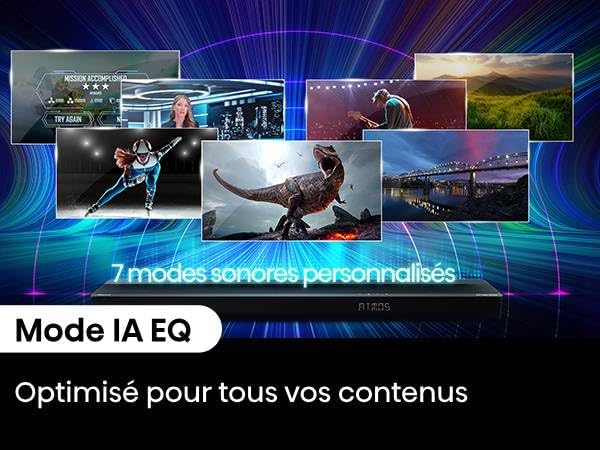
Image: The soundbar display showing 'ATOMS', with text highlighting '7 Personalized Sound Modes' and 'AI EQ Mode' for content optimization.
5.5. బ్లూటూత్ పెయిరింగ్
బ్లూటూత్ పరికరాన్ని కనెక్ట్ చేయడానికి:
- నొక్కండి బ్లూటూత్ button on the remote control to select Bluetooth input. The soundbar display will show "BT" and start flashing.
- Enable Bluetooth on your device (smartphone, tablet, etc.) and search for "Hisense AX3120G".
- Select the soundbar from the list of available devices. Once connected, the "BT" indicator on the soundbar will stop flashing and remain solid.
6. నిర్వహణ
6.1. శుభ్రపరచడం
To clean your soundbar and subwoofer:
- శుభ్రపరిచే ముందు పరికరాన్ని ఎల్లప్పుడూ పవర్ అవుట్లెట్ నుండి అన్ప్లగ్ చేయండి.
- Use a soft, dry cloth to wipe the surfaces.
- Do not use liquid cleaners, aerosol sprays, or abrasive materials, as these may damage the finish.
6.2. నిల్వ
If you plan to store the soundbar for an extended period, unplug it from the power outlet and store it in a cool, dry place, away from direct sunlight and extreme temperatures.
7. ట్రబుల్షూటింగ్
మీ సౌండ్బార్తో మీకు సమస్యలు ఎదురైతే, ఈ క్రింది సాధారణ సమస్యలు మరియు పరిష్కారాలను చూడండి:
| సమస్య | సాధ్యమైన కారణం | పరిష్కారం |
|---|---|---|
| శక్తి లేదు | పవర్ కేబుల్ కనెక్ట్ కాలేదు; పవర్ అవుట్లెట్ యాక్టివ్గా లేదు | Ensure power cables are securely connected. Check the power outlet with another device. |
| శబ్దం లేదు | తప్పు ఇన్పుట్ ఎంచుకోబడింది; వాల్యూమ్ చాలా తక్కువగా ఉంది; కేబుల్స్ సరిగ్గా కనెక్ట్ కాలేదు. | Select the correct input source. Increase the volume. Check all audio cable connections. Ensure TV audio output is set to external speakers. |
| సబ్ వూఫర్ కనెక్ట్ కావడం లేదు | Subwoofer not paired; Out of range | Refer to Section 4.3 for subwoofer pairing instructions. Ensure subwoofer is within 10 meters of the soundbar. |
| బ్లూటూత్ కనెక్షన్ సమస్యలు | Device not in pairing mode; Out of range; Interference | Ensure soundbar is in Bluetooth pairing mode. Move device closer to soundbar. Avoid strong electromagnetic interference. |
| రిమోట్ కంట్రోల్ పనిచేయడం లేదు | Batteries depleted; Obstruction; Incorrect angle | బ్యాటరీలను మార్చండి. రిమోట్ మరియు సౌండ్బార్ మధ్య ఏవైనా అడ్డంకులను తొలగించండి. రిమోట్ను నేరుగా సౌండ్బార్ సెన్సార్ వైపు ఉంచండి. |
8. స్పెసిఫికేషన్లు
Below are the technical specifications for the Hisense AX3120G Soundbar system:
| ఫీచర్ | స్పెసిఫికేషన్ |
|---|---|
| మోడల్ పేరు | AX3120G |
| బ్రాండ్ | హిస్సెన్స్ |
| స్పీకర్ రకం | వైర్లెస్ సబ్ వూఫర్తో సౌండ్బార్ |
| సౌండ్ ఛానల్ కాన్ఫిగరేషన్ | 3.1.2 ఛానెల్లు |
| గరిష్ట అవుట్పుట్ పవర్ | 360 వాట్స్ |
| ఫ్రీక్వెన్సీ రెస్పాన్స్ | 20000 Hz |
| కనెక్టివిటీ టెక్నాలజీ | Bluetooth, HDMI, USB, Optical Audio |
| Wireless Subwoofer Connectivity | వైర్లెస్ |
| బ్లూటూత్ రేంజ్ | 10 మీటర్లు |
| ప్రత్యేక లక్షణాలు | Dolby Atmos, DTS:X Support, Up-firing Speakers |
| మౌంటు రకం | వాల్ మౌంటబుల్ |
| సౌండ్బార్ కొలతలు (అడుగు x అడుగు x అడుగు) | 920 x 60 x 90 మిమీ |
| వస్తువు బరువు | 8.1 కిలోలు |
| చేర్చబడిన భాగాలు | Soundbar, Subwoofer, Remote Control, Batteries, Optical Cable, HDMI Cable |
9. వారంటీ మరియు మద్దతు
Hisense products are manufactured to the highest quality standards. This product comes with a limited warranty. For detailed warranty information, please refer to the warranty card included in your package or visit the official Hisense website. For technical support, troubleshooting assistance, or service inquiries, please contact Hisense customer service through their official channels.