
Xiaomi Xiaomi Robot Vacuum X10
Xiaomi రోబోట్ వాక్యూమ్ X10 యూజర్ మాన్యువల్
Model: Xiaomi Robot Vacuum X10 | Brand: Xiaomi
పరిచయం
This user manual provides essential information for the safe and efficient operation, maintenance, and troubleshooting of your Xiaomi Robot Vacuum X10. Please read this manual thoroughly before using the product and retain it for future reference.
The Xiaomi Robot Vacuum X10 is a versatile 2-in-1 robotic vacuum cleaner and mop, designed to provide powerful suction and efficient cleaning for various floor surfaces. It features a strong 4000Pa suction power, a 5200mAh battery capacity, and can be controlled remotely via the Xiaomi Home app.
భద్రతా సమాచారం
పరికరానికి గాయం లేదా నష్టం జరగకుండా నిరోధించడానికి ఎల్లప్పుడూ క్రింది భద్రతా జాగ్రత్తలను పాటించండి:
- Do not allow children to operate the robot vacuum.
- పవర్ అడాప్టర్ మీ స్థానిక వాల్యూమ్కు అనుకూలంగా ఉందని నిర్ధారించుకోండిtage.
- జుట్టు, వదులుగా ఉండే దుస్తులు, వేళ్లు మరియు శరీరంలోని అన్ని భాగాలను ఓపెనింగ్స్ మరియు కదిలే భాగాలకు దూరంగా ఉంచండి.
- Do not use the robot vacuum to pick up large objects, sharp objects, or liquids.
- పరికరాన్ని నీరు లేదా తేమకు బహిర్గతం చేయకుండా ఉండండి.
- Turn off the device and unplug it before cleaning or performing maintenance.
ప్యాకేజీ విషయాలు
ప్యాకేజీలో అన్ని అంశాలు ఉన్నాయని నిర్ధారించుకోండి:
- Xiaomi Robot Vacuum X10 Unit
- Auto-Emptying Dock Station
- పవర్ కేబుల్
- సైడ్ బ్రష్
- Mop Pad (pre-installed or separate)
- డస్ట్ బ్యాగ్ (ముందుగా ఇన్స్టాల్ చేయబడినది లేదా విడిగా)
- శుభ్రపరిచే సాధనం
- వినియోగదారు మాన్యువల్ (ఈ పత్రం)
ఉత్పత్తి ముగిసిందిview

Figure 1: Xiaomi Robot Vacuum X10 with its auto-emptying dock station. The robot vacuum is white and circular, positioned in front of a tall, white rectangular dock.

Figure 2: The Xiaomi Robot Vacuum X10 (left) and its auto-emptying dock station (right) shown separately. This illustrates the compact design of both components.

చిత్రం 3: పై నుండి క్రిందికి view of the Xiaomi Robot Vacuum X10, highlighting its clean white surface and the central LiDAR sensor dome. Two control buttons are visible near the front.

Figure 4: The Xiaomi Robot Vacuum X10 shown alongside a smartphone displaying the Xiaomi Home app interface with a floor map, and a white mop pad, illustrating its smart features and mopping capability.
సెటప్
1. అన్ప్యాకింగ్ మరియు ప్లేస్మెంట్
- Remove all packaging materials from the robot vacuum and the auto-emptying dock.
- Place the auto-emptying dock against a wall in an open area, ensuring there are no obstacles within 0.5 meters to either side and 1.5 meters in front.
- Connect the power cable to the dock and plug it into a power outlet.
2. ప్రారంభ ఛార్జింగ్
Place the robot vacuum onto the charging contacts of the auto-emptying dock. Ensure the robot is properly aligned. The indicator light on the robot will illuminate, indicating it is charging. Fully charge the robot before first use (approximately 6 hours).
3. యాప్ కనెక్షన్
- డౌన్లోడ్ చేయండి షియోమి హోమ్ మీ పరికరం యొక్క యాప్ స్టోర్ నుండి యాప్.
- యాప్ తెరిచి ఖాతాను సృష్టించండి లేదా లాగిన్ అవ్వండి.
- Tap the "+" icon to add a new device and select "Xiaomi Robot Vacuum X10".
- Follow the on-screen instructions to connect the robot vacuum to your Wi-Fi network.
ఆపరేటింగ్ సూచనలు
1. శుభ్రపరిచే చక్రాన్ని ప్రారంభించడం
- రోబోట్ ద్వారా: శుభ్రపరిచే చక్రాన్ని ప్రారంభించడానికి రోబోట్లోని పవర్ బటన్ను ఒకసారి నొక్కండి.
- యాప్ ద్వారా: Open the Xiaomi Home app, select your robot vacuum, and tap "Clean" to start.

Figure 5: The Xiaomi Robot Vacuum X10 actively cleaning a hard floor, illustrating its powerful suction picking up dust and debris. The robot is shown moving away from its dock.
2. మాపింగ్ ఫంక్షన్
- శుభ్రమైన నీటితో వాటర్ ట్యాంక్ నింపండి.
- Attach the mop pad to the mop module and slide it into the robot.
- Start a cleaning cycle. The robot will automatically switch to mopping mode.
3. Auto-Emptying
The auto-emptying dock will automatically empty the robot's dustbin after each cleaning cycle. Ensure the dust bag in the dock is properly installed.
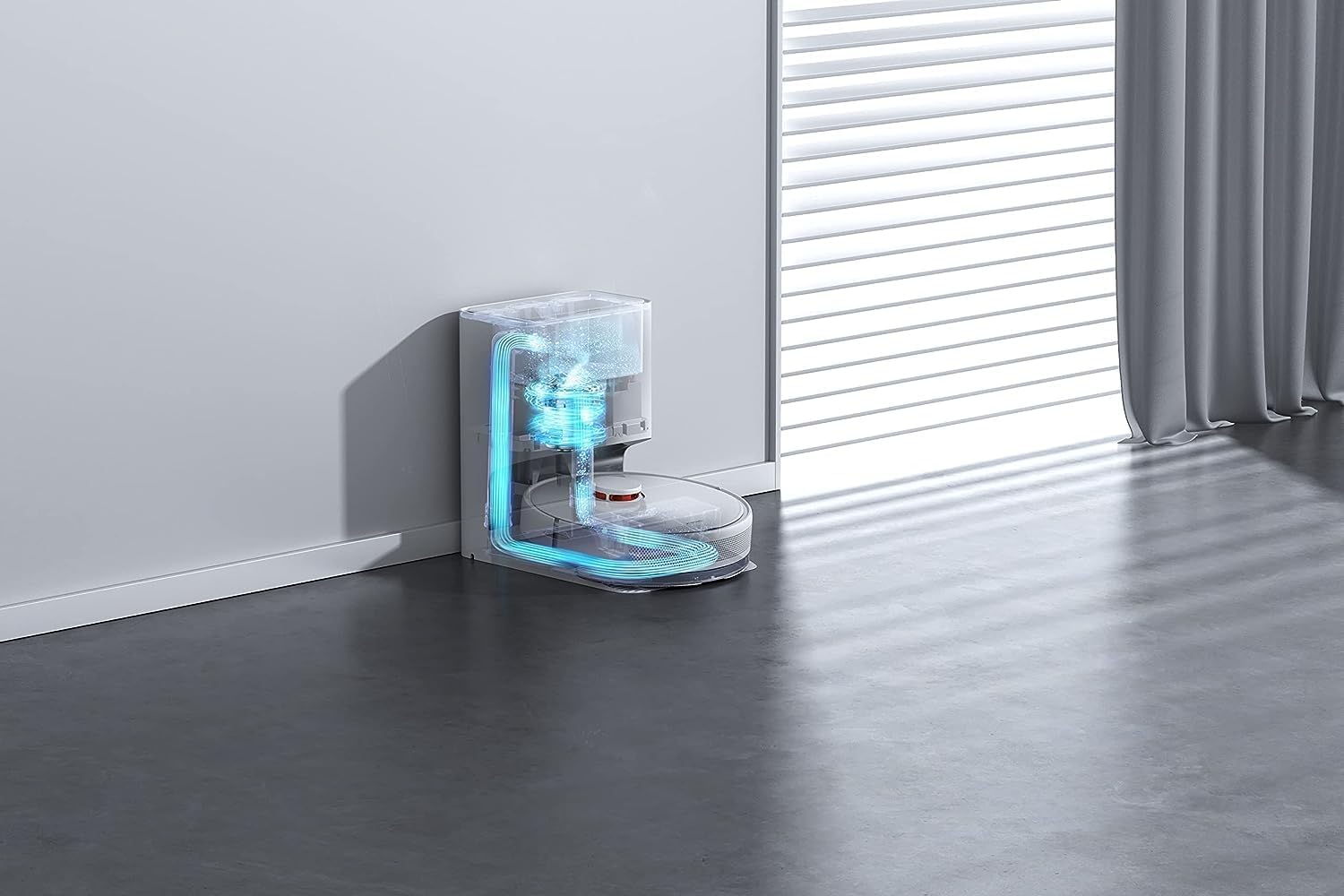
Figure 6: An internal diagram illustrating the dust collection process within the auto-emptying dock. Arrows indicate airflow and debris transfer from the robot into the dock's dust bag.
4. Advanced Features (via App)
- మ్యాప్ నిర్వహణ: View and edit cleaning maps, set virtual walls, and no-go zones.
- షెడ్యూల్ చేసిన శుభ్రపరచడం: రోబోట్ స్వయంచాలకంగా శుభ్రం చేయడానికి నిర్దిష్ట సమయాలను సెట్ చేయండి.
- స్పాట్ క్లీనింగ్: Direct the robot to clean a specific area.
- చూషణ శక్తి సర్దుబాటు: Adjust the suction level for different cleaning needs.

Figure 7: The underside of the Xiaomi Robot Vacuum X10, showing the main roller brush, side brush, and the attached mop pad, indicating its dual cleaning capabilities.
నిర్వహణ
క్రమం తప్పకుండా నిర్వహణ సరైన పనితీరును నిర్ధారిస్తుంది మరియు మీ రోబోట్ వాక్యూమ్ యొక్క జీవితకాలాన్ని పొడిగిస్తుంది.
1. డస్ట్బిన్ మరియు ఫిల్టర్
- Empty the robot's internal dustbin after each use, even with auto-emptying, to check for blockages.
- Clean the filter weekly using the cleaning tool or by tapping it gently to remove dust. Replace the filter every 3-6 months.
2. మెయిన్ బ్రష్ మరియు సైడ్ బ్రష్
- Remove the main brush cover and clean the main brush weekly, removing any tangled hair or debris.
- Clean the side brush monthly. If damaged, replace it.
3. Mop Pad and Water Tank
- Wash the mop pad after each use. Allow it to air dry completely before reattaching.
- Empty and rinse the water tank after each mopping session to prevent mold or odor.
4. సెన్సార్లు మరియు ఛార్జింగ్ కాంటాక్ట్లు
- Wipe the cliff sensors, wall sensors, and charging contacts on both the robot and the dock with a clean, dry cloth monthly.

Figure 8: The Xiaomi Robot Vacuum X10 demonstrating its navigation capabilities, approaching a raised surface or step, indicating its ability to detect and avoid obstacles or drop-offs.
ట్రబుల్షూటింగ్
| సమస్య | సాధ్యమైన కారణం | పరిష్కారం |
|---|---|---|
| రోబోట్ ఆన్ చేయదు. | బ్యాటరీ తక్కువగా ఉంది; పవర్ బటన్ను ఎక్కువసేపు నొక్కి ఉంచలేదు. | Charge the robot; Press and hold the power button for 3 seconds. |
| రోబోట్ ఛార్జ్ చేయలేదు. | Charging contacts are dirty; Dock not powered. | Clean charging contacts; Ensure dock is plugged in and powered. |
| చూషణ శక్తి బలహీనంగా ఉంది. | Dustbin full; Filter clogged; Main brush tangled. | Empty dustbin; Clean/replace filter; Clean main brush. |
| రోబో తరచుగా ఇరుక్కుపోతుంది. | మార్గంలో అడ్డంకులు; సెన్సార్లు మురికిగా ఉన్నాయి. | అడ్డంకులను తొలగించండి; సెన్సార్లను శుభ్రం చేయండి. |
| మాపింగ్ ఫంక్షన్ పనిచేయడం లేదు. | Water tank empty; Mop pad not attached correctly. | Fill water tank; Reattach mop pad. |

Figure 9: The Xiaomi Robot Vacuum X10 utilizing its laser navigation system to map a room, depicted by blue laser lines extending from the robot, ensuring efficient and systematic cleaning.
స్పెసిఫికేషన్లు
| ఫీచర్ | స్పెసిఫికేషన్ |
|---|---|
| మోడల్ పేరు | Xiaomi Robot Vacuum X10 |
| బ్రాండ్ | Xiaomi |
| రంగు | తెలుపు |
| చూషణ శక్తి | 4000పా |
| బ్యాటరీ కెపాసిటీ | 5200mAh |
| ఆపరేటింగ్ సమయం | 180 నిమిషాల వరకు |
| డస్ట్బిన్ కెపాసిటీ | 2.5 Liters (dock) |
| వాల్యూమ్tage | 20 వోల్ట్లు |
| కొలతలు (రోబోట్) | 35.3 x 35.3 x 9.9 సెం.మీ (L x W x H) |
| బరువు (వస్తువు) | 7.4 కిలోలు |
| అనుకూల పరికరాలు | Smartphones (Xiaomi Home App) |
| ప్రత్యేక ఫీచర్ | Portable, Auto-Emptying Dock |
| ఫిల్టర్ రకం | గుళిక |
వారంటీ మరియు మద్దతు
వారంటీ సమాచారం మరియు సాంకేతిక మద్దతు కోసం, దయచేసి అధికారిక Xiaomi వెబ్సైట్ను చూడండి. webసైట్లో లేదా వారి కస్టమర్ సర్వీస్ను సంప్రదించండి. కొనుగోలు రుజువుగా మీ కొనుగోలు రసీదును ఉంచండి.
మరిన్ని వివరాలకు మీరు అధికారిక Xiaomi స్టోర్ని సందర్శించవచ్చు: Xiaomi అధికారిక స్టోర్
Ask a question about this manual
Ask about setup, troubleshooting, compatibility, parts, safety, or missing instructions. Manuals+ will review the question and use this page’s manual context to help answer it.