
LXJTHT Wireless Android Auto Car Adapter
LXJTHT ఆండ్రాయిడ్ ఆటో వైర్లెస్ అడాప్టర్ యూజర్ మాన్యువల్
Model: Wireless Android Auto Car Adapter
బ్రాండ్: LXJTHT
1. ఉత్పత్తి ముగిసిందిview
The LXJTHT Android Auto Wireless Adapter is designed to convert your car's existing wired Android Auto system into a wireless one. This allows for a more convenient and clutter-free driving experience, enabling you to access your Android Auto features such as navigation, music, and calls without needing to physically connect your phone via a USB cable.
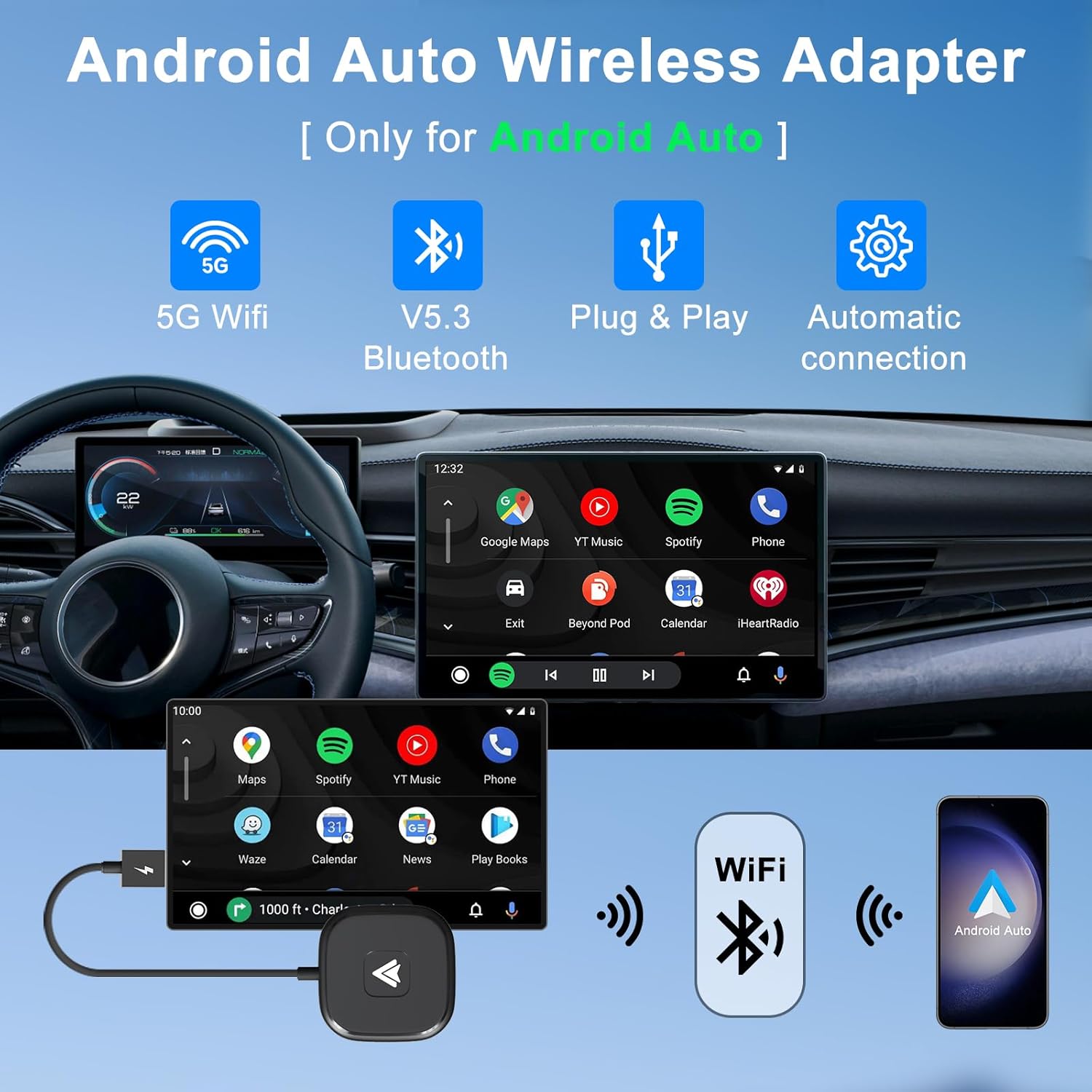
Image: The LXJTHT Android Auto Wireless Adapter highlighting its key features: 5G WiFi, Bluetooth 5.3, Plug & Play functionality, and automatic connection.
2 కీ ఫీచర్లు
- వైర్లెస్ కనెక్టివిటీ: Say goodbye to annoying wired connections with our easy-to-use Wireless Android Car Adapter, the official latest version in 2025.
- Full Android Auto Functionality: Enjoy complete Android Auto functions while maintaining your car's original operations such as navigation planning, music playing, news updates, and more.
- స్థిరమైన పనితీరు: The Android Auto wireless adapter has a built-in 5.8Ghz chip, which provides fast and stable connections for your Android phone and car through Bluetooth and 5GHz WiFi modules, speeding up heat dissipation and making it more durable and stable.
- ప్లగ్ మరియు ప్లే: Our wireless Android Auto dongle is Plug and Play, simply plug it into your car's USB or Type C port and connect to your phone's Bluetooth and Wi-Fi for an instant upgrade to your infotainment system.
- యూనివర్సల్ అనుకూలత: Android Auto wireless adapter is compatible with more than 1000+ car models and supports various functions such as voice control, Google Assistant, phone calls, maps, music apps and messages.

Image: Depiction of the adapter's advanced 5G technology ensuring stable, fast, and lag-free connections.
3. ప్యాకేజీ విషయాలు
Your LXJTHT Android Auto Wireless Adapter package includes the following items:
- LXJTHT ఆండ్రాయిడ్ ఆటో వైర్లెస్ అడాప్టర్
- USB-A నుండి USB-C అడాప్టర్ వరకు

Image: The LXJTHT Android Auto Wireless Adapter with its included USB-C adapter.
4. అనుకూలత
కారు అనుకూలత
This adapter is compatible with over 1000+ car models that come with factory-wired Android Auto. Please ensure your vehicle supports wired Android Auto before purchase. For a detailed list of compatible vehicles, please refer to the official Android Auto compatibility webసైట్: https://www.android.com/auto/compatibility
ఫోన్ అనుకూలత
The adapter supports Android phones running Android 11.0 and above. Please note that Huawei phones are currently not supported.

Image: Visual guide for checking car and phone compatibility with the adapter.
5. సెటప్ గైడ్
Follow these simple steps to set up your LXJTHT Android Auto Wireless Adapter:
- ప్లగ్ ఇన్: Connect the wireless adapter to your car's USB or Type C port. Use the provided USB-A to USB-C adapter if your car has a Type C port.
- బ్లూటూత్ పెయిరింగ్: On your Android phone, enable Bluetooth and Wi-Fi. కోసం వెతకండి available Bluetooth devices and select the adapter (e.g., "smartBox-XXXX"). Confirm the pairing request on your phone. Ensure your phone's Wi-Fi is not occupied by another network during this process.
- Use Android Auto: Once paired, your phone will automatically connect to the adapter, and Android Auto will launch on your car's infotainment screen within 5-15 seconds.

Image: A visual representation of the three-step easy setup process for the wireless adapter.
సెటప్ ప్రదర్శన వీడియో
Video: An official demonstration of the wireless car dongle, showing its compact size and simple plug-and-play setup process in a vehicle.
6. ఆపరేటింగ్ సూచనలు
Once connected, the LXJTHT Android Auto Wireless Adapter allows you to fully utilize your car's infotainment system with Android Auto wirelessly. All standard Android Auto features are accessible.
Accessing Android Auto Functions
- నావిగేషన్: Use Google Maps, Waze, or other supported navigation apps directly on your car's screen.
- సంగీతం & మీడియా: Stream music from Spotify, YouTube Music, or other audio apps.
- కాల్లు & సందేశాలు: Make and receive calls, and send/read messages using voice commands or the car's controls.
- వాయిస్ నియంత్రణ: Activate Google Assistant by saying "Hey Google" or pressing the voice command button on your steering wheel to control functions hands-free.

Image: The Android Auto interface displaying various supported applications for music, calls, maps, and Google Assistant.
Maintaining Original Car Controls
The adapter is designed to seamlessly integrate with your car's existing control mechanisms:
- స్టీరింగ్ వీల్ నియంత్రణ: Use your car's steering wheel buttons to manage calls, adjust volume, and navigate menus.
- OEM నాబ్ నియంత్రణ: Utilize your car's original equipment manufacturer (OEM) control knob for precise navigation within the Android Auto interface.
- టచ్ స్క్రీన్ నియంత్రణ: If your car has a touchscreen, you can interact with Android Auto directly by touch.

Image: Demonstrates how the adapter allows retention of original car controls including voice assistant, steering wheel, OEM knob, and touchscreen.
7. సంరక్షణ మరియు నిర్వహణ
To ensure the longevity and optimal performance of your LXJTHT Android Auto Wireless Adapter, please follow these care guidelines:
- పొడిగా ఉంచండి: Avoid exposing the adapter to water or excessive moisture.
- సున్నితంగా శుభ్రం చేయండి: Use a soft, dry cloth to clean the adapter. Do not use harsh chemicals or abrasive cleaners.
- విపరీతమైన ఉష్ణోగ్రతలను నివారించండి: పరికరాన్ని చాలా ఎక్కువ లేదా తక్కువ ఉష్ణోగ్రతలకు గురిచేయవద్దు, ఎందుకంటే ఇది దాని పనితీరు మరియు జీవితకాలాన్ని ప్రభావితం చేస్తుంది.
- జాగ్రత్తగా నిర్వహించండి: అడాప్టర్ను పడవేయడం లేదా బలమైన ప్రభావాలకు గురిచేయడం మానుకోండి.
8. ట్రబుల్షూటింగ్
If you encounter any issues with your LXJTHT Android Auto Wireless Adapter, please refer to the following common troubleshooting steps:
| సమస్య | పరిష్కారం |
|---|---|
| Adapter does not connect to car/phone. |
|
| Lag or performance issues. |
|
| తరచుగా డిస్కనెక్షన్లు. |
|
For more detailed troubleshooting or specific issues, please refer to the comprehensive వినియోగదారు మాన్యువల్ (PDF).
9. ఉత్పత్తి లక్షణాలు
| స్పెసిఫికేషన్ | వివరాలు |
|---|---|
| బ్రాండ్ | LXJTHT |
| మోడల్ సంఖ్య | వైర్లెస్ ఆండ్రాయిడ్ ఆటో కార్ అడాప్టర్ |
| ప్యాకేజీ కొలతలు | 6 x 3 x 0.7 అంగుళాలు |
| వస్తువు బరువు | 1.44 ఔన్సులు |
| ఆపరేటింగ్ సిస్టమ్ (OS) | ఆండ్రాయిడ్ |
| ప్రత్యేక లక్షణాలు | బ్లూటూత్ |
| ఇతర డిస్ప్లే ఫీచర్లు | వైర్లెస్ |
| తయారీదారు | XinCeng |
| మొదటి తేదీ అందుబాటులో ఉంది | జూన్ 14, 2023 |
| అనుకూల పరికరాలు | స్మార్ట్ఫోన్ |
| ఉత్పత్తి కోసం నిర్దిష్ట ఉపయోగాలు | Streaming, Travel, Work, Gaming |
| కనెక్టర్ రకం | USB టైప్ C |
| పోర్టుల సంఖ్య | 1 |
10. వారంటీ మరియు మద్దతు
LXJTHT is committed to providing excellent customer service and product support:
- వృత్తిపరమైన మద్దతు: Enjoy 7x24H professional support for any queries or assistance you may need.
- Return and Exchange: We offer a 30-day return and exchange service.
- వారంటీ సేవ: Your product is covered by a 365-day warranty service.
మరింత సహాయం కోసం, దయచేసి సందర్శించండి LXJTHT Store on Amazon.
Ask a question about this manual
Ask about setup, troubleshooting, compatibility, parts, safety, or missing instructions. Manuals+ will review the question and use this page’s manual context to help answer it.