
1. పరిచయం
This manual provides detailed instructions for the installation, operation, and maintenance of your Yasorn eMylo Smart Single-Phase Electric Meter. This device is designed to monitor electricity usage, offering remote control and scheduling features via a smartphone application. Please read this manual thoroughly before use to ensure safe and efficient operation.

Image 1: Yasorn eMylo Smart Single-Phase Electric Meter.
2. భద్రతా సమాచారం
- Installation should only be performed by qualified personnel to prevent electric shock or damage to the device.
- Ensure the power supply is disconnected before any installation or wiring work.
- పరికరాన్ని తేమ, విపరీతమైన ఉష్ణోగ్రతలు లేదా తినివేయు వాతావరణాలకు గురిచేయవద్దు.
- Verify all connections are secure and correct according to the wiring diagram before applying power.
- పరికరం ఇండోర్ ఉపయోగం కోసం మాత్రమే రూపొందించబడింది.
3. ఉత్పత్తి లక్షణాలు
- Highest Accuracy: Utilizes a high-quality chipset and SMT technology for precise measurement, with an error margin within 0.3%.
- రిమోట్ మరియు వాయిస్ కంట్రోల్: Control devices remotely via the “Smart Life/Tuya“ APP and compatible with Alexa and Google Home for voice commands.
- విద్యుత్ వినియోగ పర్యవేక్షణ: వాల్యూమ్ యొక్క నిజ-సమయ పర్యవేక్షణtage, current, power, and total consumption on your smartphone or tablet app with a visual digital LCD display.
- Timing and Schedule Feature: Set schedules for appliances to automatically turn on/off, optimizing energy usage.
- Safety Flame Retardant Material: Constructed from eco-friendly flame-resistant ABS for enhanced safety and durability, offering good anti-electromagnetic interference and low power consumption.
4. స్పెసిఫికేషన్లు
| స్పెసిఫికేషన్ | విలువ |
|---|---|
| ఖచ్చితత్వం | స్థాయి 1 |
| WiFi మద్దతు | 2.4 GHz (5G routers not supported) |
| రేటింగ్ కరెంట్ | 5 ఎ |
| మెటీరియల్ | ABS |
| వాల్యూమ్tage | AC 90-250V / 50Hz |
| గరిష్ట కరెంట్ | 60A |
| పల్స్ ఫ్రీక్వెన్సీ | 1200imp/kwh |
| సంస్థాపన | 35 ఎంఎం డిఎన్ రైల్ |
| శక్తి రేటు | 1W/6VA |
| ఉత్పత్తి కొలతలు | 100 x 36 x 66 సెం.మీ |
| బరువు | 175 గ్రా |
| పరిసర ఉష్ణోగ్రత | -45℃ ~ 75℃ |
5. ప్యాకేజీ విషయాలు
- 1 x WiFi Smart Meter
- 1 x ఇన్స్ట్రక్షన్ మాన్యువల్
- 1 Set Accessories (for installation)
6. సంస్థాపన
The eMylo Smart Electric Meter is designed for 35mm DIN-rail installation. Ensure the main power supply is turned off before beginning installation. Connect the device according to the wiring diagram provided in this manual and on the device itself.
6.1 వైరింగ్ రేఖాచిత్రం
Refer to the diagram below for correct wiring. The wiring does not distinguish between L (Live) and N (Neutral) lines for the input voltage. However, ensure the Current Transformer (CT) is correctly installed around one of the load wires (either L or N) to measure current accurately. Do not connect the corresponding terminals incorrectly.

Image 2: eMylo Smart Meter showing wiring terminals and diagram.
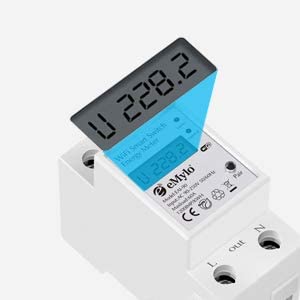
Image 3: Close-up of the meter's display and connection points.
6.2 Wiring Demonstration (General)
Video 1: A general demonstration of wiring a similar digital meter with a CT coil. Note that specific models and wiring might vary slightly, always refer to your product's diagram.
7. ఆపరేషన్
7.1 ప్రారంభ పవర్-అప్ మరియు యాప్ కనెక్షన్
- After successful wiring, turn on the main power supply. The meter's display will illuminate.
- Download the “Smart Life” or “Tuya” app from your smartphone's app store.
- మీ ఖాతాకు నమోదు చేయండి లేదా లాగిన్ అవ్వండి.
- Follow the in-app instructions to add a new device. Ensure your phone is connected to a 2.4GHz Wi-Fi network.
- The app will guide you through connecting the meter to your Wi-Fi network.
7.2 రిమోట్ కంట్రోల్ మరియు పర్యవేక్షణ
కనెక్ట్ అయిన తర్వాత, మీరు యాప్ని ఉపయోగించి వీటిని చేయవచ్చు:
- Turn connected appliances on or off remotely from anywhere.
- Monitor real-time voltagఇ, ప్రస్తుత, క్రియాశీల శక్తి మరియు మొత్తం శక్తి వినియోగం.
- View historical energy consumption data to track usage patterns.
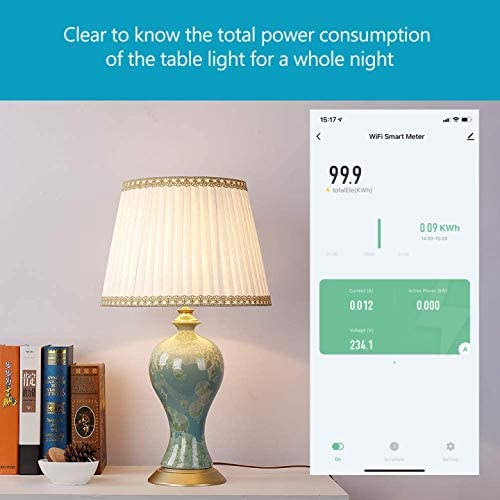
Image 4: App interface displaying real-time power consumption.

Image 5: Remote control of appliances via the smartphone app.
7.3 షెడ్యూలింగ్ మరియు టైమర్ విధులు
Set up custom schedules and timers within the app to automate appliance operation. This feature helps in energy saving and convenience.

Image 6: Setting a schedule for a water heater in the app.
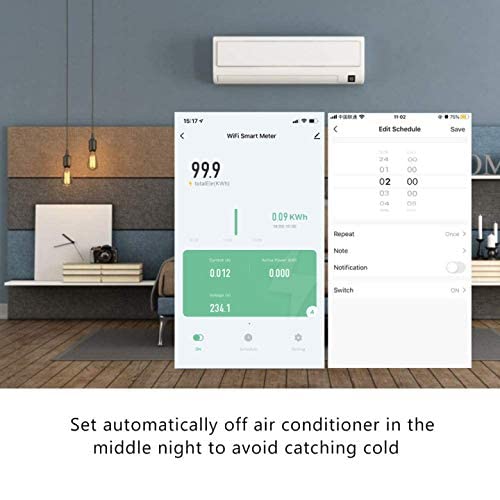
Image 7: Configuring an automatic off schedule for an air conditioner.
7.4 వాయిస్ నియంత్రణ
Integrate the eMylo Smart Meter with Amazon Alexa or Google Home for convenient voice control of connected devices.
7.5 Data Storage and Reset
The meter stores energy data even when power is off. To reset the energy consumption data, use the designated key or button on the device (refer to the specific model's physical interface for location).
8. నిర్వహణ
- పరికరాన్ని శుభ్రంగా మరియు దుమ్ము లేకుండా ఉంచండి. శుభ్రం చేయడానికి పొడి, మృదువైన వస్త్రాన్ని ఉపయోగించండి.
- రాపిడి క్లీనర్లు లేదా ద్రావకాలు ఉపయోగించవద్దు.
- Regularly check wiring connections for tightness and signs of wear.
- ఆపరేటింగ్ వాతావరణం పేర్కొన్న ఉష్ణోగ్రత మరియు తేమ పరిధిలో ఉండేలా చూసుకోండి.
9. ట్రబుల్షూటింగ్
- ప్రదర్శన లేదు: Check the power supply and ensure all input voltage connections are secure.
- సరికాని రీడింగ్లు: Verify the CT coil is correctly installed around a single load wire and that the wiring matches the diagram. Ensure the CT is not damaged.
- యాప్ కనెక్షన్ సమస్యలు: Ensure your smartphone is on a 2.4GHz Wi-Fi network. Restart the meter and your router. Re-attempt the pairing process in the app.
- రిమోట్ కంట్రోల్ పనిచేయదు: Check your internet connection and the meter's Wi-Fi status in the app. Ensure the app is updated to the latest version.
10. వారంటీ మరియు మద్దతు
For warranty information and technical support, please refer to the documentation included with your purchase or contact Yasorn customer service directly. Details can typically be found on the product packaging or the official Yasorn webసైట్.