
1. పరిచయం
This manual provides comprehensive instructions for the setup, operation, and maintenance of your TVIP S-Box v.710 4K UHD IP-Receiver. Please read this manual thoroughly before using the device to ensure proper functionality and to prevent damage.
2. ప్యాకేజీ విషయాలు
క్రింద జాబితా చేయబడిన అన్ని వస్తువులు మీ ప్యాకేజీలో చేర్చబడ్డాయని ధృవీకరించండి:
- 1x TVIP S-Box v.710 4K UHD Android 11 IP-Receiver (Black)
- 1x రిమోట్ కంట్రోల్
- 1x HDMI కేబుల్
- 1x పవర్ అడాప్టర్
- 2x AAA బ్యాటరీలు
- 1x యూజర్ మాన్యువల్ (ఈ పత్రం)
3. ఉత్పత్తి ముగిసిందిview
The TVIP S-Box v.710 is a compact 4K UHD IP-Receiver designed for high-quality media streaming. It operates on Android 11 and supports various media formats and protocols.
3.1 పరికర లక్షణాలు
- ఆండ్రాయిడ్ 11.0 ఆపరేటింగ్ సిస్టమ్
- 4K Ultra HD Resolution support
- HDR (హై డైనమిక్ రేంజ్) మద్దతు
- 1GB RAM & 8GB Flash Storage
- MicroSD-Slot for expandable storage
- HDMI 2.1 అవుట్పుట్
- Ethernet (10/100 Mbit/s) connectivity
- USB 2.0 పోర్ట్
3.2 పరికర లేఅవుట్ మరియు పోర్ట్లు
Familiarize yourself with the physical layout and connection ports of your TVIP S-Box v.710.

మూర్తి 1: ముందు వైపు view of the TVIP S-Box v.710. This image shows the compact black receiver with the 'TVIP' logo on the front.

మూర్తి 2: వైపు view of the TVIP S-Box v.710, highlighting the USB 2.0 port, MicroSD card slot, IR receiver port, and AV output port.

మూర్తి 3: టాప్ view of the TVIP S-Box v.710, showing its sleek, minimalist design.
3.3 రిమోట్ కంట్రోల్
The included remote control allows for easy navigation and control of your TVIP S-Box v.710.
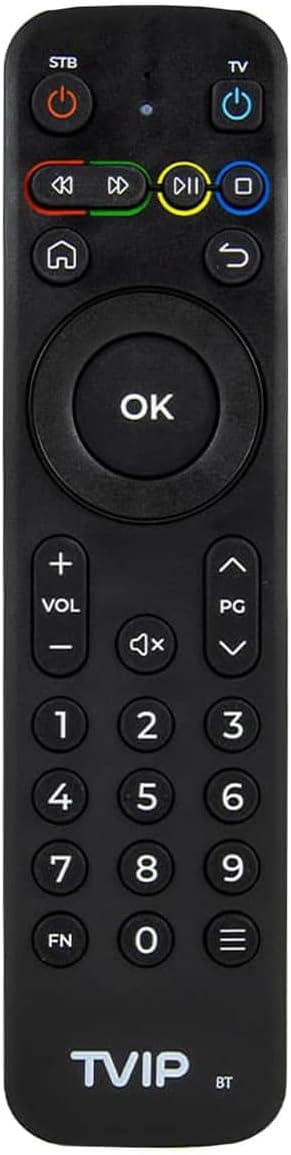
మూర్తి 4: The TVIP S-Box v.710 remote control, featuring power buttons for STB and TV, navigation keys, number pad, volume controls, and media playback buttons.
4. సెటప్
Follow these steps to set up your TVIP S-Box v.710.
4.1 మీ టెలివిజన్కి కనెక్ట్ చేయడం
- Connect one end of the provided HDMI cable to the HDMI 2.1 port on the TVIP S-Box v.710.
- Connect the other end of the HDMI cable to an available HDMI input port on your television. Note the HDMI input number (e.g., HDMI 1, HDMI 2).
4.2 Connecting to the Network
- For a stable connection, use an Ethernet cable. Connect one end of an Ethernet cable to the Ethernet (LAN) port on the TVIP S-Box v.710.
- ఈథర్నెట్ కేబుల్ యొక్క మరొక చివరను మీ రౌటర్ లేదా నెట్వర్క్ స్విచ్లో అందుబాటులో ఉన్న LAN పోర్ట్కు కనెక్ట్ చేయండి.
4.3 పవర్ కనెక్షన్
- Insert the small end of the power adapter into the DC port on the TVIP S-Box v.710.
- Plug the power adapter into a wall outlet. The device should power on automatically or enter standby mode.
4.4 ప్రారంభ సెటప్ విజార్డ్
- మీ టెలివిజన్ను ఆన్ చేసి, మీ టీవీ రిమోట్ని ఉపయోగించి సరైన HDMI ఇన్పుట్ సోర్స్ను ఎంచుకోండి.
- The TVIP S-Box v.710 will display a boot screen, followed by an initial setup wizard.
- Follow the on-screen prompts to configure language, display settings, and network settings.
5. ఆపరేటింగ్ సూచనలు
This section covers basic operation of your TVIP S-Box v.710.
5.1 ఇంటర్ఫేస్ను నావిగేట్ చేయడం
Use the included remote control to navigate the Android 11 interface:
- ఉపయోగించండి directional arrow keys to move between menu items.
- నొక్కండి OK button to select an item or confirm an action.
- నొక్కండి వెనుకకు button (curved arrow) to return to the previous screen.
- నొక్కండి హోమ్ button (house icon) to return to the main home screen.
5.2 మీడియా ప్లేబ్యాక్
The TVIP S-Box v.710 supports various media applications and services. To play 4K or HDR content, ensure you have compatible media files and a 4K/HDR compatible television.
5.3 Using USB and MicroSD Storage
You can connect external storage devices to your TVIP S-Box v.710:
- USB డ్రైవ్: Insert a USB flash drive or external hard drive into the USB 2.0 port. The device will typically detect it automatically, and you can access its contents via a file మేనేజర్ అప్లికేషన్.
- మైక్రో SD కార్డ్: Insert a MicroSD card into the MicroSD slot. Ensure it is inserted correctly. Access its contents using a file మేనేజర్ అప్లికేషన్.
6. నిర్వహణ
సరైన నిర్వహణ మీ పరికరం యొక్క దీర్ఘాయువు మరియు సరైన పనితీరును నిర్ధారిస్తుంది.
6.1 శుభ్రపరచడం
- శుభ్రపరిచే ముందు విద్యుత్ సరఫరా నుండి పరికరాన్ని డిస్కనెక్ట్ చేయండి.
- పరికరం యొక్క వెలుపలి భాగాన్ని తుడవడానికి మృదువైన, పొడి వస్త్రాన్ని ఉపయోగించండి.
- Do not use liquid cleaners, aerosols, or abrasive materials, as these can damage the finish or internal components.
6.2 సాఫ్ట్వేర్ నవీకరణలు
Periodically check for software updates to ensure your device has the latest features and security enhancements. Updates are typically managed through the device's settings menu under 'About device' or 'System updates'.
7. ట్రబుల్షూటింగ్
If you encounter issues with your TVIP S-Box v.710, refer to the following common problems and solutions.
7.1 శక్తి లేదు
- పవర్ అడాప్టర్ పరికరం మరియు పనిచేసే పవర్ అవుట్లెట్ రెండింటికీ సురక్షితంగా కనెక్ట్ చేయబడిందని నిర్ధారించుకోండి.
- అడాప్టర్ను వేరే అవుట్లెట్లోకి ప్లగ్ చేయడానికి ప్రయత్నించండి.
7.2 No Picture on TV
- Verify that the HDMI cable is securely connected to both the TVIP S-Box v.710 and your television.
- Ensure your television is set to the correct HDMI input source.
- మీ టీవీలో వేరే HDMI కేబుల్ లేదా HDMI పోర్ట్ని ప్రయత్నించండి.
7.3 రిమోట్ కంట్రోల్ స్పందించడం లేదు
- Ensure the AAA batteries in the remote control are correctly inserted and not depleted. Replace them if necessary.
- Point the remote directly at the front of the TVIP S-Box v.710, ensuring no obstructions.
7.4 నెట్వర్క్ కనెక్షన్ సమస్యలు
- Check that the Ethernet cable is securely connected to both the device and your router.
- Restart your router and the TVIP S-Box v.710.
- Verify your network settings in the device's system settings.
7.5 4K/HDR Playback Problems
- Ensure your television supports 4K UHD and HDR content.
- Verify that the media content you are trying to play is indeed 4K or HDR.
- Check your TV's settings to ensure HDR or enhanced HDMI input is enabled for the connected port.
8. స్పెసిఫికేషన్లు
Detailed technical specifications for the TVIP S-Box v.710.
| రిజల్యూషన్ | 4K HDR (3840x2160) |
| ప్రాసెసర్ | Amlogic S905W2 (Quad Core 1.8 GHz) |
| ఆపరేటింగ్ సిస్టమ్ | ఆండ్రాయిడ్ 11 |
| RAM | 1GB DDR |
| ఫ్లాష్ మెమరీ | 8GB eMMC |
| ఈథర్నెట్ | 10/100M RJ45 Network Port |
| వీడియో డీకోడర్లు | AV1, H.265(10bit), VP9, H.264, MPEG4 ASP, Xvid, MPEG2, MJPEG 2160p 60fps |
| ఆడియో డీకోడర్లు | MPEG/MP3/MPA, AAC, WMA, OGG, WAV, FLAC, APE |
| మద్దతు ఉన్న ప్రోటోకాల్లు | UDP, RTP, HTTP, HLS, MPEG-DASH, RTSP, SMB, NFS, DLNA |
| ఉపశీర్షికలు | DVBSUB, VOBSUB, Teletext, SSA/ASS, SubRip, MOV_TEXT, Webవీటీటీ |
| కనెక్టివిటీ | 1x HDMI 2.1, 1x USB 2.0, 1x MicroSD-Slot, 1x Ethernet (10/100 Mbit/s), 1x AV-Port, 1x DC-Port, 1x IR-Port |
| కొలతలు (WxHxD) | 67 x 67 x 15 మిమీ |
| బరువు | 70 గ్రా |
| ఆపరేటింగ్ ఉష్ణోగ్రత | 1°C - 40°C |
| తేమ | 5% - 93% |
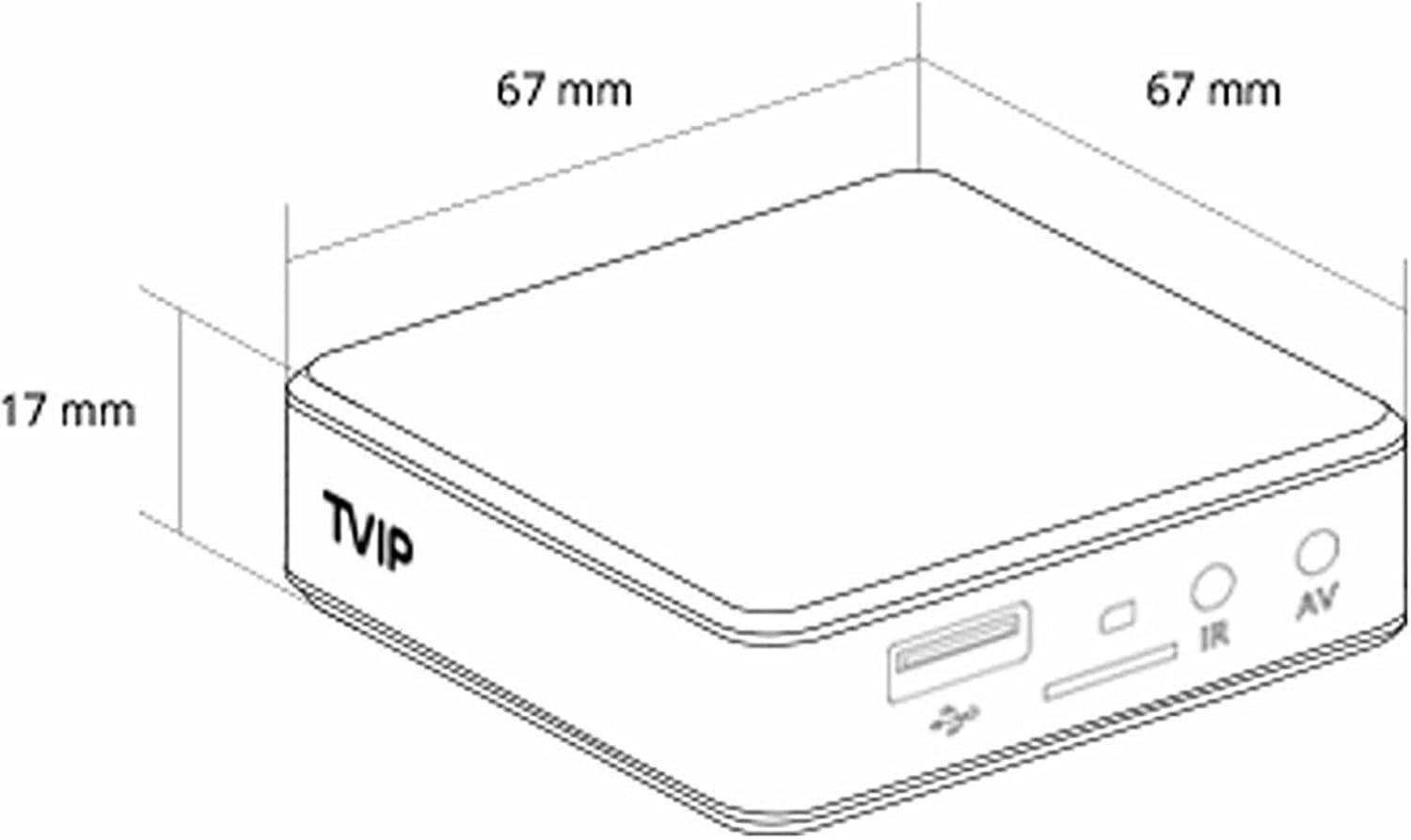
మూర్తి 5: Diagram illustrating the dimensions of the TVIP S-Box v.710 (67mm x 67mm x 17mm).
9. భద్రతా సమాచారం
దయచేసి క్రింది భద్రతా జాగ్రత్తలను గమనించండి:
- పరికరాన్ని నీరు లేదా తేమకు బహిర్గతం చేయవద్దు.
- పరికరాన్ని వేడి మూలాల దగ్గర లేదా ప్రత్యక్ష సూర్యకాంతిలో ఉంచడం మానుకోండి.
- పరికరాన్ని మీరే తెరవడానికి లేదా మరమ్మతు చేయడానికి ప్రయత్నించవద్దు. అన్ని సర్వీసింగ్లను అర్హత కలిగిన సిబ్బందికి సూచించండి.
- అందించిన పవర్ అడాప్టర్ను మాత్రమే ఉపయోగించండి.
- పరికరం మరియు ఉపకరణాలను పిల్లలకు అందుబాటులో లేకుండా ఉంచండి.
10. వారంటీ మరియు మద్దతు
Your TVIP S-Box v.710 comes with a standard manufacturer's warranty. For warranty claims or technical support, please contact your retailer or the official TVIP support channels. Keep your proof of purchase for warranty purposes.


