
పరిచయం
This manual provides detailed instructions for the safe operation and maintenance of your SYMA X660 Mini Drone. Please read this manual thoroughly before operating the drone to ensure proper use and to prevent damage or injury. Keep this manual for future reference.
ప్యాకేజీ విషయాలు
క్రింద జాబితా చేయబడిన అన్ని వస్తువులు మీ ప్యాకేజీలో చేర్చబడ్డాయని ధృవీకరించండి:
- 1 x SYMA X660 Drone
- 1 x రిమోట్ కంట్రోల్
- 1 x USB ఛార్జింగ్ కేబుల్
- 4 x అదనపు ప్రొపెల్లర్లు
- 1 x స్క్రూడ్రైవర్
- 1 x ఇన్స్ట్రక్షన్ మాన్యువల్

Image: Contents of the SYMA X660 Mini Drone package.
ఉత్పత్తి ముగిసిందిview
Drone Features
- 6-Color LED Light Display
- Full Propeller Guards for Safety
- కాంపాక్ట్ మరియు తేలికపాటి డిజైన్
- ఆల్టిట్యూడ్ హోల్డ్ ఫంక్షన్
- వన్-కీ టేకాఫ్/ల్యాండింగ్
- 3-Speed Modes
- హెడ్లెస్ మోడ్
- 360° Flips and other stunt modes
రిమోట్ కంట్రోల్ లేఅవుట్

Image: Remote control layout with functions for left joystick (light effects, trimming), right joystick (speed switch), spin button, rotate button, flip button, one-key takeoff/landing, and power switch.
- ఎడమ జాయ్స్టిక్: Short press to change light effects; press and hold for trimming adjustment. To clear trimming settings, press and hold simultaneously with the power button.
- కుడి జాయ్స్టిక్: Short press to switch between high and low speed modes.
- స్పిన్ బటన్: Initiates spin flight.
- రొటేట్ బటన్: Initiates rotary ascent.
- ఫ్లిప్ బటన్: Activates 360° flip stunt.
- వన్-కీ టేకాఫ్/ల్యాండింగ్ బటన్: For automatic takeoff and landing.
- పవర్ స్విచ్: రిమోట్ కంట్రోల్ను ఆన్/ఆఫ్ చేస్తుంది.
సెటప్
1. డ్రోన్ బ్యాటరీని ఛార్జ్ చేయడం
- Connect the drone's Type-C charging port to the USB charging cable.
- Connect the USB charging cable to a USB power adapter (not included) or a computer's USB port.
- The drone's LED lights will indicate charging status (refer to the full instruction manual for specific light patterns).
- ఛార్జింగ్ సమయం సుమారు 40 నిమిషాలు.
2. రిమోట్ కంట్రోల్ బ్యాటరీలను ఇన్స్టాల్ చేయడం
- రిమోట్ కంట్రోల్ వెనుక బ్యాటరీ కంపార్ట్మెంట్ను తెరవండి.
- Insert the required batteries (refer to the remote control for battery type and polarity).
- బ్యాటరీ కంపార్ట్మెంట్ను సురక్షితంగా మూసివేయండి.
3. డ్రోన్ మరియు రిమోట్ కంట్రోల్ జత చేయడం
- డ్రోన్ను చదునైన, స్థాయి ఉపరితలంపై ఉంచండి.
- డ్రోన్ పవర్ స్విచ్ ఆన్ చేయండి. డ్రోన్ LED లైట్లు వెలుగుతాయి.
- రిమోట్ కంట్రోల్ పవర్ స్విచ్ ఆన్ చేయండి.
- Push the left joystick fully up, then fully down. The drone's LED lights will stop flashing and remain solid, indicating successful pairing.
ఆపరేటింగ్ సూచనలు
ప్రాథమిక విమాన నియంత్రణలు

Image: Basic flight controls for the SYMA X660 Mini Drone.
- టేకాఫ్: Press the One-Key Takeoff/Landing button. The drone will automatically ascend and hover.
- లాండింగ్: వన్-కీ టేకాఫ్/ల్యాండింగ్ బటన్ను మళ్ళీ నొక్కండి. డ్రోన్ స్వయంచాలకంగా దిగి ల్యాండ్ అవుతుంది.
- ఆరోహణ/అవరోహణ: Use the left joystick to control altitude. Push up to ascend, pull down to descend.
- ముందుకు/వెనుకకు: Use the right joystick to move the drone forward or backward.
- Left/Right Turn: Use the right joystick to turn the drone left or right.
ప్రత్యేక లక్షణాలు
6-Color LED Light Display
The drone features 6 vibrant, switchable LED colors. Short press the left joystick on the remote control to cycle through the different light effects. The lights will blink rapidly when the battery is low, indicating it's time to land.

Image: SYMA X660 Mini Drone displaying its 6-color LED lights.
3-Speed Modes
The drone offers three adjustable speed settings. Short press the right joystick to switch between low, medium, and high speed modes. Beginners should start with the low speed mode.
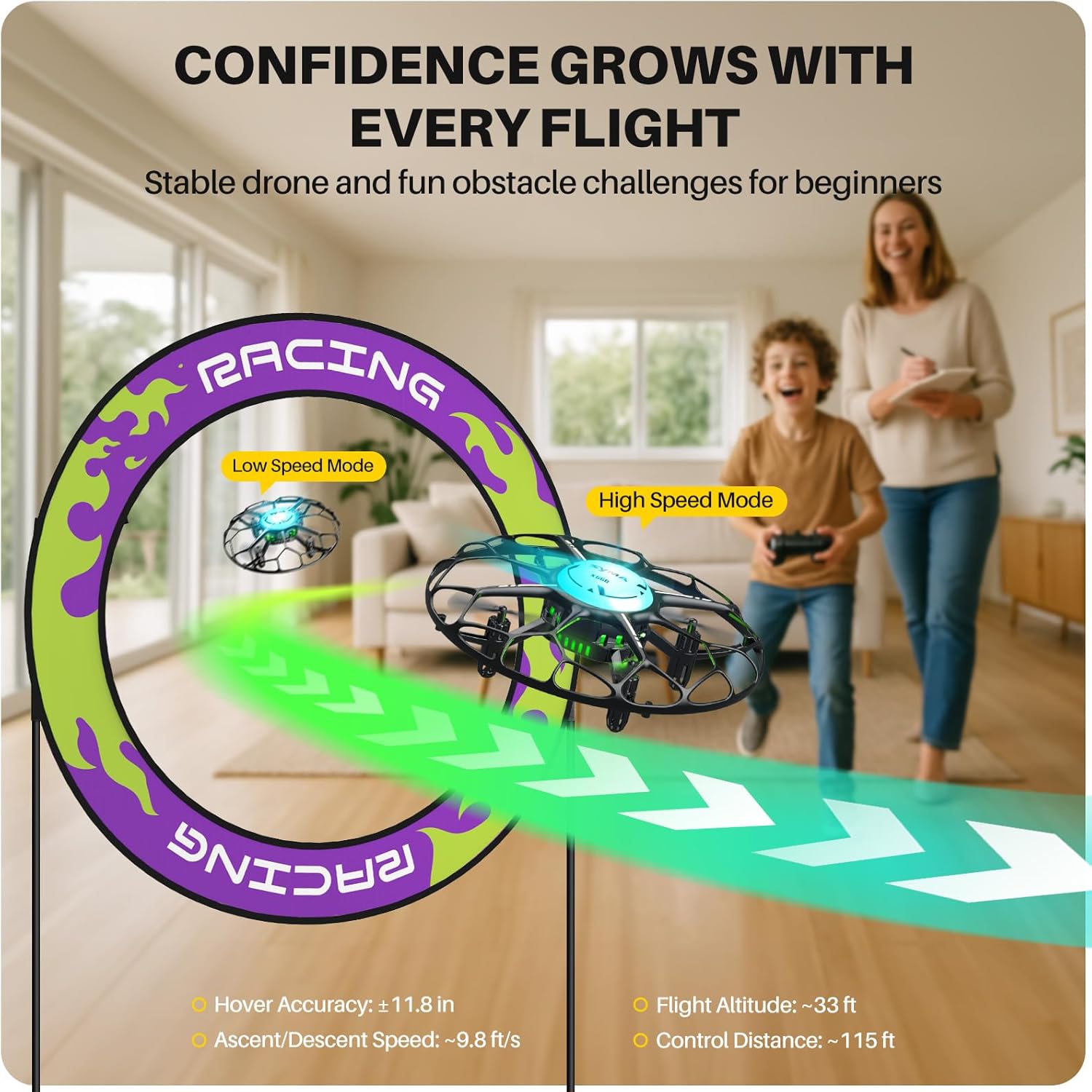
Image: Illustration of the drone's speed modes, showing a drone in low speed and high speed.
హెడ్లెస్ మోడ్
In Headless Mode, the drone's orientation is relative to the pilot, regardless of the drone's actual front direction. This simplifies control for beginners. Refer to the full instruction manual for activation and deactivation procedures.
వన్-టచ్ స్టంట్స్
The SYMA X660 Mini Drone can perform various aerial acrobatics with simple button presses:
- 360° ఫ్లిప్లు: Press the Flip button to execute a 360-degree roll.
- Rotary Ascent: Press the Rotate button to perform a spiraling climb.
- Spin Flight: Press the Spin button to make the drone spin while flying.
- Other stunts include Spin in Place, Diagonal Flip, and Self-spin and Orbital Flight.

Image: Visual guide to mastering 6 drone tricks.
నిర్వహణ
- శుభ్రపరచడం: Use a soft, dry cloth to clean the drone and remote control. Avoid using water or solvents.
- ప్రొపెల్లర్ ప్రత్యామ్నాయం: If propellers are damaged, use the included screwdriver to replace them with the spare propellers. Ensure correct propeller (A or B) is installed in the corresponding position.
- బ్యాటరీ సంరక్షణ: Do not overcharge or over-discharge the battery. Store the drone and battery in a cool, dry place when not in use. Remove batteries from the remote control if storing for extended periods.
- నిల్వ: Store the drone and its components in a safe place, away from direct sunlight and extreme temperatures.
ట్రబుల్షూటింగ్
| సమస్య | సాధ్యమైన కారణం | పరిష్కారం |
|---|---|---|
| డ్రోన్ రిమోట్ కంట్రోల్కు స్పందించదు. | Not paired; low battery in drone or remote. | Re-pair the drone and remote. Charge drone battery; replace remote control batteries. |
| అస్థిర విమాన ప్రయాణం లేదా కొట్టుకుపోవడం. | Drone not calibrated; damaged propellers. | Calibrate the drone on a flat surface. Replace damaged propellers. Adjust trimming settings. |
| చిన్న విమాన సమయం. | బ్యాటరీ పూర్తిగా ఛార్జ్ కాలేదు; పాత బ్యాటరీ. | Ensure battery is fully charged. Consider replacing the battery if it's old or degraded. |
| LED lights blinking rapidly. | Low drone battery. | Land the drone immediately and recharge the battery. |
For more detailed troubleshooting, please refer to the complete instruction manual included in your package.
స్పెసిఫికేషన్లు

Image: Product features and specifications overview.
| ఫీచర్ | వివరాలు |
|---|---|
| బ్రాండ్ | SYMA |
| మోడల్ పేరు | X660 |
| ఉత్పత్తి కొలతలు | 4.72"లీ x 4.72"వా x 1.77"హ |
| వస్తువు బరువు | 38 గ్రాములు (1.34 ఔన్సులు) |
| బ్యాటరీ కెపాసిటీ | 200 మిల్లీamp గంటలు (3.7V) |
| ఛార్జింగ్ సమయం | సుమారు 40 నిమిషాలు |
| విమాన సమయం | సుమారు 6 నిమిషాలు |
| రిమోట్ కంట్రోల్ దూరం | దాదాపు 115 అడుగులు |
| కనెక్టివిటీ టెక్నాలజీ | 2.4GHz |
| నైపుణ్యం స్థాయి | అనుభవశూన్యుడు |
| ప్రత్యేక లక్షణాలు | 6-Color LED Light Display, Kid-Safe Design, Stunt Modes, Altitude Hold |
అధికారిక ఉత్పత్తి వీడియో
Video: An official product video demonstrating the features and operation of the SYMA X660 Mini Drone.
వారంటీ సమాచారం
Specific warranty details for the SYMA X660 Mini Drone are typically provided with the product packaging or on the manufacturer's official website. Please refer to those sources for the most accurate and up-to-date warranty information.
మద్దతు మరియు సంప్రదించండి
If you encounter any issues or have questions regarding your SYMA X660 Mini Drone, please contact our customer support team:
- ఇమెయిల్: usa@symatoys.com (USA)
- ఫోన్: +1 (718) 312-0558
For additional resources, you may visit the official SYMA webసైట్.