
పరిచయం
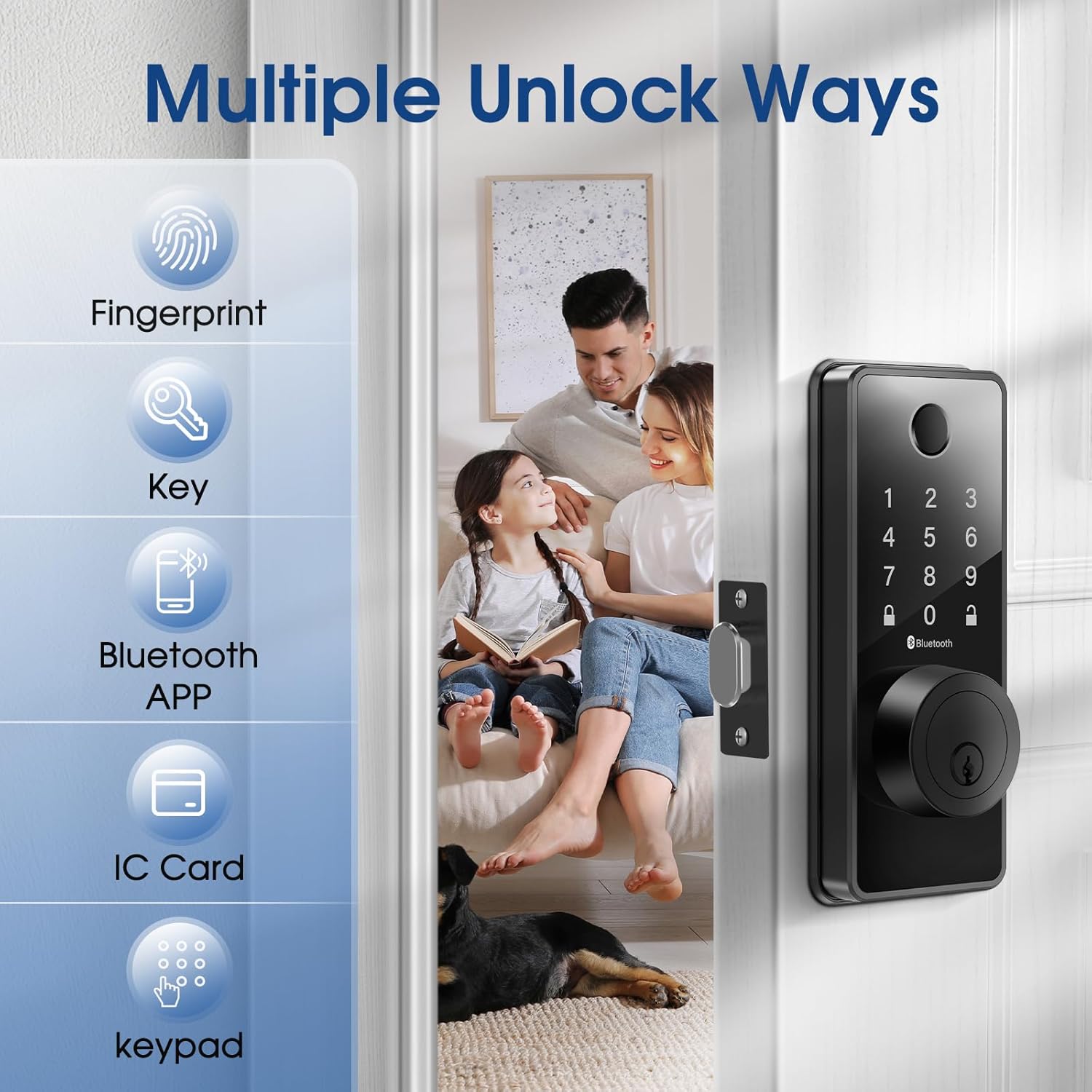
Welcome to the ELAMOR Smart Lock M12 user manual. This guide provides detailed instructions for the installation, operation, and maintenance of your new smart lock. The ELAMOR M12 offers multiple unlocking methods including fingerprint, touchscreen password, physical keys, fobs, dynamic E-keys, and Bluetooth App control, enhancing your home security and convenience.

The ELAMOR Smart Lock M12, shown with its sleek matte black finish, features a numeric keypad, fingerprint scanner, and traditional key entry. Included are two physical keys and two key fobs, along with a view of the mobile application for smart control.
పెట్టెలో ఏముంది
ఇన్స్టాలేషన్ ప్రారంభించే ముందు అన్ని భాగాలు ఉన్నాయని నిర్ధారించుకోండి.
- ఎంట్రీ కీలు
- 3/4"(19mm) Screws (4 pcs)
- 3/4"(19mm) Screws (2 pcs, Preinstalled)
- 1-5/32"(33mm) Screws (2 pcs)
- డెడ్బోల్ట్ గొళ్ళెం
- డెడ్బోల్ట్ స్ట్రైక్ ప్లేట్
- బకిల్ బాక్స్
- కీప్యాడ్ అసెంబ్లీ
- అంతర్గత అసెంబ్లీ
- Mounting Plate (Preinstalled)
A visual representation of all parts included in the ELAMOR Smart Lock M12 package, including the exterior keypad assembly, interior assembly, deadbolt latch, strike plate, mounting plate, physical keys, and key fobs.
ఉత్పత్తి లక్షణాలు
| ఫీచర్ | వివరాలు |
|---|---|
| బ్రాండ్ | ఎలమోర్ |
| మోడల్ పేరు | M12 |
| రంగు | మాట్ బ్లాక్ |
| మెటీరియల్ | జింక్ |
| వస్తువు బరువు | 2.9 పౌండ్లు |
| ఉత్పత్తి కొలతలు | 7.55 x 5.59 x 4.4 అంగుళాలు |
| లాక్ రకం | బయోమెట్రిక్ |
| ప్రత్యేక లక్షణాలు | Touchscreen, Fingerprint, Passcode Unlock, Weather Resistant, Auto-Lock |
| కనెక్టివిటీ ప్రోటోకాల్ | బ్లూటూత్ |
| బ్యాటరీలు అవసరం | అవును (4x AA, చేర్చబడలేదు) |
| జలనిరోధిత స్థాయి | IP54 |
| ANSI గ్రేడ్ | 3 |

A technical diagram illustrating the precise dimensions of the ELAMOR Smart Lock M12 components and the required door specifications for proper installation, including backset, door edge hole, and door thickness.
సెటప్ & ఇన్స్టాలేషన్
The ELAMOR Smart Lock M12 is designed for easy installation, typically taking about 15 minutes. Follow these steps carefully.
ఇన్స్టాలేషన్ వీడియో గైడ్
An official installation guide video demonstrating the step-by-step process of setting up the ELAMOR M12 Smart Lock, from preparing the door to securing the components.
డోర్ తయారీ
- మీ తలుపు కింది స్పెసిఫికేషన్లకు అనుగుణంగా ఉందని నిర్ధారించుకోండి:
- Backset: 2-3/8" or 2-3/4" (60 or 70 mm)
- Door Edge Hole: 1" (25 mm)
- Door Thickness: 1-3/8" to 2" (35 mm to 50 mm)
దశల వారీ సంస్థాపన
Step 1: Install the Latch Bolt
Twist the latch to adjust the bolt length if necessary, ensuring the latch bolt is retracted. Insert the latch bolt into the door, making sure the T-shaped hole is in the bottom position.

A close-up image showing a hand inserting the deadbolt latch into the pre-drilled hole on the door edge, a crucial first step in the smart lock installation process.
దశ 2: బాహ్య అసెంబ్లీని ఇన్స్టాల్ చేయండి
Route the cable through the door. Feed the tail of the exterior assembly through the T-shaped hole and the stud through the latch. Ensure the key is pulled out when installing and gently push the keypad onto the door.
దశ 3: మౌంటు ప్లేట్ను ఇన్స్టాల్ చేయండి
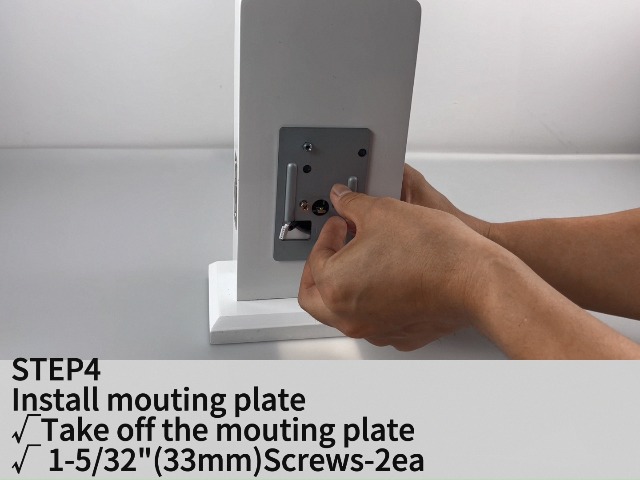
Take off the mounting plate from the interior assembly. Secure the mounting plate to the door using the provided 1-5/32" (33mm) screws.
దశ 4: ఇంటీరియర్ అసెంబ్లీని ఇన్స్టాల్ చేయండి
Ensure a tight cable connection between the exterior and interior assemblies. Feed the tail of the exterior assembly into the T-shaped hole of the interior assembly. Carefully align and attach the interior assembly to the mounting plate.
దశ 5: బ్యాటరీలను వ్యవస్థాపించండి
Open the battery cover on the interior assembly. Insert 4 AA batteries, ensuring correct polarity. Close the battery cover.
Step 6: Test Operation
After installation, test the lock/unlock process. Press the lock key on the keypad; the latch bolt should extend. To unlock, use the default user code (e.g., 123456) or a physical key.
An image depicting the ease of installation for the ELAMOR Smart Lock M12, with a person using a screwdriver to secure the lock components to a door.
ఆపరేటింగ్ సూచనలు
అన్లాకింగ్ పద్ధతులు
వేలిముద్ర అన్లాక్
మీ నమోదిత వేలిని వేలిముద్ర సెన్సార్పై ఉంచండి. వేలిముద్ర గుర్తించబడితే లాక్ అన్లాక్ అవుతుంది.

An illustration showing a finger being placed on the fingerprint sensor of the ELAMOR Smart Lock M12, highlighting the quick identification and unlock times.
Touchscreen Keypad Unlock
Enter your valid passcode on the touchscreen keypad, then press the unlock key.
భౌతిక కీ అన్లాక్
భౌతిక కీని కీహోల్లోకి చొప్పించి, అన్లాక్ చేయడానికి తిరగండి.
బ్లూటూత్ యాప్ నియంత్రణ
Download and install the "Smart Life" app. Pair your lock with the app via Bluetooth. Use the app to remotely lock/unlock, manage users, and view access logs.

A visual representation of the Smart Life app interface, demonstrating various control features for the ELAMOR Smart Lock M12, including keyless entry, member management, temporary passwords, automatic lock settings, unlocking records, and door lock alarms.
ఒక వీడియో ప్రదర్శనasing the various functionalities of the ELAMOR M12 Bluetooth Smart Lock, including different unlocking methods and app control features.
ఆటోమేటిక్ లాకింగ్
The lock features an automatic locking function. You can set the auto-lock delay time through the Smart Life App. If the door is left open or unlocked, it will automatically lock after the set time.

An image illustrating the automatic locking feature of the ELAMOR Smart Lock M12, showing the deadbolt extending automatically to secure the door.
నిర్వహణ
బ్యాటరీ భర్తీ
When the battery is low, the lock will provide a low battery alarm. Replace all four AA batteries promptly to ensure continuous operation. In case of complete battery exhaustion, use the emergency charging port (USB-A) to temporarily power the lock.

An image highlighting the long-lasting battery life (10 months standby) and the emergency USB-A charging port of the ELAMOR Smart Lock M12, along with its IP54 waterproof rating and low battery alarm feature.
క్లీనింగ్
Clean the touchscreen and fingerprint sensor regularly with a soft, dry cloth to ensure optimal performance. Avoid using abrasive cleaners or solvents.
వాతావరణ నిరోధకత
The ELAMOR Smart Lock M12 has an IP54 waterproof rating, providing reliable protection against water damage. However, avoid direct exposure to heavy rain or prolonged submersion.
ట్రబుల్షూటింగ్
| సమస్య | సాధ్యమైన కారణం | పరిష్కారం |
|---|---|---|
| లాక్ స్పందించడం లేదు | తక్కువ బ్యాటరీలు | Replace batteries or use emergency charging. |
| వేలిముద్ర గుర్తించబడలేదు | Dirty sensor/finger, unregistered fingerprint | Clean sensor/finger, re-register fingerprint. |
| కీప్యాడ్ స్పందించడం లేదు | Incorrect code, temporary lockout | Enter correct code, wait for lockout period to end. |
| ఆటో-లాక్ పనిచేయడం లేదు | Feature disabled, incorrect settings | Enable auto-lock in Smart Life App, adjust delay time. |
| యాప్ కనెక్టివిటీ సమస్యలు | Bluetooth off, lock out of range, app glitch | Ensure Bluetooth is on, move closer to lock, restart app. |
| Latch bolt not extending/retracting fully | Misalignment, obstruction | Check alignment of lock components, remove any obstructions. |
For further assistance, please refer to the official user guide PDF or contact customer support.
వారంటీ & మద్దతు
The ELAMOR Smart Lock M12 comes with a 1-year warranty.
For technical support or warranty claims, please visit the ELAMOR Store లేదా మీ ఉత్పత్తి ప్యాకేజింగ్లో అందించిన సంప్రదింపు సమాచారాన్ని చూడండి.
You can also download the full user manual in PDF format here: ELAMOR Smart Lock User Manual (PDF)

Contact ELAMOR support for assistance.