
1. పరిచయం మరియు ఓవర్view
The UGREEN Uno 65W GaN USB-C Charger is a compact and efficient multi-port charging device. Utilizing advanced GaN (Gallium Nitride) technology, it offers high power output in a smaller form factor, reducing energy loss and heat generation during operation. This charger features an interactive LED display that indicates the charging status, providing a clear visual cue.
Equipped with two USB-C ports and one USB-A port, it supports various fast charging protocols, making it compatible with a wide range of devices including laptops, tablets, and smartphones. Integrated multiple safety features protect against short circuits, overcharging, overheating, and overvoltage, ensuring safe and reliable charging.

Image 1.1: UGREEN Uno 65W GaN USB-C Charger, showcasing దాని కాంపాక్ట్ డిజైన్.
2. భద్రతా సమాచారం
- ఛార్జర్ను ద్రవాలు, తేమ లేదా తీవ్రమైన ఉష్ణోగ్రతలకు గురిచేయవద్దు.
- ఛార్జర్ను పడవేయడం లేదా బలమైన ప్రభావాలకు గురిచేయడం మానుకోండి.
- Do not disassemble, modify, or attempt to repair the charger. This may void the warranty and pose safety risks.
- Ensure proper ventilation when using the charger. Do not cover it with clothing or other materials.
- ఛార్జర్తో అనుకూలమైన కేబుల్లు మరియు పరికరాలను మాత్రమే ఉపయోగించండి.
- పిల్లలకు దూరంగా ఉంచండి.
- ఉపయోగంలో లేనప్పుడు లేదా విద్యుత్ తుఫానుల సమయంలో పవర్ అవుట్లెట్ నుండి ఛార్జర్ను అన్ప్లగ్ చేయండి.
3. ప్యాకేజీ విషయాలు
దయచేసి ఈ క్రింది అంశాల కోసం ప్యాకేజీని తనిఖీ చేయండి:
- UGREEN Uno 65W GaN USB-C Charger (Model CD361)
- వినియోగదారు మాన్యువల్
4. ఉత్పత్తి లక్షణాలు
- 65W గరిష్ట అవుట్పుట్: అనుకూల పరికరాల వేగవంతమైన ఛార్జింగ్ కోసం 65W వరకు శక్తిని అందిస్తుంది.
- GaNFast Technology: High-efficiency power conversion (95%) for reduced heat and compact size.
- 3-in-1 Multi-Port Design: Features 2 USB-C ports and 1 USB-A port for simultaneous charging of multiple devices.
- LED డిస్ప్లే: An interactive LED screen indicates the current charging status.
- అధునాతన భద్రతా వ్యవస్థ: Built-in protections against short circuits, overcharging, overheating, and overvoltage.
- Removable Magnetic Feet: Provides stability and a unique aesthetic.
- విస్తృత అనుకూలత: Supports a wide range of devices including laptops, tablets, and smartphones from various brands.

చిత్రం 4.1: వివరణాత్మకమైనది view of the charger's ports, magnetic feet, and LED display.
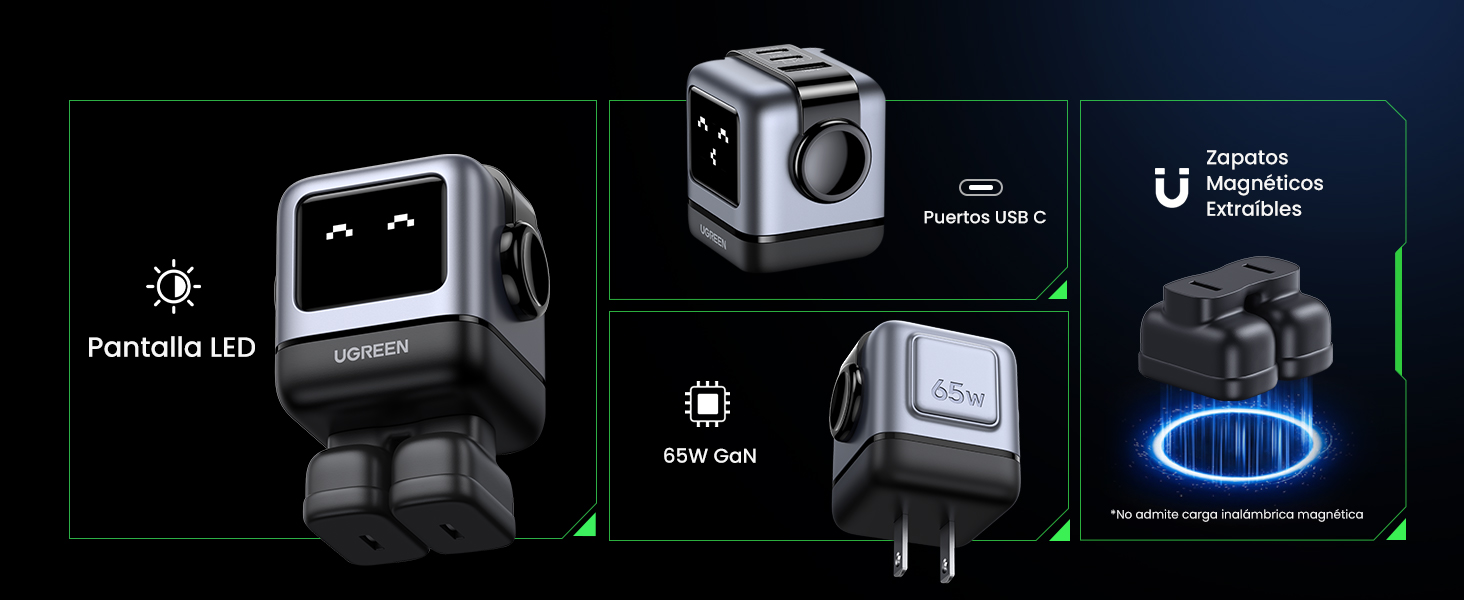
Image 4.2: The charger's LED display showing charging status.
5. సెటప్
- ఛార్జర్ని అన్ప్యాక్ చేయండి: Carefully remove the UGREEN Uno 65W GaN USB-C Charger from its packaging.
- Attach Magnetic Feet (Optional): If desired, attach the removable magnetic feet to the bottom of the charger for added stability.
- పవర్ అవుట్లెట్కి కనెక్ట్ చేయండి: Plug the charger into a standard wall power outlet (AC 100-240V, 50/60Hz).
- ఉపయోగం కోసం సిద్ధంగా ఉంది: The charger is now ready to connect your devices.
6. ఆపరేటింగ్ సూచనలు
6.1 కనెక్ట్ చేసే పరికరాలు
- Use a compatible USB-C to USB-C cable for devices that support USB-C charging.
- Use a compatible USB-A to [device connector] cable for devices that charge via USB-A.
- Connect the appropriate cable to one of the charger's ports (2x USB-C, 1x USB-A).
- కేబుల్ యొక్క మరొక చివరను మీ పరికరానికి కనెక్ట్ చేయండి.
6.2 విద్యుత్ పంపిణీ
The charger intelligently distributes power based on the connected devices and their charging requirements:
- సింగిల్ పోర్ట్ వినియోగం: When only one USB-C port is used, it can deliver up to 65W (e.g., charging a MacBook Air M2 from 0% to 51% in approximately 30 minutes).
- బహుళ పోర్ట్ వినియోగం: When multiple ports are in use, the 65W total power is dynamically distributed. For example, if both USB-C ports are used, one might provide 45W for a laptop and the other 20W for a mobile device.
- USB-A పోర్ట్: The USB-A port provides standard charging output, typically up to 18W, depending on the device.
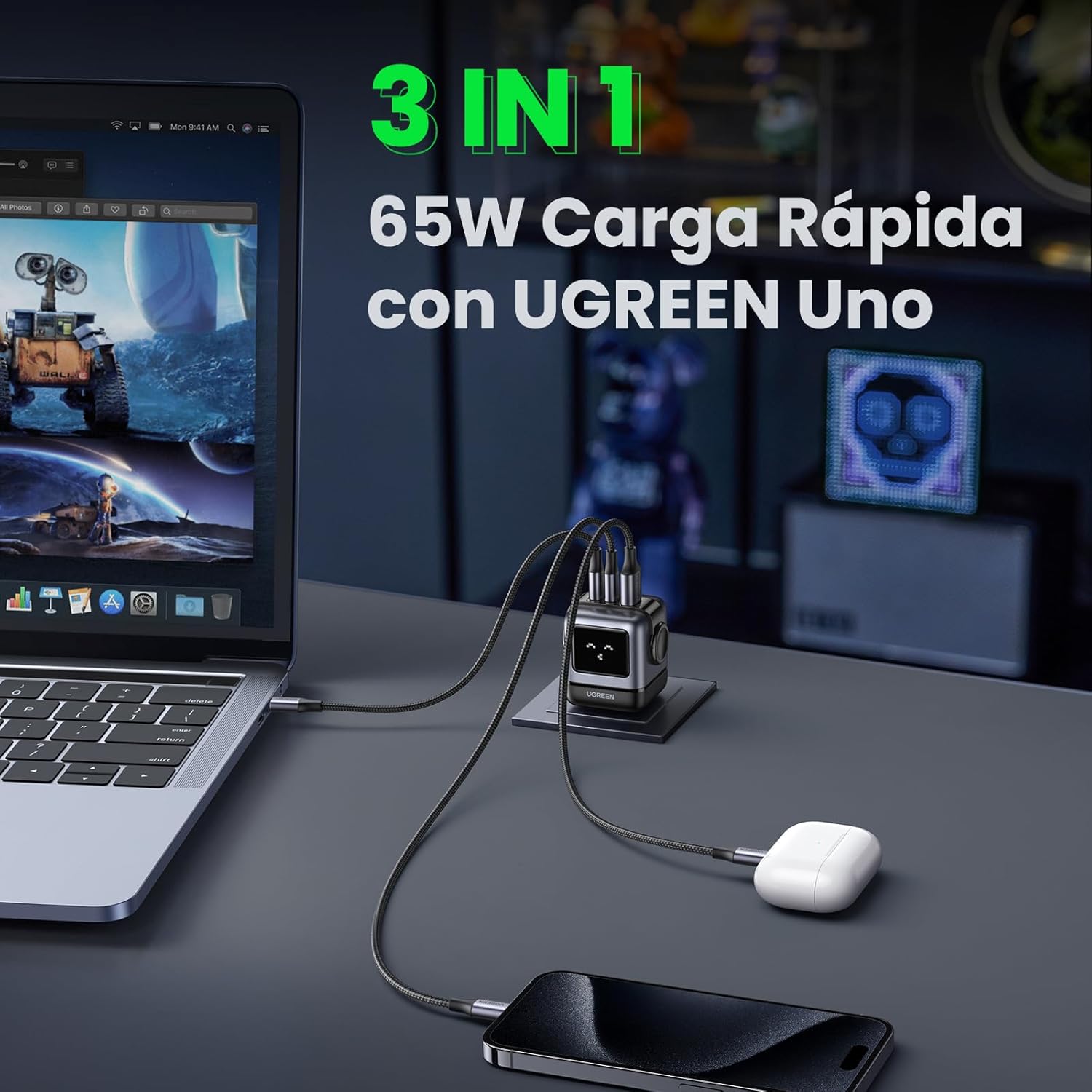
Image 6.1: The charger simultaneously charging a laptop, smartphone, and earbuds.
6.3 LED Display Indications
The LED display on the charger provides visual feedback on its operational status:
- ఛార్జింగ్: The LED display will show an animation or specific icon indicating that a device is actively charging.
- పూర్తిగా ఛార్జ్ చేయబడింది: Once a connected device reaches full charge, the LED display will change to indicate completion.
- నిష్క్రియ: When no devices are connected or charging, the display may show a standby indicator.

Image 6.2: Comparison of the LED display during charging and when fully charged.
గమనిక: The charger is not compatible with 60W fast charging for the Samsung S26 Ultra; it will charge at a maximum of 45W PPS for this device.
7. నిర్వహణ
- శుభ్రపరచడం: శుభ్రపరిచే ముందు పవర్ అవుట్లెట్ నుండి ఛార్జర్ను డిస్కనెక్ట్ చేయండి. ఉపరితలాన్ని తుడవడానికి మృదువైన, పొడి వస్త్రాన్ని ఉపయోగించండి. లిక్విడ్ క్లీనర్లు లేదా ఏరోసోల్లను ఉపయోగించవద్దు.
- నిల్వ: ఛార్జర్ను ప్రత్యక్ష సూర్యకాంతి మరియు విపరీతమైన ఉష్ణోగ్రతల నుండి దూరంగా చల్లని, పొడి ప్రదేశంలో నిల్వ చేయండి.
- కేబుల్ కేర్: Avoid bending or twisting charging cables excessively, as this can damage them.
8. ట్రబుల్షూటింగ్
| సమస్య | సాధ్యమైన కారణం | పరిష్కారం |
|---|---|---|
| పరికరం ఛార్జ్ అవ్వడం లేదు. | 1. Charger not plugged in. 2. Cable is faulty. 3. Device is incompatible or port is damaged. | 1. Ensure the charger is securely plugged into a live power outlet. 2. Try a different charging cable. 3. Test with another device or try a different port on the charger. |
| నెమ్మదిగా ఛార్జింగ్ అవుతోంది. | 1. Using a non-fast charging cable. 2. Multiple devices connected, distributing power. 3. Device does not support fast charging. 4. Device requires higher PPS than provided (e.g., S26 Ultra). | 1. Use a high-quality, fast-charging compatible cable. 2. Disconnect other devices to allow maximum power to a single device. 3. Verify your device supports fast charging. 4. Note that some devices may not achieve their absolute maximum charging speed if they require specific PPS profiles not fully supported by the charger. |
| ఛార్జర్ వెచ్చగా అనిపిస్తుంది. | సాధారణ ఆపరేషన్, ముఖ్యంగా అధిక-శక్తి ఛార్జింగ్ సమయంలో. | The charger is designed with thermal protection. If it becomes excessively hot, disconnect it and allow it to cool. Ensure adequate ventilation. |
| LED display not working or showing incorrect status. | తాత్కాలిక సాఫ్ట్వేర్ లోపం లేదా విద్యుత్ సమస్య. | Unplug the charger from the wall outlet, wait a few seconds, and plug it back in. If the issue persists, contact customer support. |
9. స్పెసిఫికేషన్లు
| ఫీచర్ | వివరాలు |
|---|---|
| బ్రాండ్ | ఉగ్రీన్ |
| మోడల్ సంఖ్య | CD361 |
| కనెక్టర్ రకం | USB టైప్-C |
| అనుకూల పరికరాలు | Game consoles, Laptops, Smartphones, Tablets (e.g., iPhone 8-17 Series, Galaxy S10-S24 Series, Pixel 8/7/6, MacBook Air/Pro, iPad Pro/Air/mini, Watch 8/7, HomePod, AirPods Pro) |
| ఇన్పుట్ వాల్యూమ్tage | 240 Volts (AC 100-240V) |
| Ampఎరేజ్ | 3.25 Ampఈరెస్ |
| మొత్తం USB పోర్ట్లు | 3 (2x USB-C, 1x USB-A) |
| గరిష్ట పవర్ అవుట్పుట్ | 65 వాట్స్ |
| అవుట్పుట్ కరెంట్ | 5 Ampఈరెస్ |
| అవుట్పుట్ వాల్యూమ్tage | 5 వోల్ట్లు |
| శక్తి మూలం | వైర్డ్ ఎలక్ట్రిక్ |
| ఫ్రీక్వెన్సీ రేంజ్ | 50-60 Hz |
| ప్రధాన పవర్ కనెక్టర్ రకం | 2-pin (North America Type A) |
| పోర్టబుల్ | అవును |
| వస్తువు బరువు | 146 గ్రాములు |
| బాహ్య పదార్థం | GaN |
| ఫారమ్ ఫ్యాక్టర్ | Robot-shaped |
10. వారంటీ మరియు మద్దతు
10.1 వారంటీ సమాచారం
This UGREEN product is covered by an 18 నెలల వారంటీ కొనుగోలు చేసిన తేదీ నుండి. ఈ వారంటీ తయారీ లోపాలు మరియు సాధారణ వినియోగం వల్ల తలెత్తే సమస్యలను కవర్ చేస్తుంది. దుర్వినియోగం, ప్రమాదాలు, అనధికార మార్పులు లేదా ప్రకృతి వైపరీత్యాల వల్ల కలిగే నష్టాన్ని ఇది కవర్ చేయదు.
వారంటీ క్లెయిమ్ల కోసం దయచేసి మీ కొనుగోలు రుజువును ఉంచుకోండి.
10.2 కస్టమర్ మద్దతు
For technical support, warranty claims, or any questions regarding your UGREEN Uno 65W GaN USB-C Charger, please contact UGREEN customer service through the following channels:
- ఉగ్రీన్ అధికారికం Webసైట్: సందర్శించండి www.ugreen.com తరచుగా అడిగే ప్రశ్నలు, మద్దతు వనరులు మరియు సంప్రదింపు సమాచారం కోసం.
- ఇమెయిల్ మద్దతు: అధికారిక పేజీలోని కాంటాక్ట్ విభాగాన్ని చూడండి. website for the appropriate email address.
- ఆన్లైన్ రిటైలర్ మద్దతు: If purchased from an online retailer, you may also contact their customer service for assistance.