
1. పరిచయం
This manual provides essential information for the installation, operation, and maintenance of your KiriNavi Qualcomm Car Radio. This advanced head unit features an Android 13 operating system, an 8-core CPU, 4GB RAM, and 64GB ROM, offering enhanced performance and a 12.1-inch 2K IPS touch screen. It integrates seamlessly with your vehicle's existing systems, providing modern connectivity and entertainment options.
సరైన కార్యాచరణను నిర్ధారించడానికి మరియు ఉత్పత్తితో మీ అనుభవాన్ని పెంచుకోవడానికి దయచేసి ఇన్స్టాలేషన్ మరియు ఉపయోగం ముందు ఈ మాన్యువల్ను పూర్తిగా చదవండి.
2. వాహన అనుకూలత
This KiriNavi car radio is specifically designed for the following Ford truck models:
- Ford F250 (2009-2012)
- Ford F350 (2009-2012)
- Ford F450 (2009-2016)
- Ford F650 (2009-2016)
ముఖ్యమైన గమనిక:
This unit is compatible ONLY with vehicles that DO NOT have the SYNC 2 System. Please verify your vehicle's current AC control panel configuration to ensure compatibility. Refer to the image below for visual guidance.

Image: Visual guide for compatible (top) and incompatible (bottom) AC control panels. Units with the specified AC control (red X) are not compatible.
3. ప్యాకేజీ విషయాలు
ప్యాకేజీని తెరిచినప్పుడు, కింది అన్ని భాగాలు ఉన్నాయని నిర్ధారించుకోండి:
- 1x KiriNavi Android Head Unit
- 1x GPS యాంటెన్నా
- 1x Power Cable and other necessary cables and plugs
- 1x బాహ్య మైక్రోఫోన్
- 1x Backup Camera

చిత్రం: పైగాview of the head unit's rear connections and all included wiring harnesses and accessories.
4. సెటప్ మరియు ఇన్స్టాలేషన్
The KiriNavi car radio is designed for a standard fit, eliminating the need for additional accessories. Installation typically involves removing the existing stereo and connecting the new unit using the provided wiring harnesses.
4.1 ప్రీ-ఇన్స్టాలేషన్ చెక్
- Confirm your vehicle's compatibility as detailed in Section 2.
- Ensure the vehicle's battery is disconnected before beginning installation to prevent electrical damage.
- Familiarize yourself with the included cables and their corresponding ports on the head unit and your vehicle.
4.2 ఇన్స్టాలేషన్ దశలు (జనరల్ గైడ్)
- Carefully remove the existing factory radio and trim panels from your dashboard.
- Connect the main power harness from the KiriNavi unit to your vehicle's wiring. The connectors are designed to be plug-and-play, with different sizes preventing incorrect connections.
- Connect the GPS antenna, external microphone, and backup camera cables to their respective ports on the head unit.
- Route all cables neatly to avoid interference and ensure a clean installation.
- Mount the KiriNavi head unit into the dashboard opening.
- Reconnect the vehicle's battery and test the unit's functionality before fully reassembling the dashboard trim.

Image: A visual comparison showing the factory radio setup (bottom) and the KiriNavi unit installed (top) in a Ford F-Series truck dashboard.
For detailed, vehicle-specific installation instructions, it is recommended to consult a professional installer or refer to your vehicle's service manual.
5. ఆపరేటింగ్ సూచనలు
The KiriNavi car radio offers a wide range of features powered by Android 13. Below are instructions for key functionalities.
5.1 పవర్ ఆన్/ఆఫ్ మరియు బేసిక్ నావిగేషన్
- పవర్ ఆన్: The unit will power on automatically when the vehicle's ignition is turned on.
- పవర్ ఆఫ్: The unit will power off automatically when the vehicle's ignition is turned off.
- టచ్ స్క్రీన్: Navigate through menus and applications using the responsive 12.1-inch touch screen.
5.2 ఆపిల్ కార్ప్లే మరియు ఆండ్రాయిడ్ ఆటో
The unit supports both wireless and wired Apple CarPlay and Android Auto. This allows for seamless integration with your smartphone, providing access to navigation, phone contacts, messages, music, and more.
- కనెక్షన్: Connect your smartphone via USB for wired connection or wirelessly via Bluetooth and Wi-Fi.
- వాయిస్ నియంత్రణ: Utilize Siri or Google Assistant for hands-free operation, allowing you to stay focused on the road.
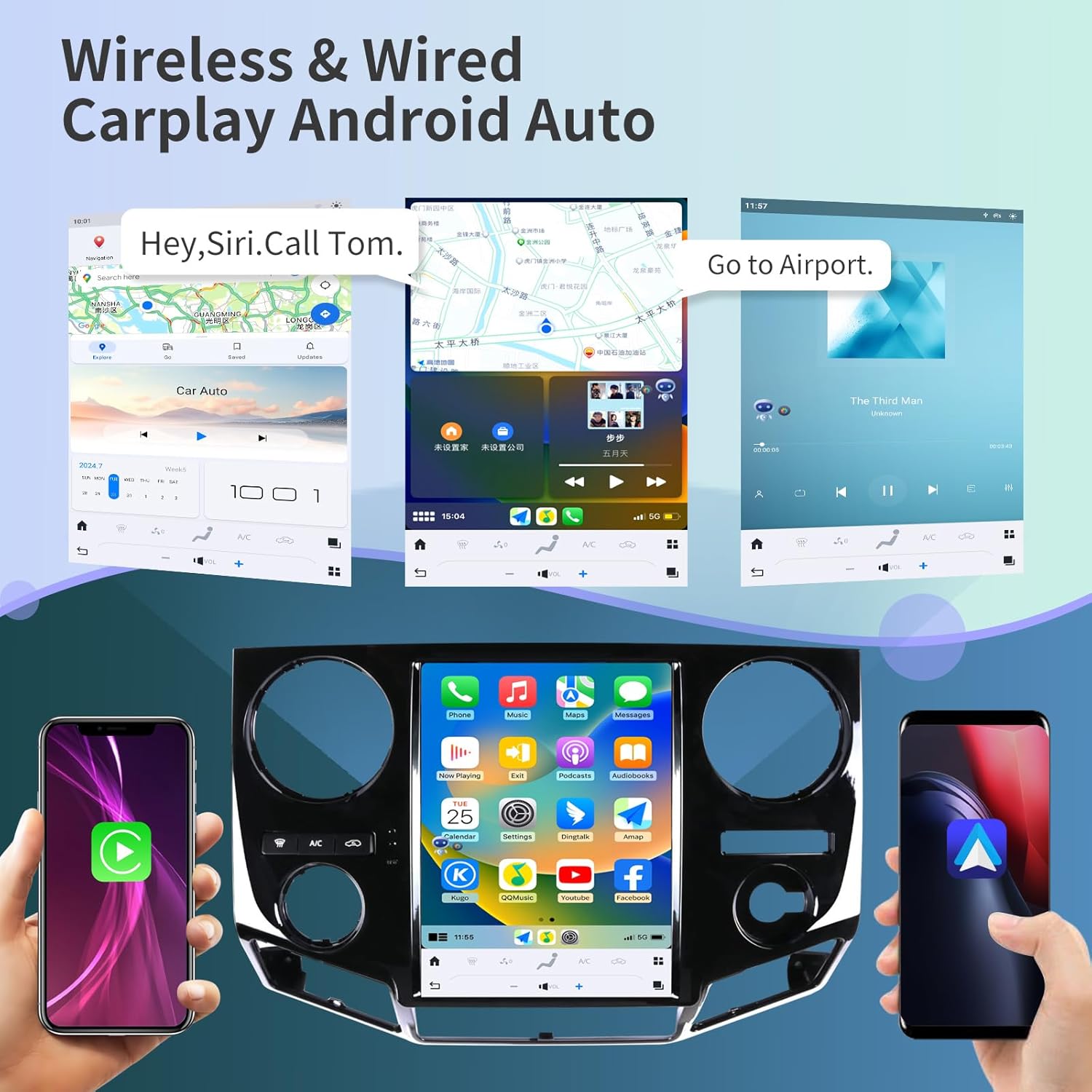
చిత్రం: ఉదాamples of Apple CarPlay and Android Auto interfaces displayed on the head unit, showing navigation and music playback.
5.3 GPS నావిగేషన్
The unit features a built-in GPS module with support for both online and offline maps, utilizing GPS + GLONASS for high-precision navigation.
- Map Applications: Compatible with popular navigation apps such as Apple Maps, Google Maps, and Waze.
- Online/Offline: Download offline maps for navigation without an internet connection, or use online maps for real-time traffic updates.

Image: The head unit displaying various navigation application icons and indicating Wi-Fi and 4G network capabilities.
5.4 Wi-Fi & 4G Network Connectivity
Access the internet via Wi-Fi or a 4G network (SIM card required for 4G, not included) to enhance your in-car experience.
- Online Content: Stream online videos, browse the web, and download applications from the app store (e.g., YouTube, Netflix, Facebook).
- హాట్స్పాట్: Connect to your smartphone's hotspot for internet access.
5.5 బ్లూటూత్ 5.0
The integrated Bluetooth 5.0 module enables wireless audio streaming and hands-free calling.
- హ్యాండ్స్-ఫ్రీ కాలింగ్: Make and receive calls safely using the external microphone and the unit's display.
- ఆడియో స్ట్రీమింగ్: Play music from your Bluetooth-enabled devices.
- Contact Sync: Sync your phone contacts for easy access.
5.6 స్టీరింగ్ వీల్ నియంత్రణ
ఈ యూనిట్ మీ వాహనం యొక్క అసలు స్టీరింగ్ వీల్ నియంత్రణలకు మద్దతు ఇస్తుంది, మీ చేతులను చక్రం నుండి తీయకుండానే ఆడియో, కాల్లు మరియు ఇతర విధులను నిర్వహించడానికి మిమ్మల్ని అనుమతిస్తుంది.
- కాన్ఫిగరేషన్: The unit can be configured to learn and map your vehicle's steering wheel buttons. Refer to the unit's settings menu for steering wheel control setup.

Image: The head unit displaying the interface for configuring steering wheel controls, alongside a view of the backup camera in action.
5.7 బ్యాకప్ కెమెరా కార్యాచరణ
The included HD backup camera provides a 170° wide viewing angle and night vision capabilities, enhancing safety during reversing maneuvers.
- స్వయంచాలక ప్రదర్శన: The camera feed automatically appears on the unit's screen when the vehicle is shifted into reverse.
- రాత్రి దృష్టి: Improved visibility in low-light conditions.
5.8 డిజిటల్ సౌండ్ ప్రాసెసర్ (DSP)
Customize your audio experience with the built-in 16-band equalizer and DSP settings.
- సమం: Adjust frequency bands to match your audio preferences.
- సౌండ్ మోడ్లు: Select from various preset sound modes or create custom profiles.
5.9 స్ప్లిట్ స్క్రీన్ డిస్ప్లే
Enhance multitasking by displaying two applications simultaneously on the screen.
- వాడుక: ఉదాహరణకుample, use navigation on one side and music playback on the other.
6. నిర్వహణ
Proper maintenance ensures the longevity and optimal performance of your KiriNavi car radio.
- స్క్రీన్ క్లీనింగ్: టచ్ స్క్రీన్ను సున్నితంగా తుడవడానికి మృదువైన, మెత్తటి బట్టను ఉపయోగించండి. మొండి మరకల కోసం, కొద్దిగా dampనీటితో లేదా స్క్రీన్-సేఫ్ క్లీనర్తో వస్త్రాన్ని తుడవండి. కఠినమైన రసాయనాలు లేదా రాపిడి పదార్థాలను నివారించండి.
- సాఫ్ట్వేర్ అప్డేట్లు: Periodically check for software updates through the unit's settings menu to ensure you have the latest features and performance improvements.
- కనెక్షన్ తనిఖీలు: Occasionally inspect all visible cable connections to ensure they are secure and free from damage.
- పర్యావరణ సంరక్షణ: యూనిట్ను తీవ్రమైన ఉష్ణోగ్రతలు, ఎక్కువసేపు ప్రత్యక్ష సూర్యకాంతి లేదా అధిక తేమకు గురిచేయకుండా ఉండండి.
7. ట్రబుల్షూటింగ్
This section addresses common issues you might encounter with your KiriNavi car radio.
| సమస్య | సాధ్యమైన కారణం | పరిష్కారం |
|---|---|---|
| యూనిట్ పవర్ ఆన్ చేయదు. | Loose power connection, blown fuse, vehicle ignition issue. | Check power cable connections. Inspect vehicle's fuse box for blown fuses. Ensure vehicle ignition is on. |
| ధ్వని లేదా వక్రీకరించిన ఆడియో లేదు. | Incorrect wiring, volume set to zero, DSP settings. | Verify speaker wiring. Adjust volume. Check DSP equalizer settings. Perform a soft reset. |
| GPS సిగ్నల్ పోయింది లేదా సరిగ్గా లేదు. | GPS antenna obstruction or faulty connection. | Ensure GPS antenna is mounted in a clear location with an unobstructed view of the sky. Check antenna connection to the unit. |
| Wi-Fi/4G connectivity issues. | Weak signal, incorrect network settings, SIM card issue (for 4G). | Move to an area with better signal. Verify Wi-Fi password or 4G SIM card installation and activation. Restart the unit. |
| CarPlay/Android Auto కనెక్ట్ కావడం లేదు. | Incorrect phone settings, faulty USB cable, software glitch. | Ensure CarPlay/Android Auto is enabled on your phone. Try a different USB cable. Restart both phone and head unit. |
| Unit is slow or unresponsive. | Too many applications running, low memory, software issue. | Close unused applications. Restart the unit. If issues persist, consider a factory reset (see warning below). |
| బ్యాకప్ కెమెరా ప్రదర్శించబడటం లేదు. | Loose camera connection, incorrect wiring, camera fault. | Check camera cable connections. Ensure the camera is receiving power. Verify settings in the unit. |
Warning regarding Factory Reset:
Performing a factory reset will erase all user data and settings. If you decide to perform a factory reset, ensure you have noted any critical information or settings. Some users have reported losing backup camera functionality after a factory reset without proper re-configuration. Refer to the product's included booklet or contact support for specific instructions if a factory reset is necessary.
8. స్పెసిఫికేషన్లు
| ఫీచర్ | వివరాలు |
|---|---|
| మోడల్ | B0C7BP28RS |
| ఆపరేటింగ్ సిస్టమ్ | ఆండ్రాయిడ్ 13 |
| ప్రాసెసర్ | 8 Core CPU (Qualcomm 665) |
| RAM | 4GB |
| ROM | 64GB |
| ప్రదర్శన పరిమాణం | 12.1 అంగుళాలు |
| రిజల్యూషన్ | 1920 x 1080 (2K IPS Touchscreen) |
| కనెక్టివిటీ | Bluetooth 5.0, Ethernet, USB, Wi-Fi, 4G Network Support |
| ప్రత్యేక లక్షణాలు | Android Auto, Apple CarPlay, Built-In Bluetooth, DSP, GPS Navigation, Steering Wheel Control Support, Backup Camera Input |
| మ్యాప్ రకం | Satellite (Online/Offline) |
| వాయిస్ కమాండ్ | బటన్లు, మైక్రోఫోన్, టచ్స్క్రీన్ |
| ఆడియో అవుట్పుట్ మోడ్ | స్టీరియో |
| మౌంటు రకం | డాష్బోర్డ్ మౌంట్ |
| వస్తువు బరువు | 10.43 పౌండ్లు |
| ప్యాకేజీ కొలతలు | 22 x 16.12 x 8 అంగుళాలు |
9. వారంటీ మరియు మద్దతు
KiriNavi is committed to providing excellent customer service and technical support for your product.
9.1 సాంకేతిక మద్దతు
If you encounter any issues during installation or operation, or if you have questions about your KiriNavi car radio, please contact our technical support team. We offer one-on-one service to assist you.
To contact support, please follow these steps:
- Visit the KiriNavi store page on Amazon.
- Locate the 'Ask a question' button to send a message to the seller.

Image: A visual guide demonstrating how to navigate to the KiriNavi seller page on Amazon and use the 'Ask a question' feature for support.
9.2 వారంటీ సమాచారం
Specific warranty details are typically provided with your purchase documentation. Please retain your proof of purchase for warranty claims. Protection plans may also be available for extended coverage.