
TEYES CC3 2K
TEYES CC3 2K Car Radio Multimedia Video Player Navigation Stereo GPS Android 10 Headunit User Manual
Model: CC3 2K | Brand: TEYES
1. పరిచయం
The TEYES CC3 2K is an advanced car multimedia player designed for Jeep Grand Cherokee WK2 models from 2013 to 2020. This head unit features a high-resolution 2000x1200 2K touch screen, Android 10 operating system, and a powerful 8-core processor, offering enhanced navigation, entertainment, and connectivity options for your vehicle. It integrates seamlessly with your car's existing systems, providing a modern and intuitive user experience.

మూర్తి 1.1: TEYES CC3 2K Head Unit displaying its user interface with media playback and navigation elements.
2. ప్యాకేజీ విషయాలు
Upon opening the package, verify that all the following components are present and in good condition:
- 1x Head unit (TEYES CC3 2K)
- 1x USB కేబుల్
- 1x GPS యాంటెన్నా
- 1x AUX కేబుల్
- 1x 4G WiFi antenna
- 1x E-book (digital instruction manual)
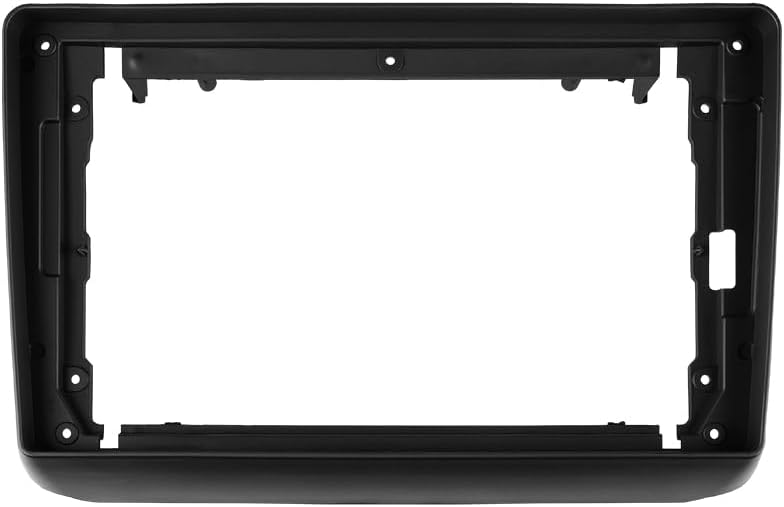
- 1x Frame (OEM Panel)
- 1x పవర్ కేబుల్
- 1x AHD 1080p rear camera
- Audio & Video harness + RCA cables
- స్క్రూలు & స్క్రూడ్రైవర్
- క్లీనింగ్ క్లాత్
- వైరింగ్ రేఖాచిత్రం
మూర్తి 2.1: Visual representation of all items included in the TEYES CC3 2K product package.
మూర్తి 2.2: క్లోజ్-అప్ view of the included USB 2.0 cables for data transmission and peripheral connectivity.
3. సెటప్ మరియు ఇన్స్టాలేషన్
This section provides general guidelines for installing the TEYES CC3 2K head unit in your Jeep Grand Cherokee WK2 (2013-2020). Professional installation is recommended.
3.1 ప్రీ-ఇన్స్టాలేషన్ చెక్
- ఇన్స్టాలేషన్ ప్రారంభించే ముందు వాహనం యొక్క బ్యాటరీ డిస్కనెక్ట్ చేయబడిందని నిర్ధారించుకోండి.
- Verify all package contents are present.
- Review the included wiring diagram thoroughly.
3.2 సంస్థాపనా దశలు
- అసలు కారు రేడియో మరియు డాష్బోర్డ్ ట్రిమ్ను జాగ్రత్తగా తీసివేయండి.
- Connect the power cable, GPS antenna, 4G WiFi antenna, and other necessary harnesses to the TEYES CC3 2K head unit.
- Connect the other ends of the harnesses to the corresponding ports in your vehicle.
- If installing the AHD 1080p rear camera, route its cable to the rear of the vehicle and connect it to the head unit.
- Test the unit's basic functions (power on, audio, touch screen responsiveness) before fully securing it.
- Install the new frame (OEM Panel) and secure the head unit into the dashboard opening.
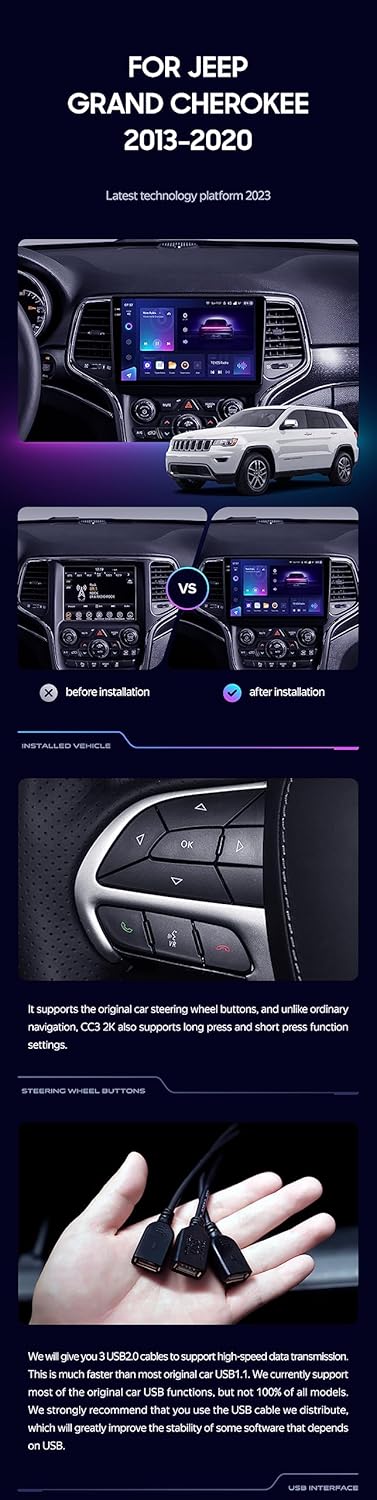
మూర్తి 3.1: Comparison showing the vehicle's dashboard before and after the installation of the TEYES CC3 2K head unit, highlighting the integrated appearance.
3.3 Important Installation Note
Due to the slightly larger size of the CC3's back cover compared to the stock panel, it may be necessary to trim some plastic from the vehicle's dashboard opening during installation. Refer to the image below for guidance on areas that might require modification.

మూర్తి 3.2: Illustration indicating specific areas (highlighted in red) on the vehicle's dashboard where minor plastic trimming might be required for proper fitment of the TEYES CC3 2K head unit.
4. ఆపరేటింగ్ సూచనలు
The TEYES CC3 2K operates on Android 10, providing a familiar and intuitive interface. Below are key operational features:
4.1 ప్రాథమిక ఆపరేషన్
- పవర్ ఆన్/ఆఫ్: Press and hold the power button (if available) or turn on vehicle ignition.
- టచ్ స్క్రీన్: Navigate the interface using touch gestures similar to a smartphone or tablet. The 2K touch screen technology ensures high responsiveness and clarity.
- వాల్యూమ్ నియంత్రణ: Adjust audio volume via on-screen controls or vehicle's steering wheel buttons.
4.2 ముఖ్య లక్షణాలు
- అధిక పనితీరు: Equipped with 6GB RAM and 128GB ROM, powered by an 8-core 2.0GHz processor for smooth multitasking and application performance.
- ప్రదర్శన నాణ్యత: Features a CC3 2K In-cell Display with 157% Gamut Coverage, providing vivid and accurate colors.
- ఆడియో సిస్టమ్: Integrated with 2*DSP ADAU1701 + ROHM32107 for superior audio processing, including optical and coaxial digital audio output.
- కనెక్టివిటీ: Supports 4G internet, Bluetooth (upgraded QCC3031QFN Qualcomm module), USB, WIFI, and Hotspot for versatile connectivity options. RDS is also supported for radio.
- నావిగేషన్: Utilize pre-installed navigation software or download your preferred map applications. Supports North America map types.
- వెనుక View కెమెరా: రియల్ టైమ్ viewing of the vehicle's rear view is supported, along with video recording capabilities when connected to the included AHD 1080p rear camera.
- సాఫ్ట్వేర్ ఫీచర్స్: Access a variety of creative 3D software such as TEYES Vision and TEYES Yahu for enhanced user experience.
4.3 Steering Wheel Control Integration
The TEYES CC3 2K supports the original car steering wheel buttons. Unlike ordinary navigation systems, the CC3 2K also supports long press and short press function settings, allowing for customized control of various functions directly from your steering wheel.

మూర్తి 4.1: Image illustrating the integration of the TEYES CC3 2K with the vehicle's steering wheel controls, enabling convenient operation.
5. నిర్వహణ
Proper maintenance ensures the longevity and optimal performance of your TEYES CC3 2K head unit.
- స్క్రీన్ క్లీనింగ్: Use the provided cleaning cloth or a soft, lint-free cloth slightly dampened with water or a screen-safe cleaner. Avoid abrasive materials or harsh chemicals.
- సాఫ్ట్వేర్ అప్డేట్లు: Periodically check for and install software updates provided by TEYES to ensure the system runs efficiently and has the latest features and security patches.
- పర్యావరణ పరిస్థితులు: యూనిట్ను తీవ్రమైన ఉష్ణోగ్రతలు, ఎక్కువసేపు ప్రత్యక్ష సూర్యకాంతి లేదా అధిక తేమకు గురిచేయకుండా ఉండండి.
- కేబుల్ కనెక్షన్లు: అన్ని కేబుల్స్ సురక్షితంగా కనెక్ట్ చేయబడ్డాయని నిర్ధారించుకోండి. వదులుగా ఉన్న కనెక్షన్లు అడపాదడపా సమస్యలకు దారితీయవచ్చు.
6. ట్రబుల్షూటింగ్
ఈ విభాగం మీరు ఎదుర్కొనే సాధారణ సమస్యలను పరిష్కరిస్తుంది. మరింత క్లిష్టమైన సమస్యల కోసం, కస్టమర్ మద్దతును సంప్రదించండి.
- శక్తి లేదు:
- అన్ని విద్యుత్ కేబుల్ కనెక్షన్లను తనిఖీ చేయండి.
- Verify the vehicle's fuse related to the head unit.
- వాహనం యొక్క ఇగ్నిషన్ ఆన్లో ఉందని నిర్ధారించుకోండి.
- ధ్వని లేదు:
- Check volume levels on the head unit and vehicle.
- ఆడియో కేబుల్స్ సరిగ్గా కనెక్ట్ అయ్యాయని నిర్ధారించుకోండి.
- Verify audio output settings in the system menu.
- GPS సిగ్నల్ నష్టం:
- GPS యాంటెన్నా సురక్షితంగా కనెక్ట్ చేయబడిందని మరియు స్పష్టమైన కాంతిని కలిగి ఉందని నిర్ధారించుకోండి view ఆకాశం యొక్క.
- వాహనాన్ని ఎత్తైన భవనాలు లేదా దట్టమైన ఆకుల నుండి దూరంగా బహిరంగ ప్రదేశానికి తరలించండి.
- టచ్ స్క్రీన్ స్పందించదు:
- Restart the head unit.
- స్క్రీన్ శుభ్రంగా మరియు చెత్త లేకుండా ఉందని నిర్ధారించుకోండి.
- బ్లూటూత్ కనెక్టివిటీ సమస్యలు:
- Ensure Bluetooth is enabled on both the head unit and the device.
- Delete previous pairings and re-pair the device.
- రెండు పరికరాలను పునఃప్రారంభించండి.
7. స్పెసిఫికేషన్లు
Detailed technical specifications for the TEYES CC3 2K head unit:
| ఫీచర్ | స్పెసిఫికేషన్ |
|---|---|
| మోడల్ సంఖ్య | CC3 2K |
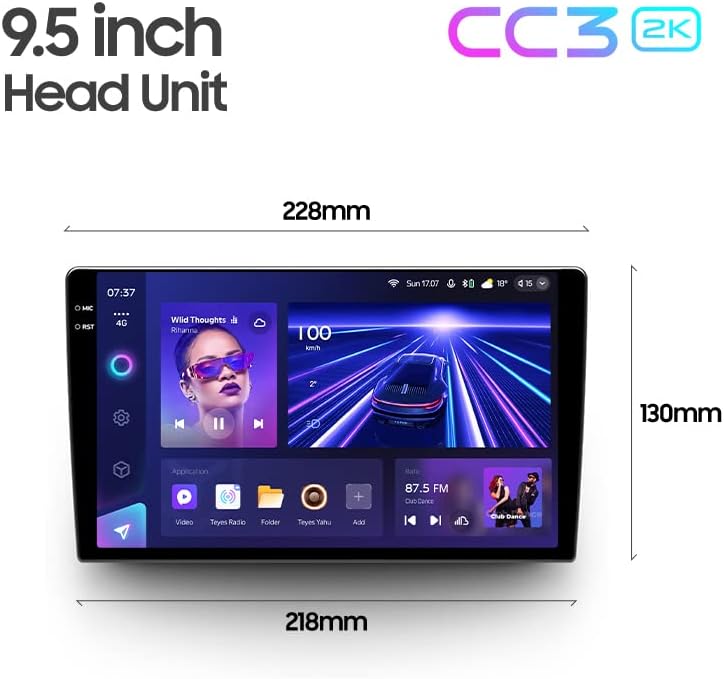
| ప్రదర్శన పరిమాణం | 9.5 అంగుళాలు |
| రిజల్యూషన్ | 2000*1200 |
| RAM | 6GB |
| ROM | 128GB |
| ప్రాసెసర్ | 8 Cores, 2.0GHz |
| ఆపరేటింగ్ సిస్టమ్ | ఆండ్రాయిడ్ 10 |
| బ్లూటూత్ మాడ్యూల్ | QCC3031QFN Qualcomm |
| DSP | 2*DSP ADAU1701 + ROHM32107 |
| ఆడియో అవుట్పుట్ మోడ్ | Stereo (Optical and coaxial digital audio output) |
| కనెక్టివిటీ టెక్నాలజీ | Bluetooth, USB, WIFI, Hotspot, 4G Internet |
| మ్యాప్ రకం | ఉత్తర అమెరికా |
| ప్రత్యేక లక్షణాలు | Bluetooth, Touchscreen, RDS Support, Real-time Rear View, Video Recording |
| వాహన సేవా రకం | Car (Jeep Grand Cherokee WK2 2013-2020) |
మూర్తి 7.1: TEYES CC3 2K Head Unit showing approximate dimensions (228mm top width, 218mm bottom width, 130mm height).
8. వారంటీ సమాచారం
The TEYES CC3 2K head unit comes with a 1 సంవత్సరాల వారంటీ from the date of purchase. This warranty covers manufacturing defects and malfunctions under normal use. It does not cover damage caused by improper installation, accidents, misuse, unauthorized repairs, or natural disasters.
For warranty claims, please retain your proof of purchase and contact TEYES customer support.
9. కస్టమర్ మద్దతు
For technical assistance, troubleshooting beyond this manual, or warranty inquiries, please contact TEYES customer support through the official channels. You can also visit the official TEYES store on Amazon for more information and resources:
Ask a question about this manual
Ask about setup, troubleshooting, compatibility, parts, safety, or missing instructions. Manuals+ will review the question and use this page’s manual context to help answer it.