
1. పరిచయం
This manual provides comprehensive instructions for the installation, operation, maintenance, and troubleshooting of the Vivotek FE9391-EHV-V2 12MP Outdoor Fisheye IR Illumination Camera. Please read this manual thoroughly before using the product to ensure proper setup and functionality. Retain this manual for future reference.
2. ఉత్పత్తి ముగిసిందిview
2.1 ముఖ్య లక్షణాలు
- 12 Megapixel Effective Still Resolution for high-quality imaging.
- Fisheye Lens with 1.2mm focal length for wide-area surveillance.
- Integrated IR Illumination for clear night vision up to 20 meters.
- WDR Pro technology for optimal image visibility in high contrast lighting.
- H.265/H.264/MJPEG compression for efficient video streaming.
- IP66-rated weather-resistant enclosure for outdoor use.
- Motion-only alert type for event detection.
- Wi-Fi Connectivity Protocol for flexible network integration.
2.2 ప్యాకేజీ విషయాలు
ప్యాకేజీలో అన్ని అంశాలు ఉన్నాయని నిర్ధారించుకోండి:
- Vivotek FE9391-EHV-V2 Camera Unit
- మౌంటింగ్ కిట్ (స్క్రూలు, యాంకర్లు)
- జలనిరోధిత కనెక్టర్
- త్వరిత సంస్థాపన గైడ్
- Software CD (or download link information)
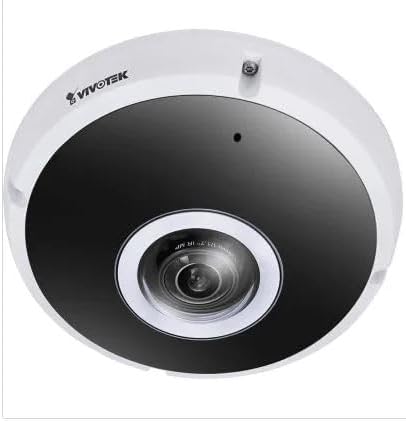
మూర్తి 2.1: ముందు view of the Vivotek FE9391-EHV-V2 12MP Outdoor Fisheye IR Illumination Camera, showing the lens and IR illuminators.
3. భద్రతా సమాచారం
- సంస్థాపన మరియు ఆపరేషన్ ముందు అన్ని సూచనలను జాగ్రత్తగా చదవండి.
- Ensure the power source matches the camera's requirements (Corded Electric).
- కెమెరాను విడదీయడానికి లేదా సవరించడానికి ప్రయత్నించవద్దు. ఇది వారంటీని రద్దు చేస్తుంది.
- బలమైన కాంతి వనరుల వైపు కెమెరాను ఎక్కువసేపు నేరుగా గురిపెట్టకుండా ఉండండి.
- స్థానిక విద్యుత్ కోడ్లకు అనుగుణంగా అర్హత కలిగిన సిబ్బంది ద్వారా సంస్థాపన నిర్వహించబడాలి.
- కేబుల్స్ నడవకుండా లేదా పించ్ అవ్వకుండా రక్షించండి.
4. సెటప్ మరియు ఇన్స్టాలేషన్
4.1 మౌంటు స్థానం
Select a suitable outdoor location for mounting. Consider the desired surveillance area, proximity to power, and network connectivity (Wi-Fi or wired Ethernet). The camera is IP66 rated for outdoor use.

Figure 4.1: Dimensional drawing of the Vivotek FE9391-EHV-V2 camera, showing a diameter of 150mm and height of 68.2mm.
4.2 భౌతిక సంస్థాపన
- మౌంటు ఉపరితలాన్ని సిద్ధం చేయండి: Use the provided mounting template (if included) to mark drill holes.
- డ్రిల్ రంధ్రాలు: అవసరమైతే పైలట్ రంధ్రాలు వేయండి మరియు వాల్ యాంకర్లను చొప్పించండి.
- కెమెరాను భద్రపరచండి: Attach the camera base securely to the mounting surface using the provided screws.
- కేబుల్స్ కనెక్ట్ చేయండి:
- శక్తి: పవర్ కేబుల్ను తగిన పవర్ సోర్స్కి కనెక్ట్ చేయండి.
- నెట్వర్క్: Connect an Ethernet cable for wired network access, or ensure Wi-Fi signal strength is adequate for wireless connection. Use the waterproof connector for outdoor Ethernet connections.
- కెమెరా కోణాన్ని సర్దుబాటు చేయండి: Loosen the adjustment screws (if applicable) to position the fisheye lens for optimal coverage. Tighten screws once adjusted.

Figure 4.2: An Ethernet cable with an RJ45 connector, used for wired network connectivity.
4.3 ప్రారంభ నెట్వర్క్ కాన్ఫిగరేషన్
After physical installation and power-up, the camera needs to be configured on your network.
- కెమెరాను కనుగొనండి: Use the Vivotek IP Utility software (available on the manufacturer's website) to discover the camera on your network.
- Assign IP Address: Assign a static IP address or ensure it obtains an IP address via DHCP.
- యాక్సెస్ Web ఇంటర్ఫేస్: తెరవండి a web బ్రౌజర్ని తెరిచి, కెమెరా యొక్క IP చిరునామాను నమోదు చేసి, దాన్ని యాక్సెస్ చేయండి. web-ఆధారిత కాన్ఫిగరేషన్ ఇంటర్ఫేస్.
- లాగిన్: Enter the default username and password (refer to the Quick Installation Guide for defaults). Change the default password immediately for security.
- Wi-Fi Setup (if applicable): Navigate to the network settings and configure the Wi-Fi connection if you are using wireless connectivity.
5. ఆపరేటింగ్ సూచనలు
5.1 ప్రత్యక్ష ప్రసారం View
Once configured, you can access the live video feed through the web interface or compatible Vivotek surveillance software.
- Web బ్రౌజర్: కెమెరాలోకి లాగిన్ అవ్వండి web interface and navigate to the "Live View" విభాగం.
- Surveillance Software: Add the camera to your Vivotek NVR or VMS (Video Management Software) for centralized monitoring.
- మొబైల్ యాప్: Download the Vivotek mobile app and add your camera for remote viewing.

చిత్రం 5.1: ఉదాample of surveillance footage from multiple cameras displayed on a tablet device, demonstrating remote monitoring capabilities.

Figure 5.2: A monitor displaying a split-screen view of four camera feeds, labeled CAM1 through CAM4, illustrating a typical surveillance setup.
5.2 రికార్డింగ్ మరియు నిల్వ
కెమెరా వివిధ రికార్డింగ్ ఎంపికలకు మద్దతు ఇస్తుంది:
- స్థానిక నిల్వ: Insert a microSD card (not included) into the camera's slot for edge recording. Configure recording schedules and event triggers (e.g., motion detection).
- నెట్వర్క్ వీడియో రికార్డర్ (NVR): Connect the camera to a compatible NVR for continuous or event-based recording.
- క్లౌడ్ నిల్వ: Some Vivotek models or third-party services may offer cloud storage integration. Refer to the camera's web interface for specific options.
5.3 మోషన్ డిటెక్షన్ మరియు హెచ్చరికలు
Configure motion detection zones and sensitivity settings in the camera's web interface. When motion is detected, the camera can trigger actions such as:
- Recording video to local storage or NVR.
- స్నాప్షాట్లతో ఇమెయిల్ నోటిఫికేషన్లను పంపుతోంది.
- Uploading footage to an FTP server.
6. నిర్వహణ
- లెన్స్ క్లీనింగ్: Gently wipe the camera lens with a soft, clean cloth. For stubborn dirt, use a lens cleaning solution designed for optical surfaces. Do not use abrasive cleaners.
- హౌసింగ్ క్లీనింగ్: కెమెరా హౌసింగ్ను ప్రకటనతో శుభ్రం చేయండిamp వస్త్రం. బలమైన డిటర్జెంట్లు లేదా ద్రావకాలను ఉపయోగించడం మానుకోండి.
- ఫర్మ్వేర్ నవీకరణలు: Regularly check the Vivotek website for firmware updates. Updating firmware can improve performance, add features, and enhance security.
- కేబుల్ తనిఖీ: Periodically inspect all cables for signs of wear or damage, especially for outdoor installations.
- పర్యావరణ తనిఖీ: కెమెరా ఆపరేటింగ్ వాతావరణం పేర్కొన్న ఉష్ణోగ్రత మరియు తేమ పరిధులలో ఉండేలా చూసుకోండి.
7. ట్రబుల్షూటింగ్
7.1 వీడియో ఫీడ్ లేదు
- శక్తిని తనిఖీ చేయండి: Ensure the camera is receiving power. Verify power adapter and cable connections.
- నెట్వర్క్ కనెక్షన్: Confirm the Ethernet cable is securely connected or that the Wi-Fi signal is strong and the camera is connected to the correct network.
- IP చిరునామా: Verify the camera's IP address and ensure it is not conflicting with another device on the network.
- ఫైర్వాల్: Check if any firewall settings on your network or computer are blocking access to the camera.
7.2 పేలవమైన చిత్ర నాణ్యత
- క్లీన్ లెన్స్: కెమెరా లెన్స్ శుభ్రంగా మరియు దుమ్ము లేదా మరకలు లేకుండా చూసుకోండి.
- లైటింగ్ పరిస్థితులు: Adjust camera settings for optimal exposure in varying light conditions. Ensure IR illuminators are functioning at night.
- రిజల్యూషన్ సెట్టింగ్లు: Verify that the video resolution and quality settings are configured appropriately in the camera's web ఇంటర్ఫేస్.
- నెట్వర్క్ బ్యాండ్విడ్త్: Insufficient network bandwidth can lead to choppy or low-quality video. Check network load.
7.3 మోషన్ డిటెక్షన్ పనిచేయడం లేదు
- మోషన్ డిటెక్షన్ను ప్రారంభించండి: Ensure motion detection is enabled in the camera's settings.
- Sensitivity and Zones: Adjust motion detection sensitivity and define detection zones correctly.
- రికార్డింగ్ షెడ్యూల్: Verify that the recording schedule is active for motion-triggered events.
8. స్పెసిఫికేషన్లు
| ఫీచర్ | వివరాలు |
|---|---|
| మోడల్ సంఖ్య | FE9391-EHV-V2 |
| ఎఫెక్టివ్ స్టిల్ రిజల్యూషన్ | 12 ఎంపీ |
| లెన్స్ | 1.2mm Fisheye Lens |
| IR ఇల్యూమినేషన్ పరిధి | 20మీ |
| WDR టెక్నాలజీ | WDR ప్రో |
| వీడియో కంప్రెషన్ | H.265 / H.264 / MJPEG |
| కనెక్టివిటీ ప్రోటోకాల్ | Wi-Fi |
| అంతర్జాతీయ రక్షణ రేటింగ్ | IP66 |
| శక్తి మూలం | కార్డెడ్ ఎలక్ట్రిక్ |
| ఉత్పత్తి కొలతలు (L x W x H) | 5.9 x 5.9 x 2.68 అంగుళాలు (150 x 150 x 68.2 మిమీ) |
| తయారీదారు | వివోటెక్ ఇంక్. |
| సిఫార్సు చేసిన ఉపయోగాలు | అవుట్డోర్ సెక్యూరిటీ |
9. వారంటీ మరియు మద్దతు
For warranty information, technical support, and additional resources, please visit the official Vivotek webసైట్ లేదా వారి కస్టమర్ సేవా విభాగాన్ని సంప్రదించండి.
- తయారీదారు: వివోటెక్ ఇంక్.
- Webసైట్: www.vivotek.com (ఉదాampలింక్ అయితే, వాస్తవ లింక్ మారవచ్చు)
- సంప్రదించండి: చూడండి website for regional support contact information.
Please have your model number (FE9391-EHV-V2) and purchase date available when contacting support.