
పరిచయం
Welcome to the AILRINNI Smart Lock user manual. This guide provides detailed instructions for the installation, operation, and maintenance of your new smart lock. The AILRINNI Smart Lock offers multiple convenient and secure unlocking methods, including Bluetooth app control, fingerprint recognition, touchscreen keypad entry, and traditional mechanical keys. Designed for ease of use and high security, this lock is suitable for various environments such as homes, offices, bedrooms, and apartments.
ఉత్పత్తి ముగిసిందిview
కీ ఫీచర్లు
- Multifunctional Unlocking: Supports mobile phone application (BLE), digital passwords, semiconductor fingerprint identification, and traditional mechanical keys.
- అధిక భద్రత: Utilizes advanced semiconductor fingerprint technology for faster and more accurate recognition. Constructed from durable aluminum alloy for enhanced reliability.
- షేర్డ్ యాక్సెస్: Easily share temporary, scheduled, or permanent access codes with family and friends via the mobile application.
- సులభమైన సంస్థాపన: Designed to meet most lever lock standards, requiring no hard wiring. Adjustable latch for various door sizes.
- బహుముఖ అప్లికేషన్: Ideal for residential and commercial use, including homes, offices, villas, and hotels.
ప్యాకేజీ విషయాలు
దయచేసి ఇన్స్టాలేషన్ ప్రారంభించే ముందు అన్ని భాగాలు ఉన్నాయని ధృవీకరించండి.
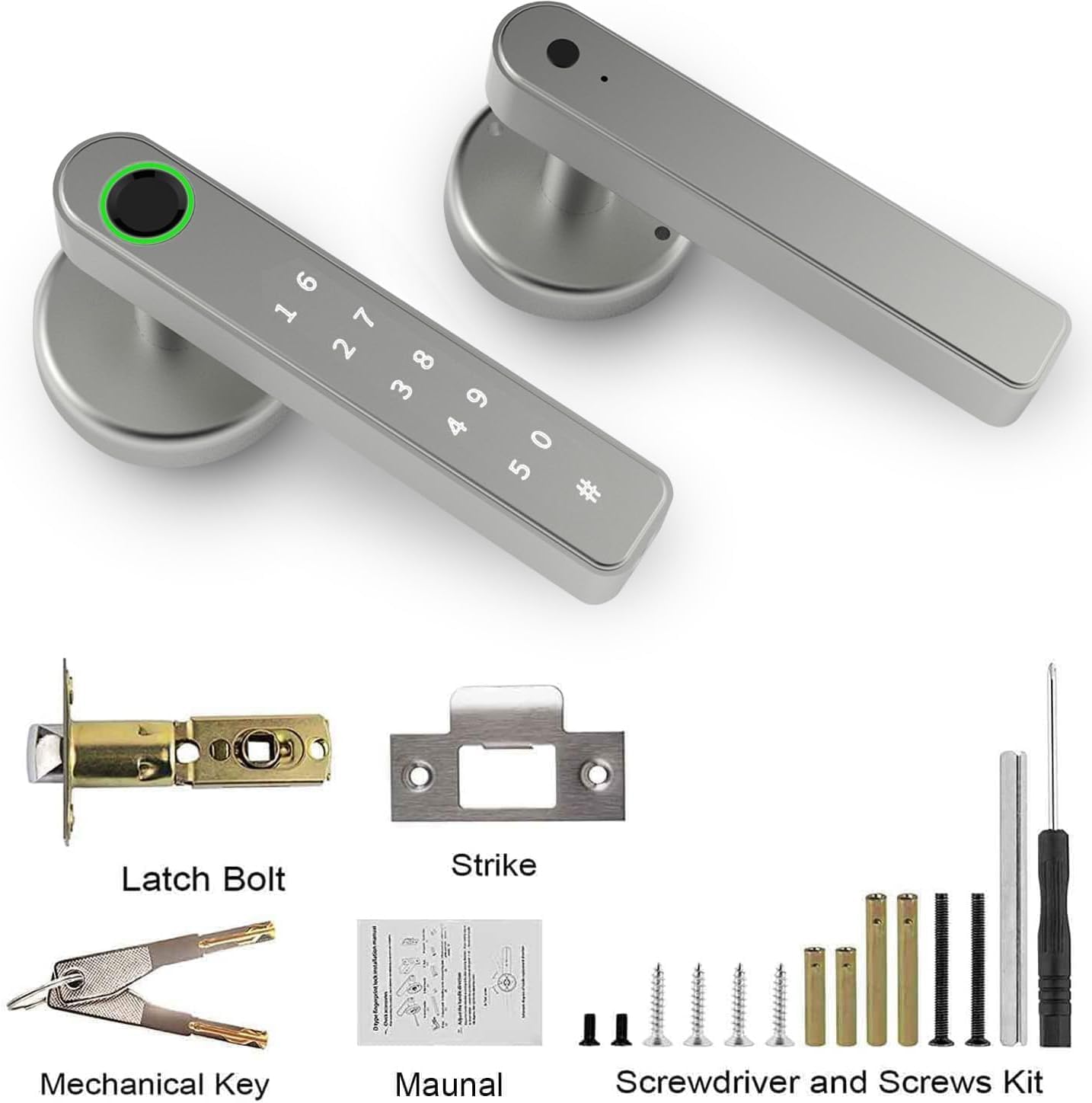
- AILRINNI Smart Lock Unit (Front and Rear Handles)
- గొళ్ళెం బోల్ట్
- స్ట్రైక్ ప్లేట్
- మెకానికల్ కీలు (2)
- Mounting Screws and Accessories Kit
- వినియోగదారు మాన్యువల్ (ఈ పత్రం)
- స్క్రూడ్రైవర్
స్పెసిఫికేషన్లు
| ఫీచర్ | వివరాలు |
|---|---|
| మోడల్ సంఖ్య | 29182-TY90 పరిచయం |
| బ్రాండ్ | ఆయిల్రిన్ని |
| కొలతలు (L x W x H) | 22.91 x 16.51 x 16.51 సెం.మీ |
| వస్తువు బరువు | 800 గ్రా |
| మెటీరియల్ | Plastic (with Aluminum Alloy components) |
| రంగు | వెండి |
| ముగింపు రకం | బ్రష్ చేయబడింది |
| లాక్ రకం | బయోమెట్రిక్ |
| ప్రత్యేక లక్షణాలు | Fingerprint, Weather Resistant, Auto-Lock |
| శక్తి మూలం | బ్యాటరీలు (చేర్చబడలేదు) |
| తలుపు మందం అనుకూలత | 1-3/8 inch (35mm) to 2-3/16 inch (55mm) |
| Latch Compatibility | Adjustable 2-3/8 inch (60mm) or 2-3/4 inch (70mm) |

Note: Batteries are not included and must be purchased separately. Please refer to the installation section for battery requirements.
సెటప్ మరియు ఇన్స్టాలేషన్
Before installation, ensure your door meets the specified thickness and latch compatibility requirements. No hard wiring is required for this smart lock.
ప్రీ-ఇన్స్టాలేషన్ చెక్
- Verify door thickness is between 1-3/8 inch (35mm) and 2-3/16 inch (55mm).
- Confirm latch backset is either 2-3/8 inch (60mm) or 2-3/4 inch (70mm).
- అన్ని ప్యాకేజీ కంటెంట్లు ఉన్నాయని నిర్ధారించుకోండి.
సంస్థాపనా దశలు
- తలుపును సిద్ధం చేయండి: If replacing an existing lock, remove it. Ensure the door boreholes are clean and clear.
- లాచ్ బోల్ట్ను ఇన్స్టాల్ చేయండి: Insert the latch bolt into the door edge. Ensure the "UP" arrow on the latch is pointing upwards. Secure with screws.
- బాహ్య హ్యాండిల్ను ఇన్స్టాల్ చేయండి: Feed the spindle and wires from the exterior handle through the latch bolt and door. Align the handle with the latch.
- Install the Interior Handle: Connect the wires from the exterior handle to the interior handle. Align the interior handle with the mounting plate and secure it with screws.
- బ్యాటరీలను చొప్పించండి: Open the battery cover on the interior handle. Insert the required batteries (typically 4 x AAA, though not explicitly stated in specs, common for these locks).
- పరీక్ష ఆపరేషన్: Test the mechanical key, and ensure the handle operates smoothly.

Adjusting Handle Direction
The AILRINNI Smart Lock features a free handle design, allowing it to be opened from either the left or right side. Adjust the handle direction as needed during installation.

ఆపరేటింగ్ సూచనలు
అన్లాకింగ్ పద్ధతులు
Your AILRINNI Smart Lock offers multiple ways to unlock for maximum convenience and security.
1. Mobile App Unlock (Bluetooth)
Download the compatible mobile application (e.g., Tuya Smart or Smart Life app) from your app store. Follow the in-app instructions to pair your lock via Bluetooth.

Once paired, you can unlock the door directly through the app, manage user access, generate temporary passwords, and view access logs.
2. వేలిముద్ర అన్లాక్
The smart lock features a semiconductor fingerprint sensor for quick and secure access.
- వేలిముద్రలను కలుపుతోంది: Refer to the mobile app's instructions for adding new fingerprints. Typically, this involves placing your finger on the sensor multiple times from different angles.
- అన్లాక్ చేస్తోంది: మీ నమోదిత వేలిని వేలిముద్ర సెన్సార్పై ఉంచండి. వేలిముద్ర గుర్తించబడితే లాక్ అన్లాక్ అవుతుంది.
3. Touchscreen Keypad Unlock
Use the integrated touchscreen keypad to enter a digital password.
- Setting Passwords: Manage and set new digital passwords through the mobile application. You can create permanent, temporary, or one-time codes.
- అన్లాక్ చేస్తోంది: Enter your valid digital password on the keypad, then press the '#' key to confirm.
4. Mechanical Key Unlock
For emergency situations or as a backup, use the provided mechanical keys.
- Accessing Keyhole: The keyhole is typically located at the bottom of the exterior handle.
- అన్లాక్ చేస్తోంది: Insert the mechanical key and turn to unlock the door.

నిర్వహణ
బ్యాటరీ భర్తీ
The smart lock is powered by batteries (not included). When the battery level is low, the lock will typically provide an audible or visual alert.
- Open the battery compartment on the interior handle.
- పాత బ్యాటరీలను తీసివేసి వాటిని సరిగ్గా పారవేయండి.
- సరైన ధ్రువణతను నిర్ధారిస్తూ కొత్త బ్యాటరీలను చొప్పించండి.
- బ్యాటరీ కంపార్ట్మెంట్ను మూసివేయండి.
Note: If batteries completely drain, you can use the mechanical key or connect a power bank via the USB charging interface for emergency power to unlock the door and replace batteries.

క్లీనింగ్
తాళం యొక్క బాహ్య భాగాన్ని మృదువైన, పొడి వస్త్రంతో శుభ్రం చేయండి. రాపిడి క్లీనర్లు, ద్రావకాలు లేదా కఠినమైన రసాయనాలను ఉపయోగించకుండా ఉండండి, ఎందుకంటే ఇవి ముగింపు మరియు ఎలక్ట్రానిక్ భాగాలను దెబ్బతీస్తాయి.
పర్యావరణ పరిగణనలు
While the lock is weather-resistant, extreme temperatures or prolonged exposure to direct moisture should be avoided to ensure optimal performance and longevity.
ట్రబుల్షూటింగ్
సాధారణ సమస్యలు మరియు పరిష్కారాలు
Lock is not responding / No power
- బ్యాటరీలను తనిఖీ చేయండి: బ్యాటరీలు సరిగ్గా చొప్పించబడ్డాయని మరియు తగినంత ఛార్జ్ కలిగి ఉన్నాయని నిర్ధారించుకోండి. అవసరమైతే భర్తీ చేయండి.
- అత్యవసర శక్తి: Use a power bank connected to the USB charging interface for temporary power.
వేలిముద్ర గుర్తించబడలేదు
- క్లీన్ సెన్సార్: వేలిముద్ర సెన్సార్ శుభ్రంగా మరియు ధూళి లేదా తేమ లేకుండా ఉందని నిర్ధారించుకోండి.
- Reposition Finger: Try placing your finger on the sensor from different angles.
- వేలిముద్రను తిరిగి నమోదు చేయండి: If issues persist, delete and re-register your fingerprint in the app.
కీప్యాడ్ స్పందించడం లేదు
- బ్యాటరీలను తనిఖీ చేయండి: Low batteries can affect keypad responsiveness.
- Correct Code: Ensure you are entering the correct digital password.
- రీసెట్: If unresponsive, try removing and reinserting batteries to reset the lock.
బ్లూటూత్ కనెక్షన్ సమస్యలు
- బ్లూటూత్ని ప్రారంభించండి: మీ మొబైల్ పరికరంలో బ్లూటూత్ ప్రారంభించబడిందని నిర్ధారించుకోండి.
- యాప్ అనుమతులు: Verify the app has necessary Bluetooth permissions.
- సామీప్యత: Ensure your device is within Bluetooth range of the lock.
- యాప్/ఫోన్ను రీస్టార్ట్ చేయండి: Close and reopen the app, or restart your phone.
Lock does not auto-lock
- సెట్టింగ్లను తనిఖీ చేయండి: Verify auto-lock feature is enabled in the mobile app settings.
- తలుపు అమరిక: Ensure the door closes properly and the latch bolt extends fully into the strike plate.
If you encounter issues not listed here or require further assistance, please contact AILRINNI customer support.
వారంటీ మరియు మద్దతు
వారంటీ సమాచారం
The AILRINNI Smart Lock (Model 29182-TY90) comes with a 1 సంవత్సరాల వారంటీ from the date of purchase. This warranty covers manufacturing defects and malfunctions under normal use. It does not cover damage caused by misuse, unauthorized modification, accident, or improper installation.
కస్టమర్ మద్దతు
For technical support, warranty claims, or any questions regarding your AILRINNI Smart Lock, please contact our customer service team.
- ఇమెయిల్: ailrinni_trade@163.com
- ఆన్లైన్ మద్దతు: Refer to the official AILRINNI webతరచుగా అడిగే ప్రశ్నలు మరియు అదనపు వనరుల కోసం సైట్.
Please have your product model number (29182-TY90) and purchase details ready when contacting support.