
Ulefone us-arm x12p
Ulefone Armor X12 Pro Rugged Phone User Manual
Model: us-arm x12p
1. పరిచయం
The Ulefone Armor X12 Pro is a robust 4G rugged smartphone designed for durability and performance in challenging environments. It features IP68/IP69K and MIL-STD-810H certifications, ensuring resistance to dust, water, drops, and extreme temperatures. Powered by an octa-core MediaTek Helio G36 processor, it offers smooth operation with 8GB RAM (4GB physical + 4GB virtual) and 64GB internal storage, expandable up to 256GB. The device includes a 13MP SONY main camera, an 8MP selfie camera, and a 4860mAh battery for extended use. Running on Android 14, it provides a secure and private user experience with additional features like NFC, Glove Mode, and a custom key.
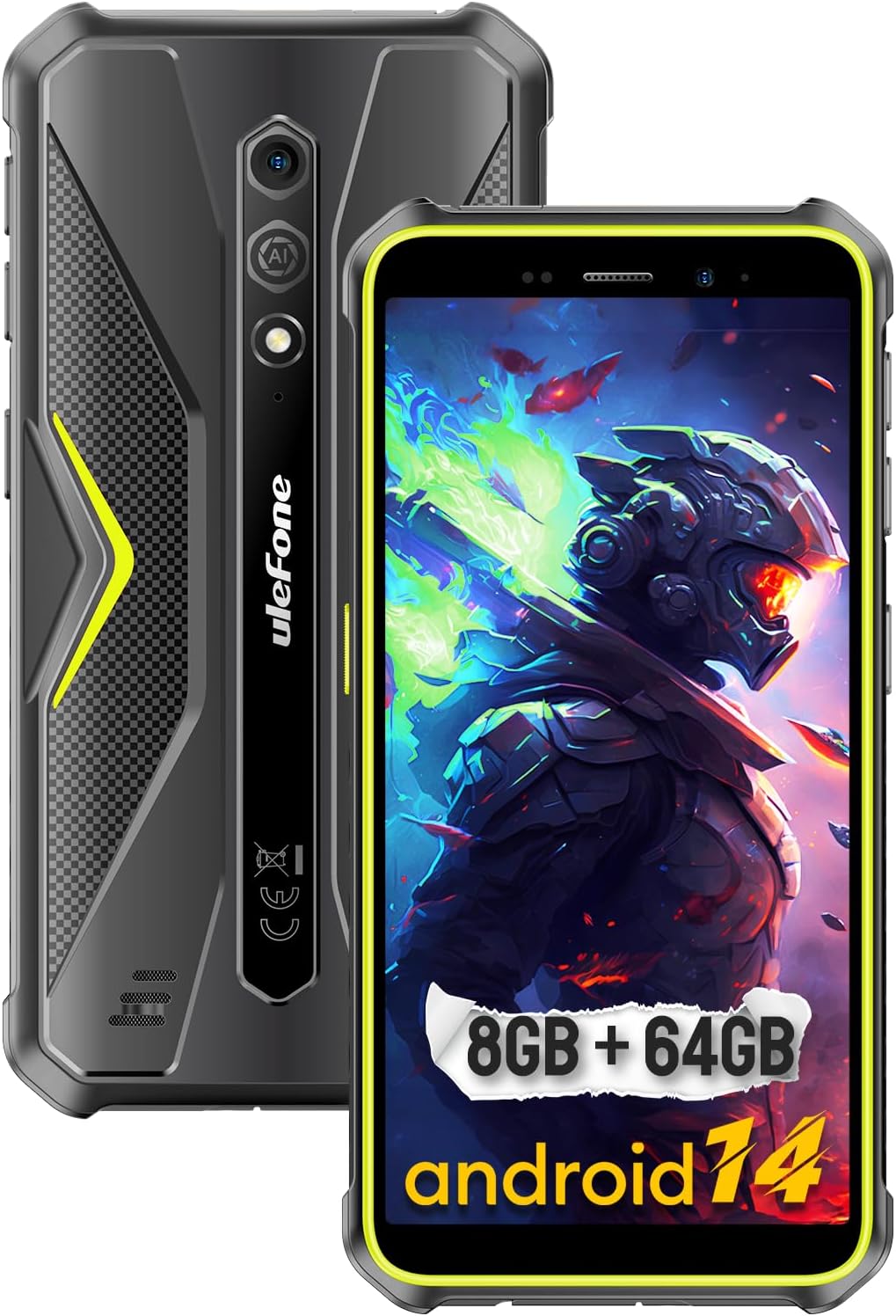
Figure 1: The Ulefone Armor X12 Pro, showcasing its rugged build and key specifications like 8GB RAM + 64GB storage and Android 14.
2. పెట్టెలో ఏముంది
Upon unboxing your Ulefone Armor X12 Pro, please verify that all the following items are included:
- Ulefone Armor X12 Pro Smartphone
- AC పవర్ ఛార్జర్ (100~240V /US ప్లగ్)
- డేటా కేబుల్ (100సెం.మీ)
- ప్రొటెక్టివ్ ఫిల్మ్ (ముందే ఇన్స్టాల్ చేయబడింది)
- లాన్యార్డ్
- SIM pick
3. సెటప్ గైడ్
3.1. SIM కార్డ్ మరియు మైక్రో SD కార్డ్ ఇన్స్టాలేషన్
The Ulefone Armor X12 Pro supports a 3-card slot configuration, allowing for two Nano-SIM cards and one microSD card simultaneously. Ensure the phone is powered off before inserting or removing cards.
- పరికరం వైపున SIM కార్డ్ ట్రేని గుర్తించండి.
- Use the provided SIM pick tool to gently eject the tray.
- Carefully place your Nano-SIM cards and/or microSD card into the designated slots on the tray. Ensure the gold contacts face downwards.
- ఫోన్ బాడీకి సరిగ్గా అతుక్కుపోయే వరకు ట్రేని స్లాట్లోకి సున్నితంగా నెట్టండి.

Figure 2: Illustration of the 3-card slot for SIM and microSD card installation.
3.2. Initial Power On and Android 14 Setup
After installing your cards, press and hold the power button until the Ulefone logo appears. Follow the on-screen prompts to complete the initial setup of Android 14, including language selection, Wi-Fi connection, Google account sign-in, and security settings. The new permission system in Android 14 enhances privacy and security.
4. మీ పరికరాన్ని ఆపరేట్ చేయడం
4.1. దృఢత్వం మరియు మన్నిక
The Ulefone Armor X12 Pro is engineered to meet IP68, IP69K, and MIL-STD-810H standards, making it highly resistant to dust, water, and drops. It can withstand immersion in water up to 1.5 meters for 30 minutes and drops from 1.5 meters. This robust construction ensures reliable performance in demanding outdoor or industrial environments.

Figure 3: The Armor X12 Pro's certifications for extreme durability.
Video 1: Official product video demonstrating the rugged features and durability of the Ulefone Armor X12 Pro, including drop and water resistance tests.
4.2. పనితీరు మరియు నిల్వ
The device is powered by a MediaTek Helio G36 octa-core chipset, offering clock speeds up to 2.2GHz for efficient performance. It comes with 8GB of RAM (4GB physical + 4GB virtual RAM) and 64GB of internal storage. For additional storage, a microSD card up to 256GB is supported.

Figure 4: Details on the MediaTek Helio G36 processor and memory configuration.
4.3. కెమెరా ఫీచర్లు
Capture clear photos and videos with the 13MP SONY IMX214 main camera and an 8MP front-facing selfie camera. The phone offers various camera modes to enhance your photography experience.

చిత్రం 5: పైగాview of the phone's camera specifications and capabilities.
4.4. బ్యాటరీ లైఫ్
The Ulefone Armor X12 Pro is equipped with a 4860mAh battery, providing extended usage times. Expect up to 264 hours of standby time, 20 hours of talk time, and 8 hours of video playback on a single charge.

Figure 6: Information regarding the phone's battery capacity.
4.5. డిస్ప్లే మరియు యూజర్ ఇంటర్ఫేస్
The phone features a compact 5.45-inch HD+ display, designed for comfortable one-handed use and portability. It also supports Glove Mode, allowing you to operate the touchscreen even while wearing gloves.

Figure 7: The phone's design and display size.
4.6 అదనపు ఫీచర్లు
- NFC: Supports Near Field Communication for convenient mobile payments and data transfer.
- అనుకూల కీ: A programmable side button for quick access to frequently used functions or apps.
- ఫేస్ అన్లాక్: Securely unlock your phone using facial recognition.
- Outdoor Tools: Pre-installed applications useful for outdoor activities, such as a compass.
- GPS: Integrated GPS, Glonass, Galileo, and BeiDou for accurate navigation.
- హెడ్సెట్ లేని FM రేడియో: Enjoy FM radio without needing to connect headphones as an antenna.

Figure 8: Features like GPS and NFC for enhanced usability.
5. నిర్వహణ
To ensure the longevity and optimal performance of your Ulefone Armor X12 Pro, follow these maintenance guidelines:
- శుభ్రపరచడం: Despite its ruggedness, regularly wipe the phone with a soft, damp cloth to remove dirt and grime. For stubborn dirt, you can rinse it under tap water, ensuring all ports are securely sealed.
- పోర్ట్ కేర్: Keep the charging port and headphone jack free of dust and debris. Use a soft, dry brush if necessary.
- స్క్రీన్ రక్షణ: While the screen is durable, the pre-installed protective film offers an extra layer of defense against scratches. Consider replacing it if it becomes heavily scratched.
- ఉష్ణోగ్రత: Avoid exposing the phone to extreme temperatures for prolonged periods, as this can affect battery life and internal components.
- సాఫ్ట్వేర్ అప్డేట్లు: మీ పరికరం తాజా భద్రతా ప్యాచ్లు మరియు పనితీరు మెరుగుదలలను కలిగి ఉందని నిర్ధారించుకోవడానికి సిస్టమ్ నవీకరణల కోసం క్రమం తప్పకుండా తనిఖీ చేసి, ఇన్స్టాల్ చేయండి.
6. ట్రబుల్షూటింగ్
This section addresses common issues you might encounter with your Ulefone Armor X12 Pro.
6.1. Network and Connectivity Issues
- No Data/Signal: The Ulefone Armor X12 Pro is not compatible with Cricket activations, new AT&T, or with CDMA Networks like Verizon, Sprint, and Boost Mobile. Please ensure your carrier is compatible (e.g., T-Mobile and its offshoots are generally usable). If you experience no data or signal with a compatible carrier, try restarting the phone, re-inserting the SIM card, or checking your APN settings.
- Wi-Fi/Bluetooth Connection Problems: Ensure Wi-Fi or Bluetooth is enabled. Try forgetting the network/device and reconnecting. Restarting the phone can often resolve minor connectivity glitches.
6.2. Performance and Responsiveness
- నెమ్మదిగా పనితీరు: Close unnecessary background applications. Clear cache from apps or perform a system cache clear. Ensure you have sufficient free storage space.
- యాప్ క్రాష్లు: Update the problematic app to its latest version. Clear the app's cache and data in settings. If the issue persists, reinstall the app.
6.3. బ్యాటరీ జీవితకాల సమస్యలు
- వేగవంతమైన బ్యాటరీ డ్రెయిన్: Check battery usage in settings to identify power-hungry apps. Reduce screen brightness, disable unnecessary features like GPS or Bluetooth when not in use, and limit background app refresh.
For persistent issues not covered here, please contact Ulefone customer support at amazon@ulefone.com.
7. స్పెసిఫికేషన్లు
| ఫీచర్ | వివరాలు |
|---|---|
| మోడల్ పేరు | ఆర్మర్ X12 ప్రో |
| ఆపరేటింగ్ సిస్టమ్ | ఆండ్రాయిడ్ 14 |
| ప్రాసెసర్ | MediaTek Helio G36 Octa-core (Up to 2.2GHz) |
| RAM | 8GB (4GB భౌతిక + 4GB వర్చువల్) |
| అంతర్గత నిల్వ | 64GB |
| విస్తరించదగిన నిల్వ | మైక్రో SD ద్వారా 256GB వరకు |
| ప్రదర్శన పరిమాణం | 5.45 inches HD+ |
| రిజల్యూషన్ | 720 x 1440 |
| వెనుక కెమెరా | 13MP SONY IMX214 |
| ఫ్రంట్ కెమెరా | 8MP |
| బ్యాటరీ కెపాసిటీ | 4860mAh |
| మన్నిక రేటింగ్లు | IP68, IP69K, MIL-STD-810H |
| కనెక్టివిటీ | 4G LTE, Wi-Fi, Bluetooth, NFC |
| నావిగేషన్ | GPS, Glonass, Galileo, BeiDou |
| ఆడియో జాక్ | 3.5 మి.మీ |
| కొలతలు | 61.9 x 30.2 x 5.65 అంగుళాలు |
| వస్తువు బరువు | 11.6 ఔన్సులు (330 గ్రాములు) |
8. వారంటీ మరియు మద్దతు
For warranty information, please refer to the documentation included with your purchase or visit the official Ulefone website. If you encounter any issues or require technical assistance, you can contact Ulefone customer support directly via email at amazon@ulefone.com. Please provide your product model and a detailed description of the issue for efficient support.
Ask a question about this manual
Ask about setup, troubleshooting, compatibility, parts, safety, or missing instructions. Manuals+ will review the question and use this page’s manual context to help answer it.