
పరిచయం
This user manual provides comprehensive instructions for the setup, operation, and maintenance of your AILRINNI 15.6 inch Portable Monitor. Please read this manual thoroughly before using the product to ensure proper functionality and to prevent damage.

Image: The AILRINNI 15.6 inch Portable Monitor, showcasing its compact design and compatibility with multiple devices including laptops, smartphones, gaming consoles, and desktop PCs.
ప్యాకేజీ విషయాలు
ప్యాకేజీని తెరిచినప్పుడు, దయచేసి కింది అంశాలన్నీ చేర్చబడ్డాయో లేదో తనిఖీ చేయండి:
- 15.6 inch Portable Monitor x1
- రక్షణ కేసు x1
- Mini HD to HD cable x1
- USB Type-C to USB Type-C cable x1
- ఛార్జర్ x1
- వినియోగదారు మాన్యువల్ x1
ఉత్పత్తి ముగిసిందిview
Familiarize yourself with the monitor's ports and controls for optimal use.

చిత్రం: వివరణాత్మకం view of the monitor's connectivity options and control buttons.
పోర్టులు మరియు నియంత్రణలు:
- 3.5mm ఆడియో జాక్: బాహ్య హెడ్ఫోన్లు లేదా స్పీకర్లను కనెక్ట్ చేయడానికి.
- స్విచ్ ఆన్/ఆఫ్: మానిటర్ను ఆన్ లేదా ఆఫ్ చేస్తుంది.
- మినీ HDMI పోర్ట్: Connects to devices via HDMI cable for video and audio transmission.
- Full Function USB-C Port (x2): Supports power delivery, video signal, and data transfer (for compatible devices).
- Touche menu roue (Menu Wheel): Used to navigate and select options within the On-Screen Display (OSD) menu.
The monitor features a slim 0.3-inch profile and weighs approximately 1.76 pounds, making it highly portable. The included magnetic smart cover provides protection and can be folded to serve as a stand, allowing for multi-angle viewing.

Image: The magnetic smart cover, which protects the monitor and functions as a multi-angle stand.
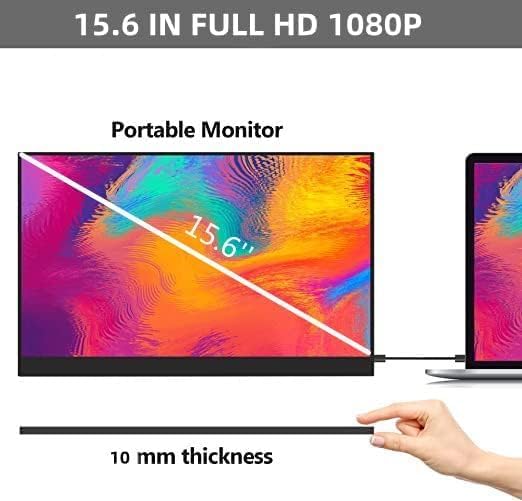
Image: Demonstrating the ultra-thin design of the 15.6-inch portable monitor.
సెటప్ మరియు కనెక్షన్
The AILRINNI portable monitor offers versatile connectivity options for various devices. Ensure your device supports the necessary output for display.
Connecting to a Laptop/PC (USB-C)
- Ensure your laptop's USB-C port supports Thunderbolt 3, USB 3.1, or USB 3.2 with DisplayPort Alternate Mode.
- Connect one end of the USB Type-C to USB Type-C cable to your laptop's compatible USB-C port.
- Connect the other end of the USB Type-C to USB Type-C cable to one of the Full Function USB-C ports on the monitor.
- The monitor should automatically detect the signal and display your laptop's screen. If not, adjust display settings on your laptop (e.g., Extend, Duplicate).
Connecting to a Laptop/PC (HDMI)
- Connect one end of the Mini HD to HD cable to the Mini HDMI Port on the monitor.
- Connect the other end of the HDMI cable to your laptop's or PC's HDMI output port.
- If the monitor does not power on, connect the charger to one of the USB-C ports on the monitor for power.
- Adjust display settings on your laptop/PC as needed.
స్మార్ట్ఫోన్కు కనెక్ట్ అవుతోంది
- Ensure your smartphone's USB-C port supports DisplayPort Alternate Mode (video output).
- Connect one end of the USB Type-C to USB Type-C cable to your smartphone's USB-C port.
- Connect the other end of the USB Type-C to USB Type-C cable to one of the Full Function USB-C ports on the monitor.
- The monitor will mirror or extend your phone's display.
Connecting to Gaming Consoles (Xbox, Switch, PS4)
- Connect one end of the Mini HD to HD cable to the Mini HDMI Port on the monitor.
- Connect the other end of the HDMI cable to your gaming console's HDMI output port.
- Connect the charger to one of the USB-C ports on the monitor for power, as gaming consoles typically do not provide power through HDMI.
- Ensure the console's video output settings are compatible with the monitor's resolution (1920x1080).
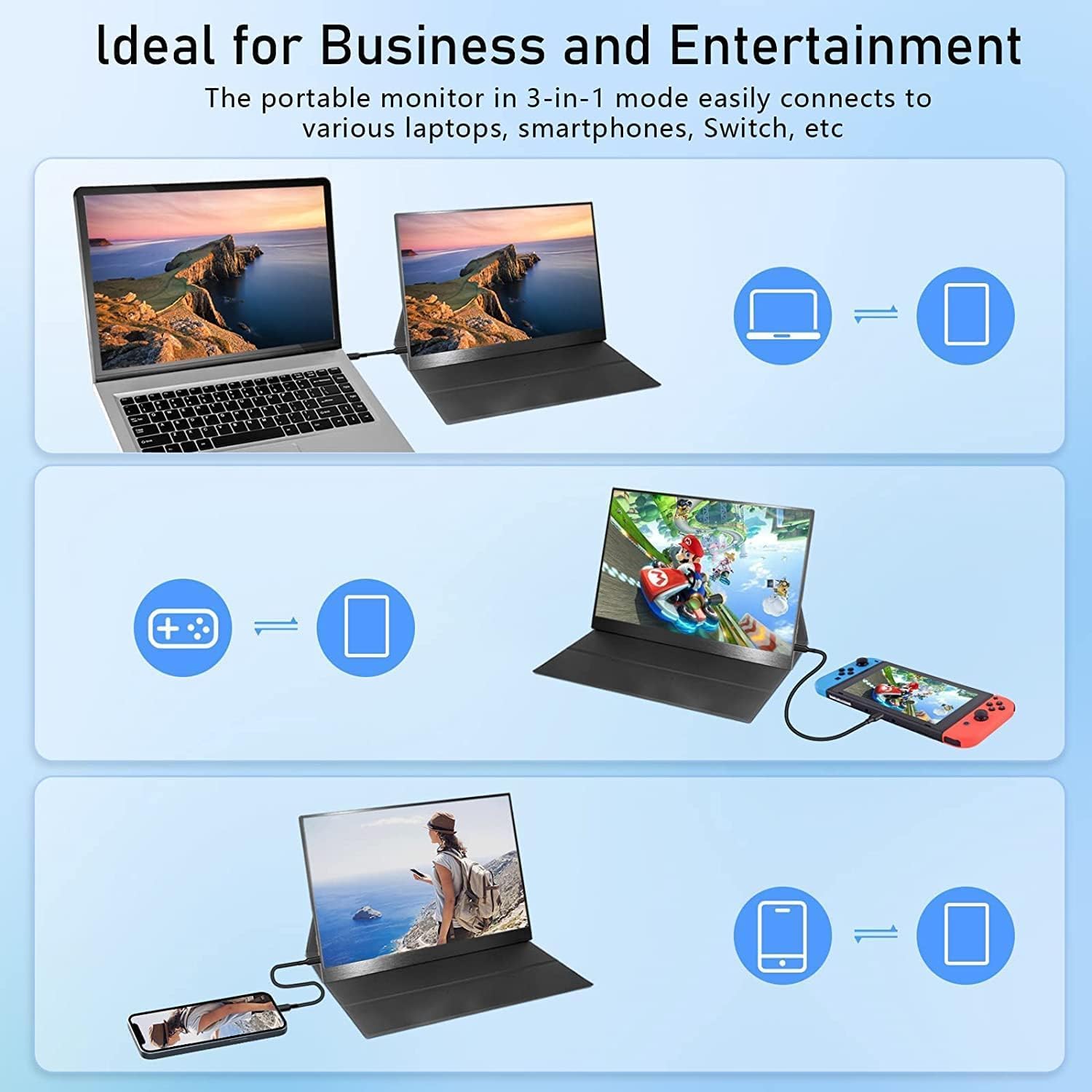
చిత్రం: ఉదాamples of connecting the portable monitor to different devices for business and entertainment.

Image: The monitor in use with a laptop, ideal for extending screen space.

Image: The monitor providing an immersive gaming experience.

Image: The monitor used with a smartphone for portable media consumption.
ఆపరేటింగ్ సూచనలు
The monitor features an intuitive On-Screen Display (OSD) menu for adjusting various settings.
ఆన్-స్క్రీన్ డిస్ప్లే (OSD) మెను:
Use the "Touche menu roue" (Menu Wheel) to navigate the OSD menu. Press the wheel to confirm selections.
- ప్రకాశం: Adjust the display brightness (250 cd/m² maximum).
- కాంట్రాస్ట్: Modify the contrast ratio (800:1).
- వాల్యూమ్: Control the audio output level from the built-in dual speakers.
- రంగు సెట్టింగ్లు: Fine-tune color temperature, hue, and saturation. The monitor supports 16.7M (8-bit) true colors and 72% NTSC color gamut.
- ఇన్పుట్ మూలం: Manually select between USB-C and Mini HDMI input if auto-detection fails.
- HDR మోడ్: Enable or disable HDR (High Dynamic Range) for enhanced visuals.

Image: Illustrating the superior visual quality and wide viewing angles of the IPS panel.
నిర్వహణ
Proper care will extend the life of your portable monitor.
- శుభ్రపరచడం: స్క్రీన్ను సున్నితంగా తుడవడానికి మృదువైన, మెత్తటి బట్టను ఉపయోగించండి. మొండి గుర్తుల కోసం, కొద్దిగా dampనీటితో లేదా స్క్రీన్-క్లీనింగ్ ద్రావణంతో వస్త్రాన్ని తుడవండి. కఠినమైన రసాయనాలు లేదా రాపిడి పదార్థాలను నివారించండి.
- నిల్వ: When not in use, store the monitor in its protective case to prevent scratches and dust accumulation.
- నిర్వహణ: Avoid dropping the monitor or subjecting it to strong impacts. Do not place heavy objects on top of it.
- ఉష్ణోగ్రత: Operate and store the monitor within recommended temperature ranges to prevent damage to internal components.
ట్రబుల్షూటింగ్
If you encounter issues with your AILRINNI portable monitor, refer to the following common problems and solutions:
| సమస్య | సాధ్యమైన కారణం | పరిష్కారం |
|---|---|---|
| డిస్ప్లే లేదు/సిగ్నల్ లేదు |
|
|
| మినుకుమినుకుమనే స్క్రీన్ |
|
|
| స్పీకర్ల నుండి ఆడియో లేదు |
|
|
| పవర్ బటన్ స్పందించడం లేదు |
|
|
స్పెసిఫికేషన్లు
| ఫీచర్ | వివరాలు |
|---|---|
| బ్రాండ్ | ఆయిల్రిన్ని |
| మోడల్ | AILRINNI 15,6 cm |
| స్క్రీన్ పరిమాణం | 15.6 అంగుళాలు |
| ప్రదర్శన సాంకేతికత | IPS LCD |
| రిజల్యూషన్ | 1920x1080 (FHD 1080p) |
| రిఫ్రెష్ రేట్ | 60 Hz |
| ప్రకాశం | 250 cd/m² |
| కాంట్రాస్ట్ రేషియో | 800:1 |
| Viewing యాంగిల్ | 178 డిగ్రీలు |
| ప్రతిస్పందన సమయం | 5 మిల్లీసెకన్లు |
| కారక నిష్పత్తి | 16:9 |
| రంగు లోతు | 16.7M (8-bit), 72% colors (NTSC) |
| కనెక్టివిటీ | Mini HDMI, 2x Full Function USB-C |
| ఆడియో | Dual Speakers, 3.5mm Audio Jack |
| ప్రత్యేక లక్షణాలు | HDR Display, Wall Mountable, Magnetic Smart Cover |
| ఉత్పత్తి కొలతలు | 5 x 25 x 40 సెం.మీ; 1 కిలోలు |
వారంటీ మరియు మద్దతు
AILRINNI provides professional technical support and high-quality after-sales service for your portable monitor.
- For any product-related issues or technical assistance, please contact us via email.
- ఇమెయిల్: ailrinni_trade@163.com
వారంటీ ప్రయోజనాల కోసం దయచేసి మీ కొనుగోలు రసీదుని ఉంచుకోండి.