1. పరిచయం
Thank you for choosing the Generic S2200 G2 AC LiPo Smart Charger. This manual provides essential information for the safe and efficient operation of your charger. Please read this manual thoroughly before using the device to ensure proper setup, operation, and maintenance. Retain this manual for future reference.
1.1 ముఖ్యమైన భద్రతా సమాచారం
- ఛార్జర్ను ఎల్లప్పుడూ బాగా వెంటిలేషన్ ఉన్న ప్రదేశంలో, మండే పదార్థాలకు దూరంగా ఆపరేట్ చేయండి.
- ఉపయోగంలో ఉన్నప్పుడు ఛార్జర్ను ఎప్పుడూ గమనించకుండా ఉంచవద్దు.
- Ensure correct battery type and cell count settings before charging. Incorrect settings can lead to fire or explosion.
- దెబ్బతిన్న, ఉబ్బిన లేదా లీక్ అవుతున్న బ్యాటరీలను ఛార్జ్ చేయవద్దు.
- నీరు, తేమ మరియు తీవ్రమైన ఉష్ణోగ్రతల నుండి ఛార్జర్ను దూరంగా ఉంచండి.
- Use only the original power cord and charging cables provided or approved by the manufacturer.
- This charger is designed for specific battery types (LiPo, LiFe, LiIon, NiMH, NiCd, Pb). Do not attempt to charge other battery chemistries.
2. ఉత్పత్తి ముగిసిందిview
The Generic S2200 G2 AC is a dual-port smart charger designed for various battery types, primarily LiPo batteries up to 6S. It features an integrated AC power supply, making it convenient for home use. Each channel can deliver up to 200W of power and 20A of current, allowing for fast and efficient charging of two batteries simultaneously.
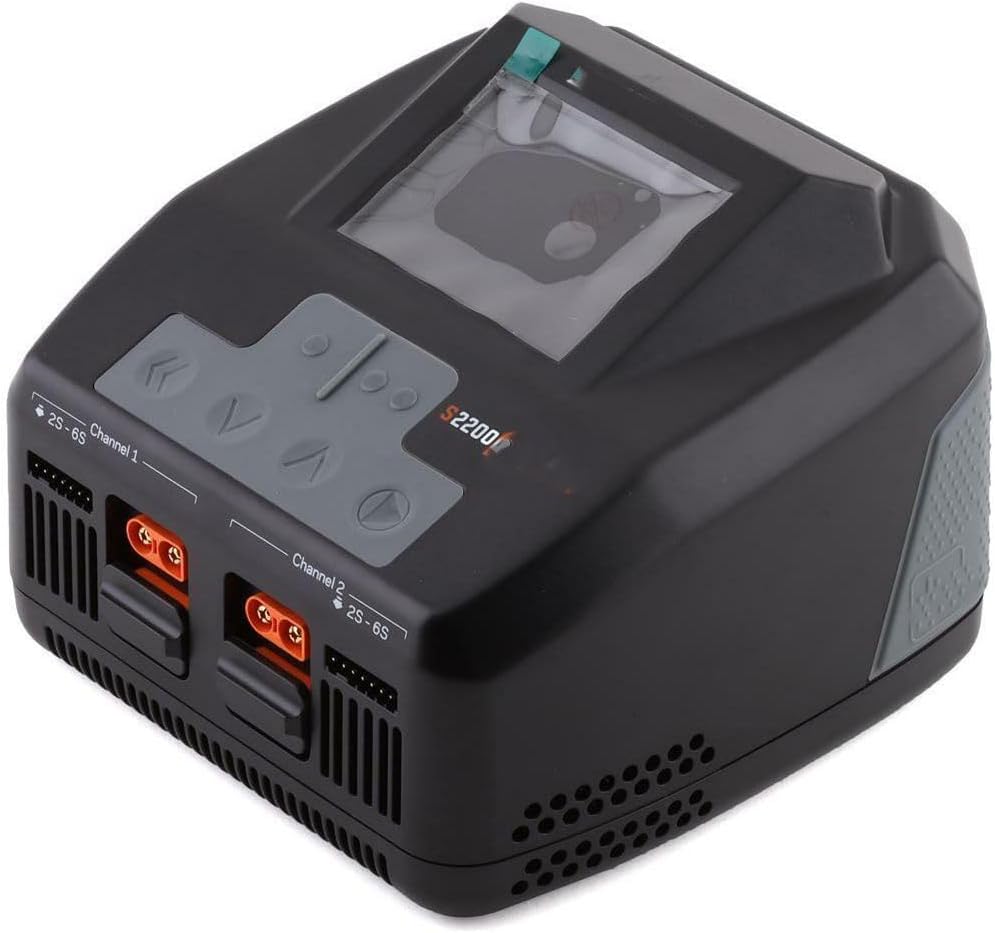
మూర్తి 1: ముందు view of the Generic S2200 G2 AC LiPo Smart Charger, showing the dual charging ports, balance ports, and control buttons with a central display screen.
3. ప్యాకేజీ విషయాలు
Please check the contents of your package upon opening. If any items are missing or damaged, contact your retailer immediately. Typical package contents include:
- Generic S2200 G2 AC LiPo Smart Charger Unit
- AC పవర్ కార్డ్
- Charging Cables (e.g., XT60, EC5, or similar, quantity may vary)
- Balance Boards (quantity may vary)
- వినియోగదారు మాన్యువల్ (ఈ పత్రం)
4. సెటప్
4.1 పవర్కు కనెక్ట్ చేస్తోంది
- Place the charger on a stable, non-flammable surface.
- Ensure the charger's power switch (if present) is in the OFF position.
- Connect the supplied AC power cord to the AC input port on the back or side of the charger.
- Plug the other end of the AC power cord into a suitable wall outlet (240V AC, as per specifications).
- Turn the charger's power switch to the ON position. The display should illuminate.
4.2 Connecting Batteries
- Identify the main discharge connector and the balance connector on your battery.
- Connect the battery's main discharge connector to the corresponding output port on the charger (e.g., Channel 1 or Channel 2). Ensure the polarity is correct.
- Connect the battery's balance connector to the appropriate balance port on the charger or balance board. Ensure the cell count matches the port (e.g., 2S, 3S, 6S).
- Repeat for the second battery if using both channels.
5. ఆపరేషన్
5.1 వినియోగదారు ఇంటర్ఫేస్
The charger features a central LCD screen and several control buttons for navigation and setting adjustments. Typically, these include:
- MENU/ENTER Button: ఎంపికలను నిర్ధారించడానికి లేదా మెనూలను నమోదు చేయడానికి.
- పైకి/క్రిందికి బాణాలు: ఎంపికల ద్వారా నావిగేట్ చేయడానికి లేదా విలువలను సర్దుబాటు చేయడానికి.
- START/STOP బటన్: To initiate or terminate a charging/discharging process.
- CHANNEL Select Button: To switch between Channel 1 and Channel 2 settings.
5.2 Basic Charging Procedure (LiPo Exampలే)
- పవర్ ఆన్: ఛార్జర్ని ఆన్ చేయండి.
- ఛానెల్ని ఎంచుకోండి: Use the CHANNEL button to select the desired charging channel (1 or 2).
- ప్రోగ్రామ్ని ఎంచుకోండి: Navigate to the 'LiPo CHARGE' or 'LiPo BALANCE' program using the arrow buttons and confirm with ENTER.
- బ్యాటరీ వాల్యూమ్ని సెట్ చేయండిtage/Cell Count: Adjust the cell count (e.g., 3S, 4S, 6S) to match your battery. The charger may auto-detect, but always verify.
- ఛార్జ్ కరెంట్ సెట్ చేయండి: ఛార్జ్ కరెంట్ను సర్దుబాటు చేయండి (లో Amps) based on your battery's capacity. A common guideline is 1C (e.g., for a 5000mAh battery, set 5.0A).
- ఛార్జింగ్ ప్రారంభించండి: Press and hold the START button to initiate the charging process. The charger will typically perform a battery check before starting.
- పురోగతిని పర్యవేక్షించండి: The display will show real-time information such as current voltage, charge current, charged capacity, and elapsed time.
- పూర్తి: The charger will beep and display a 'Charge Complete' message when finished. Disconnect the battery safely.
5.3 Other Modes
- LiPo Fast Charge: Charges the battery faster but may not balance cells as precisely.
- LiPo Storage: బ్యాటరీని సురక్షితమైన నిల్వ వాల్యూమ్కు ఛార్జ్ చేస్తుంది లేదా డిశ్చార్జ్ చేస్తుంది.tage (typically 3.85V per cell) for prolonged periods.
- LiPo Discharge: Discharges the battery to a user-defined voltage.
- Other Battery Types: The charger supports various battery types (LiFe, LiIon, NiMH, NiCd, Pb). Select the appropriate program and set parameters accordingly.
6. నిర్వహణ
- శుభ్రపరచడం: Use a soft, dry cloth to clean the charger's exterior. Do not use solvents or abrasive cleaners.
- నిల్వ: ఛార్జర్ను ఉపయోగంలో లేనప్పుడు ప్రత్యక్ష సూర్యకాంతి మరియు తీవ్రమైన ఉష్ణోగ్రతలకు దూరంగా చల్లని, పొడి ప్రదేశంలో నిల్వ చేయండి.
- కేబుల్ తనిఖీ: Regularly inspect all power and charging cables for signs of wear, damage, or frayed wires. Replace damaged cables immediately.
- వెంటిలేషన్: Ensure the charger's ventilation openings are clear of dust and debris to prevent overheating.
7. ట్రబుల్షూటింగ్
| సమస్య | సాధ్యమైన కారణం | పరిష్కారం |
|---|---|---|
| ఛార్జర్ పవర్ ఆన్ చేయదు | No AC power; Power cord loose; Charger switch off | Check wall outlet; Ensure power cord is securely connected; Turn charger switch ON. |
| "Connection Error" message | Battery not connected properly; Damaged cable | Verify main and balance connections; Inspect cables for damage. |
| "Cell Voltage Error" or "Balance Error" | Incorrect cell count setting; Damaged battery; Balance lead issue | Verify cell count setting; Inspect battery for damage; Check balance lead connection. |
| Charger gets hot during operation | Poor ventilation; High ambient temperature | Ensure adequate airflow around the charger; Operate in a cooler environment. |
8. స్పెసిఫికేషన్లు
| ఫీచర్ | స్పెసిఫికేషన్ |
|---|---|
| మోడల్ | S2200 G2 AC |
| ఇన్పుట్ వాల్యూమ్tage | 240 వోల్ట్స్ AC |
| అవుట్పుట్ వాల్యూమ్tage | 22 వోల్ట్లు (గరిష్టంగా) |
| కరెంట్ ఛార్జ్ చేయండి | 20 Amps (Max per channel) |
| ఛార్జ్ పవర్ | 200 Watts (Max per channel) |
| మద్దతు ఉన్న బ్యాటరీ రకాలు | LiPo/LiFe/LiIon (1-6S), NiMH/NiCd (1-15S), Pb (2-20V) |
| డిశ్చార్జ్ పవర్ | Typically 10-20W (per channel, specific value not provided) |
| ప్రదర్శించు | LCD స్క్రీన్ |
| శీతలీకరణ | ఇంటిగ్రేటెడ్ కూలింగ్ ఫ్యాన్ |
9. వారంటీ మరియు మద్దతు
Warranty information for the Generic S2200 G2 AC LiPo Smart Charger is typically provided by the retailer or manufacturer at the time of purchase. Please refer to your purchase documentation or contact your point of sale for details regarding warranty coverage and claims.
For technical support or further assistance, please contact the retailer from whom you purchased this product. They can provide guidance or direct you to the appropriate support channels.


