
1. పరిచయం
This manual provides detailed instructions for the safe and efficient use of your Lyridz A5266 Rechargeable Nursery Night Light. Please read this manual thoroughly before operating the device and retain it for future reference.
2. ఉత్పత్తి లక్షణాలు
- దీర్ఘకాలం ఉండే బ్యాటరీ: Equipped with a built-in 5000mAh rechargeable battery, providing extended usage time.
- ఫాస్ట్ ఛార్జింగ్: Supports 2A charging current for quicker recharging.
- సహజమైన స్పర్శ నియంత్రణ: Features a user-friendly top touch switch for easy operation.
- సర్దుబాటు ప్రకాశం: Offers a brightness range of 1-100LM to suit various needs.
- సర్దుబాటు చేయగల రంగు ఉష్ణోగ్రత: Provides color temperature options from 2700K (warm light) to 6500K (cool light).
- మెమరీ ఫంక్షన్: Remembers the last used brightness and color temperature settings.
- పోర్టబుల్ డిజైన్: Compact and lightweight, suitable for various indoor locations.
3. ప్యాకేజీ విషయాలు
అన్ప్యాక్ చేసేటప్పుడు అన్ని వస్తువులు ఉన్నాయని నిర్ధారించుకోండి:
- Lyridz A5266 Rechargeable Nursery Night Light
- USB-C ఛార్జింగ్ కేబుల్
- వినియోగదారు మాన్యువల్
- Wristlet Strap

Figure 3.1: Contents of the Lyridz A5266 package.
4. సెటప్
4.1 ప్రారంభ ఛార్జింగ్
Before first use, fully charge the night light. Connect the provided USB-C cable to the charging port on the device and plug the other end into a compatible USB power adapter (not included). The charging indicator light will illuminate during charging and change color when fully charged.
4.2 ప్లేస్మెంట్
Place the night light on a stable, flat surface. Ensure it is away from direct sunlight, heat sources, and moisture. The portable design allows for flexible placement in nurseries, bedrooms, or other areas requiring soft illumination.
5. ఆపరేటింగ్ సూచనలు
5.1 పవర్ ఆన్/ఆఫ్
- Top Touch Control: Gently tap the top surface of the night light to turn it on or off.
- పవర్ బటన్: Press the power button located on the base of the light to turn it on or off.

Figure 5.1: Activating the night light using the top touch switch.
5.2 ప్రకాశం సర్దుబాటు
- Top Touch Control: While the light is on, press and hold the top surface to smoothly adjust the brightness from 1LM to 100LM. Release when the desired brightness is reached.
- డిమ్మింగ్ బటన్: Press the 'Dimming' button on the base to cycle through preset brightness levels.

Figure 5.2: Brightness adjustment from 1LM to 100LM.
5.3 రంగు ఉష్ణోగ్రత సర్దుబాటు
Press the 'Color' button on the base to switch between different color temperatures (e.g., 2700K warm white, 4500K neutral white, 6500K cool white). This allows you to select the most suitable light for various activities like breastfeeding or diaper changes.

Figure 5.3: Adjustable color temperature options.
5.4 మెమరీ ఫంక్షన్
The night light is designed with a memory function. When turned back on, it will default to the last brightness and color temperature settings used.
5.5 ఉత్పత్తి ముగిసిందిview వీడియో
Watch this video for a visual demonstration of the Lyridz Nursery Night Light's features and operation.
Video 5.1: Lyridz Nursery Night Light for Kids - Features and Usage.
6. ఛార్జింగ్
The Lyridz A5266 features a 5000mAh rechargeable battery. A full charge can provide over 2 months of usage (based on 3 hours a day at medium brightness). The device supports 2A charging, allowing for a full charge in approximately 3 hours.

Figure 6.1: Battery life indication for the 5000mAh battery.
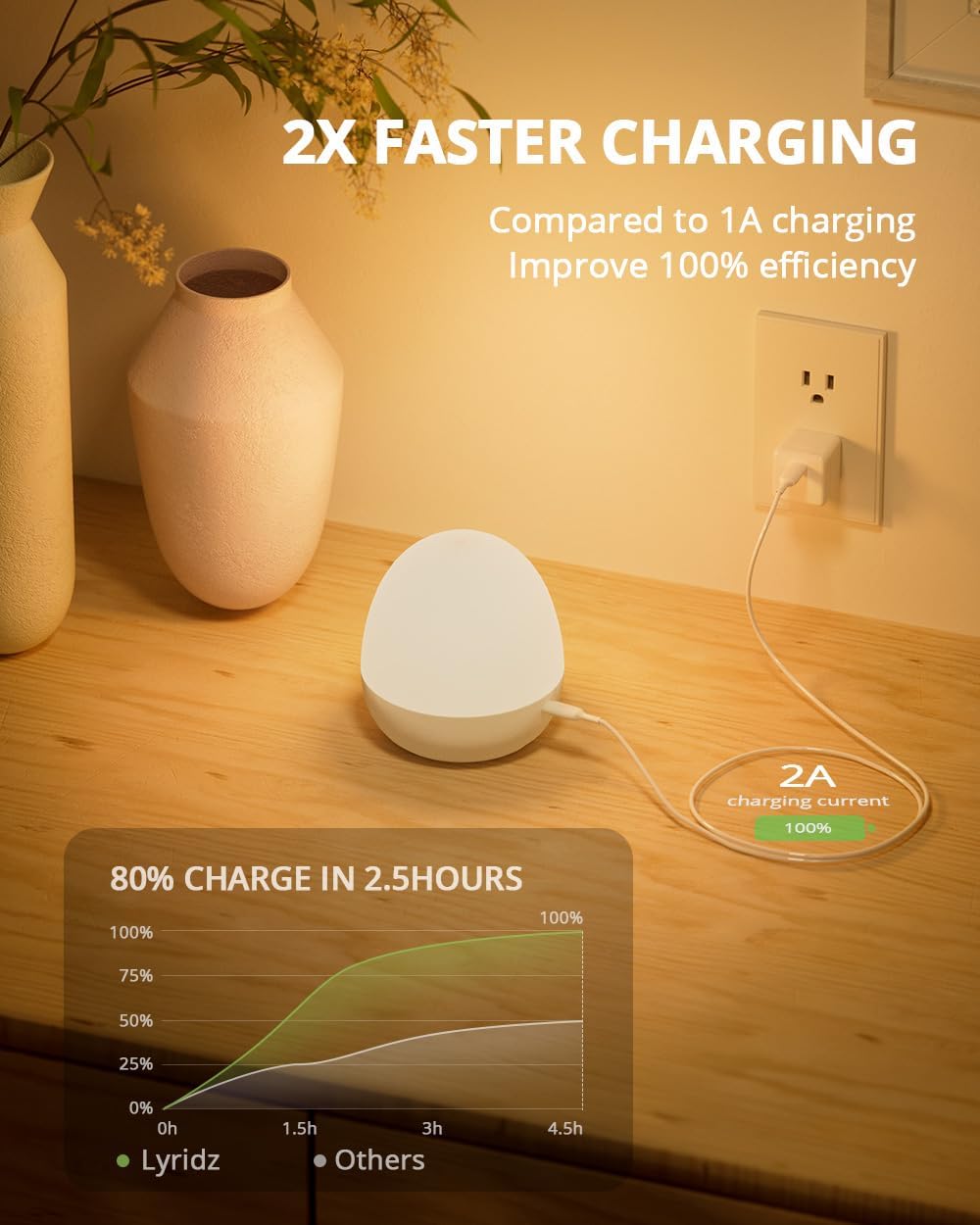
Figure 6.2: Faster charging capability of the Lyridz A5266.
7. నిర్వహణ
- శుభ్రపరచడం: Use a soft, dry cloth to clean the surface of the night light. Do not use abrasive cleaners or solvents.
- నిల్వ: ఎక్కువసేపు ఉపయోగంలో లేనప్పుడు, పరికరాన్ని చల్లని, పొడి ప్రదేశంలో నిల్వ చేయండి.
8. ట్రబుల్షూటింగ్
8.1 లైట్ ఆన్ కావడం లేదు
- బ్యాటరీ ఛార్జ్ అయ్యిందని నిర్ధారించుకోండి. USB-C కేబుల్ ఉపయోగించి పరికరాన్ని పవర్ సోర్స్కి కనెక్ట్ చేయండి.
- Verify that the power button or top touch control is being pressed correctly.
8.2 Light Not Charging
- Check the USB-C cable for damage and ensure it is securely connected to both the light and the power adapter.
- వేరే USB పవర్ అడాప్టర్ లేదా USB పోర్ట్ని ప్రయత్నించండి.
- పవర్ సోర్స్ యాక్టివ్గా ఉందని నిర్ధారించుకోండి.
8.3 Inconsistent Brightness/Color Change
- Ensure your finger is making full contact with the top touch area for brightness adjustment.
- Press the 'Dimming' or 'Color' buttons firmly and release to cycle through settings.
9. స్పెసిఫికేషన్లు
| ఫీచర్ | స్పెసిఫికేషన్ |
|---|---|
| మోడల్ సంఖ్య | A5266 |
| కొలతలు | 3.94"డి x 3.94"వా x 4.33"హ |
| వస్తువు బరువు | 10.5 ఔన్సులు |
| శక్తి మూలం | బ్యాటరీ పవర్డ్ (2 లిథియం అయాన్ బ్యాటరీలు ఉన్నాయి) |
| బ్యాటరీ కెపాసిటీ | 5000mAh |
| ఛార్జింగ్ కరెంట్ | 2A (approx. 3 hours for full charge) |
| కాంతి మూలం రకం | LED |
| ప్రకాశం పరిధి | 1-100LM |
| రంగు ఉష్ణోగ్రత | 2700 కె - 6500 కె |
| నియంత్రణ పద్ధతి | టచ్ |
| మెటీరియల్ | ప్లాస్టిక్ |
| ఇండోర్/అవుట్డోర్ వినియోగం | ఇండోర్ |
| నీటి నిరోధక స్థాయి | జలనిరోధిత |
10. భద్రతా సమాచారం
- పరికరాన్ని విడదీయవద్దు, మరమ్మత్తు చేయవద్దు లేదా సవరించవద్దు.
- Keep the device away from water and high humidity, despite its waterproof rating, to prevent damage to internal components.
- పరికరాన్ని తీవ్రమైన ఉష్ణోగ్రతలకు బహిర్గతం చేయకుండా ఉండండి.
- Keep out of reach of small children to prevent accidental ingestion of small parts or misuse.
- Use only the provided or a certified USB-C cable for charging.
11. వారంటీ మరియు మద్దతు
Lyridz products come with a standard manufacturer's warranty. For warranty claims, technical support, or any inquiries regarding your Lyridz A5266 Night Light, please contact Lyridz customer service through the retailer where the product was purchased or visit the official Lyridz webసంప్రదింపు సమాచారం కోసం సైట్.


