1. పరిచయం
This manual provides detailed instructions for the setup, operation, and maintenance of your new Generic Manta Smart TV Remote Control. Please read this manual thoroughly before using the remote to ensure proper functionality and to maximize your viewing అనుభవం.
2. అనుకూలత
This remote control is designed for use with Manta Smart TVs. For optimal compatibility, ensure that the physical appearance of this remote matches your original Manta Smart TV remote. Additionally, verify that the remote includes a 'Fav' button in the last row of buttons, as this indicates full compatibility with specific Manta Smart TV models.
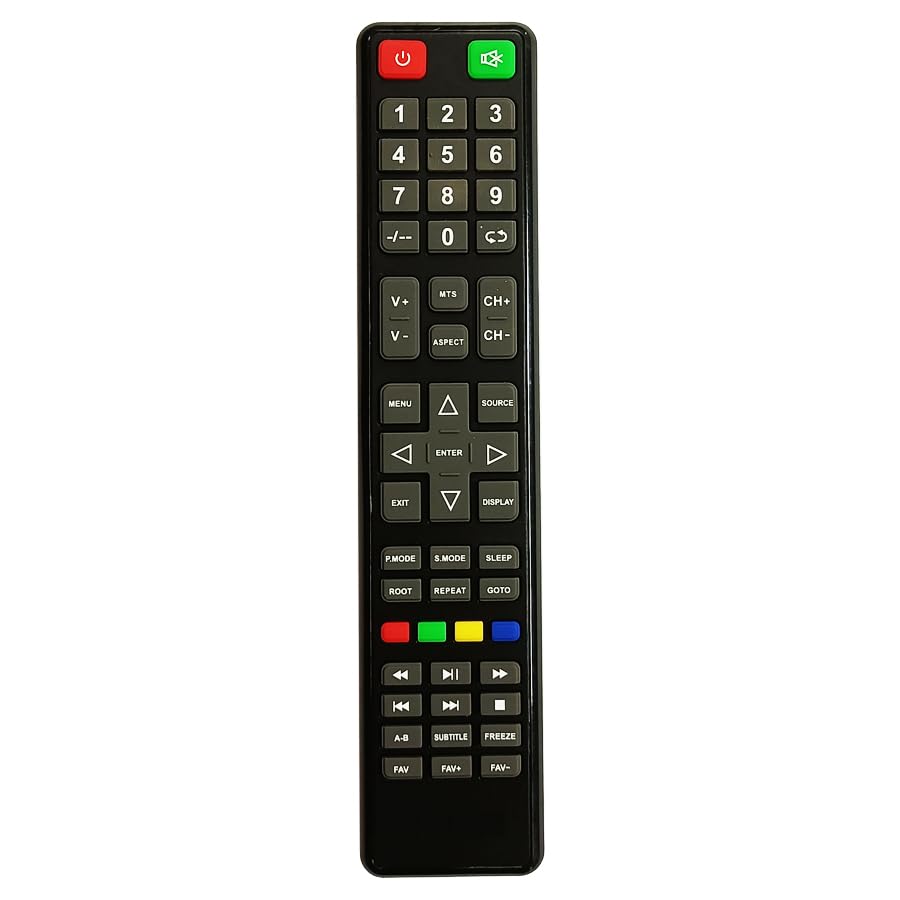
Figure 1: Manta Smart TV Remote Control. A black remote control with various buttons for TV operation, including a numeric keypad, navigation buttons, and dedicated smart TV function buttons.
3. బ్యాటరీ ఇన్స్టాలేషన్
The remote control requires Lithium Ion batteries (not typically included). Follow these steps to install the batteries:
- రిమోట్ కంట్రోల్ వెనుక బ్యాటరీ కంపార్ట్మెంట్ కవర్ను గుర్తించండి.
- కంపార్ట్మెంట్ తెరవడానికి కవర్ను క్రిందికి జారండి లేదా గొళ్ళెం నొక్కండి.
- Insert the Lithium Ion batteries, ensuring the positive (+) and negative (-) terminals align correctly with the markings inside the compartment.
- బ్యాటరీ కంపార్ట్మెంట్ కవర్ సురక్షితంగా క్లిక్ అయ్యే వరకు దాన్ని తిరిగి స్థానంలోకి జారడం ద్వారా దాన్ని మూసివేయండి.
గమనిక: Always replace all batteries at the same time. Do not mix old and new batteries, or different types of batteries.
4. సెటప్ మరియు మొదటి ఉపయోగం
This remote control uses infrared (IR) technology and typically does not require complex pairing. Once batteries are installed, it should be ready for use with compatible Manta Smart TVs.
- Ensure your Manta Smart TV is powered on or in standby mode.
- Point the remote control directly at the IR receiver on your Manta Smart TV.
- నొక్కండి శక్తి button to turn on or off the TV. If the TV responds, the remote is successfully set up.
If the TV does not respond, refer to the Troubleshooting section.
5. ఆపరేటింగ్ సూచనలు
Familiarize yourself with the main functions of the remote control:
- పవర్ బటన్: టీవీని ఆన్ లేదా ఆఫ్ చేస్తుంది.
- సంఖ్యా కీప్యాడ్ (0-9): డైరెక్ట్ ఛానల్ ఇన్పుట్ కోసం ఉపయోగించబడుతుంది.
- వాల్యూమ్ అప్/డౌన్: ధ్వని స్థాయిని సర్దుబాటు చేస్తుంది.
- ఛానల్ పైకి/క్రిందికి: టీవీ ఛానెళ్లను వరుసగా మారుస్తుంది.
- మ్యూట్ బటన్: టీవీ సౌండ్ను మ్యూట్ చేస్తుంది లేదా అన్మ్యూట్ చేస్తుంది.
- నావిగేషన్ బటన్లు (పైకి, క్రిందికి, ఎడమ, కుడి, సరే): మెనూలను నావిగేట్ చేయడానికి మరియు స్క్రీన్పై ఎంపికలను ఎంచుకోవడానికి ఉపయోగించబడుతుంది.
- వెనుకకు/నిష్క్రమించు బటన్: మునుపటి మెనూకు తిరిగి వస్తుంది లేదా ప్రస్తుత మెనూ నుండి నిష్క్రమిస్తుంది.
- Smart TV/Home Button: Accesses the Smart TV interface or home screen.
- Fav Button: Accesses your favorite channels list (if supported by your TV model).
- రంగు బటన్లు (ఎరుపు, ఆకుపచ్చ, పసుపు, నీలం): Perform specific functions within menus or applications, as indicated on screen.
6. ట్రబుల్షూటింగ్
మీ రిమోట్ కంట్రోల్తో మీకు సమస్యలు ఎదురైతే, ఈ క్రింది సాధారణ సమస్యలు మరియు పరిష్కారాలను చూడండి:
| సమస్య | పరిష్కారం |
|---|---|
| Remote is not responding to the TV. |
|
| కొన్ని బటన్లు పనిచేయడం లేదు. |
|
| రిమోట్ అడపాదడపా పనిచేస్తుంది. |
|
7. నిర్వహణ
To ensure the longevity of your remote control:
- రిమోట్ను మృదువైన, పొడి వస్త్రంతో తుడిచి శుభ్రంగా ఉంచండి.
- రిమోట్ను తీవ్రమైన ఉష్ణోగ్రతలు, ప్రత్యక్ష సూర్యకాంతి లేదా తేమకు గురిచేయకుండా ఉండండి.
- Do not drop the remote or subject it to strong impacts.
- రిమోట్ను ఎక్కువ కాలం ఉపయోగించకపోతే, లీకేజీని నివారించడానికి బ్యాటరీలను తీసివేయండి.
8. స్పెసిఫికేషన్లు
| ఫీచర్ | వివరాలు |
|---|---|
| బ్రాండ్ | సాధారణమైనది |
| తయారీదారు | cheops |
| మూలం దేశం | చైనా |
| కనెక్టివిటీ టెక్నాలజీ | ఇన్ఫ్రారెడ్ |
| కంట్రోలర్ రకం | బటన్ నియంత్రణ |
| బ్యాటరీ వివరణ | లిథియం అయాన్ |
| ASIN | B0CC31JXM4 |
9. వారంటీ మరియు మద్దతు
For warranty information and customer support, please refer to the documentation provided with your purchase or contact the seller directly. Specific warranty terms and support channels may vary depending on your region and point of purchase.


