
Tecno LH8n (256+8)
TECNO Pova 5 Pro 5G User Manual
Model: LH8n (256+8)
పరిచయం
This manual provides essential information for the safe and efficient operation of your TECNO Pova 5 Pro 5G smartphone. Please read it thoroughly before using your device to ensure optimal performance and longevity.

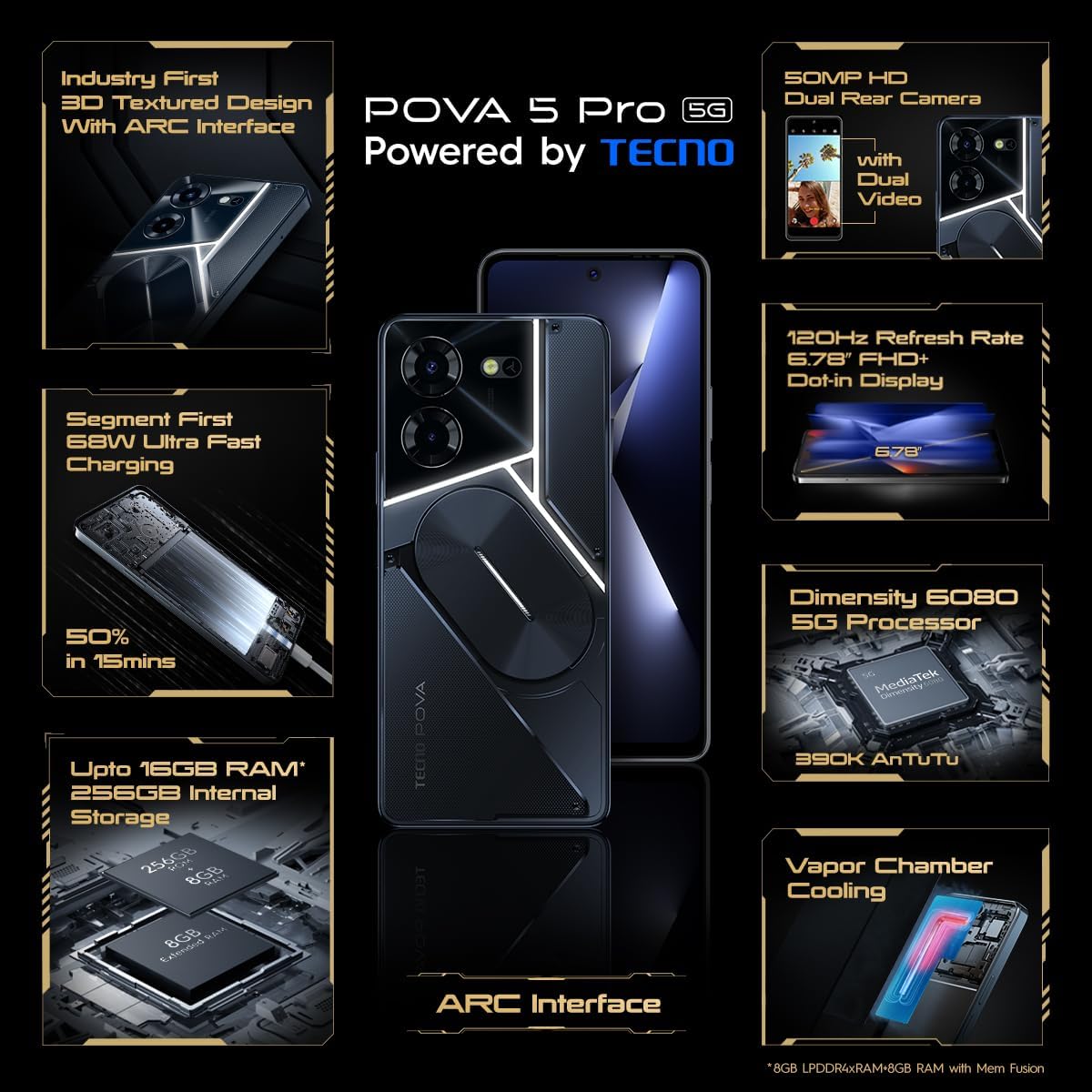
Image: The TECNO Pova 5 Pro 5G smartphone, showcasing its design and key feature of 68W Ultra Fast Charging.
పెట్టెలో ఏముంది
ప్యాకేజింగ్లో అన్ని వస్తువులు ఉన్నాయని నిర్ధారించుకోండి:
- స్మార్ట్ఫోన్
- 68 W పవర్ అడాప్టర్
- టైప్-సి కేబుల్
- TPU Cover
- SIM ఎజెక్టర్ సాధనం

Image: A flat lay of the TECNO Pova 5 Pro 5G packaging contents, showing the smartphone, 68W power adapter, USB-C cable, TPU protective cover, and the SIM ejector tool.
సెటప్
ప్రారంభ సెటప్
- SIM/SD కార్డ్ని చొప్పించండి: Locate the SIM tray on the side of the device. Use the provided SIM ejector tool to open the tray. Insert your Nano-SIM card(s) and/or microSD card into the designated slots. Ensure the tray is fully reinserted.
- పవర్ ఆన్: Press and hold the Power button (located on the right side) until the TECNO logo appears.
- ఆన్-స్క్రీన్ ప్రాంప్ట్లను అనుసరించండి: The device will guide you through initial setup, including language selection, Wi-Fi connection, Google account setup, and security settings.
పరికరాన్ని ఛార్జ్ చేస్తోంది
The TECNO Pova 5 Pro 5G supports 68W Ultra Fast Charging.
- Connect the Type-C cable to the charging port at the bottom of the phone.
- Connect the other end of the cable to the 68W power adapter.
- పవర్ అడాప్టర్ను వాల్ అవుట్లెట్లోకి ప్లగ్ చేయండి.
- A full charge typically takes approximately 45 minutes, with 50% charge achievable in about 15 minutes.
చిత్రం: స్పష్టమైన ముందు భాగం view of the TECNO Pova 5 Pro 5G smartphone, highlighting its display and front camera.
పరికరాన్ని ఆపరేట్ చేస్తోంది
ప్రాథమిక నావిగేషన్
- టచ్స్క్రీన్: ఎంచుకోవడానికి నొక్కండి, స్క్రోల్ చేయడానికి స్వైప్ చేయండి, జూమ్ చేయడానికి పించ్ చేయండి.
- పవర్ బటన్: స్క్రీన్ను మేల్కొలపడానికి/నిద్రలోకి తీసుకురావడానికి నొక్కండి. పవర్ ఆఫ్ చేయడానికి లేదా పునఃప్రారంభించడానికి నొక్కి పట్టుకోండి.
- వాల్యూమ్ బటన్లు: మీడియా వాల్యూమ్, కాల్ వాల్యూమ్ లేదా రింగ్టోన్ వాల్యూమ్ను సర్దుబాటు చేయండి.
కెమెరా వినియోగం
The device features a 50MP AI Dual Rear Camera and a 16MP Selfie Camera.
- హోమ్ స్క్రీన్ లేదా యాప్ డ్రాయర్ నుండి కెమెరా యాప్ను తెరవండి.
- కావలసిన మోడ్ను ఎంచుకోండి (ఫోటో, వీడియో, పోర్ట్రెయిట్, మొదలైనవి).
- ఫోటోలను క్యాప్చర్ చేయడానికి లేదా వీడియో రికార్డింగ్ను ప్రారంభించడానికి/ఆపివేయడానికి షట్టర్ బటన్ను నొక్కండి.
- Utilize AI enhancements for optimized scene recognition and image quality.
ARC Interface and Notifications
The TECNO Pova 5 Pro 5G features a unique multi-color ARC interface with backlighting.
- The ARC interface provides customizable light effects for notifications, incoming calls, gaming, and music playback.
- Access settings to personalize the light patterns and colors for different alerts.

చిత్రం: వెనుక భాగం view of the TECNO Pova 5 Pro 5G, showcasing its distinctive 3D textured design and the illuminated ARC interface.

చిత్రం: వివరణాత్మక view of the TECNO Pova 5 Pro 5G's ARC interface, illustrating the multi-color backlighting feature.
నిర్వహణ
- బ్యాటరీ సంరక్షణ: To prolong battery life, avoid exposing the device to extreme temperatures. Do not fully discharge the battery regularly.
- శుభ్రపరచడం: స్క్రీన్ మరియు బాడీని శుభ్రం చేయడానికి మృదువైన, మెత్తటి బట్టను ఉపయోగించండి. కఠినమైన రసాయనాలు లేదా రాపిడి పదార్థాలను ఉపయోగించకుండా ఉండండి.
- సాఫ్ట్వేర్ అప్డేట్లు: Regularly check for and install system updates to ensure optimal performance, security, and access to new features. Navigate to Settings > System > System update.
- నిల్వ నిర్వహణ: కాలానుగుణంగా అనవసరమైన వాటిని క్లియర్ చేయండి fileతగినంత నిల్వ స్థలం మరియు పరికర వేగాన్ని నిర్వహించడానికి లు మరియు యాప్లు.
ట్రబుల్షూటింగ్
- పరికరం ఆన్ చేయడం లేదు: Ensure the battery is charged. Connect the device to the charger for at least 15 minutes before attempting to power on again. If the issue persists, perform a forced restart by holding the Power button for 10-15 seconds.
- ఛార్జింగ్ సమస్యలు: Verify that the charging cable and adapter are securely connected and undamaged. Try using a different outlet.
- యాప్ క్రాషింగ్/ఫ్రీజింగ్: Close the problematic app and reopen it. If the issue continues, clear the app's cache and data in Settings > Apps. As a last resort, uninstall and reinstall the app.
- పేలవమైన నెట్వర్క్ కనెక్టివిటీ: Check if Airplane Mode is off. Restart the device. If using mobile data, ensure your SIM card is properly inserted and your data plan is active.
- వేడెక్కడం: Avoid using the device in direct sunlight or during intensive tasks for extended periods. Close background applications.
స్పెసిఫికేషన్లు
| ఫీచర్ | స్పెసిఫికేషన్ |
|---|---|
| మోడల్ పేరు | Pova 5 Pro 5G |
| ఆపరేటింగ్ సిస్టమ్ | ఆండ్రాయిడ్ 13.0 |
| ప్రాసెసర్ | Dimensity 6080 (2.4 GHz Octa-Core) |
| RAM | 8 GB (expandable up to 16 GB with Memory Fusion) |
| అంతర్గత నిల్వ | 256 GB (UMCP) |
| ప్రదర్శించు | 6.78-inch FHD+ Dot-in Display |
| రిఫ్రెష్ రేట్ | 120 Hz |
| వెనుక కెమెరా | 50 MP AI Dual Camera |
| ఫ్రంట్ కెమెరా | 16 MP సెల్ఫీ కెమెరా |
| బ్యాటరీ | 5000 mAh లిథియం-పాలిమర్ |
| ఛార్జింగ్ | 68W Ultra Fast Charging |
| కొలతలు | 16.9 x 7.7 x 16.9 సెం.మీ |
| బరువు | 214 గ్రాములు |
| కనెక్టివిటీ | 5G (10 bands supported), NFC, Bluetooth 5.1 |

Image: An internal diagram or view of the TECNO Pova 5 Pro 5G, illustrating its vapor chamber cooling system for efficient heat dissipation.
వారంటీ మరియు మద్దతు
Your TECNO Pova 5 Pro 5G comes with a manufacturer's warranty. Please refer to the warranty card included in your product packaging for specific terms and conditions.
For technical support, service, or warranty claims, please contact TECNO customer service. TECNO maintains a large service network with over 1200 service centers in India.
You can find more information and support resources by visiting the official Tecno store on Amazon: Tecno Store
Ask a question about this manual
Ask about setup, troubleshooting, compatibility, parts, safety, or missing instructions. Manuals+ will review the question and use this page’s manual context to help answer it.