
పరిచయం
This manual provides essential information for the safe and efficient use of your SANSUI JSW50GSUHD 50-inch 4K Ultra HD Smart Google LED TV. Please read these instructions thoroughly before operating the television and retain them for future reference.

చిత్రం: ముందు భాగం view of the SANSUI JSW50GSUHD 50-inch 4K Ultra HD Smart Google LED TV.
భద్రతా సమాచారం
Always follow basic safety precautions when using this television to reduce the risk of fire, electric shock, and injury. Keep the TV away from water and moisture. Do not block ventilation openings. Use only attachments/accessories specified by the manufacturer. Refer all servicing to qualified service personnel.
పెట్టెలో ఏముంది
పెట్టెను జాగ్రత్తగా విప్పి, అన్ని వస్తువులు ఉన్నాయని నిర్ధారించుకోండి:
- 1 x SANSUI JSW50GSUHD 50-inch TV
- 1 x రిమోట్ కంట్రోల్
- 1 pair x AAA Batteries (for remote)
- 1 set x Base Stand
- 2 pairs x Screws (for stand)
- 1 set x Wall Mounting Kit (if included)
- 1 x యూజర్ మాన్యువల్ & వారంటీ కార్డ్
- 1 x పవర్ కేబుల్
- 1 x Mini AV cable
సెటప్
1 టీవీ ప్లేస్మెంట్
Place the TV on a stable, flat surface using the provided base stand, or mount it on a wall using a compatible VESA 100 x 100 mm wall mount (sold separately). Ensure adequate ventilation around the TV.

Image: The SANSUI JSW50GSUHD TV placed on a media console with its stand.
2. బాహ్య పరికరాలను కనెక్ట్ చేస్తోంది
Your SANSUI TV offers various connectivity options:
- HDMI పోర్ట్లు (3): Connect Blu-ray players, gaming consoles, set-top boxes, etc.
- USB పోర్ట్లు (2): మీడియా ప్లేబ్యాక్ కోసం USB డ్రైవ్లను కనెక్ట్ చేయండి.
- AV (Mini) Port: మిశ్రమ వీడియో మరియు స్టీరియో ఆడియోను ఉపయోగించే పాత పరికరాల కోసం.
- ఈథర్నెట్ (LAN) పోర్ట్: వైర్డు ఇంటర్నెట్ కనెక్షన్ కోసం.
- Antenna/RF Input: యాంటెన్నా లేదా కేబుల్ టీవీని కనెక్ట్ చేయడానికి.
- ఆప్టికల్ ఆడియో అవుట్పుట్: బాహ్య ఆడియో సిస్టమ్లకు కనెక్ట్ చేయడానికి.
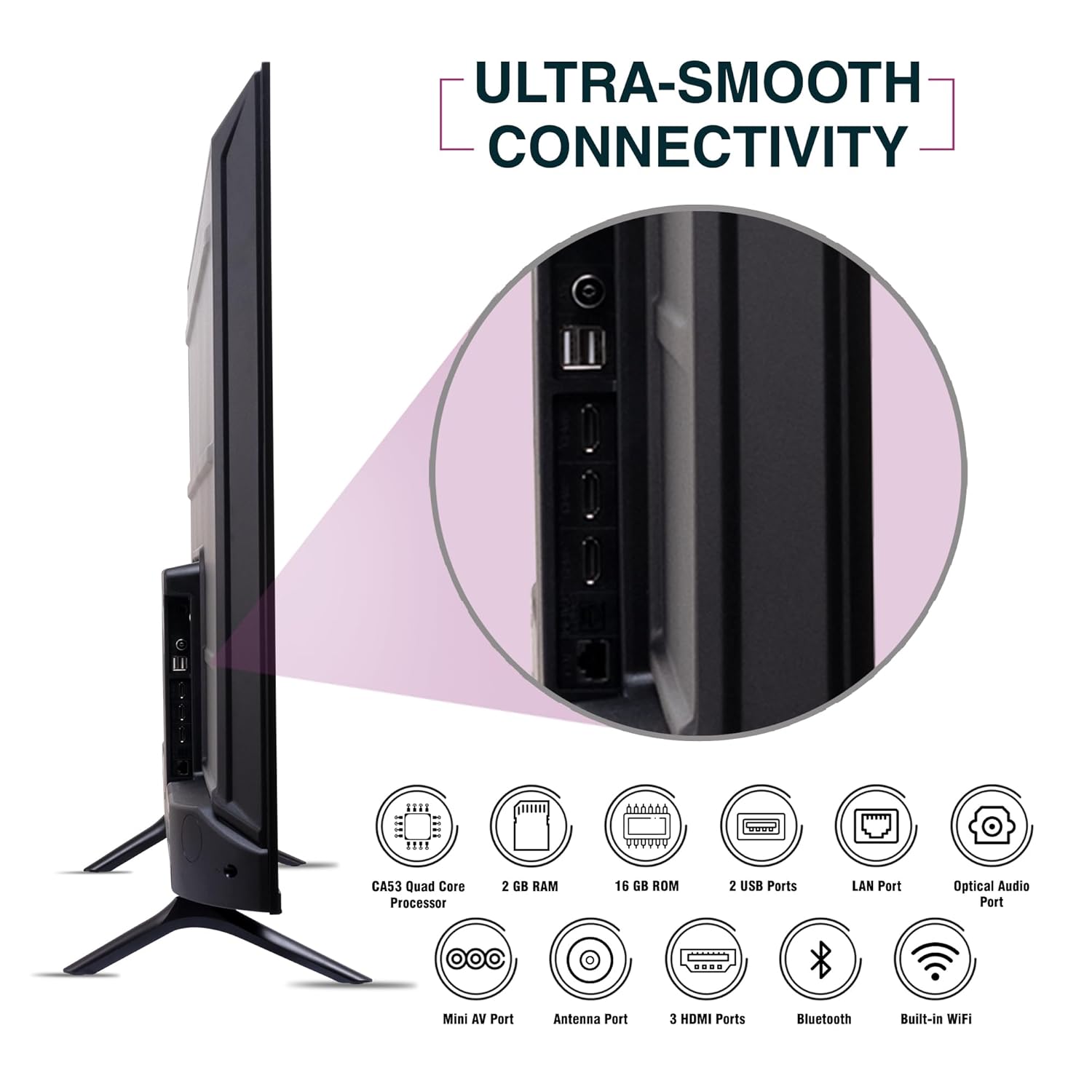
చిత్రం: వైపు view of the SANSUI JSW50GSUHD TV highlighting the various input and output ports.
3. పవర్ కనెక్షన్
Connect the power cable to the TV's power input and then to a wall outlet. The TV supports 100-240 VAC, 50-60 Hz.
4. రిమోట్ కంట్రోల్ సెటప్
Insert the two AAA batteries into the remote control, ensuring correct polarity.
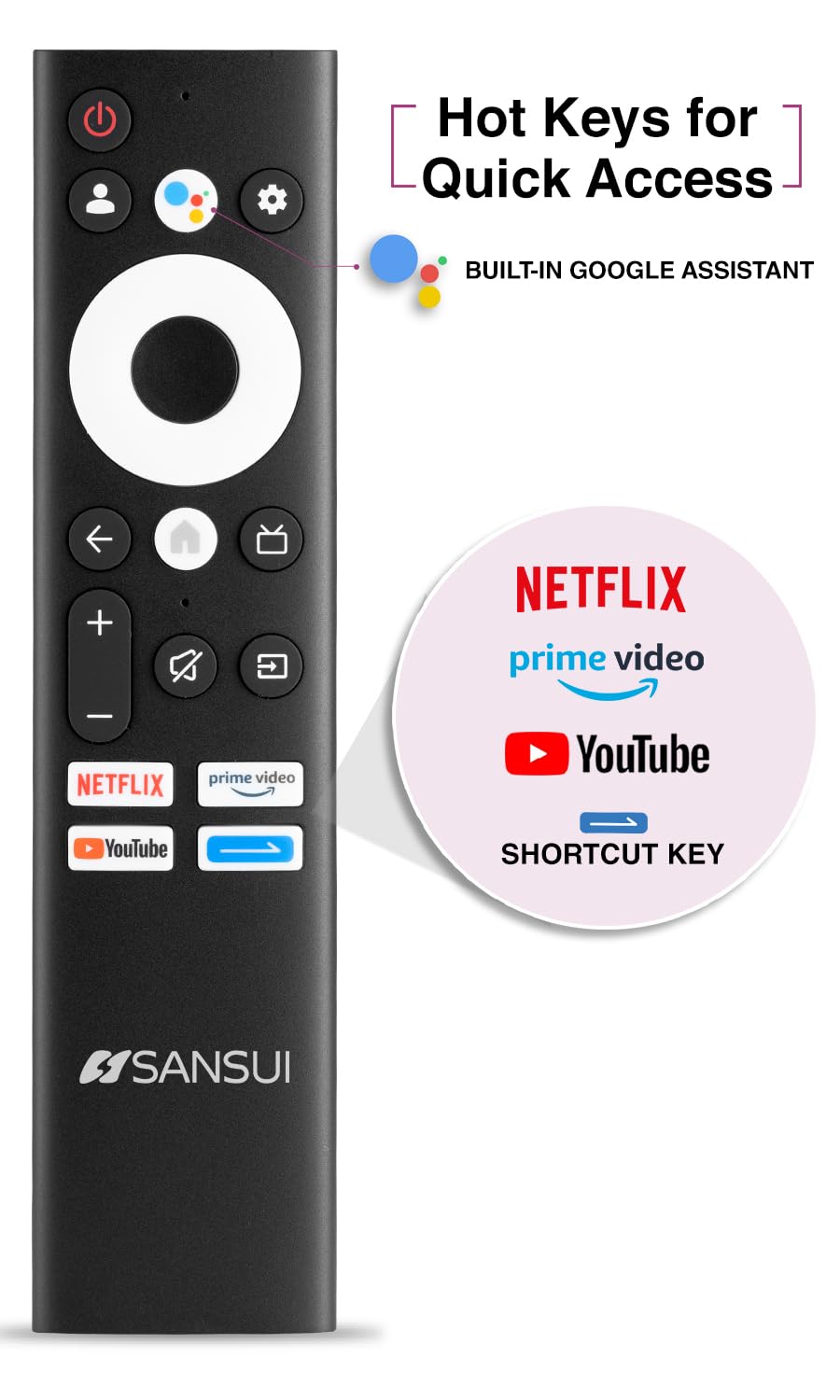
Image: The SANSUI JSW50GSUHD remote control, showing button layout and hot keys.
5. ప్రారంభ సెటప్ (గూగుల్ టీవీ)
Upon first power-on, the TV will guide you through the initial setup process. This includes selecting your language, connecting to Wi-Fi, signing in with your Google account, and configuring Google TV settings. Follow the on-screen prompts.
మీ టీవీని ఆపరేట్ చేయడం
1. ప్రాథమిక విధులు
- శక్తి: టీవీని ఆన్ లేదా ఆఫ్ చేయడానికి రిమోట్లోని పవర్ బటన్ను నొక్కండి.
- వాల్యూమ్: ఆడియో స్థాయిలను సర్దుబాటు చేయడానికి వాల్యూమ్ అప్/డౌన్ బటన్లను ఉపయోగించండి.
- ఇన్పుట్ మూలం: Press the Source button to select between HDMI, AV, TV, and other inputs.
- నావిగేషన్: Use the directional pad and OK button to navigate menus.
2. స్మార్ట్ టీవీ ఫీచర్లు (గూగుల్ టీవీ)
Your TV runs on Google TV, providing access to a wide range of streaming services and smart features.
- Google అసిస్టెంట్: Use the dedicated button on your remote for voice commands to search for content, control smart home devices, and get information.
- అంతర్నిర్మిత Chromecast: మీ అనుకూల స్మార్ట్ఫోన్, టాబ్లెట్ లేదా కంప్యూటర్ నుండి కంటెంట్ను నేరుగా మీ టీవీకి ప్రసారం చేయండి.
- యాప్లు: Access popular streaming apps like Netflix, Prime Video, Disney+ Hotstar, and YouTube directly from the Google TV interface. Download more apps from the Google Play Store.
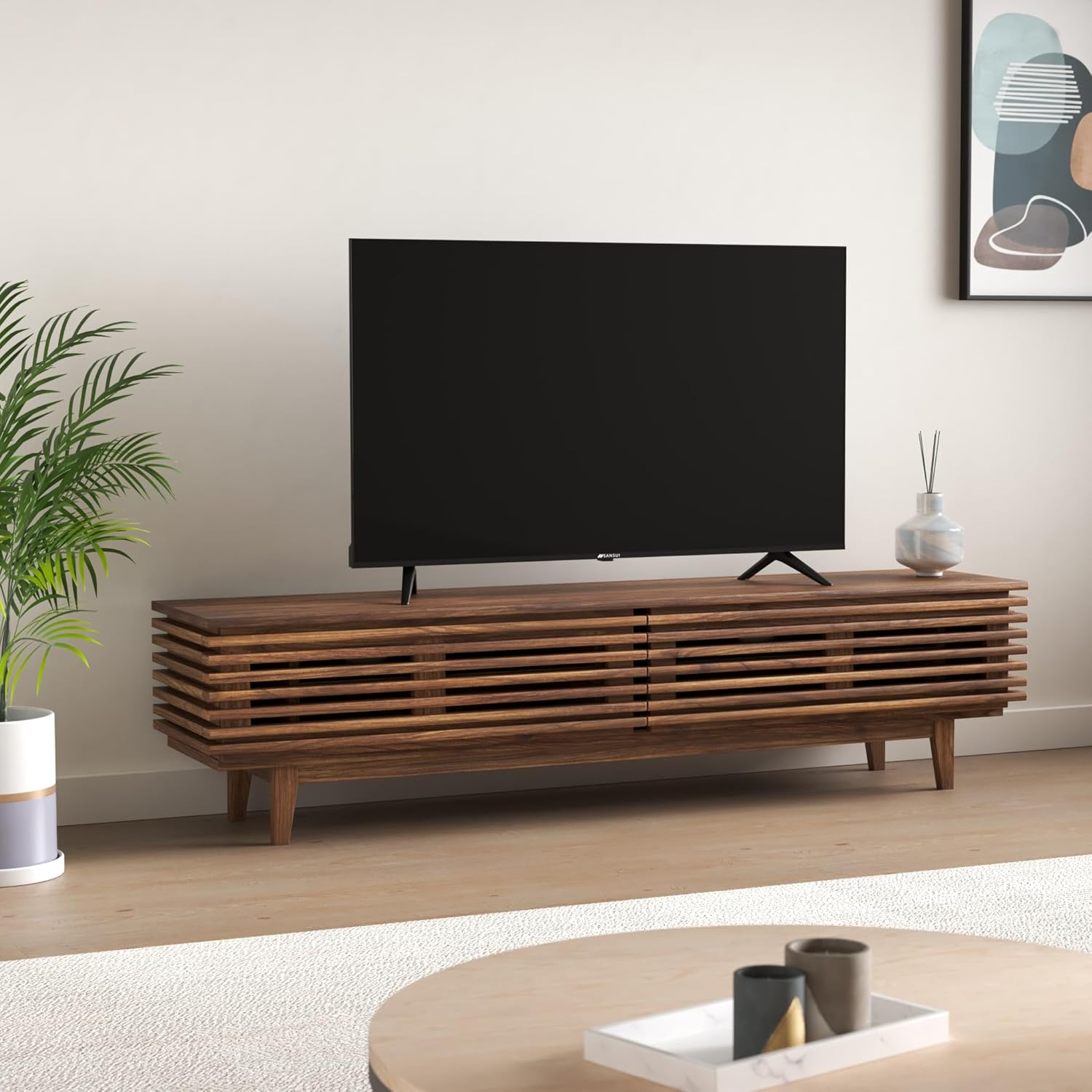
Image: The Google TV home screen displaying various streaming applications and content suggestions.
3. Display and Audio Enhancements
- 4K అల్ట్రా HD: Enjoy stunning clarity and detail with 3840x2160 resolution.
- HDR10: Experience enhanced contrast and a wider range of colors with HDR10 content.
- Zen Panel: The A+ Zen panel dynamically enhances visual content with uniform light dispersal for improved picture quality.
- Bezel-less Design: లీనమయ్యేలా స్క్రీన్ స్థలాన్ని పెంచుతుంది viewing అనుభవం.
- డాల్బీ ఆడియో & DTS స్టూడియో సౌండ్: Delivers rich, clear, and immersive audio with 20W output.

చిత్రం: క్లోజప్ view of the SANSUI JSW50GSUHD TV showcasing its bezel-less design with a vibrant nature scene.

Image: An illustration demonstrating the advanced light dispersal technology of the Zen Panel for enhanced hues.
నిర్వహణ
1. శుభ్రపరచడం
స్క్రీన్ను శుభ్రం చేయడానికి, మృదువైన, మెత్తటి బట్టతో సున్నితంగా తుడవండి. మొండి మరకల కోసం, కొద్దిగా dampen the cloth with water or a screen cleaner specifically designed for TVs. Do not spray liquid directly onto the screen. Clean the TV body with a soft, dry cloth.
2. సాఫ్ట్వేర్ నవీకరణలు
మీ Google TV ఆటోమేటిక్ సాఫ్ట్వేర్ అప్డేట్లను అందుకోవచ్చు. ఈ అప్డేట్లను స్వీకరించడానికి మీ టీవీ ఇంటర్నెట్కు కనెక్ట్ చేయబడిందని నిర్ధారించుకోండి, ఇది పనితీరును మెరుగుపరుస్తుంది మరియు కొత్త ఫీచర్లను జోడిస్తుంది.
ట్రబుల్షూటింగ్
మీ టీవీలో మీకు సమస్యలు ఎదురైతే, ఈ క్రింది సాధారణ పరిష్కారాలను చూడండి:
| సమస్య | సాధ్యమైన పరిష్కారం |
|---|---|
| పవర్ లేదు | పవర్ కేబుల్ టీవీకి మరియు వాల్ అవుట్లెట్కి సురక్షితంగా కనెక్ట్ చేయబడిందో లేదో తనిఖీ చేయండి. అవుట్లెట్ పనిచేస్తుందని నిర్ధారించుకోండి. |
| చిత్రం/ధ్వని లేదు | Verify the correct input source is selected. Check cable connections to external devices. Try a different HDMI port. |
| రిమోట్ కంట్రోల్ పనిచేయడం లేదు | బ్యాటరీలను తనిఖీ చేసి భర్తీ చేయండి. రిమోట్ మరియు టీవీ యొక్క IR సెన్సార్ మధ్య ఎటువంటి అడ్డంకులు లేవని నిర్ధారించుకోండి. |
| Wi-Fi కనెక్షన్ సమస్యలు | Restart your router and modem. Reconnect the TV to the Wi-Fi network in the settings. Ensure the TV is within range of your router. |
| చిత్ర నాణ్యత సమస్యలు | టీవీ మెనూలో చిత్ర సెట్టింగ్లను (ప్రకాశం, కాంట్రాస్ట్, రంగు) సర్దుబాటు చేయండి. కంటెంట్ మూలం అధిక నాణ్యతతో ఉందని నిర్ధారించుకోండి. |
If problems persist, perform a factory reset via the TV settings menu (Settings > System > About > Reset). Note that a factory reset will erase all personal data and settings.
స్పెసిఫికేషన్లు
Detailed technical specifications for the SANSUI JSW50GSUHD TV:
- స్క్రీన్ పరిమాణం: 127 Centimetres (50 Inches)
- ప్రదర్శన సాంకేతికత: LED
- రిజల్యూషన్: 4K అల్ట్రా HD (3840x2160)
- రిఫ్రెష్ రేట్: 60 Hz
- ప్రత్యేక లక్షణాలు: Bezel-Less Design, Browser, Chromecast, Parental Controls, Sleep Timer, Google TV, Google Assistant, Voice Search Smart Remote
- కనెక్టివిటీ: 3 HDMI ports, 2 USB ports, 1 AV (mini), Bluetooth, Wi-Fi, Ethernet (LAN), Optical Audio
- ఆడియో అవుట్పుట్: 20W with Dolby Audio and DTS Studio Sound
- ప్రాసెసర్: CA53 Quad core Processor
- మెమరీ: RAM 2GB, ROM 16GB (FLASH)
- ఆపరేటింగ్ సిస్టమ్: Google TV
- ఉత్పత్తి కొలతలు (D x W x H): 9D x 111W x 71.7H సెంటీమీటర్లు
- వస్తువు బరువు: 9300 గ్రాములు
- విద్యుత్ వినియోగం: 130 వాట్స్
- వెసా మౌంట్ స్టాండర్డ్: 100 x 100 మి.మీ
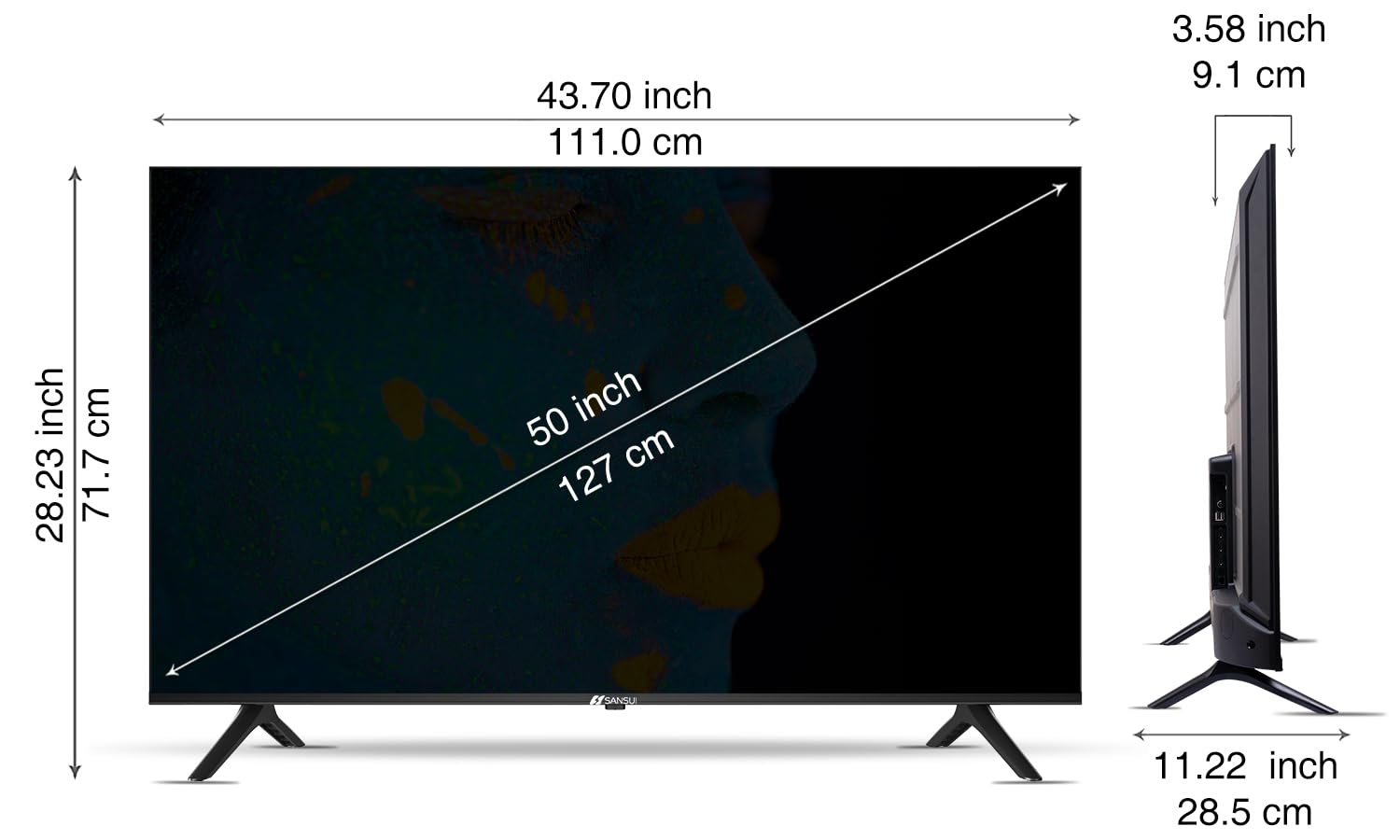
Image: Diagram illustrating the dimensions of the SANSUI JSW50GSUHD 50-inch TV.
వారంటీ మరియు మద్దతు
Your SANSUI JSW50GSUHD TV comes with a 1-year comprehensive warranty, plus an additional 1-year warranty on the panel, provided by the brand from the date of purchase.
For warranty support or any technical assistance, please contact SANSUI customer care:
- వ్యయరహిత ఉచిత నంబరు: 1800 419 3777
- ఇమెయిల్: sansuicare@jainaindia.com
Manufacturer: PG Electroplast Limited
Importer: Jaina India Pvt Ltd.