
1. పరిచయం
Thank you for choosing the Deko TV PRO2 DVB-T2 HEVC Digital Terrestrial Receiver. This device allows you to receive digital terrestrial television broadcasts (DVB-T2) with HEVC (H.265) encoding, providing high-quality video and audio. This manual will guide you through the setup, operation, and maintenance of your new receiver to ensure optimal performance and enjoyment.
2. బాక్స్ విషయాలు
దయచేసి ప్యాకేజీలోని విషయాలను జాగ్రత్తగా తనిఖీ చేయండి. ఏవైనా వస్తువులు తప్పిపోయినా లేదా దెబ్బతిన్నా, మీ రిటైలర్ను సంప్రదించండి.
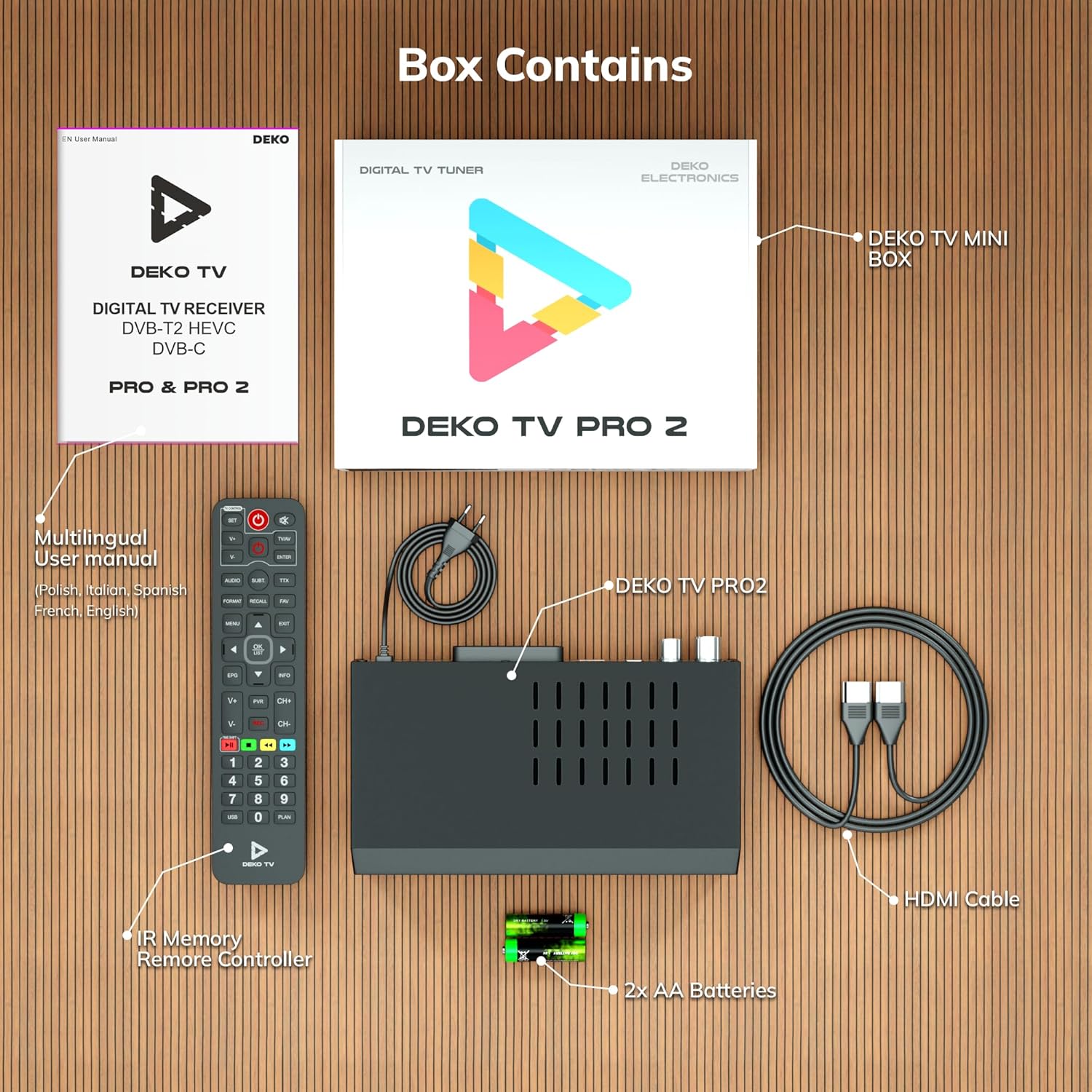
మూర్తి 2.1: Deko TV PRO2 Box Contents. The image displays the Deko TV PRO2 receiver, a multilingual user manual, an IR remote control, two AA batteries, a power cable, and an HDMI cable.
- Deko TV PRO2 Digital Terrestrial Receiver
- IR రిమోట్ కంట్రోలర్
- 2x AAA బ్యాటరీలు
- పవర్ కేబుల్
- HDMI కేబుల్
- బహుభాషా వినియోగదారు మాన్యువల్
3. ఉత్పత్తి లక్షణాలు
The Deko TV PRO2 offers a range of features designed to enhance your viewఅనుభవం:

మూర్తి 3.1: Deko TV PRO2 Key Features. This image illustrates the main functionalities including DVB-T2 Terrestrial reception, Timeshift, HEVC H.265 Codec support, Personal Video Recorder (PVR), universal compatibility, and Crystal Clear Full HD output.
- DVB-T2 Terrestrial: Supports the latest digital terrestrial broadcasting standard.
- HEVC H.265 Codec: Ensures efficient video compression for high-quality picture.
- యూనివర్సల్ అనుకూలత: Works with both modern and older television models.
- కాలమార్పు: Pause live TV and resume watching later.
- Personal Video Recorder (PVR): Record your favorite programs to a connected USB storage device.
- Crystal Clear Full HD: Delivers high-definition video output.
- ద్వంద్వ USB పోర్ట్ లు: For media playback and PVR functionality.
4. సెటప్ గైడ్
4.1. భౌతిక సంబంధాలు
Before powering on the device, ensure all necessary connections are made.

మూర్తి 4.1: Rear Panel Connections. This image details the rear panel of the Deko TV PRO2, indicating the RF IN, RF LOOP THROUGH, two USB ports, HDMI output, and SCART connector.
- యాంటెన్నా కనెక్షన్: మీ టెరెస్ట్రియల్ యాంటెన్నా కేబుల్ను దీనికి కనెక్ట్ చేయండి RF IN port on the back of the receiver. If you have another device (e.g., a TV with an integrated tuner) that also needs an antenna signal, you can connect it to the RF LOOP THROUGH ఓడరేవు
- TV Connection (HDMI): For high-definition video and audio, connect an HDMI cable from the HDMI port on the receiver to an HDMI input on your television.
- TV Connection (SCART): పాత టెలివిజన్ల కోసం, నుండి SCART కేబుల్ను కనెక్ట్ చేయండి SCART మీ టెలివిజన్లోని SCART ఇన్పుట్కు రిసీవర్లోని పోర్ట్. (Note: Do not use both HDMI and SCART simultaneously for video output.)
- USB పరికరాలు: Insert USB storage devices (for PVR or media playback) into the USB ports. The device has two USB ports.
- పవర్ కనెక్షన్: Connect the power cable to the receiver and then plug it into a wall outlet.
4.2. రిమోట్ కంట్రోల్ బ్యాటరీ ఇన్స్టాలేషన్
Open the battery compartment on the back of the remote control and insert two AAA batteries, ensuring correct polarity (+/-). Close the compartment.
4.3. ప్రారంభ పవర్ ఆన్ మరియు ఛానల్ స్కాన్
- అన్ని కనెక్షన్లు సురక్షితంగా ఉన్నాయని నిర్ధారించుకోండి.
- Turn on your television and select the correct HDMI or SCART input source corresponding to where the Deko TV PRO2 is connected.
- Power on the Deko TV PRO2 using the power button on the front panel or the remote control.
- The first time you power on the receiver, an initial setup wizard will appear. Follow the on-screen instructions to select your language, country, and initiate an automatic channel scan. This process will find and store all available digital terrestrial channels.
- స్కాన్ పూర్తయిన తర్వాత, మీరు వీటిని చేయగలరు view ఛానెల్లు.
5. ఆపరేటింగ్ సూచనలు
5.1. ప్రాథమిక టీవీ విధులు
- ఛానెల్ ఎంపిక: ఉపయోగించండి CH + / CH- buttons or the numeric keypad on the remote control to change channels.
- వాల్యూమ్ నియంత్రణ: ఉపయోగించండి VOL + / VOL- రిమోట్ కంట్రోల్లో బటన్లు.
- మెనూ యాక్సెస్: నొక్కండి మెనూ button to access the main menu for settings and features.
- ఎలక్ట్రానిక్ ప్రోగ్రామ్ గైడ్ (EPG): నొక్కండి EPG బటన్ view program information and schedules.
- సమాచార ప్రదర్శన: నొక్కండి సమాచారం button to display current channel and program details.
5.2. USB మీడియా ప్లేబ్యాక్
The Deko TV PRO2 supports media playback from USB storage devices.
- Insert a USB flash drive or external hard drive into one of the USB ports.
- Navigate to the "Media" or "USB" section in the main menu.
- మీరు ప్లే చేయాలనుకుంటున్న మీడియా రకాన్ని ఎంచుకోండి (ఉదా. వీడియో, సంగీతం, ఫోటో).
- మీ files and select the desired content to play.
5.3. PVR (Personal Video Recorder) and Timeshift
To use PVR and Timeshift functions, a USB storage device must be connected and formatted by the receiver.
- రికార్డింగ్: ఒక కార్యక్రమాన్ని చూస్తున్నప్పుడు, REC button on the remote control to start recording. Press ఆపు to end the recording. Recorded programs can be accessed via the "PVR" or "Recordings" menu.
- కాలమార్పు: నొక్కండి పాజ్ చేయండి button during live TV to activate Timeshift. The program will pause, and recording will begin in the background. You can then use ఆడండి, ఫాస్ట్ ఫార్వర్డ్, మరియు రివైండ్ buttons to control playback. Press ఆపు to exit Timeshift and return to live TV.
5.4. Internet and Multimedia Features (Optional Wi-Fi Adapter)
The Deko TV PRO2 supports internet connectivity via a compatible USB Wi-Fi adapter (sold separately). Once connected, you can access certain online multimedia features.

మూర్తి 5.1: Internet Connectivity. This image shows the Deko TV PRO2 with an optional USB Wi-Fi adapter, indicating support for Wi-Fi, YouTube, and IPTV functionalities.
- Insert a compatible USB Wi-Fi adapter into one of the USB ports.
- Go to the "Network Settings" in the main menu to configure your Wi-Fi connection.
- Once connected, you may find options for applications like YouTube or IPTV within the receiver's menu, depending on the firmware version.
6. నిర్వహణ
- శుభ్రపరచడం: Use a soft, dry cloth to clean the receiver. Do not use liquid or aerosol cleaners.
- వెంటిలేషన్: Ensure the receiver has adequate ventilation. Do not block the ventilation slots.
- సాఫ్ట్వేర్ అప్డేట్లు: తయారీదారుని కాలానుగుణంగా తనిఖీ చేయండి webఅందుబాటులో ఉన్న సాఫ్ట్వేర్ నవీకరణల కోసం సైట్. నవీకరణలు పనితీరును మెరుగుపరుస్తాయి మరియు కొత్త లక్షణాలను జోడించగలవు. నవీకరణతో అందించబడిన సూచనలను జాగ్రత్తగా అనుసరించండి.
7. ట్రబుల్షూటింగ్
| సమస్య | సాధ్యమైన కారణం | పరిష్కారం |
|---|---|---|
| చిత్రం లేదా ధ్వని లేదు | Incorrect TV input selected; loose cables; receiver not powered on. | Select the correct HDMI/SCART input on your TV. Check all cable connections. Ensure the receiver is powered on. |
| "సిగ్నల్ లేదు" సందేశం | Antenna not connected; poor antenna signal; no channels scanned. | Check antenna connection. Adjust antenna position. Perform a channel scan (refer to Section 4.3). |
| రిమోట్ కంట్రోల్ పనిచేయడం లేదు | Batteries are dead or incorrectly inserted; obstruction between remote and receiver. | Replace batteries with new AAA batteries, ensuring correct polarity. Remove any obstructions. Point the remote directly at the receiver. |
| USB కి రికార్డ్ చేయడం సాధ్యం కాదు | USB device not connected or formatted; insufficient storage space. | Ensure USB device is properly connected. Format the USB device via the receiver's menu (this will erase all data). Check available storage space. |
8. స్పెసిఫికేషన్లు
| ఫీచర్ | వివరాలు |
|---|---|
| బ్రాండ్ | Deko |
| మోడల్ సంఖ్య | PRO2 |
| కనెక్టివిటీ టెక్నాలజీ | USB |
| కనెక్షన్లు | USB, Wi-Fi (via adapter), HDMI, SCART, RF IN, RF LOOP THROUGH |
| అనుకూల పరికరాలు | టెలివిజన్ |
| ప్రత్యేక లక్షణాలు | Connected and multimedia functions, universal remote control |
| మొత్తం USB పోర్ట్లు | 2 |
| మొత్తం HDMI పోర్ట్లు | 1 |
| ఆడియో ఎన్కోడింగ్ | DD |
| ఆడియో అవుట్పుట్ మోడ్ | స్టీరియో, సరౌండ్ |
| సరౌండ్ సౌండ్ ఛానెల్ కాన్ఫిగరేషన్ | 2.1 |
| రిమోట్ కంట్రోల్ రకం | రిమోట్ కంట్రోల్ |
| బ్యాటరీలు అవసరం | 2 AAA batteries (Zinc-carbon) |
9. వారంటీ మరియు మద్దతు
The Deko TV PRO2 receiver comes with a standard manufacturer's warranty. Please refer to the warranty card included in your package or contact your retailer for specific warranty terms and conditions.
For technical support, troubleshooting assistance beyond this manual, or inquiries about spare parts and software updates, please visit the official Deko Electronics webసైట్లో లేదా వారి కస్టమర్ సర్వీస్ విభాగాన్ని సంప్రదించండి. సంప్రదింపు సమాచారం సాధారణంగా ఉత్పత్తి ప్యాకేజింగ్ లేదా తయారీదారు యొక్క webసైట్.