
1. ఉత్పత్తి ముగిసిందిview
The EAGLEND EH01 USB Headset with Microphone is designed for clear communication and comfortable use with PCs and laptops. It features an on-ear design, a noise-cancelling microphone, and versatile connectivity options.

Figure 1: EAGLEND EH01 USB Headset with Microphone
This headset is engineered for all-day comfort, featuring soft protein memory foam earpads made from high-level breathable materials. The adjustable headband ensures a secure fit for various head sizes. The unidirectional boom microphone rotates 270 degrees, allowing for placement on either the left or right ear, and is designed to pick up your voice while minimizing background noise.
వీడియో 1: ముగిసిందిview of the EAGLEND EH01 USB Headset with Microphone features and design.
2. పెట్టెలో ఏముంది
ప్యాకేజీని తెరిచినప్పుడు, కింది అంశాలన్నీ ఉన్నాయని నిర్ధారించుకోండి:
- EAGLEND EH01 USB Headset with Microphone
- USB Cable with In-line Control
- 3.5mm Audio Cable (detachable from in-line control)

మూర్తి 2: ప్యాకేజీ కంటెంట్లు
3. సెటప్ మరియు ఇన్స్టాలేషన్
The EH01 headset offers dual connectivity for broad compatibility.
3.1. USB Connection (for PC/Mac/Laptop)
- Ensure the 3.5mm audio cable is connected to the in-line control unit.
- Plug the USB connector of the in-line control unit into an available USB port on your computer.
- మీ ఆపరేటింగ్ సిస్టమ్ అవసరమైన డ్రైవర్లను స్వయంచాలకంగా గుర్తించి ఇన్స్టాల్ చేయాలి.
- Verify the headset is selected as the default audio input and output device in your computer's sound settings.

Figure 3: Dual Connection Options
3.2. 3.5mm Jack Connection (for Tablets/Smartphones/Gaming Consoles)
- Detach the 3.5mm audio cable from the USB in-line control unit.
- Plug the 3.5mm jack directly into the audio port of your device (e.g., tablet, smartphone, PS5, PS4, Xbox One).
- Adjust volume and microphone settings directly on your device, as the in-line controls are active only with the USB connection.
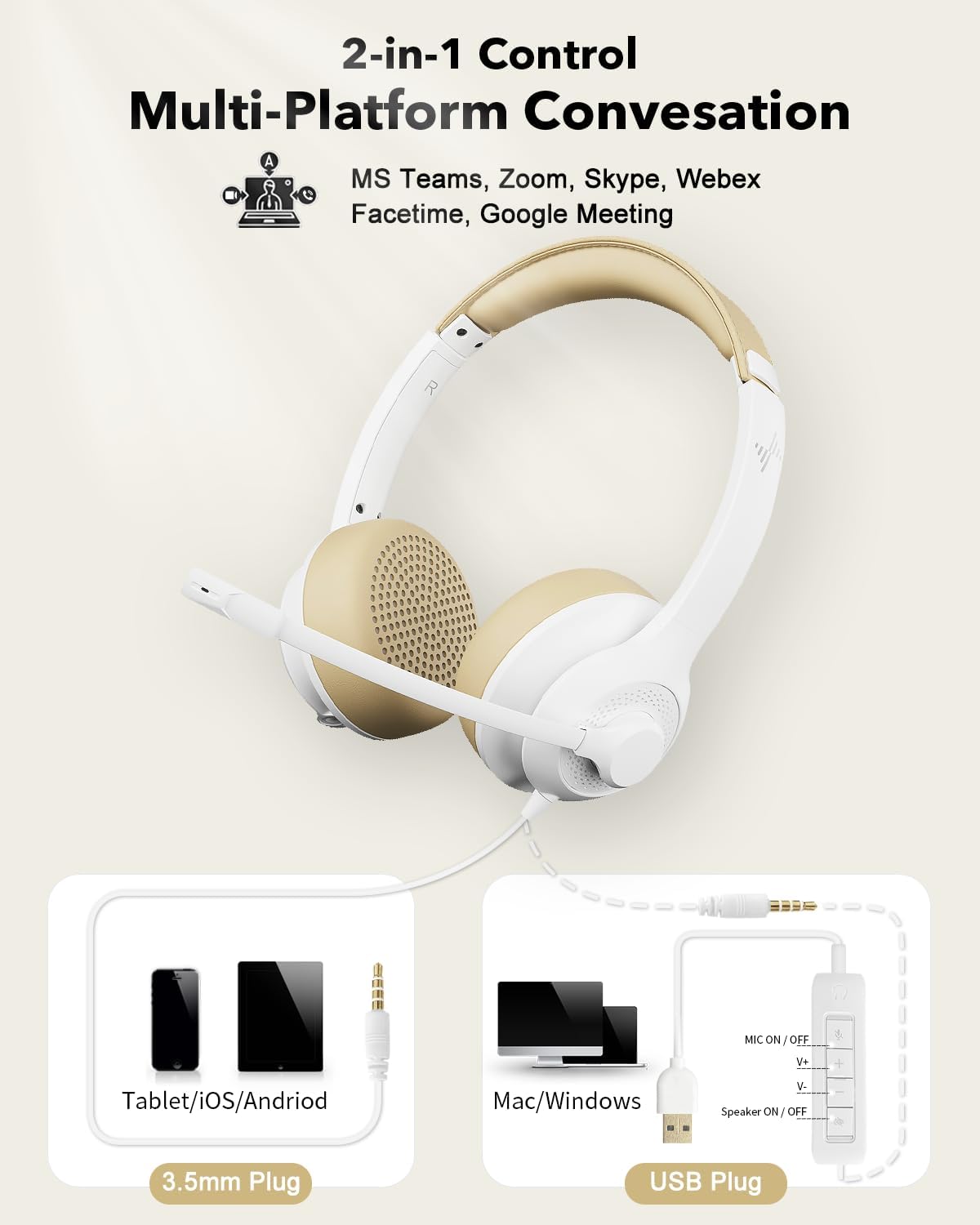
Figure 4: USB and 3.5mm Connection
4. ఆపరేటింగ్ సూచనలు
4.1. మైక్రోఫోన్ వినియోగం
- మైక్రోఫోన్ని సర్దుబాటు చేయడం: The unidirectional boom microphone can be rotated 270° to position it on either your left or right ear. Adjust its position so it is close to your mouth for optimal voice pickup.
- నాయిస్ క్యాన్సిలింగ్: The microphone features noise-cancelling technology to reduce ambient background sounds, ensuring your voice is heard clearly during calls.

Figure 5: Noise-Cancelling Microphone in action

Figure 6: Flexible Microphone Adjustment
4.2. In-line Control (USB Connection Only)
The in-line control unit provides convenient access to audio functions when connected via USB:
- Mic ON/OFF Button: Press to mute or unmute the microphone. An indicator light will show the microphone status.
- Volume Up (V+): స్పీకర్ వాల్యూమ్ పెంచడానికి నొక్కండి.
- Volume Down (V-): స్పీకర్ వాల్యూమ్ తగ్గించడానికి నొక్కండి.
- Speaker ON/OFF Button: Press to mute or unmute the headset speakers.
- శక్తి సూచిక కాంతి: Illuminates to indicate the headset is powered and connected.

Figure 7: In-line Control Unit
5. నిర్వహణ
సరైన జాగ్రత్త మీ హెడ్సెట్ యొక్క జీవితాన్ని మరియు పనితీరును పొడిగిస్తుంది.
- శుభ్రపరచడం: హెడ్సెట్ను శుభ్రం చేయడానికి మృదువైన, పొడి వస్త్రాన్ని ఉపయోగించండి. లిక్విడ్ క్లీనర్లు లేదా ఏరోసోల్లను ఉపయోగించవద్దు.
- ఇయర్ప్యాడ్లు: The soft protein memory foam earpads are designed for breathability. Avoid exposing them to excessive moisture or harsh chemicals.
- నిల్వ: When not in use, store the headset in a clean, dry place, away from extreme temperatures and direct sunlight.
- కేబుల్ కేర్: కేబుల్స్ దెబ్బతినకుండా ఉండటానికి పదునైన వంపులు లేదా ఎక్కువగా లాగడం మానుకోండి.

Figure 8: Breathable Earpads for Comfort and Hygiene
6. ట్రబుల్షూటింగ్
మీ హెడ్సెట్తో మీకు సమస్యలు ఎదురైతే, ఈ క్రింది సాధారణ పరిష్కారాలను చూడండి:
| సమస్య | సాధ్యమైన కారణం | పరిష్కారం |
|---|---|---|
| హెడ్సెట్ నుండి శబ్దం లేదు |
|
|
| మైక్రోఫోన్ పని చేయడం లేదు |
|
|
| ధ్వని నాణ్యత తక్కువగా ఉంది |
|
|
7. స్పెసిఫికేషన్లు
| ఫీచర్ | వివరాలు |
|---|---|
| మోడల్ పేరు | EH01 |
| కనెక్టివిటీ టెక్నాలజీ | USB, AUX (3.5mm Jack) |
| హెడ్ఫోన్స్ జాక్ | 3.5 మి.మీ జాక్ |
| చెవి ప్లేస్మెంట్ | చెవి మీద |
| ఫారమ్ ఫ్యాక్టర్ | చెవి మీద |
| నాయిస్ కంట్రోల్ | యాక్టివ్ నాయిస్ క్యాన్సిలేషన్ (మైక్రోఫోన్) |
| నియంత్రణ రకం | Volume Control, Inline Remote |
| మైక్రోఫోన్ | Unidirectional Boom, 270° Rotatable |
| ఆడియో డ్రైవర్ రకం | డైనమిక్ డ్రైవర్ |
| అనుకూల పరికరాలు | PC, Mac, Chromebook, Tablet, Smartphones, MP3 Players, PS5, PS4, Xbox One, Gaming Systems |
| మెటీరియల్ | ప్లాస్టిక్ |
| రంగు | తెలుపు |
| వస్తువు బరువు | 9.6 ఔన్సులు |
| ప్యాకేజీ కొలతలు | 7.44 x 6.18 x 2.13 అంగుళాలు |
8. వారంటీ మరియు మద్దతు
The EAGLEND EH01 USB Headset comes with a 24 నెలల వారంటీ provided by EAGLEND.
For technical support, warranty claims, or further assistance, please refer to the contact information provided on the product packaging or the official EAGLEND webసైట్.