
1. పరిచయం
This manual provides detailed instructions for the setup, operation, maintenance, and troubleshooting of your Xprinter XP-233B Thermal Barcode Printer. The XP-233B is designed for efficient thermal printing of barcodes and labels, utilizing heat-sensitive paper without the need for ink or ribbons.
2. భద్రతా సూచనలు
- Ensure the printer is connected to a power source with the correct voltage as specified on the power adapter.
- ప్రింటర్ను నీటికి లేదా అధిక తేమకు గురిచేయవద్దు.
- ప్రింటర్ను ప్రత్యక్ష సూర్యకాంతిలో లేదా ఉష్ణ వనరుల దగ్గర ఉంచకుండా ఉండండి.
- Keep the printer away from dust and debris to prevent damage to internal components.
- ప్రింటర్ను మీరే విడదీయడానికి లేదా రిపేర్ చేయడానికి ప్రయత్నించవద్దు. సహాయం కోసం అర్హత కలిగిన సేవా సిబ్బందిని సంప్రదించండి.
- Use only recommended thermal label rolls to ensure optimal print quality and printer longevity.
3. ప్యాకేజీ విషయాలు
ప్యాకేజీలో అన్ని అంశాలు ఉన్నాయని నిర్ధారించుకోండి:
- Xprinter XP-233B Thermal Barcode Printer
- పవర్ అడాప్టర్
- USB కేబుల్
- త్వరిత ప్రారంభ మార్గదర్శి (చేర్చబడి ఉంటే)
- Driver CD (if included, drivers can also be downloaded online)
4. ఉత్పత్తి ముగిసిందిview
Familiarize yourself with the main components of the XP-233B printer.

మూర్తి 4.1: ముందు వైపు view of the Xprinter XP-233B, showing the power switch, control panel, and label output slot.

మూర్తి 4.2: వెనుక view of the Xprinter XP-233B, highlighting the USB, Ethernet, and power input ports.
నియంత్రణ ప్యానెల్ విధులు:
- ఫీడ్ బటన్: Press to feed a blank label. Hold to perform a self-test print.
- పాజ్ బటన్: ముద్రణను పాజ్ చేస్తుంది లేదా తిరిగి ప్రారంభిస్తుంది.
- రద్దు బటన్: ప్రస్తుత ముద్రణ పనిని రద్దు చేస్తుంది.
- LED సూచికలు: Display printer status (e.g., Power, Error, Paper Out). Refer to troubleshooting for specific light patterns.
5. సెటప్
5.1 ప్రింటర్ను కనెక్ట్ చేస్తోంది
- Connect the power adapter to the printer's power input port and then plug it into a wall outlet.
- Connect the USB cable from the printer to your computer. For Ethernet connectivity, connect an Ethernet cable from the printer to your network router or switch.
- పక్కన ఉన్న పవర్ స్విచ్ని ఉపయోగించి ప్రింటర్ను ఆన్ చేయండి.
5.2 లేబుల్లను లోడ్ చేస్తోంది
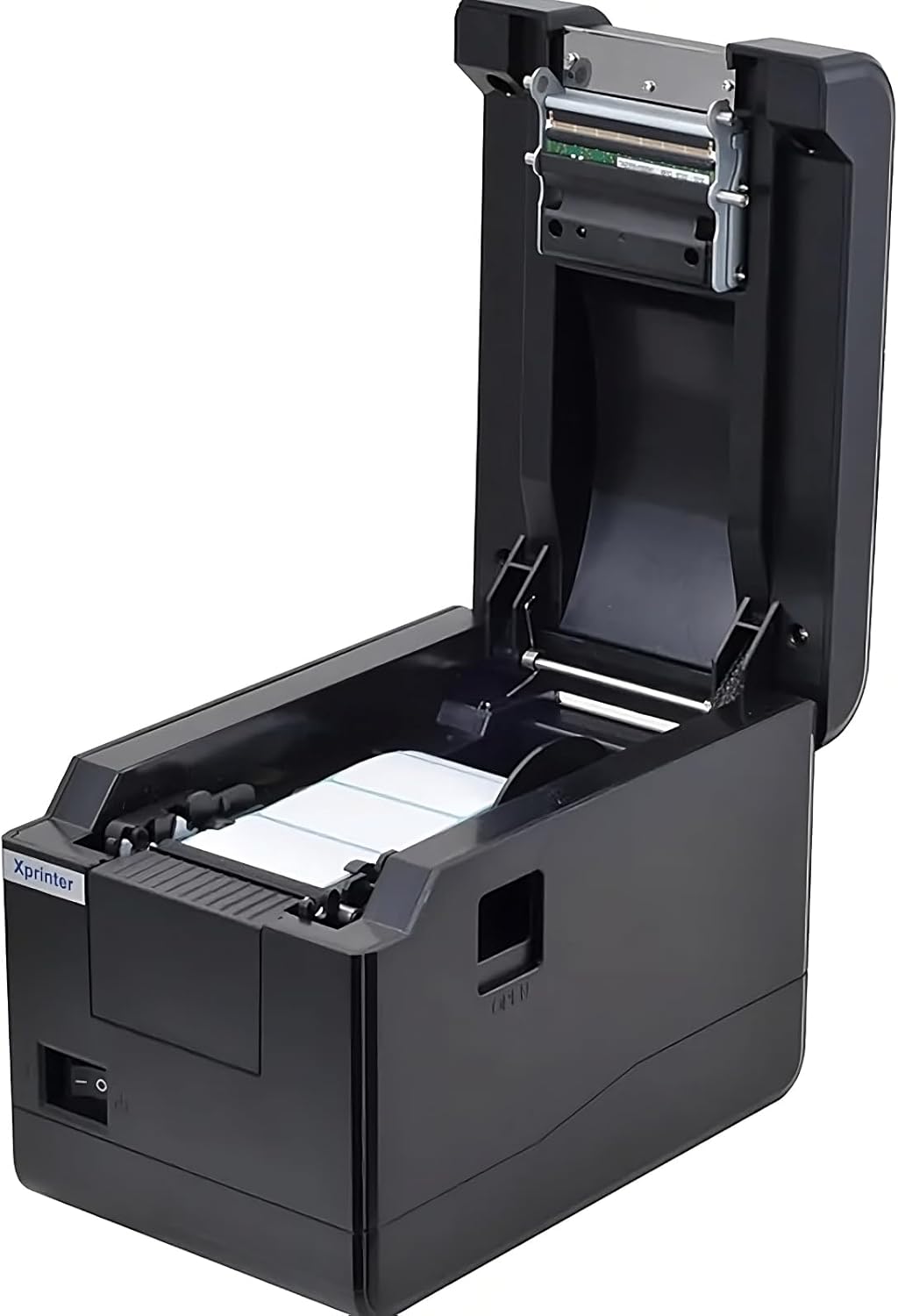
మూర్తి 5.1: పై నుండి క్రిందికి view of the Xprinter XP-233B with the cover open, illustrating the label loading area.
- Press the 'OPEN' button on the side of the printer to open the top cover.
- Place the thermal label roll into the label compartment, ensuring the labels feed from the bottom of the roll and the printable side faces upwards.
- Adjust the movable label guides to fit the width of your label roll snugly, without pinching the labels.
- Pull a few labels past the print head and out through the front slot.
- పై కవర్ సరిగ్గా తగిలే వరకు గట్టిగా మూసివేయండి.
- The printer will automatically calibrate and feed a few labels to detect the label gap.
5.3 డ్రైవర్ ఇన్స్టాలేషన్
Install the printer drivers on your computer. Drivers can typically be found on the included CD or downloaded from the official Xprinter webసైట్. ఇన్స్టాలేషన్ కోసం స్క్రీన్పై ఉన్న సూచనలను అనుసరించండి.
6. ప్రింటర్ను ఆపరేట్ చేయడం
6.1 ప్రాథమిక ముద్రణ
Once the printer is set up and drivers are installed, you can print labels from your application (e.g., label design software, shipping software). Ensure the correct printer model (Xprinter XP-233B) is selected in your application's print settings.
6.2 Self-Test Print
To perform a self-test print:
- Ensure the printer is powered on and labels are loaded.
- నొక్కండి మరియు పట్టుకోండి ఫీడ్ button for approximately 3-5 seconds until the printer starts printing.
- The self-test print will display printer information and a test pattern, confirming basic functionality.
7. నిర్వహణ
7.1 ప్రింట్ హెడ్ను శుభ్రపరచడం
Regular cleaning of the print head ensures optimal print quality and extends the printer's lifespan. Clean the print head when print quality degrades or after every few rolls of labels.
- ప్రింటర్ను ఆపివేసి, పవర్ కార్డ్ను డిస్కనెక్ట్ చేయండి.
- టాప్ కవర్ తెరవండి.
- Gently wipe the print head surface with a cotton swab lightly dampened with isopropyl alcohol (70% or higher).
- Allow the print head to dry completely (approximately 2-3 minutes) before closing the cover and turning on the printer.
7.2 బాహ్యాన్ని శుభ్రపరచడం
ప్రింటర్ యొక్క బాహ్య భాగాన్ని మృదువైన, d శుభ్రముపరచుతో తుడవండి.amp వస్త్రం. కఠినమైన రసాయనాలు లేదా రాపిడి క్లీనర్లను ఉపయోగించవద్దు.
8. ట్రబుల్షూటింగ్
| సమస్య | సాధ్యమైన కారణం | పరిష్కారం |
|---|---|---|
| ప్రింటర్ ఆన్ కావడం లేదు | Power cord loose; power outlet faulty; power adapter damaged. | Check power connections; try a different outlet; replace power adapter if necessary. |
| No labels feeding | Labels incorrectly loaded; paper out; label guides too tight. | Reload labels correctly; replace label roll; adjust label guides. |
| ప్రింట్ నాణ్యత బాగాలేదు (వర్ణించినవి, లైన్లు) | Print head dirty; low-quality labels; print head damaged. | Clean print head (refer to Section 7.1); use recommended thermal labels; contact support if print head is damaged. |
| Printer not responding to print commands | Incorrect driver installed; USB/Ethernet cable loose; printer paused. | Reinstall drivers; check cable connections; press పాజ్ చేయండి పున ume ప్రారంభించడానికి బటన్. |
| Labels skipping or misaligning | Incorrect label sensor calibration; label guides not set correctly. | Perform a self-test print to recalibrate; adjust label guides. |
9. స్పెసిఫికేషన్లు
| ఫీచర్ | స్పెసిఫికేషన్ |
|---|---|
| మోడల్ పేరు | Xprinter - Thermal barcode printer |
| అంశం మోడల్ సంఖ్య | ఎక్స్పి-233బి |
| ప్రింటర్ టెక్నాలజీ | థర్మల్ |
| కనెక్టివిటీ టెక్నాలజీ | ఈథర్నెట్, USB |
| ప్రింటర్ అవుట్పుట్ | మోనోక్రోమ్ |
| ప్రింట్ మీడియా | లేబుల్స్ |
| గరిష్ట షీట్ సామర్థ్యం | 100 (typical for roll capacity, actual sheet capacity depends on label size) |
| ఉత్పత్తి కొలతలు (D x W x H) | 26.8 x 18 x 17.2 సెం.మీ |
| వస్తువు బరువు | 1.2 కిలోలు |
| రంగు | నలుపు |
10. వారంటీ సమాచారం
Xprinter products typically come with a limited manufacturer's warranty. Please refer to the warranty card included with your product or visit the official Xprinter website for specific warranty terms and conditions, including coverage duration and service procedures. Keep your purchase receipt as proof of purchase for warranty claims.
11. కస్టమర్ మద్దతు
For technical assistance, driver downloads, or further inquiries regarding your Xprinter XP-233B, please visit the official Xprinter support website or contact their customer service department. Contact information can usually be found on the Xprinter webసైట్లో లేదా మీ ప్రింటర్తో అందించిన డాక్యుమెంటేషన్లో.