
Wainlux JL3
Wainlux JL3 Laser Engraving Machine User Manual
Model: JL3 | Brand: Wainlux
పరిచయం
The Wainlux JL3 is a versatile and high-precision laser engraving and cutting machine designed for a wide range of materials. Featuring advanced compressed spot laser technology, it delivers a focused and accurate beam for detailed engraving and efficient cutting. Its robust and modular design ensures ease of assembly, maintenance, and upgrades, making it suitable for both beginners and experienced users. This manual provides essential information for safe operation, setup, and maintenance of your JL3 laser engraver.
భద్రతా సమాచారం
Operating a laser engraving machine involves potential risks. Please read and understand all safety warnings before use.
- కంటి రక్షణ: Always wear the provided laser safety goggles when the machine is in operation. Direct exposure to the laser beam can cause severe eye damage.
- వెంటిలేషన్: Ensure adequate ventilation in your workspace. Laser engraving can produce smoke, fumes, and odors, which may be harmful if inhaled.
- అగ్ని ప్రమాదం: Some materials are flammable when exposed to a laser. Do not leave the machine unattended during operation. Keep a fire extinguisher nearby.
- మెటీరియల్ అనుకూలత: Only engrave or cut materials specified as safe for laser processing. Avoid materials that produce toxic fumes or are highly reflective.
- పిల్లలు మరియు పెంపుడు జంతువులు: పిల్లలు మరియు పెంపుడు జంతువులను ఆపరేటింగ్ ప్రాంతం నుండి దూరంగా ఉంచండి.
- విద్యుత్ సరఫరా: Use only the recommended power adapter. Disconnect power before performing any maintenance or assembly.

Image: The Wainlux JL3 laser engraver shown with a pair of laser safety goggles, emphasizing the importance of eye protection during operation.
ప్యాకేజీ విషయాలు
ప్యాకేజీని తెరిచిన తర్వాత, దయచేసి అన్ని భాగాలు ఉన్నాయని మరియు దెబ్బతినకుండా ఉన్నాయని ధృవీకరించండి.
- Wainlux JL3 Laser Engraving Machine Frame (pre-assembled modules)
- Laser Module (40W fixed-focus)
- పవర్ అడాప్టర్
- USB కేబుల్
- USB Stick (containing software and drivers)
- భద్రతా గాగుల్స్
- వినియోగదారు మాన్యువల్ (ఈ పత్రం)
- Small material samples for testing (e.g., wood, acrylic)
- Assembly Tools (screws, wrenches, etc.)
సెటప్ మరియు అసెంబ్లీ
The JL3 laser engraver is designed for easy assembly with most components pre-installed. Follow these steps to set up your machine:
- అన్ప్యాకింగ్: ప్యాకేజింగ్ నుండి అన్ని భాగాలను జాగ్రత్తగా తొలగించండి.
- ఫ్రేమ్ అసెంబ్లీ: The main frame consists of stainless steel and acrylic components. Connect the frame sections as per the diagrams in the quick start guide (usually included with the machine). Ensure all screws are tightened securely.
- లేజర్ మాడ్యూల్ ఇన్స్టాలేషన్: Mount the laser module onto the designated carriage on the X-axis. Ensure it is firmly attached and the cables are properly connected. The lifting frame allows for flexible adjustment of engraving distance.
- కేబుల్ కనెక్షన్లు: Connect the power adapter to the machine and a suitable power outlet. Connect the USB cable from the machine to your computer if using a wired connection.
- సాఫ్ట్వేర్ ఇన్స్టాలేషన్: Insert the provided USB stick into your computer. Install the self-developed application or other compatible software like LaserGRBL or LightBurn. Follow the on-screen instructions for installation.

Image: A fully assembled Wainlux JL3 laser engraving machine, ready for operation, demonstrating its robust frame and laser module.
చిత్రం: వివరణాత్మక view of the laser module, highlighting its smoke-proof design and the ultra-fine compressed spot technology for precise engraving.
ఆపరేటింగ్ సూచనలు
The Wainlux JL3 offers flexible operation modes and wide material compatibility.
సాఫ్ట్వేర్ మరియు కనెక్టివిటీ
- మద్దతు ఉన్న సాఫ్ట్వేర్: The machine is compatible with LaserGRBL and LightBurn. A self-developed application is also provided on the USB stick, ideal for beginners.
- కనెక్టివిటీ: Supports wireless data transfer via Bluetooth and wired connection via USB.
- ఆపరేటింగ్ సిస్టమ్స్: Compatible with Windows 7/8/10, Mac, iOS, and Android.
- File ఫార్మాట్లు: Supports JPEG, BMP, GIF, PLT, PNG, DXF, JPG, XJ, and HPGL engraving file ఫార్మాట్లు.

Image: Illustration showing the Wainlux JL3's compatibility with various operating systems (Windows, Android, iOS/Mac OS) and connectivity options (USB, Bluetooth, Offline Use).
చెక్కడం మరియు కత్తిరించే ప్రక్రియ
- మెటీరియల్ ప్లేస్మెంట్: Place the material to be engraved or cut within the engraving area (370 x 410 mm or 16.12 x 15.75 inches).
- ఫోకస్ సర్దుబాటు: Use the lifting frame to adjust the laser module's height to achieve optimal focus on the material surface.
- Design Preparation: మీ డిజైన్ను లోడ్ చేయండి file into the chosen software. Adjust parameters such as laser power, speed, and number of passes according to the material and desired outcome.
- ఆపరేషన్ ప్రారంభించండి: సాఫ్ట్వేర్ నుండి చెక్కడం లేదా కత్తిరించే ప్రక్రియను ప్రారంభించండి. ఆపరేషన్ సమయంలో యంత్రాన్ని నిశితంగా పరిశీలించండి.
The JL3 features an improved motion algorithm and increased motor speed, reaching up to 300mm/s for faster engraving. Its 0.05mm engraving accuracy ensures high-quality results.

Image: Demonstrates the ultra-fine laser engraving capabilities of the JL3, highlighting its 80mm/s engraving speed and 0.05mm engraving accuracy with an example of detailed fur engraving.
మద్దతు ఉన్న పదార్థాలు
The JL3 can engrave and cut a wide variety of materials, including but not limited to:
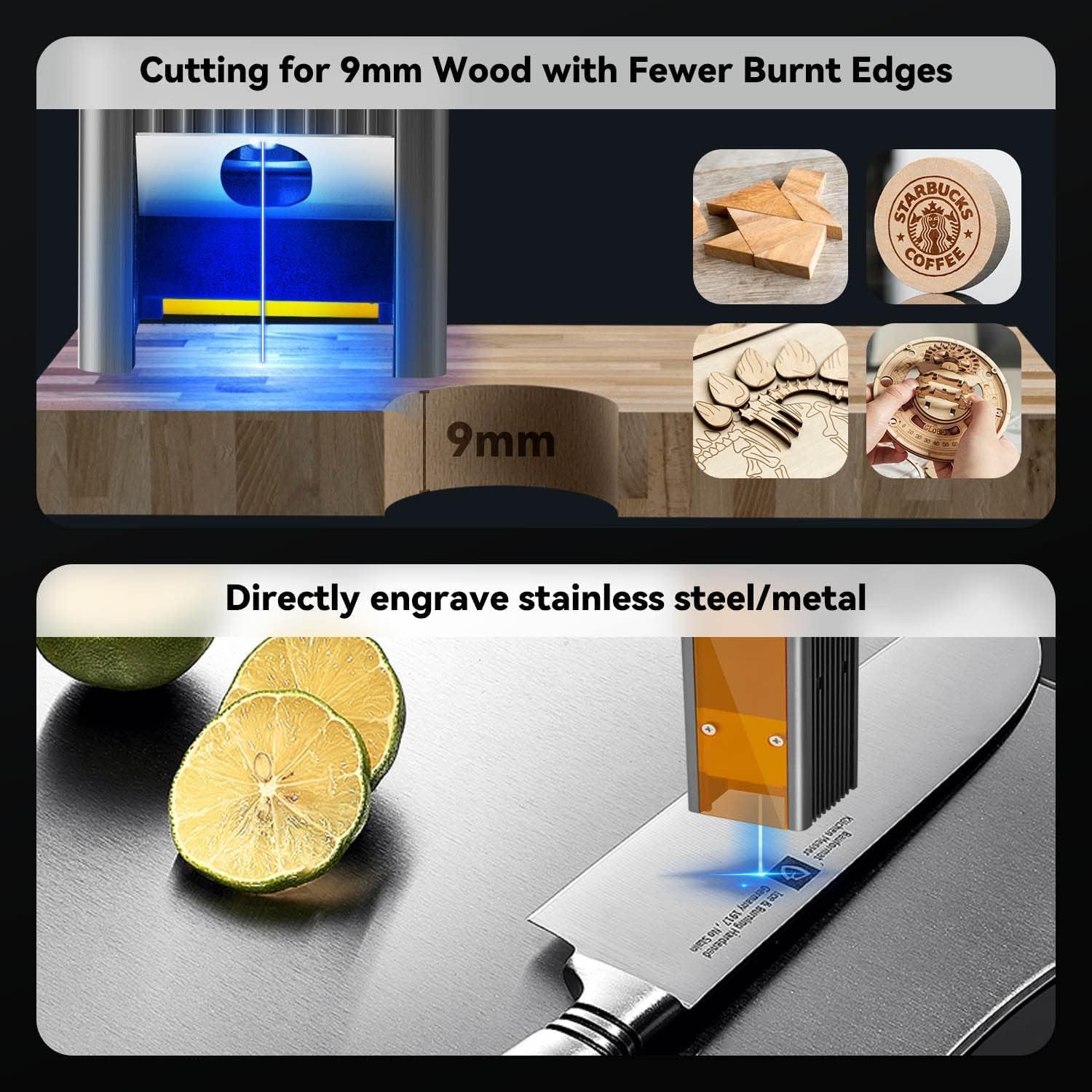
- Wood (e.g., 9mm pine boards)
- వెదురు
- తోలు
- యాక్రిలిక్
- స్టెయిన్లెస్ స్టీల్
- Other Metals (e.g., aluminum oxide)
- సర్క్యూట్ బోర్డులు
- గాజు
- Paper, Cardboard
- ఫాబ్రిక్

Image: Visual representation of the JL3's capability to cut 9mm wood with minimal burnt edges and directly engrave stainless steel/metal surfaces.
నిర్వహణ
Regular maintenance ensures optimal performance and extends the lifespan of your JL3 laser engraver.
- లెన్స్ శుభ్రపరచడం: Periodically clean the laser lens with a soft, lint-free cloth and lens cleaning solution. A dirty lens can reduce laser power and engraving quality.
- యంత్రాన్ని శుభ్రపరచడం: Wipe down the machine frame and rails to remove dust and debris. Keep the engraving area clear.
- సరళత: Apply a small amount of lubricant to the guide rails and moving parts as needed to ensure smooth operation.
- ఫర్మ్వేర్ నవీకరణలు: Check for and install any available firmware updates to ensure your machine has the latest features and performance improvements.
ట్రబుల్షూటింగ్
ఈ విభాగం మీరు ఎదుర్కొనే సాధారణ సమస్యలను పరిష్కరిస్తుంది.
| సమస్య | సాధ్యమైన కారణం | పరిష్కారం |
|---|---|---|
| లేజర్ వెలగడం లేదు లేదా బలహీనమైన అవుట్పుట్ | Loose cable connection, dirty lens, incorrect focus, low power setting. | Check all connections. Clean the laser lens. Adjust focus. Increase laser power in software. |
| యంత్రం కంప్యూటర్కు కనెక్ట్ కావడం లేదు | Incorrect USB port, driver issue, Bluetooth not paired. | Try a different USB port. Reinstall drivers. Ensure Bluetooth is enabled and paired correctly. |
| Engraving quality is poor/inconsistent | Incorrect speed/power settings, material not flat, dirty lens, loose belts. | Adjust speed and power settings. Ensure material is flat and secured. Clean lens. Check and tighten belts. |
| యంత్రం అసాధారణ శబ్దాలు చేస్తుంది | Lack of lubrication, debris on rails, loose components. | Lubricate rails. Clean rails. Check for and tighten any loose screws. |
స్పెసిఫికేషన్లు
| ఫీచర్ | వివరాలు |
|---|---|
| మోడల్ పేరు | JL3 |
| బ్రాండ్ | Wainlux |
| లేజర్ పవర్ | 5W (Optical Output), 40W (Machine Power) |
| చెక్కే ప్రాంతం | 370 x 410 మిమీ (సుమారు 16.12 x 15.75 అంగుళాలు) |
| చెక్కడం ఖచ్చితత్వం | 0.05 మి.మీ |
| చెక్కడం వేగం | 300 మిమీ/సె వరకు |
| కనెక్టివిటీ | USB, బ్లూటూత్ |
| అనుకూలమైన ఆపరేటింగ్ సిస్టమ్స్ | Windows 7/8/10, Mac, iOS, Android |
| మద్దతు ఇచ్చారు File ఫార్మాట్లు | JPEG, BMP, GIF, PLT, PNG, DXF, JPG, XJ, HPGL |
| ఉత్పత్తి కొలతలు | 60.5 x 60.3 x 15.6 సెం.మీ |
| వస్తువు బరువు | 2.65 కిలోలు |
| ఫ్రేమ్ మెటీరియల్ | స్టెయిన్లెస్ స్టీల్, యాక్రిలిక్ |
వారంటీ మరియు మద్దతు
Wainlux provides comprehensive support for your JL3 laser engraving machine.
- వారంటీ: A two-year warranty service is provided for machines purchased directly from the Wainlux manufacturer.
- సాంకేతిక మద్దతు: Our after-sales team is available to respond to your email inquiries within 24 hours.
- రిటర్న్స్: We support unreasonable returns for 30 days, including replacement of spare parts and replacement of new machines (for non-human caused failures).
For technical assistance or warranty claims, please contact Wainlux customer support through the contact information provided on their official webసైట్ లేదా మీ కొనుగోలు వేదిక.
Ask a question about this manual
Ask about setup, troubleshooting, compatibility, parts, safety, or missing instructions. Manuals+ will review the question and use this page’s manual context to help answer it.