
పరిచయం
This manual provides detailed instructions for the installation, setup, and operation of your AIERBOZ YL-57 Fingerprint Door Lock. Please read this manual thoroughly before installation and use to ensure proper function and safety. This smart door lock offers multiple unlocking methods including biometric fingerprint, passcode, and mechanical keys, designed for enhanced security and convenience in various settings such as homes, offices, and apartments.
ఉత్పత్తి లక్షణాలు
- 3-in-1 Unlocking Methods: Unlock using biometric fingerprint (up to 20 fingerprints), passcode (up to 15 sets), or mechanical keys for emergency access. Features a 3-second auto-lock function.
- Adjustable Latch: Compatible with most standard US doors, featuring an adjustable backset of 2-3/8" (60mm) and 2-1/8" (70mm). Suitable for door thicknesses between 1.26 to 1.89 inches.
- మన్నికైన నిర్మాణం: Made from sturdy zinc alloy. The biometric sensor offers a 99% recognition rate and 0.2-second unlock speed.
- ఇంటెలిజెంట్ మోడ్లు: Includes "Passage Mode" for temporary unrestricted access and "Silent Mode" to disable sound alerts.
- తక్కువ బ్యాటరీ రిమైండర్: A red light flashes to indicate low battery, allowing timely replacement. The sliding keyboard illuminates for easy code entry in low light conditions.

చిత్రం: పైగాview of the AIERBOZ YL-57 Fingerprint Door Lock's multifunctionality.

చిత్రం: వివరణాత్మకం view of the lock's upgraded biometric capabilities.
ప్యాకేజీ విషయాలు
The AIERBOZ YL-57 Fingerprint Door Lock package includes all necessary installation accessories and the following components:
- Fingerprint Door Knob (Exterior and Interior Assemblies)
- సర్దుబాటు గొళ్ళెం
- స్ట్రైక్ ప్లేట్
- మౌంటు స్క్రూలు
- మెకానికల్ కీలు
- Screwdriver (for installation)
- ఇన్స్ట్రక్షన్ మాన్యువల్
సంస్థాపన
Follow these steps to install your AIERBOZ YL-57 Fingerprint Door Lock. No professional locksmith is required.
1. తలుపు సిద్ధం చేయండి
Ensure your door meets the specified dimensions: door thickness between 1.26 to 1.89 inches, and an adjustable backset of 2-3/8" (60mm) or 2-1/8" (70mm).
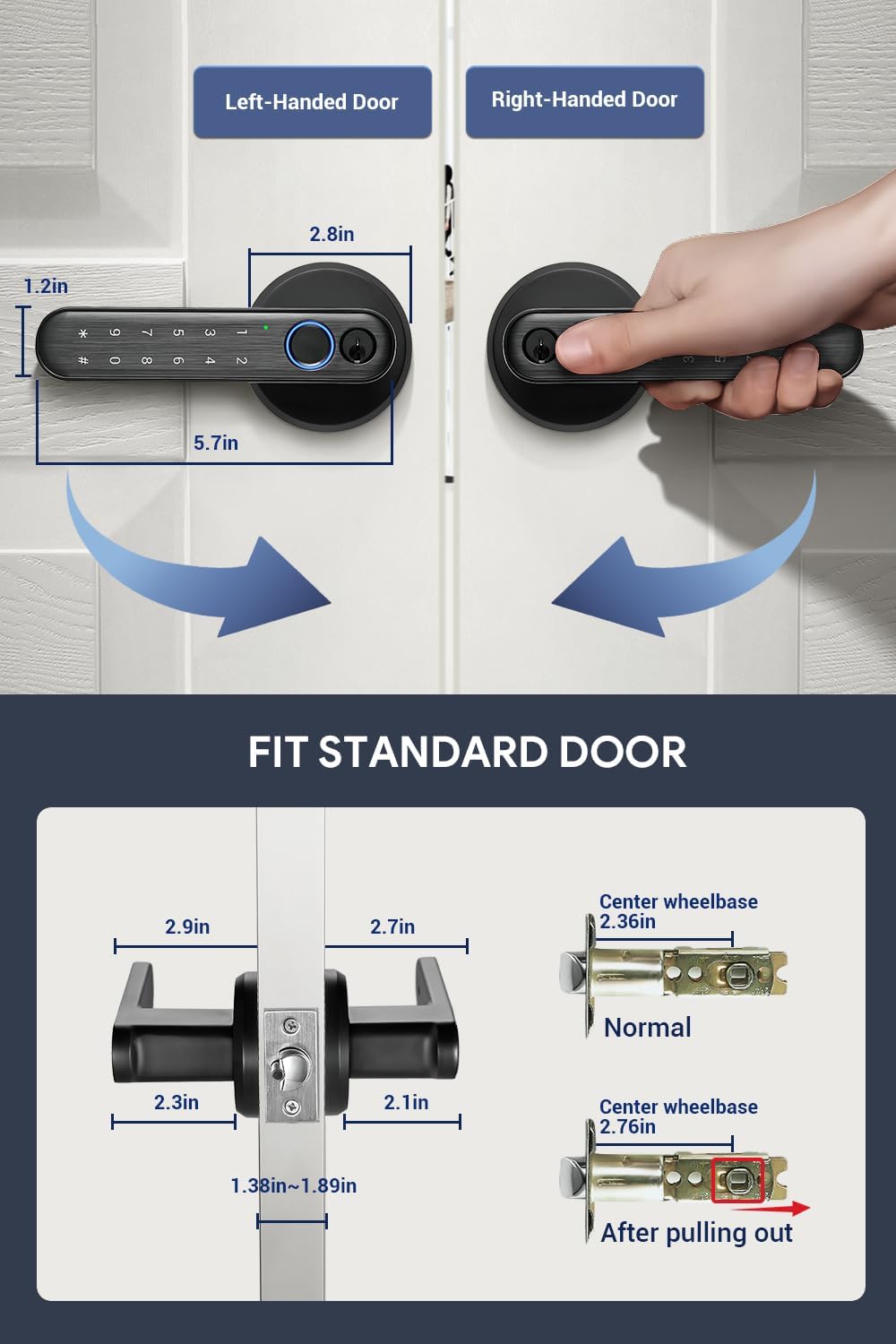
Image: Door compatibility and dimensions for installation.
2. Install the Latch and Lock Assemblies
The installation video below provides a visual guide. Key steps include:
Video: This video demonstrates the complete installation process for the AIERBOZ YL-57 Fingerprint Door Lock, including preparing the latch and mounting the lock assemblies.
- First, remove the back cover screw from the lock assembly.
- Then remove the middle two long screws to slowly separate the two lock bodies.
- Adjust the latch according to your door's backset (60mm or 70mm).
- Install the latch into the door frame and secure it with screws.
- Align the power cord through the keyhole.
- Connect the power cord to the battery box.
- Insert the battery box into the lock body.
- Secure the lock assemblies with screws.

Image: The lock is designed for easy installation, often requiring minimal tools.
Setup and User Management
After installation, you need to set up the administrator and user access methods. The video below provides a visual guide for these procedures.
Video: This video provides a guide on how to set up and manage users for the AIERBOZ YL-57 Fingerprint Door Lock.
1. Create Administrator
- Slide your finger on the keyboard area to turn on the keyboard light.
- ఆదేశాన్ని నమోదు చేయండి *0#.
- Enter a group of 4-12 digit codes + "#", and then repeat the code + "#". (ఉదాample administrator password: 1314)
- Then use your finger to collect 6 fingerprints of different lengths on the fingerprint collector.
2. Create Password User
- Slide your finger on the keyboard area to turn on the keyboard light.
- ఆదేశాన్ని నమోదు చేయండి *1#.
- Enter the administrator password. (Example admin password: 1314)
- Enter a group of 4-12 digits password + "#", and enter the password again + "#". (ఉదాample user password: 3134)
3. Create Fingerprint User
- Slide your finger on the keyboard area to turn on the keyboard light.
- ఆదేశాన్ని నమోదు చేయండి *2#.
- When the fingerprint or password of the main administrator is entered, the fingerprint collector will light up blue.
- Then use your finger to collect 6 fingerprints of different lengths on the fingerprint collector.
4 పాస్వర్డ్ మార్చండి
- Slide your finger on the keyboard area to turn on the keyboard light.
- ఆదేశాన్ని నమోదు చేయండి *3#.
- Enter the original password + "#". (ఉదాample password: 3134)
- Enter the new password + "#", and then enter the new password again + "#". (ఉదాample New User Password: 1414)
5. పాస్వర్డ్ను తొలగించండి
- Slide your finger on the keyboard area to turn on the keyboard light.
- ఆదేశాన్ని నమోదు చేయండి *4#.
- Enter the fingerprint or password administrator. (Example administrator password: 1314)
- The door lock will beep ten times to confirm. Note: All password users will be deleted.
6. Delete Fingerprint
- Slide your finger on the keyboard area to turn on the keyboard light.
- ఆదేశాన్ని నమోదు చేయండి *5#.
- Enter the fingerprint or password administrator. (Example administrator password: 1314)
- The door lock will beep ten times to confirm. Note: All fingerprint users will be deleted. (Administrator fingerprint still retained)
ఆపరేటింగ్ సూచనలు
The AIERBOZ YL-57 offers multiple ways to operate and secure your door.
అన్లాకింగ్ పద్ధతులు
- వేలిముద్ర అన్లాక్: మీ నమోదిత వేలిని సెన్సార్పై ఉంచండి. లాక్ దాదాపు 0.2 సెకన్లలో అన్లాక్ అవుతుంది.
- పాస్కోడ్ అన్లాక్: Enter your registered 4-12 digit passcode followed by the '#' key.
- మెకానికల్ కీ అన్లాక్: In case of battery depletion or other issues, use the provided mechanical keys to unlock the door.

Image: Visual representation of the three primary unlocking methods.
ప్రత్యేక మోడ్లు
- పాసేజ్ మోడ్: This mode allows the door to remain unlocked for continuous access without requiring a fingerprint or passcode.
- Slide your finger on the keyboard area to turn on the keyboard light.
- ఆదేశాన్ని నమోదు చేయండి *6#.
- Enter the fingerprint or password administrator, and the door lock will beep twice. (Example admin password: 1314)
- If you need to close it, please enter *#6#.
- నిశ్శబ్ద మోడ్: This mode disables all sound alerts from the lock.
- Slide your finger on the keyboard area to turn on the keyboard light.
- ఆదేశాన్ని నమోదు చేయండి *7#.
- Enter fingerprint or password administrator, and the lock enters silent mode. (Example admin password: 1314)
- If you need to close it, please enter *#7#.
- యాంటీ-పీపింగ్ పాస్వర్డ్: When using a password to open the door, you can add any number before and after the password (up to 20 digits total) and press # to open the door. Only when there is continuity of your actual password within the 20 digits entered can the verification be successful.

Image: Silent Mode allows for quiet operation, ideal for undisturbed environments.

Image: Passage Mode simplifies access for multiple users or during gatherings.
నిర్వహణ
To ensure the longevity and optimal performance of your AIERBOZ YL-57 Fingerprint Door Lock, regular maintenance is recommended.
- బ్యాటరీ భర్తీ: The lock will indicate a low battery with a flashing red light. Replace all four AAA batteries promptly to avoid being locked out. Always use new, high-quality alkaline batteries.
- శుభ్రపరచడం: Wipe the lock's surface and fingerprint sensor with a soft, dry cloth. Avoid using abrasive cleaners or solvents that could damage the finish or electronic components.
- కీహోల్ నిర్వహణ: Keep the mechanical keyhole free from dust and debris. Do not lubricate with oil-based products, as this can attract dirt.
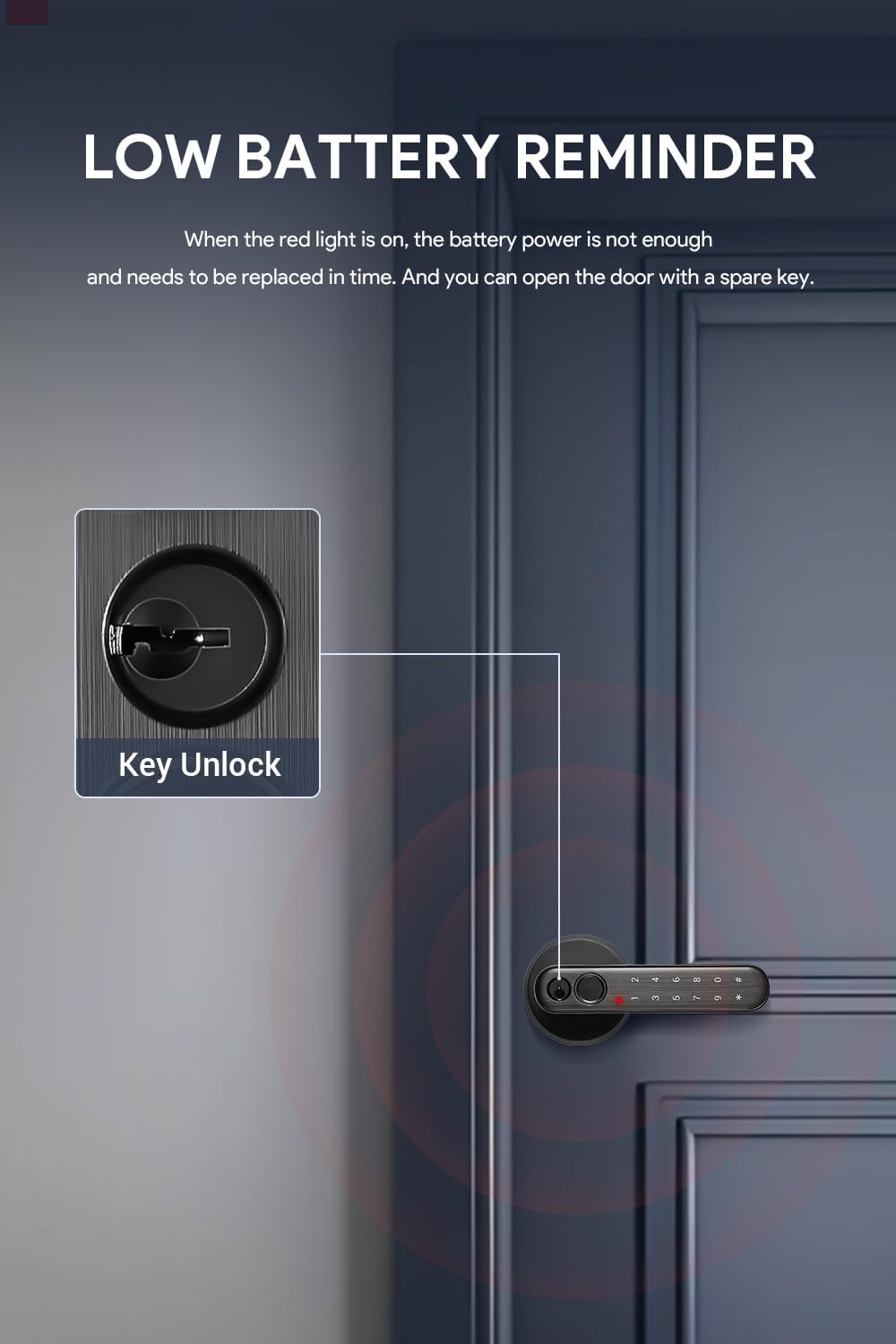
Image: The low battery reminder ensures you replace batteries before they fully deplete, with mechanical keys as a backup.
ట్రబుల్షూటింగ్
If you encounter issues with your AIERBOZ YL-57 Fingerprint Door Lock, refer to the following common problems and solutions:
- లాక్ స్పందించడం లేదు: బ్యాటరీలు సరిగ్గా ఇన్స్టాల్ చేయబడ్డాయో లేదో మరియు తగినంత ఛార్జ్ ఉందో లేదో తనిఖీ చేయండి. అవసరమైతే బ్యాటరీలను మార్చండి.
- వేలిముద్ర గుర్తించబడలేదు: Ensure your finger is clean and dry. Try repositioning your finger on the sensor. If the issue persists, re-register your fingerprint.
- Passcode not accepted: Verify that you are entering the correct passcode. Ensure the keyboard light is active before entering the code. If you suspect the passcode is incorrect, try changing it.
- Red warning light during entry: If the keyboard password is entered incorrectly, a red warning light will light up. Re-enter the correct password.
- Fingerprint collector turns red: If the fingerprint is entered incorrectly, the fingerprint collector will turn red. Re-attempt with a registered fingerprint.
- ఆటో-లాక్ పనిచేయడం లేదు: Check if Passage Mode is active. If so, deactivate it using the instructions in the Operating Instructions section.
స్పెసిఫికేషన్లు
| ఫీచర్ | స్పెసిఫికేషన్ |
|---|---|
| బ్రాండ్ | AIERBOZ |
| మోడల్ సంఖ్య | YL-57 |
| లాక్ రకం | బయోమెట్రిక్, కీప్యాడ్ |
| అన్లాకింగ్ పద్ధతులు | Fingerprint, Passcode, Mechanical Key |
| వేలిముద్ర గుర్తింపు వేగం | 0.2 సెకన్లు |
| వేలిముద్ర కెపాసిటీ | 20 వరకు |
| పాస్కోడ్ కెపాసిటీ | Up to 15 sets (4-12 digits) |
| మెటీరియల్ | జింక్ మిశ్రమం |
| తలుపు మందం అనుకూలత | 1.26 - 1.89 అంగుళాలు |
| Adjustable Backset | 2-3/8" (60mm) and 2-1/8" (70mm) |
| శక్తి మూలం | 4 x AAA బ్యాటరీలు (చేర్చబడలేదు) |
| అంశం కొలతలు (L x W x H) | 6.69 x 6.1 x 2.8 అంగుళాలు |
| వస్తువు బరువు | 1 పౌండ్ |
| ఆపరేటింగ్ ఉష్ణోగ్రత పరిధి | -4°F నుండి +167°F |

Image: The lock is designed to withstand a wide range of temperatures.
వారంటీ మరియు మద్దతు
Your AIERBOZ YL-57 Fingerprint Door Lock comes with a one-year warranty from the date of purchase, covering non-human damage. For any issues or support, please contact AIERBOZ customer service.