
1. పరిచయం
This manual provides detailed instructions for the installation, operation, and maintenance of your CP PLUS 4MP Wi-Fi Floodlight Camera, model CP-F42A. Please read this manual thoroughly before using the product to ensure proper functionality and safety. This camera combines high-resolution video surveillance with integrated floodlighting for enhanced security.
2. భద్రతా సమాచారం
- విద్యుత్ సరఫరా కెమెరా అవసరాలకు అనుగుణంగా ఉందని నిర్ధారించుకోండి.
- కెమెరాను విడదీయడానికి లేదా సవరించడానికి ప్రయత్నించవద్దు.
- Install the camera in a location where it is protected from extreme weather conditions, although it has an IP54 rating, direct exposure to heavy rain or prolonged submersion is not recommended.
- కెమెరాను వేడి వనరుల నుండి మరియు ప్రత్యక్ష సూర్యకాంతి నుండి దూరంగా ఉంచండి.
- భౌతిక నష్టాన్ని నివారించడానికి కెమెరాను జాగ్రత్తగా నిర్వహించండి.
- Consult a qualified electrician for installation if you are unsure about electrical wiring.
3. ప్యాకేజీ విషయాలు
ప్యాకేజీలో అన్ని అంశాలు ఉన్నాయని నిర్ధారించుకోండి:
- CP PLUS 4MP Wi-Fi Floodlight Camera (CP-F42A)
- పవర్ అడాప్టర్
- మౌంటు స్క్రూలు మరియు వాల్ ప్లగ్లు
- త్వరిత ప్రారంభ మార్గదర్శి (ఈ మాన్యువల్లో చేర్చబడలేదు)
4. ఉత్పత్తి ముగిసిందిview
The CP-F42A is an outdoor Wi-Fi floodlight camera designed for surveillance and illumination. It features a 4MP sensor for clear video, H.265 video compression for efficient storage, and a 110° viewing angle. The integrated floodlight provides illumination, and the PIR sensor detects motion up to 12 meters.
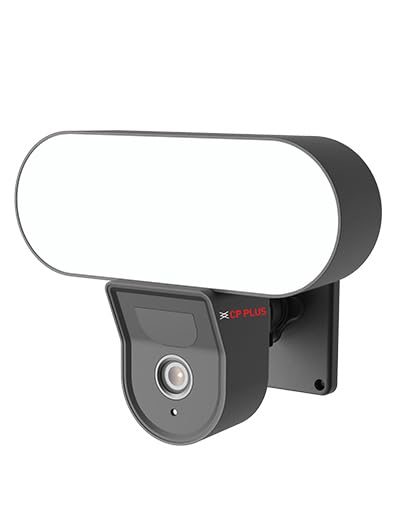
చిత్రం: ముందు భాగం view of the CP PLUS 4MP Wi-Fi Floodlight Camera CP-F42A, showing the camera lens and the integrated floodlight panel.
ముఖ్య భాగాలు:
- కెమెరా లెన్స్: Captures 4MP video.
- Floodlight Panel: ప్రకాశాన్ని అందిస్తుంది.
- పిఐఆర్ సెన్సార్: చలనాన్ని గుర్తిస్తుంది.
- మైక్రోఫోన్: ఆడియో ఇన్పుట్ కోసం.
- స్పీకర్: For two-way audio output.
- మౌంటు బ్రాకెట్: సురక్షితమైన సంస్థాపన కోసం.
5. సెటప్
5.1 భౌతిక సంస్థాపన
- ఒక స్థానాన్ని ఎంచుకోండి: స్పష్టమైన వాతావరణం ఉన్న బహిరంగ ప్రదేశాన్ని ఎంచుకోండి. view of the area you wish to monitor and within Wi-Fi range. Ensure the mounting surface is sturdy.
- డ్రిల్లింగ్ పాయింట్లను గుర్తించండి: గోడపై స్క్రూ రంధ్రాలను గుర్తించడానికి మౌంటు బ్రాకెట్ను టెంప్లేట్గా ఉపయోగించండి.
- డ్రిల్ రంధ్రాలు: గుర్తించబడిన పాయింట్ల వద్ద పైలట్ రంధ్రాలు వేయండి. తాపీపనిపై అమర్చినట్లయితే గోడ ప్లగ్లను చొప్పించండి.
- కెమెరాను మౌంట్ చేయండి: Secure the mounting bracket to the wall using the provided screws. Attach the camera to the bracket.
Image: The CP PLUS Floodlight Camera mounted on the exterior of a house, illustrating a typical installation scenario during the day.
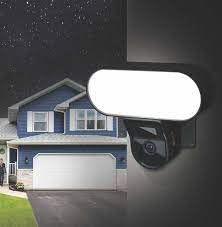
Image: The CP PLUS Floodlight Camera mounted on the exterior of a house at night, with the floodlight illuminated, demonstrating its night-time functionality.
5.2 పవర్ కనెక్షన్
Connect the provided power adapter to the camera's power input port and then plug it into a suitable electrical outlet. Ensure the connection is secure and protected from moisture.
5.3 Wi-Fi Connection and App Pairing
- అనువర్తనాన్ని డౌన్లోడ్ చేయండి: కోసం వెతకండి the "ezyKam+" app (or the recommended CP PLUS app) on your smartphone's app store (iOS or Android) and install it.
- ఖాతాను సృష్టించండి: యాప్ని తెరిచి కొత్త ఖాతా కోసం నమోదు చేసుకోండి లేదా మీకు ఇప్పటికే ఖాతా ఉంటే లాగిన్ అవ్వండి.
- పరికరాన్ని జోడించండి: Follow the in-app instructions to add a new device. Select "Floodlight Camera" or a similar option.
- Wi-Fiకి కనెక్ట్ చేయండి: The app will guide you through connecting the camera to your home Wi-Fi network. This usually involves scanning a QR code on the camera or entering your Wi-Fi credentials.
- పూర్తి సెటప్: కనెక్ట్ అయిన తర్వాత, మీరు మీ కెమెరాకు పేరు పెట్టవచ్చు మరియు ప్రారంభ సెట్టింగ్లను సర్దుబాటు చేయవచ్చు.
Image: Branding for CP PLUS ezyKam+ Wi-Fi Floodlight Full Color Camera, indicating compatibility with Alexa and Google Home, relevant for app pairing and smart home integration.
6. ఆపరేటింగ్ సూచనలు
Access all camera functions through the dedicated mobile application.
6.1 ప్రత్యక్ష ప్రసారం View
Open the app and select your camera from the device list to view the live video feed. You can pinch to zoom and pan across the image.
6.2 రికార్డింగ్ మరియు ప్లేబ్యాక్
- మాన్యువల్ రికార్డింగ్: లైవ్లో రికార్డ్ బటన్ను నొక్కండి view to start/stop manual recording.
- ఈవెంట్ రికార్డింగ్: The camera automatically records when motion is detected. These recordings are stored on the installed microSD card (if any) or cloud storage (subscription may be required).
- ప్లేబ్యాక్: రికార్డ్ చేసిన fooని యాక్సెస్ చేయండిtagయాప్లోని "ప్లేబ్యాక్" లేదా "చరిత్ర" విభాగం ద్వారా.
6.3 మోషన్ డిటెక్షన్ మరియు హెచ్చరికలు
Configure motion detection sensitivity and areas within the app settings. When motion is detected, the camera can send push notifications to your phone and trigger recording. The PIR sensor has a detection range of 6-12 meters.
6.4 Floodlight Control
The floodlight can be controlled manually via the app or set to activate automatically upon motion detection during specific times or low-light conditions. Adjust brightness and duration settings in the app.
6.5 టూ-వే ఆడియో
Use the microphone and speaker icons in the live view to communicate with visitors or deter intruders. Press and hold the microphone icon to speak, and release to listen.
౪.౧.౧౦ నైట్ విజన్
The camera features infrared (IR) night vision for clear black-and-white video in low-light conditions and can also utilize the floodlight for full-color night vision when activated. The night vision range is up to 12 meters.
7. నిర్వహణ
7.1 శుభ్రపరచడం
Wipe the camera lens and floodlight panel with a soft, damp దుమ్ము మరియు ధూళిని తొలగించడానికి వస్త్రం. కఠినమైన రసాయనాలు లేదా రాపిడి క్లీనర్లను ఉపయోగించవద్దు.
7.2 ఫర్మ్వేర్ నవీకరణలు
Periodically check the app for available firmware updates. Keeping your camera's firmware up-to-date ensures optimal performance and security features.
7.3 నిల్వ నిర్వహణ
If using a microSD card, regularly check its status in the app. Format the card periodically to maintain performance. Back up important recordings before formatting.
8. ట్రబుల్షూటింగ్
| సమస్య | సాధ్యమైన పరిష్కారం |
|---|---|
| కెమెరా ఆన్ కావడం లేదు. | Check power adapter connection and ensure the outlet is functional. |
| Wi-Fiకి కనెక్ట్ చేయడం సాధ్యపడలేదు. | Ensure the camera is within Wi-Fi range. Verify Wi-Fi password. Try resetting the camera and router. |
| పేలవమైన వీడియో నాణ్యత. | Check Wi-Fi signal strength. Clean the camera lens. Ensure sufficient lighting. |
| మోషన్ డిటెక్షన్ పని చేయడం లేదు. | Adjust motion detection sensitivity and area settings in the app. Ensure there are no obstructions. |
| Floodlight not activating. | Check floodlight settings in the app. Ensure it's set to activate on motion or during low light. |
9. స్పెసిఫికేషన్లు
| ఫీచర్ | వివరాలు |
|---|---|
| మోడల్ సంఖ్య | CP-F42A |
| రిజల్యూషన్ | 4MP (Effective Still Resolution: 4 MP) |
| వీడియో కంప్రెషన్ | H.265, MPEG |
| Viewing యాంగిల్ | 110 డిగ్రీలు |
| PIR దూరం | 6~12 మీటర్లు |
| వైర్లెస్ టెక్నాలజీ | Wi-Fi |
| నైట్ విజన్ రేంజ్ | 12 Meters (Infrared, Night Color) |
| ఫ్రేమ్ రేట్ | సెకనుకు 20 ఫ్రేమ్లు |
| ఆప్టికల్ జూమ్ | 3x |
| అంతర్జాతీయ రక్షణ రేటింగ్ | IP54 |
| హెచ్చరిక రకం | చలనం మాత్రమే |
| శక్తి మూలం | కార్డెడ్ ఎలక్ట్రిక్ |
| చేర్చబడిన భాగాలు | అడాప్టర్ |
| కొలతలు (L x W x H) | 20 x 12 x 10 సెంటీమీటర్లు |
| వస్తువు బరువు | 630 గ్రా |
| ఇండోర్/అవుట్డోర్ వినియోగం | అవుట్డోర్ |
| ఫోటో సెన్సార్ టెక్నాలజీ | CMOS |
| సిఫార్సు చేసిన ఉపయోగాలు | Home Security, Night Vision |
10. వారంటీ మరియు మద్దతు
For warranty information and technical support, please refer to the official CP PLUS webసైట్లో లేదా వారి కస్టమర్ సర్వీస్ను సంప్రదించండి. వారంటీ క్లెయిమ్ల కోసం కొనుగోలు రుజువుగా మీ కొనుగోలు రసీదును ఉంచండి.
CP PLUS Official Webసైట్: www.cpplusworld.com