
షియోమి M2112W1
Xiaomi వాచ్ S1 DE స్మార్ట్వాచ్ యూజర్ మాన్యువల్
మోడల్: M2112W1
1. పరిచయం
Thank you for choosing the Xiaomi Watch S1 DE Smartwatch. This device combines elegant design with advanced technology to support your active lifestyle and health monitoring. Featuring a vibrant 1.43" AMOLED HD display, the Watch S1 offers 117 training modes, comprehensive health tracking including SpO2, heart rate, and sleep monitoring, as well as convenient NFC and integrated GPS capabilities. With 5ATM water resistance and up to 12 days of battery life, it is designed for daily wear and various activities.
This manual provides essential information on setting up, operating, maintaining, and troubleshooting your Xiaomi Watch S1 DE Smartwatch to ensure optimal performance and user experience.
2. సెటప్
2.1 అన్బాక్సింగ్ మరియు ప్రారంభ ఛార్జ్
ప్యాకేజీని తెరిచినప్పుడు, అన్ని భాగాలు ఉన్నాయని నిర్ధారించుకోండి:
- Xiaomi Watch S1 Smartwatch
- Fluoro-rubber Watch Strap
- లెదర్ స్ట్రాప్
- ఛార్జింగ్ డాక్
- వినియోగదారు మాన్యువల్
Before first use, fully charge your smartwatch using the provided charging dock. Connect the charging dock to a USB power source. Align the watch with the magnetic charging pins until it snaps into place and the charging indicator appears on the screen.
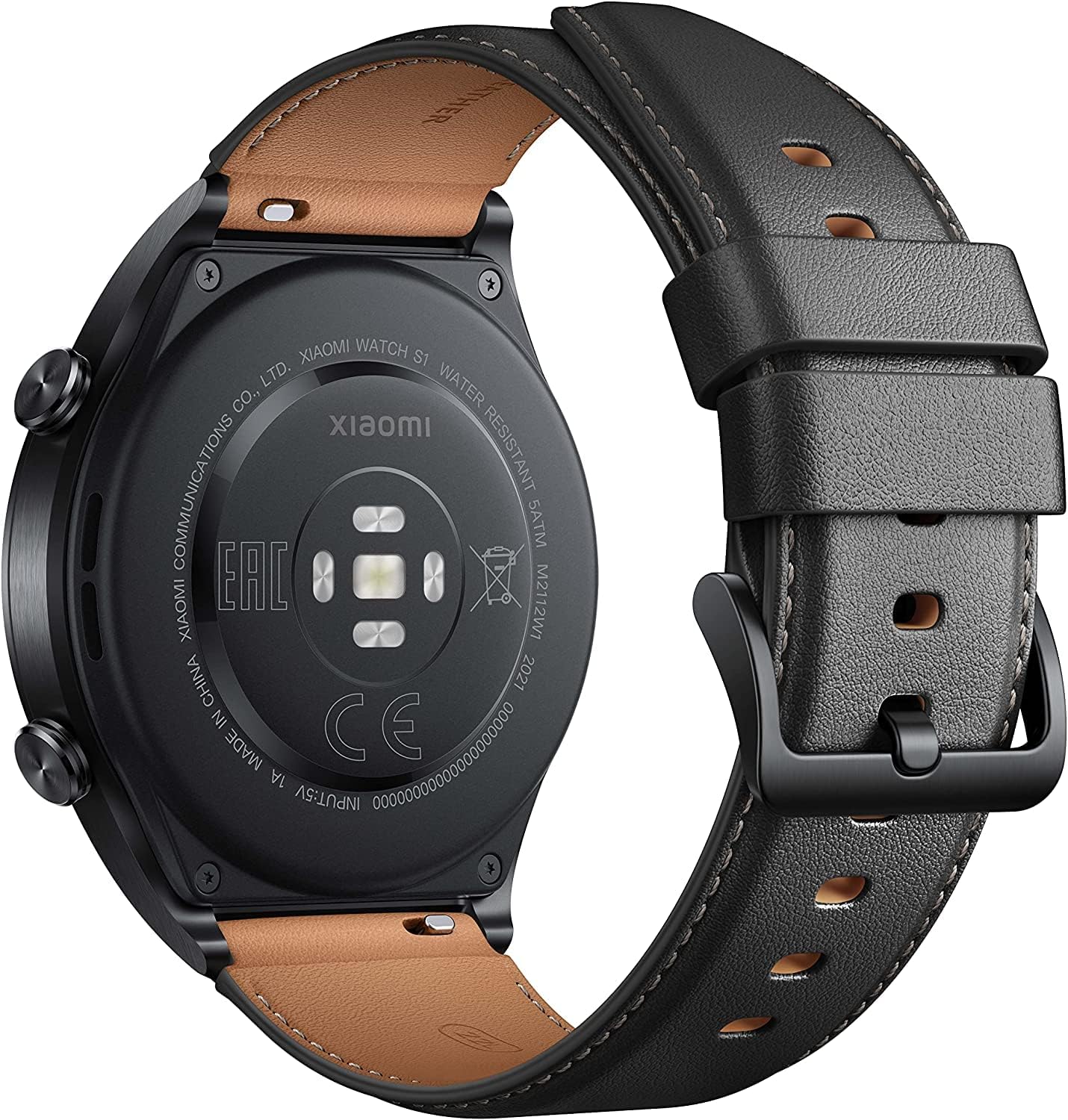
చిత్రం: వెనుక view of the Xiaomi Watch S1, highlighting the charging contacts and sensors.
2.2 మీ స్మార్ట్ఫోన్తో జత చేయడం
To unlock the full potential of your Xiaomi Watch S1, pair it with your smartphone via the Xiaomi Wear app (or Mi Fitness app, depending on region). Download the app from your device's app store.
- పవర్ బటన్ను నొక్కి పట్టుకోవడం ద్వారా స్మార్ట్ వాచ్ను ఆన్ చేయండి.
- Open the Xiaomi Wear app on your smartphone and log in or create an account.
- Follow the in-app instructions to add a new device. Select the Xiaomi Watch S1 from the list of available devices.
- మీ స్మార్ట్ఫోన్ మరియు స్మార్ట్వాచ్ రెండింటిలోనూ జత చేసే అభ్యర్థనను నిర్ధారించండి.

చిత్రం: ముందు భాగం view of the Xiaomi Watch S1, displaying the watch face with time, steps, heart rate, and weather.
3. మీ స్మార్ట్వాచ్ను ఆపరేట్ చేయడం
3.1 ప్రాథమిక నావిగేషన్
The Xiaomi Watch S1 features a responsive touchscreen and two side buttons for navigation:
- పైకి/క్రిందికి స్వైప్ చేయండి: Scroll through notifications, quick settings, or menus.
- ఎడమ/కుడి స్వైప్ చేయండి: Access widgets like heart rate, weather, activity summary, etc.
- నొక్కండి: ఒక అంశాన్ని ఎంచుకోండి లేదా అప్లికేషన్ను తెరవండి.
- టాప్ బటన్: Press to access the app list or return to the watch face.
- దిగువ బటన్: అనుకూలీకరించదగిన షార్ట్కట్, సాధారణంగా వ్యాయామ మోడ్ల కోసం.
3.2 ఆరోగ్య పర్యవేక్షణ
The watch continuously monitors your health metrics:
- హృదయ స్పందన రేటు: Real-time heart rate tracking. Access detailed data in the app.
- SpO2 (బ్లడ్ ఆక్సిజన్): Measure your blood oxygen saturation on demand.
- నిద్ర ట్రాకింగ్: Automatically monitors sleep stages మరియు నిద్ర నాణ్యతపై అంతర్దృష్టులను అందిస్తుంది.
- ఒత్తిడి పర్యవేక్షణ: రోజంతా ఒత్తిడి స్థాయిలను ట్రాక్ చేస్తుంది.
3.3 వర్కౌట్ మోడ్లు మరియు GPS
Choose from 117 fitness modes to track your workouts. The integrated GPS provides accurate outdoor activity tracking without needing your phone.
- మీ వాచ్లోని 'వర్కౌట్' విభాగానికి నావిగేట్ చేయండి.
- Select your desired activity (e.g., Outdoor Run, Cycling).
- Wait for GPS signal acquisition (if applicable) and start your workout.
3.4 NFC Payments
Set up your payment cards in the Xiaomi Wear app to use NFC for contactless payments directly from your wrist.
3.5 కాల్స్ మరియు సంగీతం
The watch supports Bluetooth calls, allowing you to answer or make calls directly from your wrist when connected to your phone. It also supports offline music playback, enabling you to store and listen to music without your phone.

Image: The Xiaomi Watch S1 worn on a wrist, demonstrating its comfortable fit and display visibility during use.
4. నిర్వహణ
4.1 క్లీనింగ్ మరియు కేర్
Regularly clean your watch and straps to maintain hygiene and appearance. Use a soft, lint-free cloth to wipe the watch body and screen. For the straps, follow the cleaning instructions specific to the material (fluoro-rubber or leather).
- కఠినమైన రసాయనాలు లేదా రాపిడి పదార్థాలను ఉపయోగించడం మానుకోండి.
- ఛార్జ్ చేసే ముందు వాచ్ పొడిగా ఉందని నిర్ధారించుకోండి.
4.2 నీటి నిరోధకత
The Xiaomi Watch S1 is rated 5ATM, meaning it can withstand pressures equivalent to a depth of 50 meters. This makes it suitable for swimming and shallow-water activities. However, it is not suitable for diving, hot showers, or saunas, as steam and hot water can compromise the seals.
4.3 బ్యాటరీ నిర్వహణ
బ్యాటరీ జీవితాన్ని పొడిగించడానికి:
- Charge the watch fully when the battery is low.
- తీవ్రమైన ఉష్ణోగ్రతలను నివారించండి.
- Disable features like Always-On Display or continuous SpO2 monitoring if not needed.
4.4 సాఫ్ట్వేర్ నవీకరణలు
Periodically check for software updates via the Xiaomi Wear app. Updates often include performance improvements, bug fixes, and new features.
5. ట్రబుల్షూటింగ్
మీ Xiaomi వాచ్ S1 తో మీకు సమస్యలు ఎదురైతే, ఈ క్రింది పరిష్కారాలను ప్రయత్నించండి:
| సమస్య | సాధ్యమైన పరిష్కారం |
|---|---|
| Watch not turning on/responsive | Ensure the watch is fully charged. Press and hold the power button for at least 10-15 seconds to force a restart. |
| స్మార్ట్ఫోన్తో జత చేయలేము | Ensure Bluetooth is enabled on your phone. Restart both the watch and phone. Clear the app cache or reinstall the Xiaomi Wear app. Check if the watch is already paired with another device. |
| సరికాని ఆరోగ్య డేటా | మీ మణికట్టు మీద వాచ్ గట్టిగా ధరించేలా చూసుకోండి, మరీ బిగుతుగా లేదా మరీ వదులుగా ఉండకూడదు. వాచ్ వెనుక ఉన్న సెన్సార్లను శుభ్రం చేయండి. |
| బ్యాటరీ త్వరగా అయిపోతుంది | Reduce screen brightness, disable Always-On Display, limit continuous heart rate/SpO2 monitoring, and turn off unnecessary notifications. Ensure no apps are running excessively in the background. |
| GPS not connecting | Ensure you are in an open outdoor area. Wait a few moments for the watch to acquire a signal. Update the watch firmware. |
If the issue persists, consider performing a factory reset (note: this will erase all data on the watch). Navigate to Settings > System > Reset on your watch.
6. స్పెసిఫికేషన్లు
| ఫీచర్ | వివరాలు |
|---|---|
| మోడల్ పేరు | Xiaomi Watch S1 GL (Black) |
| మోడల్ సంఖ్య | M2112W1 |
| ప్రదర్శించు | 1.43" AMOLED HD |
| బ్యాటరీ రకం | లిథియం-పాలిమర్ |
| బ్యాటరీ లైఫ్ | 12 రోజుల వరకు (సాధారణ వినియోగం) |
| కనెక్టివిటీ | Bluetooth, 802.11bgn, 2.4 GHz Radiofrequency |
| సెన్సార్లు | Heart Rate Monitor, SpO2, GPS, Activity Tracker |
| నీటి నిరోధకత | 5ATM |
| కొలతలు | 10 x 2 x 0.5 సెం.మీ |
| బరువు | 51.03 గ్రాములు |
| ఆపరేటింగ్ సిస్టమ్ | స్మార్ట్ వాచ్ OS |
| నిల్వ సామర్థ్యం | 1 GB |
7. వారంటీ మరియు మద్దతు
For warranty information and customer support, please refer to the documentation provided with your purchase or visit the official Xiaomi webసైట్. వారంటీ నిబంధనలు మరియు షరతులు ప్రాంతం మరియు రిటైలర్ను బట్టి మారవచ్చు.
You can also visit the official Xiaomi store on Amazon for more product information and support resources: షియోమి స్టోర్
Ask a question about this manual
Ask about setup, troubleshooting, compatibility, parts, safety, or missing instructions. Manuals+ will review the question and use this page’s manual context to help answer it.