
1. పరిచయం
This manual provides essential instructions for setting up, operating, maintaining, and troubleshooting your VIBOX VI-63 PC Gamer. Please read this guide thoroughly before using your new computer to ensure optimal performance and longevity.
2. భద్రతా సమాచారం
- Ensure the PC is placed on a stable, flat surface with adequate ventilation.
- Do not block any ventilation openings on the PC case.
- Keep the PC away from direct sunlight, heat sources, and liquids.
- Use only the power adapter supplied with your PC.
- ఏదైనా నిర్వహణ లేదా శుభ్రపరిచే ముందు విద్యుత్ కేబుల్ను డిస్కనెక్ట్ చేయండి.
- Avoid opening the PC case unless instructed by VIBOX support, as this may void your warranty.
3. ప్యాకేజీ విషయాలు
క్రింద జాబితా చేయబడిన అన్ని వస్తువులు మీ ప్యాకేజీలో చేర్చబడ్డాయని ధృవీకరించండి:
- VIBOX VI-63 PC Gamer Tower
- 22-అంగుళాల మానిటర్
- RGB గేమింగ్ కీబోర్డ్
- RGB గేమింగ్ మౌస్
- Black Mouse Pad
- మైక్రోఫోన్తో గేమింగ్ హెడ్సెట్
- Wireless WiFi Network Adapter (600 Mbps)
- పవర్ కేబుల్(లు)
- Display Cable (HDMI or VGA, depending on monitor)
- డాక్యుమెంటేషన్ (ఈ మాన్యువల్)
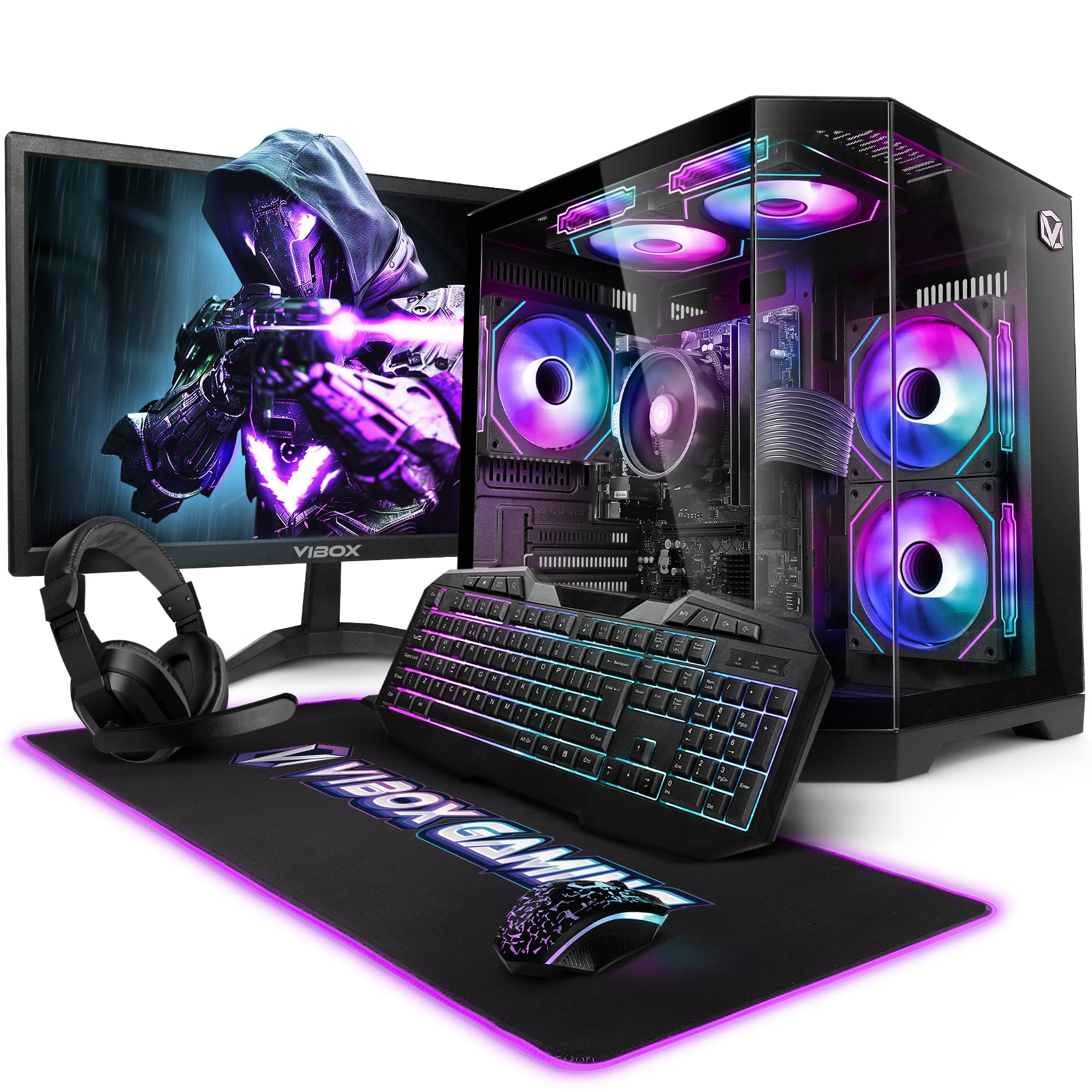
Image 3.1: VIBOX VI-63 PC Gamer Tower with internal RGB lighting.
4. సెటప్ సూచనలు
4.1. అన్ప్యాకింగ్ మరియు ప్లేస్మెంట్
- వాటి ప్యాకేజింగ్ నుండి అన్ని భాగాలను జాగ్రత్తగా తొలగించండి.
- Place the PC tower on a flat, stable surface. Ensure there is sufficient space around the tower for proper airflow.
- Place the monitor on a stable surface at a comfortable viewing ఎత్తు.
4.2. పెరిఫెరల్స్ కనెక్ట్ చేయడం
- మానిటర్: Connect one end of the display cable (HDMI or VGA) to the corresponding port on the back of the PC and the other end to the monitor.
- కీబోర్డ్ మరియు మౌస్: Connect the USB cables of the keyboard and mouse to any available USB ports on the PC.
- హెడ్సెట్: Connect the headset to the audio jacks (headphone and microphone) on the front or rear of the PC.
- వైఫై అడాప్టర్: Insert the wireless WiFi network adapter into an available USB port.
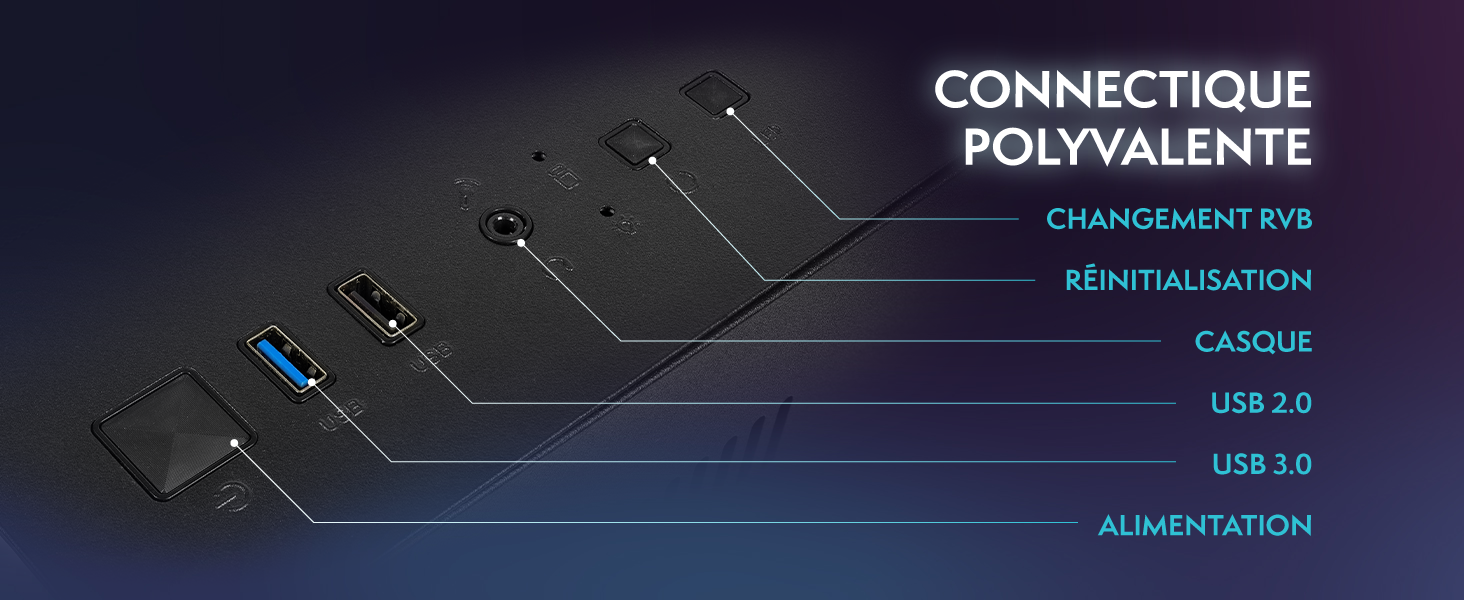
Image 4.1: Front panel connections including USB 2.0, USB 3.0, headset jack, reset button, and RGB change button.
4.3. పవర్ కనెక్షన్
- Connect the power cable to the power supply unit (PSU) at the back of the PC.
- Connect the other end of the power cable to a wall outlet.
- Connect the monitor's power cable to a wall outlet.
4.4. ప్రారంభ బూట్ మరియు Windows 11 సెటప్
- Press the power button on the front of the PC tower.
- మానిటర్ ఆన్ చేయండి.
- Follow the on-screen instructions to complete the Windows 11 Home setup. This typically involves selecting your region, language, creating a user account, and connecting to a Wi-Fi network.
5. ఆపరేటింగ్ సూచనలు
5.1. ప్రాథమిక ఆపరేషన్
- పవర్ ఆన్/ఆఫ్: Press the power button to turn on the PC. To shut down, click the Start button in Windows, then Power > Shut down.
- పునఃప్రారంభించు: From the Start menu, select Power > Restart.
- స్లీప్ మోడ్: From the Start menu, select Power > Sleep.
5.2. Windows 11 Features
Your VIBOX VI-63 PC Gamer comes with Windows 11 Home pre-installed, offering features designed to enhance your computing and gaming experience:
- DirectStorage: Enables faster loading times for compatible games.
- AutoHDR: Automatically enhances visuals for a wider range of games.
- Xbox Game Pass Integration: Seamless access to a library of games (subscription may be required).
- Optimized CPU Performance: Windows 11 is designed to optimize CPU usage for gaming and multitasking.
5.3. గేమింగ్ పనితీరు
The VIBOX VI-63 is equipped with an AMD Ryzen 3 3200GE processor and integrated Radeon Vega 8 graphics, providing solid performance for everyday computing and gaming at 720p to 1080p resolutions.

చిత్రం 5.1: ముగిసిందిview of internal components including CPU, GPU, RAM, and storage.
5.4. RGB లైటింగ్ నియంత్రణ
Your PC features RGB lighting. Use the dedicated RGB change button on the front panel (refer to Image 4.1) to cycle through different lighting modes and colors.
6. నిర్వహణ
6.1. PC ని శుభ్రపరచడం
- బాహ్య: ఒక మృదువైన ఉపయోగించండి, డిamp cloth to wipe down the exterior of the PC case and monitor. Avoid abrasive cleaners.
- దుమ్ము: Periodically use compressed air to clear dust from the ventilation openings and fan grilles. Ensure the PC is powered off and unplugged before doing so.
- పెరిఫెరల్స్: Clean your keyboard and mouse regularly to prevent dust and debris buildup.
6.2. సాఫ్ట్వేర్ నవీకరణలు
- Regularly check for and install Windows updates to ensure system stability and security. Go to Settings > Windows Update.
- Keep your graphics drivers updated for optimal gaming performance. You can usually download the latest drivers from the AMD webసైట్.
6.3. System Care
- Avoid installing unnecessary software to keep your system lean and fast.
- Run regular antivirus scans to protect against malware. Windows Defender is pre-installed.
- Ensure proper airflow around the PC to prevent overheating. The inverted airflow design helps with cooling.
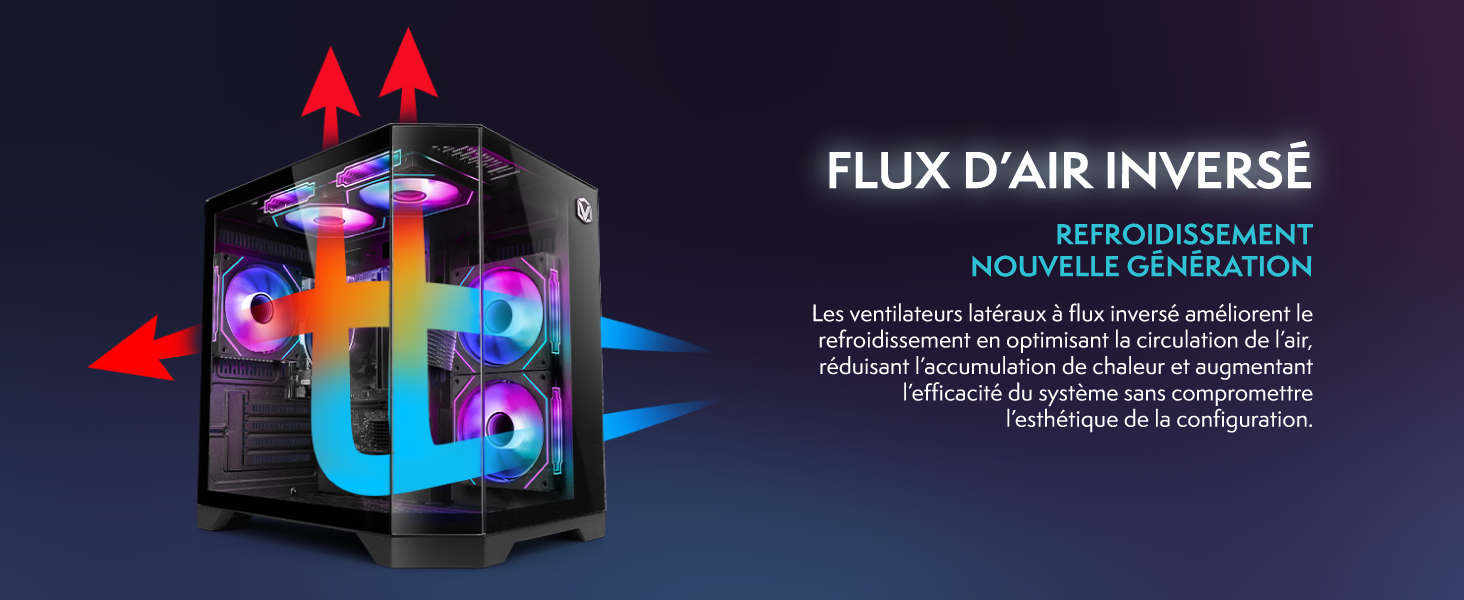
Image 6.1: Inverted airflow design for efficient cooling.
7. ట్రబుల్షూటింగ్
- శక్తి లేదు: Check all power cable connections. Ensure the wall outlet is functional.
- ప్రదర్శన లేదు: Ensure the monitor is powered on and the display cable is securely connected to both the PC and the monitor. Try a different display cable or port if available.
- ఇంటర్నెట్ కనెక్షన్ లేదు: Verify the WiFi adapter is properly installed. Check your router and internet service. In Windows, go to Settings > Network & internet to troubleshoot.
- PC Freezes/Crashes: Restart the PC. Ensure all drivers are updated. Check for overheating (ensure good airflow).
- పనిచేయని పెరిఫెరల్స్: Try connecting the keyboard, mouse, or headset to different USB/audio ports. Ensure drivers are installed if required.
8. స్పెసిఫికేషన్లు
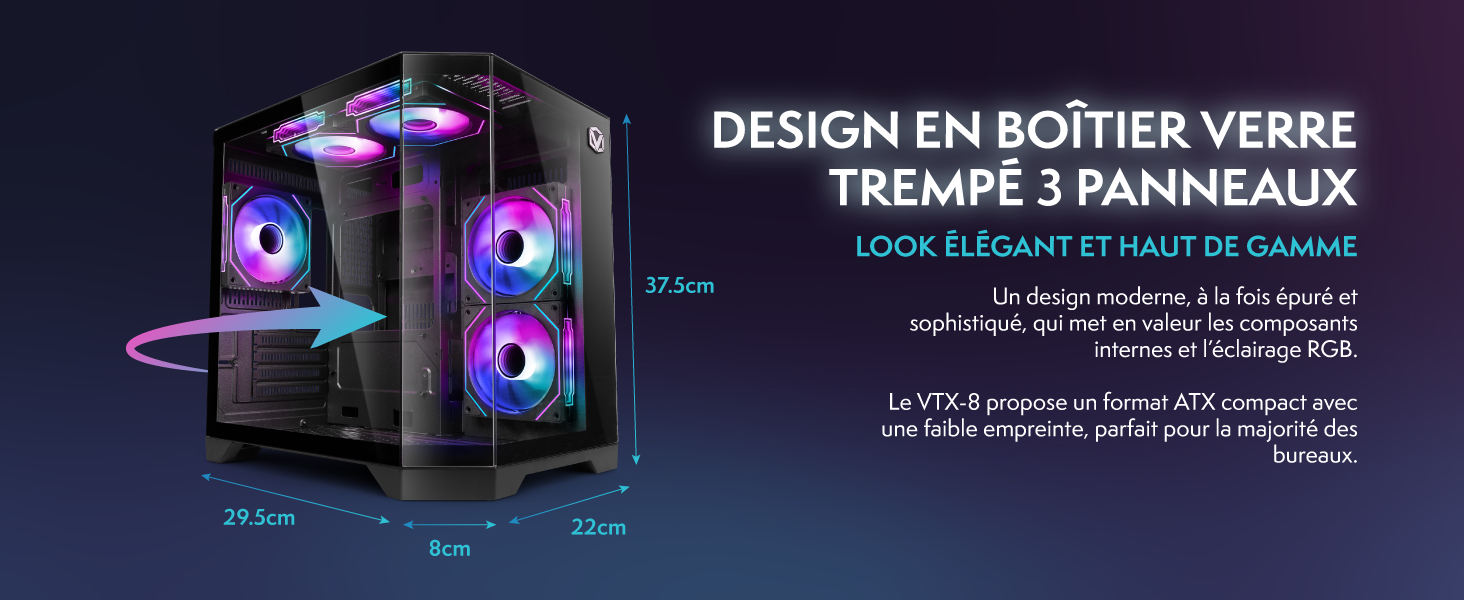
Image 8.1: VIBOX VI-63 PC Gamer case dimensions.
| ఫీచర్ | స్పెసిఫికేషన్ |
|---|---|
| బ్రాండ్ | VIBOX |
| మోడల్ పేరు | Vibox VI-63 Gaming PC |
| ఆపరేటింగ్ సిస్టమ్ | Windows 11 హోమ్ |
| CPU మోడల్ | AMD రైజెన్ 3 3200G |
| CPU వేగం | 3.6 GHz (4 GHz టర్బో) |
| CPU కోర్లు | 4 |
| గ్రాఫిక్స్ కోప్రాసెసర్ | Radeon Vega 8 (Integrated) |
| Graphics RAM | 2 GB (Shared) |
| RAM Installed | 16 GB DDR4 |
| RAM Speed | 2666 MHz |
| నిల్వ సామర్థ్యం | 1 టిబి ఎస్ఎస్డి |
| హార్డ్ డ్రైవ్ టెక్నాలజీ | SSD |
| మానిటర్ పరిమాణం | 22 అంగుళాలు |
| గరిష్ట డిస్ప్లే రిజల్యూషన్ | 1920x1080 పిక్సెల్స్ |
| వీడియో అవుట్పుట్ ఇంటర్ఫేస్ | HDMI, VGA |
| కనెక్టివిటీ టెక్నాలజీ | AMD Radeon Vega 8, Ethernet, HDMI, USB, Wi-Fi |
| కొలతలు (L x W x H) | 32.6 x 19.5 x 42 సెం.మీ |
| రంగు | VTX-1 Black |
9. వారంటీ మరియు మద్దతు
9.1. వారంటీ సమాచారం
Your VIBOX VI-63 PC Gamer comes with a 2 సంవత్సరాల వారంటీ on spare parts. This warranty covers manufacturing defects and component failures under normal use. Please retain your proof of purchase for warranty claims.
9.2. కస్టమర్ మద్దతు
For technical assistance, troubleshooting, or warranty inquiries, please contact VIBOX customer support. Refer to the contact information provided with your purchase documentation or visit the official VIBOX webమద్దతు వివరాల కోసం సైట్.
ఆన్లైన్ వనరులు: For additional support and FAQs, please visit the VIBOX official webసైట్.