
Tenveo TEVO-VHD20UA
Tenveo VHD20UA PTZ Conference Camera User Manual
Model: TEVO-VHD20UA
1. పరిచయం
This manual provides detailed instructions for the installation, operation, and maintenance of your Tenveo VHD20UA PTZ Conference Camera. Please read this manual thoroughly before using the product to ensure proper setup and optimal performance. Keep this manual for future reference.
2. ఉత్పత్తి ముగిసిందిview
The Tenveo VHD20UA is a high-definition PTZ (Pan-Tilt-Zoom) camera designed for professional video conferencing, live streaming, and tele-medicine applications. It features a 20x optical zoom, 1080p Full HD resolution at 60 frames per second, and multiple connectivity options including HDMI and USB 3.0.
కీ ఫీచర్లు
- Full HD 1080p 60fps: Delivers crisp, clear video quality for professional presentations and meetings.
- 20x Optical Zoom & 8x Digital Zoom: Allows for detailed close-ups of participants or objects without loss of clarity.
- AI ఆటో-ట్రాకింగ్: Intelligent framing and presenter tracking capabilities ensure subjects remain in focus and within the frame automatically.
- వైడ్ ఫీల్డ్ View: A 62° wide field of view captures more of the meeting space.
- బహుళ కనెక్టివిటీ: Supports HDMI, USB 3.0, RS-232, and RS-485 for versatile integration with various systems.
- ఇన్ఫ్రారెడ్ రిమోట్ కంట్రోల్: Easy control over pan, tilt, zoom, and preset settings.
- 255 ప్రీసెట్లు: Store and recall up to 255 camera positions for quick scene changes.
- యూనివర్సల్ అనుకూలత: Works seamlessly with popular video conferencing platforms like Zoom, Webex, Google Meet, Microsoft Teams, and more.

మూర్తి 2.1: పైగాview of Tenveo VHD20UA PTZ Camera key features, including 20x optical zoom, 8x digital zoom, AI auto-tracking, CMOS sensor, 1080p 60fps video, easy preset settings, USB3.0, HDMI, RS232/485 connectivity, and a 62° wide field of view.
3. సెటప్
3.1 అన్ప్యాకింగ్ మరియు తనిఖీ
Carefully remove all components from the packaging. Verify that all items listed in the packing list are present and undamaged. If any items are missing or damaged, contact Tenveo support immediately.
3.2 భౌతిక సంస్థాపన
The Tenveo VHD20UA camera offers flexible installation options to suit various environments. Choose the method that best fits your setup requirements.
- డెస్క్టాప్ ప్లేస్మెంట్: Place the camera on a stable, flat surface. Ensure it is positioned to capture the desired area.
- త్రిపాద మౌంటు: The camera includes a standard tripod mount for use with compatible tripods.
- వాల్ మౌంటు: Use the provided wall mount bracket (if included) and appropriate hardware to secure the camera to a wall. Ensure the wall can support the camera's weight.
- సీలింగ్ మౌంటు: For inverted installation, use a compatible ceiling mount bracket. Remember to adjust the image flip setting in the camera menu if mounted upside down.
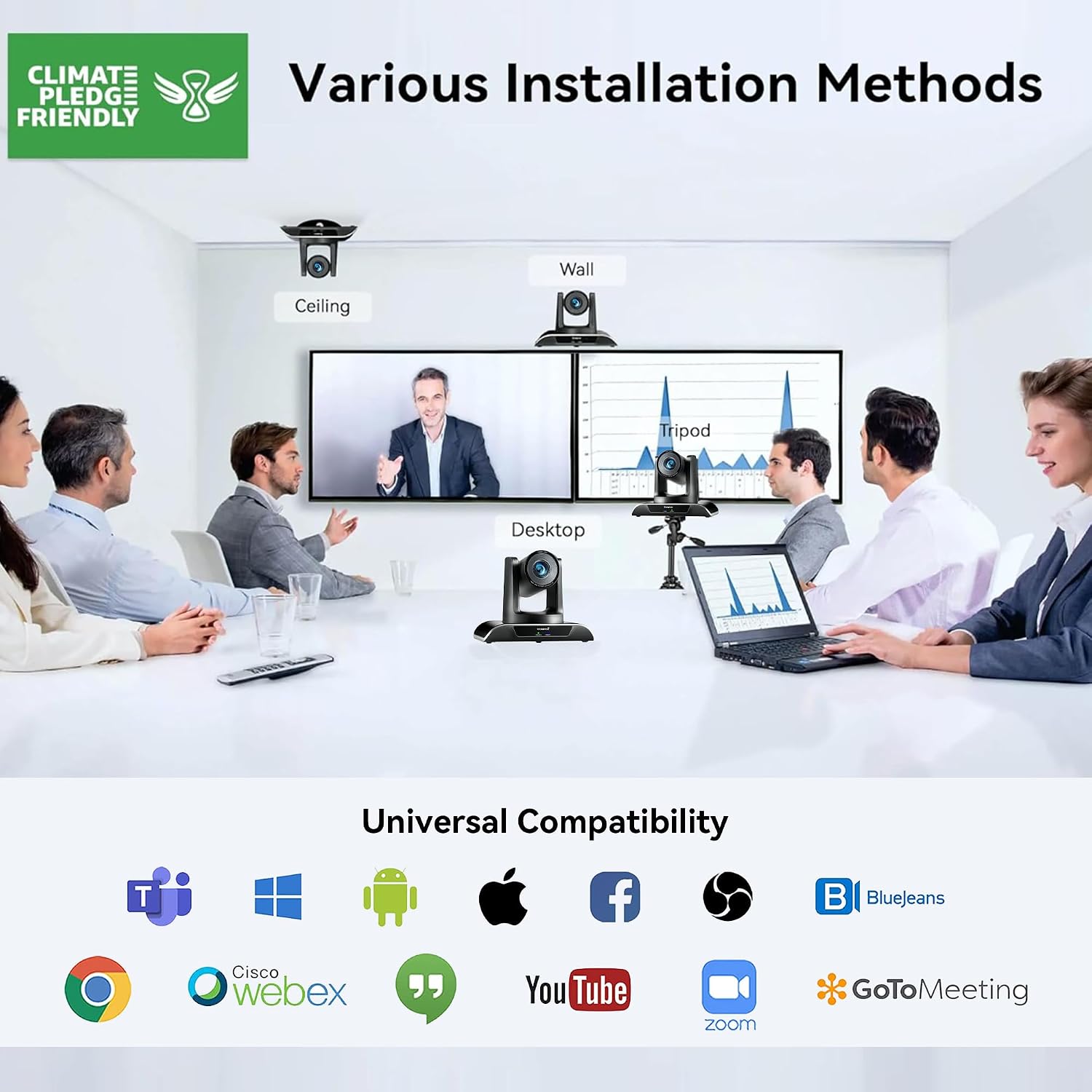
మూర్తి 3.1: Various installation methods for the Tenveo VHD20UA PTZ Camera, including ceiling, wall, desktop, and tripod mounting options, demonstrating its adaptability to different environments.
3.3 కెమెరాను కనెక్ట్ చేస్తోంది
The VHD20UA camera supports multiple connection types for video output and control. Refer to the diagram below for connection points.
- విద్యుత్ సరఫరా: Connect the included power adapter to the DC 12V input port on the camera and then to a power outlet.
- USB 3.0 కనెక్షన్: For direct connection to a computer for video and audio, use a USB 3.0 cable to connect the camera's USB port to your computer's USB 3.0 port. This provides 1080p 60fps video output.
- HDMI కనెక్షన్: Connect an HDMI cable from the camera's HDMI output port to an HDMI input on a display, video switcher, or capture card.
- RS-232/RS-485 Control: For external control systems (e.g., joystick controllers, automation systems), connect the appropriate control cable to the RS-232 or RS-485 ports.
- RJ45 (LAN) కనెక్షన్: Connect an Ethernet cable for IP streaming and control (if supported by your specific model and firmware).

మూర్తి 3.2: వివరంగా view of the Tenveo VHD20UA PTZ Camera's rear panel, illustrating various connection options including power supply, RS232/485, IR, USB 3.0, HDMI, and RJ45 ports, along with examples of connected devices like a PC, smart TV, video switcher, and serial joystick.
4. ఆపరేటింగ్ సూచనలు
4.1 Basic Camera Control (Remote Control)
Use the included infrared remote control to operate the camera's basic functions.
- పవర్ ఆన్/ఆఫ్: Press the power button to turn the camera on or off.
- పాన్/టిల్ట్: Use the directional arrows to move the camera horizontally (pan) and vertically (tilt). The camera supports 350° pan and 180° tilt.
- జూమ్: Use the '+' and '-' buttons to zoom in (telephoto) or zoom out (wide-angle). The camera features 20x optical zoom and 8x digital zoom.
- దృష్టి: Adjust focus manually using the dedicated focus buttons, or enable auto-focus.

మూర్తి 4.1: The Tenveo VHD20UA PTZ Camera demonstrating its pan (350°) and tilt (180°) capabilities, along with 20x optical zoom, 8x digital zoom, and a 62° wide angle field of view in a conference room setting.
4.2 ప్రీసెట్ సెట్టింగ్లు
The camera allows you to save and recall up to 255 preset positions, with quick access to 10 presets via the IR remote.
- Setting a Preset:
- Position the camera to the desired pan, tilt, and zoom level.
- నొక్కండి సెట్ రిమోట్లోని బటన్.
- Press a number button (0-9) to assign the current position to that preset number.
- ప్రీసెట్ను గుర్తుచేసుకోవడం:
- Press the desired number button (0-9) on the remote. The camera will move to the saved position.

మూర్తి 4.2: Illustration of the Tenveo VHD20UA PTZ Camera's quick preset settings feature, allowing users to save and recall up to 10 camera positions using the IR remote control, demonstrating pan (350°) and tilt (180°) capabilities.
4.3 AI Auto-Tracking and Framing
The VHD20UA camera features advanced AI capabilities for automatic subject tracking and framing.
- ఆటో ఫ్రేమింగ్: The camera intelligently adjusts its pan, tilt, and zoom to frame all participants within the view.
- ప్రెజెంటర్ ట్రాకింగ్: The camera can automatically follow a designated presenter as they move within the defined area, keeping them centered in the frame.
Refer to the camera's on-screen display (OSD) menu or advanced control software for specific settings and activation of AI features.

మూర్తి 4.3: Demonstration of the Tenveo VHD20UA PTZ Camera's AI Auto Tracking feature, showcasing both Auto Framing to include all participants and Presenter Tracking to follow a single speaker.
5. నిర్వహణ
Regular maintenance ensures the longevity and optimal performance of your Tenveo VHD20UA camera.
- లెన్స్ శుభ్రపరచడం: Use a soft, dry microfiber cloth to gently wipe the camera lens. Avoid using harsh chemicals or abrasive materials that could scratch the lens.
- కెమెరా బాడీని శుభ్రపరచడం: Wipe the camera's exterior with a soft, damp cloth. Do not use liquid cleaners directly on the camera.
- ఫర్మ్వేర్ నవీకరణలు: టెన్వియోను కాలానుగుణంగా తనిఖీ చేయండి website for firmware updates. Keeping your camera's firmware up-to-date can improve performance and add new features.
- నిల్వ: When not in use for extended periods, store the camera in a clean, dry environment, away from direct sunlight and extreme temperatures.
6. ట్రబుల్షూటింగ్
If you encounter issues with your Tenveo VHD20UA camera, refer to the following common problems and solutions.
| సమస్య | సాధ్యమైన కారణం | పరిష్కారం |
|---|---|---|
| వీడియో అవుట్పుట్ లేదు |
|
|
| రిమోట్ కంట్రోల్ పనిచేయడం లేదు |
|
|
| Camera movement is jerky or unresponsive |
|
|
| చిత్ర నాణ్యత తక్కువగా ఉంది |
|
|
7. స్పెసిఫికేషన్లు
Below are the technical specifications for the Tenveo VHD20UA PTZ Conference Camera.
| ఫీచర్ | వివరాలు |
|---|---|
| మోడల్ సంఖ్య | TEVO-VHD20UA |
| వీడియో రిజల్యూషన్ | 1080p Full HD (1920x1080) at 60fps |
| Effective Resolution | 2.07 మెగాపిక్సెల్స్ |
| ఆప్టికల్ జూమ్ | 20x |
| డిజిటల్ జూమ్ | 8x |
| పాన్ యాంగిల్ | 350° |
| టిల్ట్ యాంగిల్ | 180° |
| ఫీల్డ్ View (FOV) | 62° |
| గరిష్ట ఫోకల్ పొడవు | 60.0 మి.మీ |
| కనిష్ట ఫోకల్ పొడవు | 10.0 మి.మీ |
| మాక్స్ ఎపర్చరు | f/1.8 |
| Min Aperture | f/3.9 |
| ఫోకస్ రకం | ఆటో ఫోకస్, మాన్యువల్ ఫోకస్ |
| వీడియో అవుట్పుట్ | HDMI, USB 3.0 |
| కంట్రోల్ ఇంటర్ఫేస్ | RS-232, RS-485, Infrared Remote |
| వీడియో క్యాప్చర్ ఫార్మాట్ | MP4 |
| చిత్రం స్థిరీకరణ | అవును |
| బరువు | 1.37 కిలోలు |
| విద్యుత్ సరఫరా | DC 12V (Adapter included) |
8. మద్దతు
For technical assistance, warranty inquiries, or any questions regarding your Tenveo VHD20UA camera, please contact Tenveo customer support.
కస్టమర్ మద్దతు ఇమెయిల్: టెంవియో_అమెజాన్@టెన్వియో.కామ్
Support is available 24/7 via email.
Ask a question about this manual
Ask about setup, troubleshooting, compatibility, parts, safety, or missing instructions. Manuals+ will review the question and use this page’s manual context to help answer it.