
హంటర్ 52731
Hunter 52731 Builder Matte Black Ceiling Fan User Manual
మోడల్: 52731
1. పరిచయం
Thank you for choosing the Hunter 52731 Builder Matte Black Ceiling Fan. This manual provides detailed instructions for the safe installation, operation, and maintenance of your new ceiling fan. Please read all instructions carefully before beginning installation and keep this manual for future reference.

Figure 1.1: The Hunter 52731 Builder Matte Black Ceiling Fan, featuring five blades and an integrated LED light kit.
2. భద్రతా సమాచారం
అగ్ని ప్రమాదాలు, విద్యుత్ షాక్ మరియు వ్యక్తిగత గాయాల ప్రమాదాన్ని తగ్గించడానికి విద్యుత్ ఉపకరణాలను ఇన్స్టాల్ చేసేటప్పుడు మరియు ఆపరేట్ చేసేటప్పుడు ఎల్లప్పుడూ ప్రాథమిక భద్రతా జాగ్రత్తలను అనుసరించండి.
- ఇన్స్టాలేషన్ లేదా సర్వీసింగ్ చేసే ముందు సర్క్యూట్ బ్రేకర్ వద్ద పవర్ ఆఫ్ చేయబడిందని నిర్ధారించుకోండి.
- అన్ని వైరింగ్లు జాతీయ మరియు స్థానిక విద్యుత్ కోడ్లకు అనుగుణంగా ఉండాలి.
- The mounting structure must be capable of supporting the fan's weight (approximately 7.6 kg).
- Do not operate the fan with damaged wiring or if it is not functioning properly.
- ఫ్యాన్ పనిచేస్తున్నప్పుడు చేతులు, దుస్తులు మరియు ఇతర వస్తువులను ఫ్యాన్ బ్లేడ్లకు దూరంగా ఉంచండి.
- This fan is rated for indoor use only.
3. సెటప్ మరియు ఇన్స్టాలేషన్
This section outlines the steps for assembling and installing your ceiling fan. Assembly is required.
3.1 అన్ప్యాకింగ్ మరియు తనిఖీ
Carefully remove all components from the packaging. Verify that all parts are present and undamaged. Refer to the parts list in your included printed manual for a complete inventory.
3.2 ఫ్యాన్ను అమర్చడం
The fan supports standard profile mounting with a 3-inch downrod included. Ensure the electrical box is securely mounted to the building structure and can support the fan's weight.
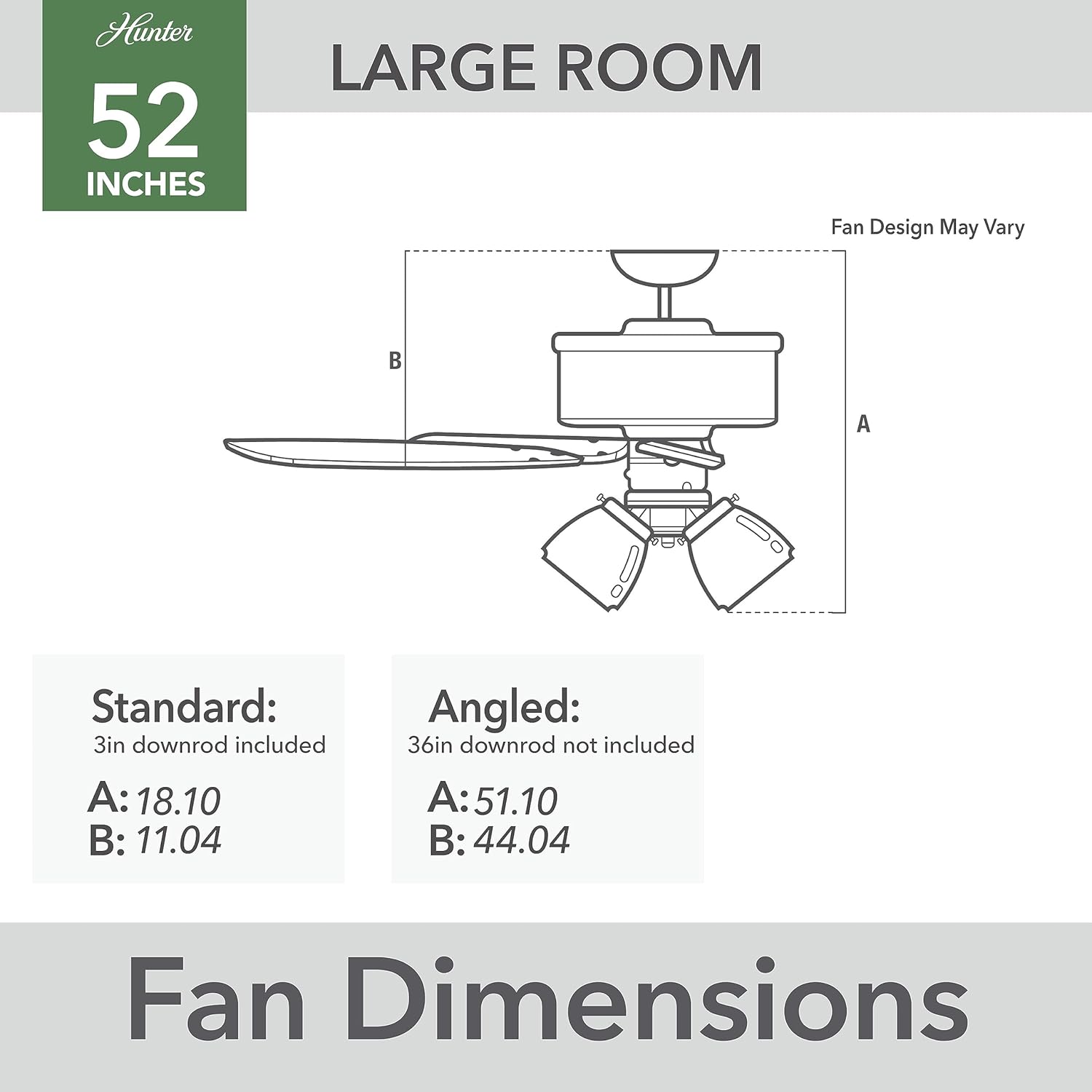
Figure 3.1: Fan dimensions for standard (3in downrod) and angled mounting options. Standard dimensions: A: 18.10 inches, B: 11.04 inches.
3.3 Assembling the Blades and Light Kit
Attach the fan blades to the motor housing. The fan comes with three LED bulbs included for the light kit. Install the light kit and bulbs according to the instructions provided in the physical manual.

Figure 3.2: Detail of the fan blade attachment mechanism.

Figure 3.3: The integrated LED light kit with three light shades.
4. ఆపరేటింగ్ సూచనలు
Your Hunter Builder ceiling fan is designed for ease of use and efficient air circulation.
4.1 ఫ్యాన్ స్పీడ్ కంట్రోల్
The fan is equipped with pull chains for controlling fan speed and light operation. Pull the fan chain to cycle through the available speeds (high, medium, low, off). The 6-speed WhisperWind DC motor ensures quiet operation.
4.2 లైట్ కంట్రోల్
Pull the light chain to turn the integrated LED light kit on or off.
5. నిర్వహణ
క్రమం తప్పకుండా నిర్వహణ మీ సీలింగ్ ఫ్యాన్ యొక్క దీర్ఘాయువు మరియు సరైన పనితీరును నిర్ధారిస్తుంది.
- శుభ్రపరచడం: Dust the fan blades and motor housing regularly with a soft, lint-free cloth. Do not use abrasive cleaners or solvents.
- బిగించే స్క్రూలు: Periodically check all screws on the fan blades and mounting hardware to ensure they are secure. Loose screws can cause noise and wobble.
- లైట్ బల్బులు: Replace LED bulbs as needed. Ensure the power is off before replacing bulbs.
6. ట్రబుల్షూటింగ్
If you experience issues with your fan, consult the following troubleshooting guide before contacting customer support.
| సమస్య | సాధ్యమైన కారణం | పరిష్కారం |
|---|---|---|
| Fan does not start or operates intermittently | Loose wire connections; Incorrect wiring of control box; Power supply issue. | Check all electrical connections. Ensure the control box is correctly wired and seated. Verify power is supplied to the fan. If the fan requires a manual 'jump start' to begin rotation, check wiring to the motor control unit. |
| ఫ్యాన్ శబ్దం చేస్తోంది | Loose fan blade screws; Loose mounting hardware; Unbalanced blades. | Tighten all blade screws and mounting hardware. Ensure blades are balanced; balancing kits are available if needed. |
| Light kit does not work | Loose wire connections; Faulty bulb; Power supply issue. | Check light kit wiring. Replace bulb. Verify power is supplied to the light kit. |
7. స్పెసిఫికేషన్లు
Detailed technical specifications for the Hunter 52731 Builder Matte Black Ceiling Fan.
| ఫీచర్ | స్పెసిఫికేషన్ |
|---|---|
| బ్రాండ్ | వేటగాడు |
| మోడల్ సంఖ్య | 52731 |
| వస్తువు బరువు | 7.6 కిలోలు |
| ముగింపు రకం | మాట్టే |
| అసెంబ్లీ అవసరం | అవును |
| ముక్కల సంఖ్య | 1 |
| బ్యాటరీలు అవసరం | నం |
| చేర్చబడిన భాగాలు | త్రాడు |
| రంగు | మాట్ బ్లాక్ |
| ఎలక్ట్రిక్ ఫ్యాన్ డిజైన్ | సీలింగ్ ఫ్యాన్ |
| శక్తి మూలం | కార్డెడ్ ఎలక్ట్రిక్ |
| శైలి | ఆధునిక |
| ఉత్పత్తి కొలతలు | 46.8D x 130.6W x 46.8H సెంటీమీటర్లు |
| గది రకం | పడకగది |
| ప్రత్యేక ఫీచర్ | Remote Controlled, LED Light (Note: Remote control not explicitly mentioned in feature bullets, but listed in specs. Manual focuses on pull chain as per feature bullets.) |
| సిఫార్సు చేసిన ఉపయోగాలు | శీతలీకరణ, గాలి ప్రసరణ |
| మౌంటు రకం | సీలింగ్ మౌంట్ |
8. వారంటీ మరియు మద్దతు
హంటర్ ఫ్యాన్ కంపెనీ తన ఉత్పత్తుల నాణ్యతకు అండగా నిలుస్తుంది.
8.1 వారంటీ సమాచారం
ఈ ఉత్పత్తి a తో వస్తుంది పరిమిత జీవితకాల మోటార్ వారంటీ, backed by Hunter Fan Company, a leader in the fan business for over 135 years. For specific terms and conditions of the warranty, please refer to the warranty card included with your purchase or visit the official Hunter Fan Company webసైట్.
8.2 కస్టమర్ మద్దతు
If you have any questions, require technical assistance, or need to order replacement parts, please contact Hunter Fan Company customer support. Contact information can typically be found on the official Hunter Fan Company webసైట్ లేదా మీ ఉత్పత్తి ప్యాకేజింగ్పై.
ఆన్లైన్ వనరులు: Visit the Hunter Fan Company official website for FAQs, additional troubleshooting tips, and product registration.
Ask a question about this manual
Ask about setup, troubleshooting, compatibility, parts, safety, or missing instructions. Manuals+ will review the question and use this page’s manual context to help answer it.