
1. పరిచయం
Thank you for choosing the EUREKA HD350 Cordless Vacuum Cleaner. This manual provides essential information for the safe and efficient use of your new appliance. Please read it thoroughly before operation and retain it for future reference.
The EUREKA HD350 is a compact and lightweight cordless vacuum cleaner designed for versatile cleaning tasks. Weighing only 500g for the main unit, it offers 10,000Pa of strong suction power, effectively cleaning dust, food spills, and fine hair from various surfaces. Its 2-in-1 design allows for use as both a stick vacuum and a handheld unit, making it ideal for quick clean-ups in your home, car, or office.
2. భద్రతా సమాచారం
అగ్ని ప్రమాదాలు, విద్యుత్ షాక్ లేదా గాయం ప్రమాదాన్ని తగ్గించడానికి విద్యుత్ ఉపకరణాలను ఉపయోగిస్తున్నప్పుడు ఎల్లప్పుడూ ప్రాథమిక భద్రతా జాగ్రత్తలను అనుసరించండి.
- వాక్యూమ్ క్లీనర్ను ఆరుబయట లేదా తడి ఉపరితలాలపై ఉపయోగించవద్దు.
- పిల్లలు వాక్యూమ్ క్లీనర్ను ఆపరేట్ చేయడానికి అనుమతించవద్దు. పిల్లల దగ్గర ఉపయోగించినప్పుడు దగ్గరి పర్యవేక్షణ అవసరం.
- Do not pick up flammable or combustible materials, such as lighter fluid, gasoline, or kerosene, or use in areas where they may be present.
- సిగరెట్లు, అగ్గిపుల్లలు లేదా వేడి బూడిద వంటి కాలుతున్న లేదా ధూమపానం చేసే ఏదైనా తీసుకోవద్దు.
- జుట్టు, వదులుగా ఉండే దుస్తులు, వేళ్లు మరియు శరీరంలోని అన్ని భాగాలను ఓపెనింగ్స్ మరియు కదిలే భాగాలకు దూరంగా ఉంచండి.
- ఈ మాన్యువల్లో వివరించిన విధంగా మాత్రమే ఉపయోగించండి. తయారీదారు సిఫార్సు చేసిన అటాచ్మెంట్లను మాత్రమే ఉపయోగించండి.
- If the suction port or metal filter becomes clogged, the motor may overheat. The built-in safety system will detect this and automatically stop operation to prevent damage. Clear any blockages before resuming use.
- వాక్యూమ్ క్లీనర్ను నీరు లేదా ఇతర ద్రవాలలో ముంచవద్దు.
3. ప్యాకేజీ విషయాలు
Carefully unpack your EUREKA HD350 and check that all items are present and in good condition. The package should include:
- ప్రధాన వాక్యూమ్ యూనిట్
- Extension Wand (for stick mode)
- ఫ్లోర్ బ్రష్ హెడ్
- బ్రష్ నాజిల్
- సందు నాజిల్
- USB టైప్-సి ఛార్జింగ్ కేబుల్
- Dedicated Storage Stand
- వినియోగదారు మాన్యువల్ (ఈ పత్రం)

Image: The EUREKA HD350 package contents, including the main unit, various nozzles, charging cable, and storage stand.
4. సెటప్
The EUREKA HD350 can be used in two configurations: as a stick vacuum or as a handheld vacuum.
4.1. స్టిక్ వాక్యూమ్ను అసెంబుల్ చేయడం
- Insert the extension wand into the main vacuum unit until it clicks into place.
- Attach the floor brush head to the other end of the extension wand until it clicks into place.
4.2. హ్యాండ్హెల్డ్ వాక్యూమ్ను అసెంబుల్ చేయడం
For handheld use, simply attach the desired nozzle (brush nozzle or crevice nozzle) directly to the main vacuum unit until it clicks into place.

Image: Illustration showing the main unit, extension wand, and floor brush head for stick vacuum assembly, and the main unit with a nozzle for handheld use.
5. పరికరాన్ని ఛార్జ్ చేస్తోంది
The EUREKA HD350 features convenient USB Type-C charging.
- Locate the Type-C charging port on the main vacuum unit.
- Connect the provided USB Type-C charging cable to the vacuum cleaner and plug the other end into a compatible USB power source (e.g., wall adapter, car charger, power bank, laptop).
- The LED screen will indicate the charging status.
- A full charge typically takes 2 to 3 hours, providing up to 20 minutes of continuous use.
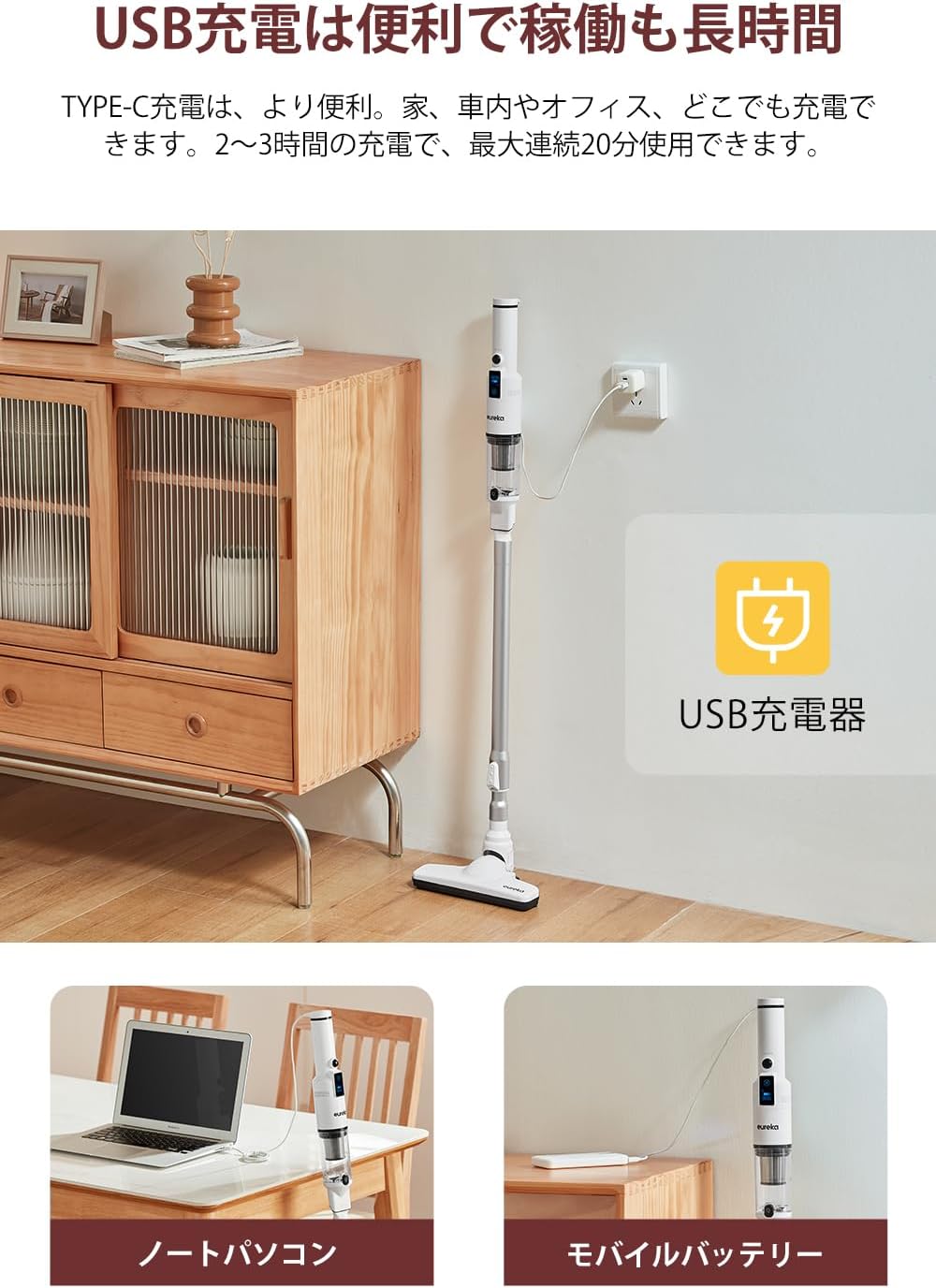
Image: The EUREKA HD350 vacuum cleaner being charged via a USB Type-C cable plugged into a wall adapter, with additional images showing charging from a laptop and a mobile battery.
6. ఆపరేటింగ్ సూచనలు
6.1. Power On/Off and Suction Modes
- To power on the vacuum cleaner, press the power button.
- The LED screen will display the current battery level and suction mode.
- Press the mode button to switch between standard and powerful suction modes.
- The screen also shows the estimated remaining usage time, helping you manage your cleaning tasks.
- పవర్ ఆఫ్ చేయడానికి, పవర్ బటన్ను మళ్లీ నొక్కండి.

Image: Close-up of the EUREKA HD350's LED screen displaying battery level, suction mode, and remaining usage time.
6.2. Using Attachments for Various Surfaces
- Floor Brush Head: Use with the extension wand for general floor cleaning. Its design allows for effective cleaning under furniture.
- బ్రష్ నాజిల్: Ideal for cleaning delicate surfaces, upholstery, and removing pet hair from sofas or car seats.
- క్రెవిస్ నాజిల్: Perfect for reaching tight spaces, corners, car interiors, and between keyboard keys.

Image: A person using the EUREKA HD350 in stick vacuum mode to clean a floor, demonstrating its lightweight design and suction power.

Image: The EUREKA HD350's floor brush head cleaning dust and debris from under a wooden bed frame.

Image: Two separate images showing the EUREKA HD350 in handheld mode, one cleaning a sofa cushion and the other cleaning a desk surface.
6.3. Suction Demonstration Video
Video: A short demonstration of the EUREKA HD350's suction power, picking up a small screw from a concrete surface.
7. నిర్వహణ
క్రమం తప్పకుండా నిర్వహణ సరైన పనితీరును నిర్ధారిస్తుంది మరియు మీ వాక్యూమ్ క్లీనర్ యొక్క జీవితకాలాన్ని పొడిగిస్తుంది.
7.1. Emptying the Dust Box
- వాక్యూమ్ క్లీనర్ ఆఫ్ చేయబడిందని నిర్ధారించుకోండి.
- Hold the main unit over a trash bin.
- Press the one-push release button on the dust box to open it and empty the contents.

Image: A hand holding the EUREKA HD350 main unit over a trash bin, demonstrating the one-push dust disposal mechanism.
7.2. Washing the Dust Box and Filter
Both the dust box and the HEPA filter are washable for thorough cleaning.
- After emptying the dust box, detach it from the main unit.
- Remove the HEPA filter from the dust box.
- Rinse the dust box and filter under running water until clean.
- Allow both parts to air dry completely before reassembling and reattaching to the vacuum cleaner. Do not use the vacuum cleaner with wet components.

Image: A collage of four images showing the maintenance process: emptying the dust box, rinsing the dust box with water, rinsing the filter with water, and the vacuum cleaner stored on its dedicated stand.
8. నిల్వ
The EUREKA HD350 comes with a dedicated storage stand for convenient and tidy storage of the cleaner and its accessories.
- After cleaning and ensuring all parts are dry, place the main vacuum unit onto the storage stand.
- The stand is designed to hold the vacuum upright and keep accessories organized.

Image: The EUREKA HD350 vacuum cleaner neatly placed on its white dedicated storage stand on a tabletop.
9. ట్రబుల్షూటింగ్
If you encounter issues with your EUREKA HD350, refer to the following common problems and solutions:
| సమస్య | సాధ్యమైన కారణం | పరిష్కారం |
|---|---|---|
| వాక్యూమ్ ఆన్ అవ్వదు. | బ్యాటరీ క్షీణించింది. | వాక్యూమ్ క్లీనర్ను పూర్తిగా ఛార్జ్ చేయండి. |
| తక్కువ చూషణ శక్తి. | డస్ట్ బాక్స్ నిండిపోయింది. | డస్ట్ బాక్స్ ఖాళీ చేయండి. |
| తక్కువ చూషణ శక్తి. | ఫిల్టర్ అడ్డుపడింది. | HEPA ఫిల్టర్ను శుభ్రం చేయండి లేదా భర్తీ చేయండి. తిరిగి చొప్పించే ముందు అది పూర్తిగా పొడిగా ఉందని నిర్ధారించుకోండి. |
| తక్కువ చూషణ శక్తి. | Nozzle or extension wand is blocked. | Remove any blockages from the nozzle, extension wand, or suction inlet. |
| వాక్యూమ్ అనుకోకుండా ఆగిపోతుంది. | Motor overheating due to blockage. | Check for and clear any blockages in the suction port or metal filter. Allow the unit to cool down before restarting. |
10. స్పెసిఫికేషన్లు
| ఫీచర్ | వివరాలు |
|---|---|
| బ్రాండ్ | EUREKA |
| మోడల్ సంఖ్య | HD350 |
| శక్తి మూలం | బ్యాటరీ ఆధారితమైనది |
| కార్డ్లెస్ | అవును |
| చూషణ శక్తి | 10,000 పే |
| ప్రధాన యూనిట్ బరువు | 500గ్రా (సుమారు 1.1 పౌండ్లు) |
| వాట్tage | 120 W |
| వాల్యూమ్tage | 3.7 వోల్ట్లు |
| ఛార్జింగ్ సమయం | 2-3 గంటలు |
| గరిష్ట రన్టైమ్ | 20 నిమిషాల వరకు |
| ఫిల్టర్ రకం | HEPA ఫిల్టర్ |
| ఉత్పత్తి కొలతలు (L x W x H) | 43.1 x 11.2 x 20.2 సెం.మీ (17 x 4.4 x 8 అంగుళాలు) |
| సిఫార్సు ఉపయోగం | Interior (Home, Car, Office) |
| UPC | 810040947254 |
| ASIN | B0CGRFCHMW |
11. వారంటీ మరియు మద్దతు
EUREKA is committed to providing high-quality products and excellent customer service.
- 1-సంవత్సరం వారంటీ: Your EUREKA HD350 is covered by a 1-year warranty for free repair and replacement during the warranty period.
- వృత్తిపరమైన మద్దతు: Access to professional staff for any product-related inquiries or assistance.
- 30-రోజుల రాబడి: Enjoy a 30-day return or new product exchange policy.
- అసలైన ఉపకరణాలు: Ensure optimal performance and longevity by using only genuine EUREKA accessories.
For further assistance, please visit the official EUREKA store or contact customer support.

Image: An illustration representing EUREKA customer service, highlighting support, warranty, and genuine accessories.