
1. ఉత్పత్తి ముగిసిందిview
The suptek MD01A Gas Spring Monitor Arm is designed to enhance your workspace ergonomics and free up desk space. This monitor arm offers full flexibility, allowing you to adjust your monitor's height, tilt, swivel, and rotation for optimal viewing సౌకర్యం.
- ఎర్గోనామిక్ డిజైన్: Helps achieve a healthier working posture by allowing easy adjustment of monitor height up to 45 cm and horizontal extension up to 49.3 cm.
- స్థిరమైన నిర్మాణం: Features a gas spring mechanism for smooth, silent adjustments, made from high-strength steel and aluminum for durability and scratch resistance.
- Space Saving & Cable Management: Integrated cable management system keeps your workspace tidy and clutter-free.
- యూనివర్సల్ అనుకూలత: Supports LED/LCD monitors from 13 to 32 inches, weighing between 2-9 kg, with VESA mounting patterns of 75x75 mm and 100x100 mm.

Image 1.1: Product dimensions showing load capacity (2-9kg), VESA patterns (75x75/100x100mm), screen size (13"-32"), and height/extension ranges.

Image 1.2: Illustration of the monitor arm's full adjustability, including tilt (±90°), swivel (±180°), and 360° rotation.
వీడియో 1.3: ఒక సంక్షిప్త ముందస్తు సమాచారంview demonstrating the general functionality and adjustability of the monitor arm.
2. భద్రతా సమాచారం
Please read and understand all instructions before installation and use. Failure to do so may result in personal injury or property damage.
- Ensure your monitor's weight and VESA pattern are within the specified limits (13-32 inches, 2-9 kg, VESA 75x75/100x100 mm).
- Do not overtighten screws during installation to avoid damaging the product or your desk.
- పిల్లలు మరియు పెంపుడు జంతువులను సంస్థాపనా ప్రాంతం నుండి దూరంగా ఉంచండి.
- Always adjust the gas spring tension carefully to match your monitor's weight.
- If you have any doubts about installation, consult a qualified professional.
3. ప్యాకేజీ విషయాలు
Verify that all components are present and undamaged before proceeding with installation. The package typically includes:
- మానిటర్ ఆర్మ్ అసెంబ్లీ
- డెస్క్ Clamp బేస్
- గ్రోమెట్ మౌంట్ బేస్
- వెసా ప్లేట్
- హార్డ్వేర్ కిట్ (స్క్రూలు, వాషర్లు, స్పేసర్లు)
- Allen Keys for adjustment
- ఇన్స్ట్రక్షన్ మాన్యువల్
4. సెటప్ మరియు ఇన్స్టాలేషన్
The suptek MD01A monitor arm offers two installation methods: C-clamp మరియు గ్రోమెట్ మౌంట్.

Image 4.1: Visual representation of the C-clamp and Grommet Mount options for desk attachment. Both support desk thickness from 10-70mm, with grommet hole diameter from 10-60mm.
4.1. Choose Your Mounting Method
C-Clamp సంస్థాపన:
- C-clని అటాచ్ చేయండిamp base to the edge of your desk. Ensure the desk thickness is between 10-70mm.
- cl బిగించండిamp securely using the knob until the base is stable.
గ్రోమెట్ మౌంట్ ఇన్స్టాలేషన్:
- Insert the grommet base through an existing hole in your desk (diameter 10-60mm). Ensure the desk thickness is between 10-70mm.
- అందించిన ప్లేట్ మరియు నట్ ఉపయోగించి డెస్క్ కింద నుండి బేస్ను భద్రపరచండి.

చిత్రం 4.2: వివరణాత్మకమైనది view C-cl యొక్కamp attachment method, suitable for desk thicknesses of 10-70mm.

చిత్రం 4.3: వివరణాత్మకమైనది view of the Grommet mount attachment method, for desk thicknesses of 10-70mm and hole diameters of 10-60mm.
4.2. Attach VESA Plate to Monitor and Assemble Arm
- మీ మానిటర్ ముఖాన్ని మృదువైన, శుభ్రమైన ఉపరితలంపై జాగ్రత్తగా ఉంచండి.
- మీ మానిటర్ వెనుక భాగంలో ఉన్న మౌంటు రంధ్రాలతో (75x75mm లేదా 100x100mm) VESA ప్లేట్ను సమలేఖనం చేయండి.
- హార్డ్వేర్ కిట్ నుండి తగిన స్క్రూలు మరియు వాషర్లను ఉపయోగించి VESA ప్లేట్ను మానిటర్కు భద్రపరచండి. అతిగా బిగించవద్దు.
- Insert the lower arm into the desk mount base.
- పై చేయిని దిగువ చేతికి అటాచ్ చేయండి.
- Slide the monitor (with VESA plate attached) onto the end of the monitor arm. Ensure it clicks securely into place.

Image 4.4: A three-step visual guide illustrating the quick and easy installation process: fixing the clamp, assembling the arm, and connecting the monitor.
5. ఆపరేటింగ్ సూచనలు మరియు సర్దుబాట్లు
The suptek MD01A monitor arm offers various adjustments for optimal viewing.
5.1. గ్యాస్ స్ప్రింగ్ టెన్షన్ సర్దుబాటు
The gas spring tension must be adjusted to match your monitor's weight for proper function. Use the provided Allen key.
- If the arm falls down: Turn the inside screw counter-clockwise (towards the "+" direction) to increase gas spring tension until the arm can stay as intended.
- If the arm rises up or cannot be pressed down: Turn the inside screw clockwise (towards the "-" direction) to decrease gas spring tension until the arm can stay as intended.
గమనిక: Ensure the arm is in a horizontal position during adjustment.
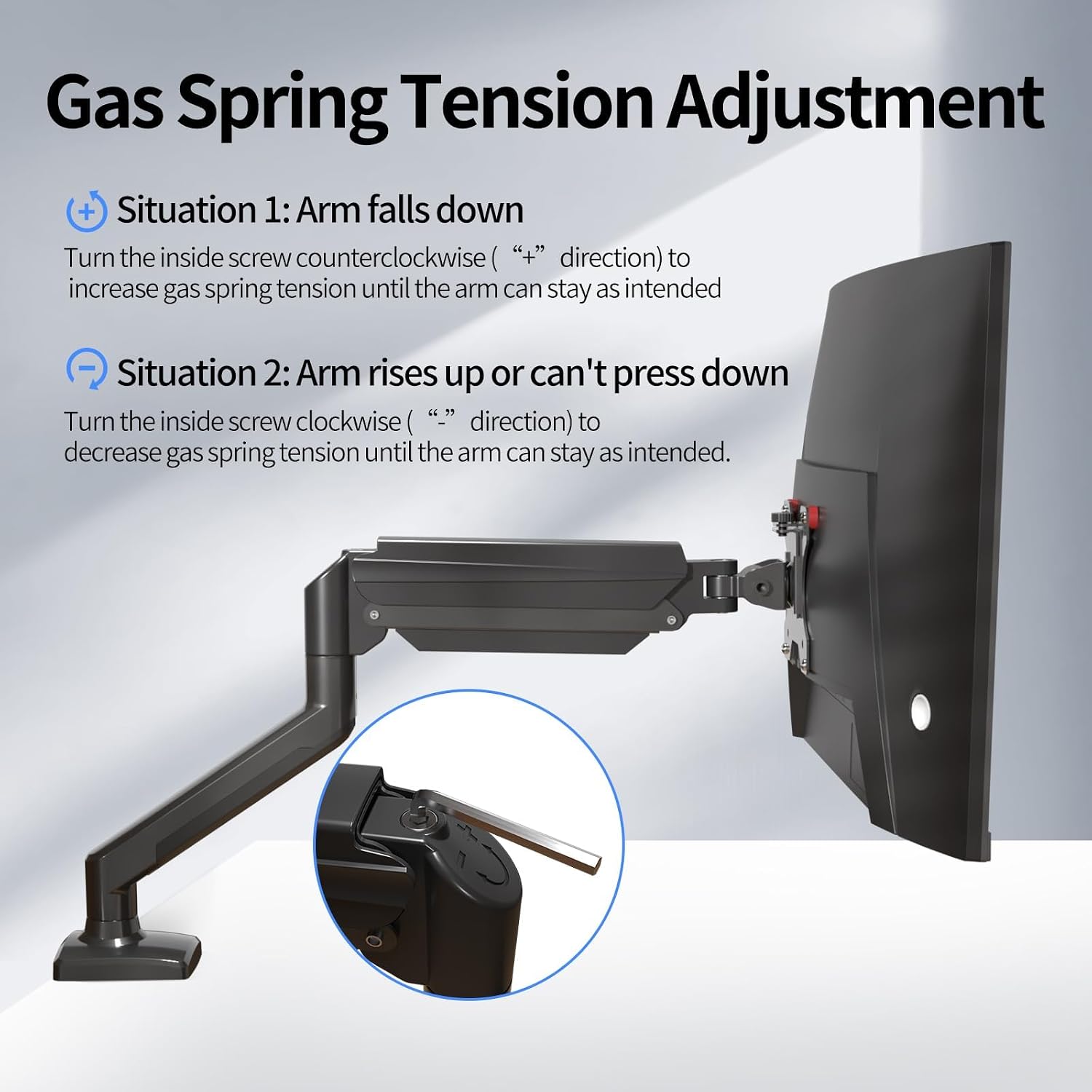
Image 5.1.1: Diagram showing how to adjust the gas spring tension using an Allen key to prevent the arm from falling or rising unintentionally.

Image 5.1.2: Detailed illustration of the gas spring adjustment mechanism, highlighting the plus and minus directions for increasinగ్రా లేదా తగ్గుదలasinగ్రా టెన్షన్.
5.2. Tilt Angle, Swivel, and Rotation Adjustment
To adjust the tilt angle of your monitor:
- Loosen the tilting bolt on the VESA plate using an Allen key.
- Adjust the monitor to your desired tilt angle. It's easier to adjust if you grab the top and bottom of the screen.
- Retighten the tilting bolt to fix the intended angle. Do not let go of the screen before locking the screw to prevent rebound.
- ఎత్తు సర్దుబాటు: Gently push or pull the monitor up or down. The gas spring will assist in holding the position.
- స్వివెల్: Rotate the monitor arm horizontally at the joints to change the viewదిశలో.
- భ్రమణం: Rotate the monitor 360 degrees from landscape to portrait orientation.

Image 5.2.1: Technical diagrams illustrating the monitor arm's tilt (±90°), swivel (±90°), and 360° rotation capabilities.
6. నిర్వహణ
క్రమం తప్పకుండా నిర్వహణ మీ మానిటర్ చేయి దీర్ఘాయువు మరియు ఉత్తమ పనితీరును నిర్ధారిస్తుంది.
- శుభ్రపరచడం: చేతిని మృదువైన, d తో తుడవండి.amp వస్త్రం. రాపిడి క్లీనర్లు లేదా ద్రావకాలను నివారించండి.
- కనెక్షన్లను తనిఖీ చేయండి: Periodically check all screws and bolts to ensure they are tight and secure. Retighten if necessary.
- గ్యాస్ స్ప్రింగ్: If the arm's movement becomes stiff or loose over time, re-adjust the gas spring tension as described in Section 5.1.
7. ట్రబుల్షూటింగ్
మీరు ఎదుర్కొనే సాధారణ సమస్యలకు పరిష్కారాలు ఇక్కడ ఉన్నాయి:
| సమస్య | పరిష్కారం |
|---|---|
| Monitor arm falls down or cannot hold position. | The gas spring tension is too low. Turn the inside screw counter-clockwise (towards "+") to increase tension. Refer to Section 5.1. |
| Monitor arm rises up or cannot be pressed down. | The gas spring tension is too high. Turn the inside screw clockwise (towards "-") to decrease tension. Refer to Section 5.1. |
| Gap at the joint of the arm. | Tighten the nut at the joint using the provided Allen key until the gap is closed and the joint rotates smoothly. |
| Cannot insert the Allen key into the gas spring adjustment hole. | Press the upper arm down firmly until the tilting bolt is fully exposed, then insert the hex wrench. |
8. స్పెసిఫికేషన్లు
| ఫీచర్ | వివరాలు |
|---|---|
| మోడల్ సంఖ్య | MD01A |
| బ్రాండ్ | సుప్టెక్ |
| అనుకూల స్క్రీన్ పరిమాణం | 13 - 32 అంగుళాలు |
| లోడ్ కెపాసిటీ | 2 - 9 కిలోలు |
| VESA అనుకూలత | 75x75 మిమీ, 100x100 మిమీ |
| మౌంటు రకం | డెస్క్ Clamp, గ్రోమెట్ మౌంట్ |
| కదలిక రకం | Articulating (Tilt, Swivel, Rotation) |
| టిల్ట్ యాంగిల్ | ±90° |
| భ్రమణం | 360° |
| మెటీరియల్ | మిశ్రమం ఉక్కు |
| డెస్క్ Clamp మందం | 10 - 70 మి.మీ. |
| గ్రోమెట్ హోల్ వ్యాసం | 10 - 60 మి.మీ. |
9. వారంటీ మరియు మద్దతు
For warranty information, technical support, or to purchase replacement parts, please refer to the official suptek webమీ రిటైలర్ను సైట్లో సంప్రదించండి లేదా సంప్రదించండి. వారంటీ క్లెయిమ్ల కోసం మీ కొనుగోలు రసీదును ఉంచండి.