
1. పరిచయం మరియు ఓవర్view
Thank you for choosing the AMONIDA Bluetooth Clip-on Earbuds. These innovative open-ear headphones are designed for comfort and high-fidelity audio, featuring an ergonomic clip-on design, IPX5 water resistance, HiFi stereo sound, intuitive touch controls, and low-latency performance, making them ideal for sports and daily use.

Image: The AMONIDA Bluetooth Clip-on Earbuds resting in their open charging case, showcasinవాటి కాంపాక్ట్ డిజైన్.
2. ప్యాకేజీ విషయాలు
- AMONIDA Bluetooth Clip-on Earbuds (Left and Right)
- ఛార్జింగ్ కేసు
- USB-C ఛార్జింగ్ కేబుల్
- వినియోగదారు మాన్యువల్ (ఈ పత్రం)

Image: The earbuds in their charging case, accompanied by the USB-C charging cable, illustrating the complete package contents.
3. సెటప్
3.1. ఇయర్బడ్లు మరియు కేస్ను ఛార్జ్ చేయడం
మొదటిసారి ఉపయోగించే ముందు, ఇయర్బడ్లు మరియు ఛార్జింగ్ కేసును పూర్తిగా ఛార్జ్ చేయండి.
- ఇయర్బడ్లను ఛార్జింగ్ కేసులో ఉంచండి, అవి సరిగ్గా అమర్చబడి ఉన్నాయని నిర్ధారించుకోండి.
- USB-C ఛార్జింగ్ కేబుల్ను కేస్ వెనుక భాగంలోని ఛార్జింగ్ పోర్ట్కు కనెక్ట్ చేయండి.
- కేబుల్ యొక్క మరొక చివరను USB పవర్ అడాప్టర్ (చేర్చబడలేదు) లేదా కంప్యూటర్ యొక్క USB పోర్ట్కు కనెక్ట్ చేయండి.
- The indicator lights on the case will show charging status. Once fully charged, the lights will indicate completion (refer to specific light behavior in product packaging if available).

చిత్రం: వెనుక view of the charging case, highlighting the USB-C charging port for easy connection.
3.2. బ్లూటూత్ పెయిరింగ్
- ఇయర్బడ్లు ఛార్జ్ అయ్యాయని నిర్ధారించుకోండి.
- Open the charging case. The earbuds will automatically enter pairing mode (indicator lights will flash, typically blue or white).
- మీ పరికరంలో (స్మార్ట్ఫోన్, టాబ్లెట్, కంప్యూటర్), బ్లూటూత్ను ప్రారంభించండి.
- కోసం వెతకండి "AMONIDA Earbuds" or a similar name in the list of available Bluetooth devices.
- Select the earbuds to connect. Once connected, the indicator lights on the earbuds will stop flashing.
- పరికరంలో బ్లూటూత్ ప్రారంభించబడితే, ఇయర్బడ్లను కేస్ నుండి బయటకు తీసినప్పుడు అవి చివరిగా జత చేసిన పరికరానికి స్వయంచాలకంగా తిరిగి కనెక్ట్ అవుతాయి.
3.3. ఇయర్బడ్స్ ధరించడం
The AMONIDA earbuds feature an ergonomic clip-on design for a secure and comfortable fit, especially during physical activity.
- ఎడమ (L) మరియు కుడి (R) ఇయర్బడ్లను గుర్తించండి.
- Gently clip the earbud onto your ear, positioning the speaker part over your ear canal and the clip securely around the back of your ear.
- Adjust for optimal comfort and sound quality. The open-ear design allows you to remain aware of your surroundings.

Image: A person wearing an AMONIDA earbud, illustrating how the ergonomic clip-on design fits securely and comfortably on the ear.
4. ఇయర్బడ్లను ఆపరేట్ చేయడం
4.1. పవర్ ఆన్/ఆఫ్
- పవర్ ఆన్: ఛార్జింగ్ కేసు నుండి తీసివేసినప్పుడు ఇయర్బడ్లు స్వయంచాలకంగా పవర్ ఆన్ అవుతాయి.
- పవర్ ఆఫ్: ఇయర్బడ్లను స్వయంచాలకంగా పవర్ ఆఫ్ చేసి ఛార్జింగ్ ప్రారంభించడానికి వాటిని తిరిగి ఛార్జింగ్ కేసులో ఉంచండి.
4.2. టచ్ నియంత్రణలు
The earbuds feature intuitive touch controls on their outer surface. Specific functions may vary slightly by model or firmware version. Refer to the quick start guide included with your product for precise touch commands.
| చర్య | ఫంక్షన్ |
|---|---|
| సింగిల్ ట్యాప్ (L/R) | సంగీతాన్ని ప్లే చేయండి/పాజ్ చేయండి, సమాధానం ఇవ్వండి/కాల్ని ముగించండి |
| రెండుసార్లు నొక్కండి (కుడివైపు) | తదుపరి ట్రాక్ |
| రెండుసార్లు నొక్కండి (ఎడమవైపు) | మునుపటి ట్రాక్ |
| ట్రిపుల్ ట్యాప్ (L/R) | వాయిస్ అసిస్టెంట్ను సక్రియం చేయండి (సిరి, గూగుల్ అసిస్టెంట్) |
| లాంగ్ ప్రెస్ (L/R) | కాల్ని తిరస్కరించండి |
| (కుడివైపు) ఎక్కువసేపు నొక్కి ఉంచండి | వాల్యూమ్ అప్ |
| లాంగ్ ప్రెస్ (ఎడమ) | వాల్యూమ్ డౌన్ |
5. నిర్వహణ
5.1. శుభ్రపరచడం
- ఇయర్బడ్లు మరియు ఛార్జింగ్ కేసును మృదువైన, పొడి, మెత్తటి బట్టతో తుడవండి.
- రాపిడి క్లీనర్లు, ఆల్కహాల్ లేదా రసాయన ద్రావకాలను ఉపయోగించవద్దు.
- ఛార్జింగ్ కాంటాక్ట్లు శుభ్రంగా మరియు పొడిగా ఉన్నాయని నిర్ధారించుకోండి.
5.2. నిల్వ
- ఇయర్బడ్లను రక్షించడానికి మరియు వాటిని ఛార్జ్లో ఉంచడానికి ఉపయోగంలో లేనప్పుడు వాటి ఛార్జింగ్ కేస్లో నిల్వ చేయండి.
- తీవ్రమైన ఉష్ణోగ్రతలు మరియు ప్రత్యక్ష సూర్యకాంతి నుండి దూరంగా చల్లని, పొడి ప్రదేశంలో నిల్వ చేయండి.
5.3. నీటి నిరోధకత (IPX5)
The AMONIDA earbuds are rated IPX5, meaning they are protected against low-pressure water jets from any direction. This makes them suitable for workouts and light rain.
- ఇయర్బడ్లను నీటిలో ముంచవద్దు.
- Do not expose them to saltwater, chlorinated water, or other liquids.
- If the earbuds get wet, dry them thoroughly before placing them back in the charging case to prevent damage to the charging contacts.
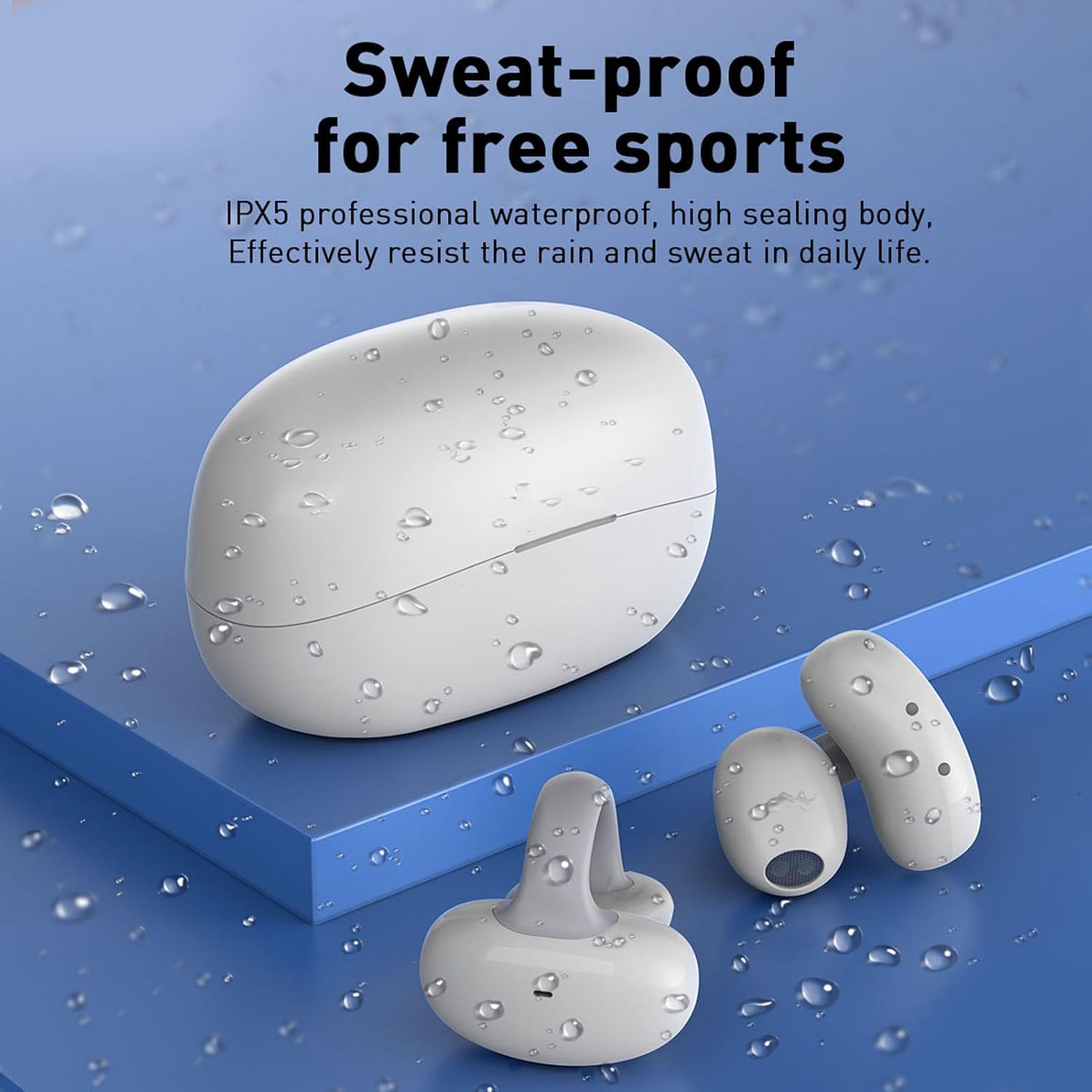
Image: The earbuds and charging case are shown with water droplets, visually representing their IPX5 sweat-proof and splash-proof capabilities.
6. ట్రబుల్షూటింగ్
6.1. సాధారణ సమస్యలు మరియు పరిష్కారాలు
- ఇయర్బడ్లు జత కావడం లేదు:
- ఇయర్బడ్లు ఛార్జ్ అయ్యాయని మరియు కేస్ వెలుపల ఉన్నాయని నిర్ధారించుకోండి.
- మీ పరికరంలో బ్లూటూత్ను ఆఫ్ చేసి ఆన్ చేయండి.
- మీ బ్లూటూత్ జాబితా నుండి పరికరాన్ని మర్చిపోయి, మళ్ళీ జత చేయడానికి ప్రయత్నించండి.
- పరికర-నిర్దిష్ట సమస్యలను తోసిపుచ్చడానికి మరొక పరికరంతో జత చేయడానికి ప్రయత్నించండి.
- శబ్దం లేదు లేదా తక్కువ వాల్యూమ్:
- ఇయర్బడ్లు మరియు మీ కనెక్ట్ చేయబడిన పరికరం రెండింటిలోనూ వాల్యూమ్ స్థాయిలను తనిఖీ చేయండి.
- ఇయర్బడ్లు మీ పరికరానికి సరిగ్గా కనెక్ట్ అయ్యాయని నిర్ధారించుకోండి.
- ఇయర్బడ్ స్పీకర్ల నుండి ఏవైనా చెత్తను శుభ్రం చేయండి.
- ఇయర్బడ్లు ఛార్జ్ కావడం లేదు:
- ఛార్జింగ్ కేబుల్ కేస్ మరియు పవర్ సోర్స్ రెండింటికీ సురక్షితంగా కనెక్ట్ చేయబడిందని నిర్ధారించుకోండి.
- Check if the charging contacts on the earbuds and inside the case are clean and dry.
- వేరే USB-C కేబుల్ లేదా పవర్ అడాప్టర్ని ప్రయత్నించండి.
6.2. ఇయర్బడ్లను రీసెట్ చేయడం
If you experience persistent issues, a factory reset may resolve them. Refer to the specific instructions provided in your product's quick start guide, as reset procedures can vary. Typically, this involves placing earbuds in the case and holding a button for a certain duration.
7. స్పెసిఫికేషన్లు
| ఫీచర్ | వివరాలు |
|---|---|
| బ్రాండ్ | అమోనిడా |
| మోడల్ సంఖ్య | AMONIDA7xcevo2squ-11 |
| ASIN | B0CH43FH63 |
| తయారీదారు | అమోనిడా |
| మూలం దేశం | చైనా |
| కనెక్టివిటీ | Bluetooth (version not specified, typically 5.0 or higher) |
| నీటి నిరోధకత | IPX5 (Sweat-proof, splash-proof) |
| డిజైన్ | Open-ear, Clip-on, Ergonomic |
| ఆడియో ఫీచర్లు | HiFi Stereo Sound, Low Latency |
| నియంత్రణ రకం | టచ్ కంట్రోల్ |
8. వారంటీ మరియు మద్దతు
For warranty information, please refer to the documentation included with your purchase or contact the seller directly. AMONIDA products typically come with a standard manufacturer's warranty covering defects in materials and workmanship.
For technical support, troubleshooting assistance beyond this manual, or inquiries about replacement parts, please contact the seller or visit the official AMONIDA website. Please have your model number (AMONIDA7xcevo2squ-11) and purchase details ready when seeking support.